



The TL;DR
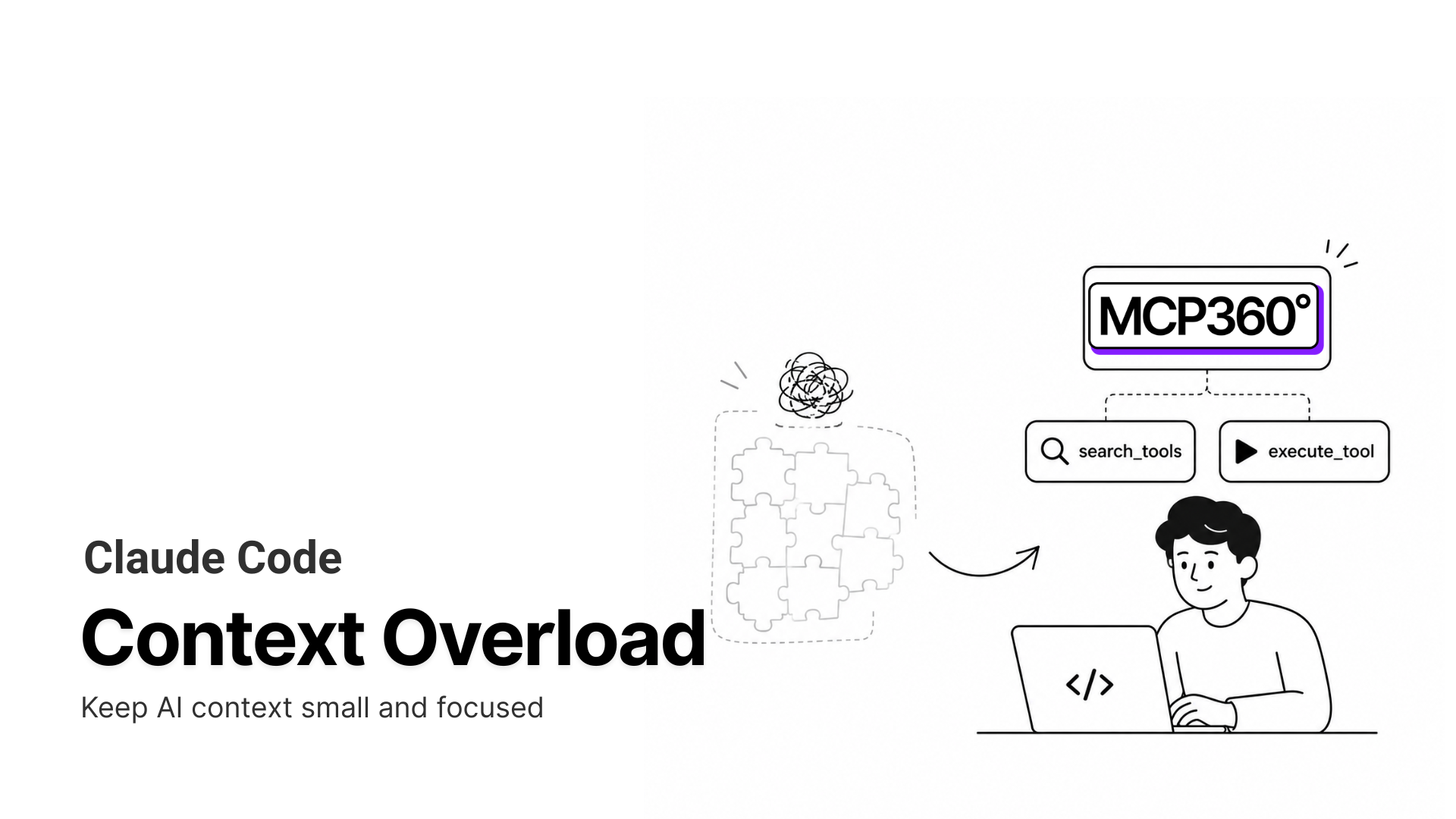
An MCP gateway replaces many individual tool-server connections with one connection, keeping Claude Code’s context lighter even as the tool catalog grows.
-
• Token Cost
A five-server MCP setup can consume roughly 55,000 tokens before Claude does any actual work, because connected servers hand over their full tool catalogs at connection time rather than only when a tool is needed.
-
• Accuracy Drop
Loading large numbers of similar-sounding tools can reduce Claude’s tool-selection accuracy. As the catalog grows, the model has more overlapping tool descriptions to distinguish between when deciding what to call.
-
• One Fix for Both
MCP360 exposes just two meta-tools instead of placing the full 100+ tool catalog directly into context. That keeps the context footprint and tool-selection complexity relatively flat as more tools are added.
Scott Spence started a Claude Code session with thirteen MCP servers connected. Before he typed a single message, tool definitions had already eaten 82,000 of his 200,000 available tokens, over 40 percent of the window, gone. That number doesn’t shrink with a bigger plan or a faster model. It grows with every server your team connects, and most teams don’t notice until a session starts making worse decisions or failing partway through a task.
That’s not a config mistake. It’s what happens when every connected MCP server hands over its full tool catalog at connection time, whether that session will touch three of those tools or none of them. MCP360 replaces that all-at-once handoff with a discover-check-execute loop, so Claude only ever sees the two tools it needs to find and run anything else.
Why Direct MCP Connections Increase Token Usage
An MCP server doesn’t hand over one tool at a time. When a client connects, the server returns the name, description, and full input schema for every tool it exposes, all at once. That’s how the Model Context Protocol works by design, and traditionally, all of it lands in context before Claude processes a single message.
MCP Tool Definitions Consume Large Token Budgets
Anthropic’s own engineering team ran the math on a five-server setup built from tools like GitHub, Slack, Sentry, Grafana, and Splunk. GitHub alone contributes 35 tools at roughly 26,000 tokens. Slack adds 11 tools for about 21,000. Sentry, Grafana, and Splunk round it out at a combined 12 tools and roughly 8,000 tokens. Add it up and you get fifty-eight tools consuming about fifty-five thousand tokens before Claude has done a single thing.
That’s not a ceiling. Anthropic has seen tool definitions reach 134,000 tokens on larger internal setups before any optimization, most of it for tools a given task never touches.
Growing Tool Catalogs Add Persistent Context Overhead
As MCP has grown into the default integration layer for AI agents, the instinct is to assume someone over-connected. The real problem sits one level down. Most MCP servers wrap an existing API one endpoint at a time, so a single server ships dozens of tools by default. The GitHub figure above, 35 tools, is typical, not extreme. You can trim what you connect, but you’re fighting the shape of the thing. The tool count comes from the server, not your config.
That’s the cost MCP360 and Anthropic’s own native fix both go after, from different angles.
MCP Tool Overload Reduces Selection Accuracy
Token math is the part everyone measures, because it shows up on the bill. The part that quietly wrecks output quality is harder to see. The more tools you load, the worse the model gets at choosing among them.
Large language models don’t resolve tool names symbolically. They pattern-match. Load get_status, fetch_status, and query_status into the same context, and the model starts firing on partial similarity rather than intent. Anthropic names this directly, calling wrong tool selection and incorrect parameters the most common failures, especially when tools have similar names. Its own fix bears that out. When Anthropic gave the model a way to search for tools instead of loading every definition, tool-use accuracy on its internal evaluations rose from 49 to 74 percent for Opus 4 and from 79.5 to 88.1 percent for Opus 4.5. A shorter list of tools in context isn’t just cheaper. It measurably improves the model’s choice.
That reframes the whole problem. A gateway that shows Claude a shorter list of tools isn’t just saving tokens, it’s handing the model a cleaner decision. Fewer options in context means the right tool wins more often.
MCP360 Uses On-Demand Tool Discovery
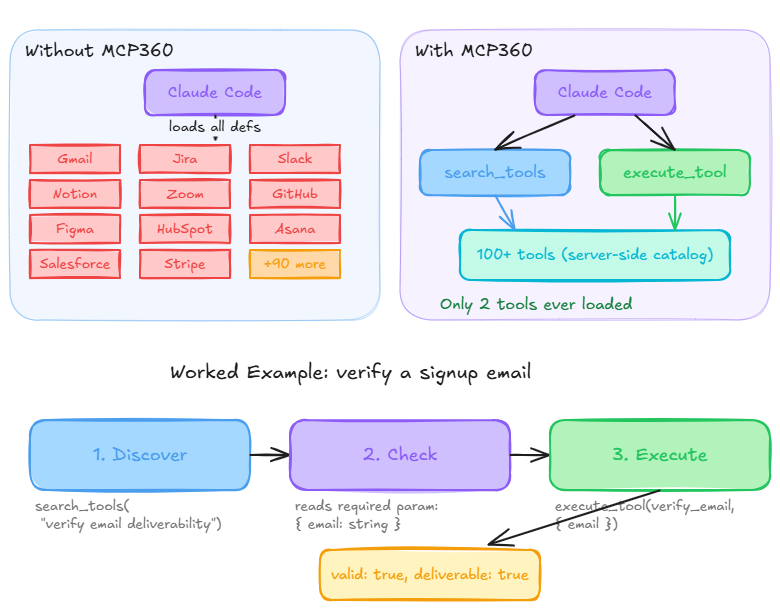
MCP360 connects Claude Code to 100+ tools through one integration, and it does that with two meta-tools that drive a three-step loop instead of a wall of pre-loaded definitions.
The Two Meta-Tools
search_toolstakes a plain description of what you need and returns the matching tools, with their names, descriptions, and required parameters. Nothing else in the catalog gets exposed.execute_toolruns whateversearch_toolsfound, with the parameters Claude supplies, and hands back a structured result.
Flat Context Usage as the Tool Catalog Grows
Say you ask Claude Code to check whether a batch of signup emails will actually deliver before your onboarding flow sends anything to them. Here’s how the loop runs.
Claude calls search_tools with something like “verify email deliverability.” MCP360 searches its catalog server-side and returns the match, verify_email, along with a note that it needs an email address.
From that result, Claude already knows the shape of the call. It doesn’t guess. The discovery step already told it.
Then Claude calls execute_tool with verify_email and the address, and gets back a structured result showing whether it’s valid and deliverable.
Three steps. Not one bespoke integration per email provider, and not a pre-loaded catalog Claude had to carry through the whole session.
Why the Footprint Stays Flat
Claude never loads, indexes, or sees the other 99+ tools it didn’t ask for. Discovery runs on MCP360’s side, not in Claude’s context, so adding a hundredth tool to the catalog costs Claude nothing beyond the two meta-tools it started with. The catalog grows. The context footprint doesn’t.
The same math holds across clients. Point Claude Code, Cursor, and an internal agent at the same MCP360 connection, and each one carries only two tools locally instead of independently reloading a growing set of servers. That gap widens once multiple agents work against the same tool set in production rather than one developer running one client.
Connecting Claude Code to MCP360
Grab your API key from the MCP360 dashboard, then add this block to your MCP client config.
{ "mcpServers": { "mcp360": { "command": "npx", "args": [ "mcp-remote", "https://connect.mcp360.ai/v1/mcp360/mcp?token=YOUR_API_KEY" ] } }}
One block covers it.
What Happens After You Connect
Restart Claude Code and ask it something the catalog covers, “look up the DNS records for a domain,” or “find the top keywords for a search term.” Claude runs the same discover-check-execute loop each time. It finds WHOIS and DNS lookup for the first request, keyword research for the second, then executes. No separate server to configure for either one. Both run through the same two tools.
Adding Custom MCP Tools
This is where a gateway pulls ahead of a stack of standalone servers. Anything you build with MCP360’s Custom MCP Builder, whether you wrap an existing REST API or write your own Python or JavaScript, becomes discoverable through the exact same search_tools/execute_tool pair, sitting alongside the 100+ marketplace tools already in the catalog. Claude finds your internal tool the same way it finds verify_email, no extra registration, no added context cost. Need just one category instead of the full catalog? MCP360 also supports single-server connections scoped to one tool domain, or a direct REST path for clients that don’t speak MCP at all.
None of this replaces Anthropic’s own fix inside Claude Code. It runs next to it.
MCP360 vs Claude Code Tool Search
These aren’t rival fixes. They solve different halves of the same bill.
Tool Search is enabled by default in Claude Code. It defers tool definitions until Claude searches for a tool it needs, so only tool names and server instructions load at session start. In Anthropic’s own benchmark, that took a 77,000-token load down to roughly 8,700, an 85 percent cut, and improved tool-use accuracy at the same time. Opus 4 went from 49 to 74 percent. Opus 4.5 went from 79.5 to 88.1 percent.
What Tool Search doesn’t remove is server count. Every connected server still registers its name and instructions at session start, so that baseline keeps growing as you add servers. That’s an operational problem closer to how MCP and CLI-based tool execution compare than to token budgeting, and it’s the problem a single gateway connection solves that a token-level fix can’t.
Claude Code MCP Token Usage Compared
| Setup | Approx. Token Cost (Single Session) | What It Scales With |
|---|---|---|
| Direct connections, no optimization | ~77K | Number of servers × tools per server |
| Native Tool Search only | ~8.7K | Number of connected servers |
| MCP360, two-tool surface | Flat, low hundreds | Nothing |
| MCP360 + native Tool Search | Flat, low hundreds | Nothing |
The first two rows are Anthropic’s published figures. The MCP360 rows are an estimate, not a measured benchmark. Two tool definitions cost roughly what any two well-scoped tools cost, in the low hundreds of tokens, but that hasn’t been run against a live session to confirm an exact number. Flagged for a pre-publish check.
The obvious objection to all of this is that context windows just got a lot bigger. Worth answering directly.
Do Larger Context Windows Solve Context Overload?
Claude’s current models, Opus 5 and Sonnet 5, both ship a 1M-token context window by default, at standard per-token pricing. No beta header, no long-context surcharge. So why fight over 55,000 tokens when you have a million to spend?
Two reasons the bigger window doesn’t close the case.
First, the accuracy problem doesn’t scale away. A 1M window still gets worse at picking tools when it’s holding a hundred of them, because the degradation comes from the number of similar options in front of the model, not from running out of room. Anthropic’s own documentation makes this point directly, a larger context window does not automatically mean better results, and quality can fall as the window fills. A bigger window just lets you overload it further.
Second, you still pay for what you load. Tool definitions sitting in context are input tokens on every request that doesn’t hit cache, whether the window is 200K or 1M. Loading a full catalog you mostly don’t use is a standing surcharge on every agent run, and a bigger window makes it easier to stop noticing, not cheaper. Loading less and holding more are different strategies, and only one of them fixes the decision the model has to make.
MCP Gateway Security Considerations
One connection means one attractive target. If MCP360 is ever compromised, whatever’s reachable through it is exposed along with it.
Benefits of Centralized MCP Access
- A single key to rotate, instead of ten scattered across separate configs.
- A single call log, instead of piecing together records from thirteen different servers.
- Scoped discovery, since
search_toolsonly surfaces the tool Claude asked for rather than exposing an entire catalog on every request.
None of that removes the need to look at what’s actually being connected.
Risks of Centralized Tool Access
Consolidation doesn’t remove the need to review what each connected tool can do. A compromised or malicious MCP server can bury hidden instructions inside a tool’s description field, and an agent may act on them without a human ever reading that text. This risk is documented widely enough that it has its own name, tool poisoning. Destructive or write-access operations, anything that deletes or modifies data, should still require a human in the loop before Claude runs them, gateway or not.
That tradeoff settled, the next question is when MCP360 actually pays for itself.
When to Use MCP360 With Claude Code
Tool Search runs by default and costs nothing to set up. For one or two well-scoped servers, it might be enough. Add MCP360 once any of these start being true.
- More than a handful of servers: Past roughly five, the ongoing work of managing separate configs and auth flows costs more time than pointing Claude Code at a single gateway once.
- Tool selection getting unreliable: If Claude is picking wrong or similar-named tools, a shorter discovered shortlist fixes the decision, not just the token count.
- Growing tool needs, including your own: New marketplace tools and your own Custom MCP builds both join the discover-execute loop at zero added context cost. New standalone servers don’t.
- More than one client: Claude Code, Cursor, and an internal agent pointed at MCP360 each carry the same flat two-tool footprint. Point them at separate servers, and each pays the full cost alone.
None of these thresholds require a migration. You keep whatever’s already connected and route new work through MCP360 going forward, the same decision the numbers above make concrete.
Frequently Asked Questions
What is an MCP gateway?
An MCP gateway is a single connection point between an AI client like Claude Code and many separate MCP servers. Instead of connecting each tool server directly, the agent connects once, and the gateway routes requests to the right tool behind it. Configuration, authentication, and context cost stay in one place.
Why does Claude Code use so many tokens before I even ask anything?
Each connected MCP server loads its full tool catalog into context at session start, including every name, description, and schema. Anthropic measured a five-server setup at around 55,000 tokens before any work, and larger ones at 134,000. Most of that belongs to tools the task never touches.
Does MCP tool overload actually affect answer quality, or just cost?
Both. A context packed with similar tools makes the model worse at choosing between them. Anthropic reported tool-use accuracy rising from 49 to 74 percent for Opus 4, and 79.5 to 88.1 percent for Opus 4.5, once the model searched for tools instead of loading them all.
Isn’t Claude Code’s built-in Tool Search enough to fix this?
It helps a lot and runs by default, deferring full schemas until Claude searches for a tool. Anthropic’s benchmark shows it cutting a 77,000-token load to about 8,700. What it does not remove is server count, since every connected server still registers its names at session start.
How does a gateway keep context flat when you add more tools?
A gateway like MCP360 exposes two meta-tools, search_tools and execute_tool, and runs the search on its own infrastructure instead of the model’s context. Claude only ever sees those two definitions, so adding a hundredth tool to the catalog costs nothing extra. The catalog grows while the footprint stays fixed.
Do I still need a gateway now that Claude has a million-token context window?
A bigger window raises the ceiling but does not fix the problem. Anthropic’s own docs note a larger window does not automatically mean better results, and quality can fall as it fills. Loading a full catalog you mostly do not use is still a cost on every request.
How do you connect MCP360 to Claude Code?
Add one configuration block to your MCP client config with your MCP360 API key, pointing mcp-remote at the gateway endpoint, then restart Claude Code. From there, ask for anything the catalog covers and Claude runs the same discover, check, execute loop. Custom tools you build join the same connection.
What are the security tradeoffs of routing all my tools through one gateway?
Consolidation cuts scattered credentials to one key to rotate and one call log to audit. The tradeoff is concentration, since a compromised gateway can reach everything behind it. It also does not remove the need to vet each tool, and write operations should still require human approval before an agent runs them.
Conclusion
Token counts are the easiest part of this to measure, which is why they dominate the conversation. The part that actually breaks agents is quieter. A context packed with tools the task doesn’t need makes the model slower, more expensive, and measurably worse at choosing the right tool, a hit Anthropic’s own accuracy numbers confirm. A bigger window doesn’t solve that. It just raises the ceiling on how much you can overload before you notice.
The fix isn’t more room. It’s giving the model a way to ask for the one tool it needs, check how to call it, and run it, instead of carrying the whole catalog through every turn. Solve that once at the connection level, and it holds for every tool you add, every custom MCP you build, and every client you point at it.
Connect Claude Code to MCP360 once, and the next hundred tools your team adds cost the same context as the first two.
Tags

Article by
RajniAI & Tech | Senior Content Writer
Rajni is a senior content writer covering AI agents, automation, and no-code tools. She writes across the AI space, from chatbots and customer support to MCP and agent workflows, focused on how businesses actually put these tools to work.


