
The TL;DR
Warp’s agent reaches MCP servers through the Settings page or through config files, including ones already written for Claude Code and Codex. Choosing the path first avoids repeating setup on every machine.
-
• Any Remote Server Fits Either Type
Warp launches CLI servers as local processes and reaches URL servers over Streamable HTTP or SSE. Remote servers such as Sentry and Linear work as either type.
-
• Config Files Travel With the Repo
A definition in
.warp/.mcp.jsoncan be committed alongside the code. Warp also reads existing Claude Code and Codex config, so servers defined there need no second entry. -
• Keep Keys Out of Shared Files
Project-scoped servers need manual approval before they run. API keys belong in Settings or the global file, never in a committed config.
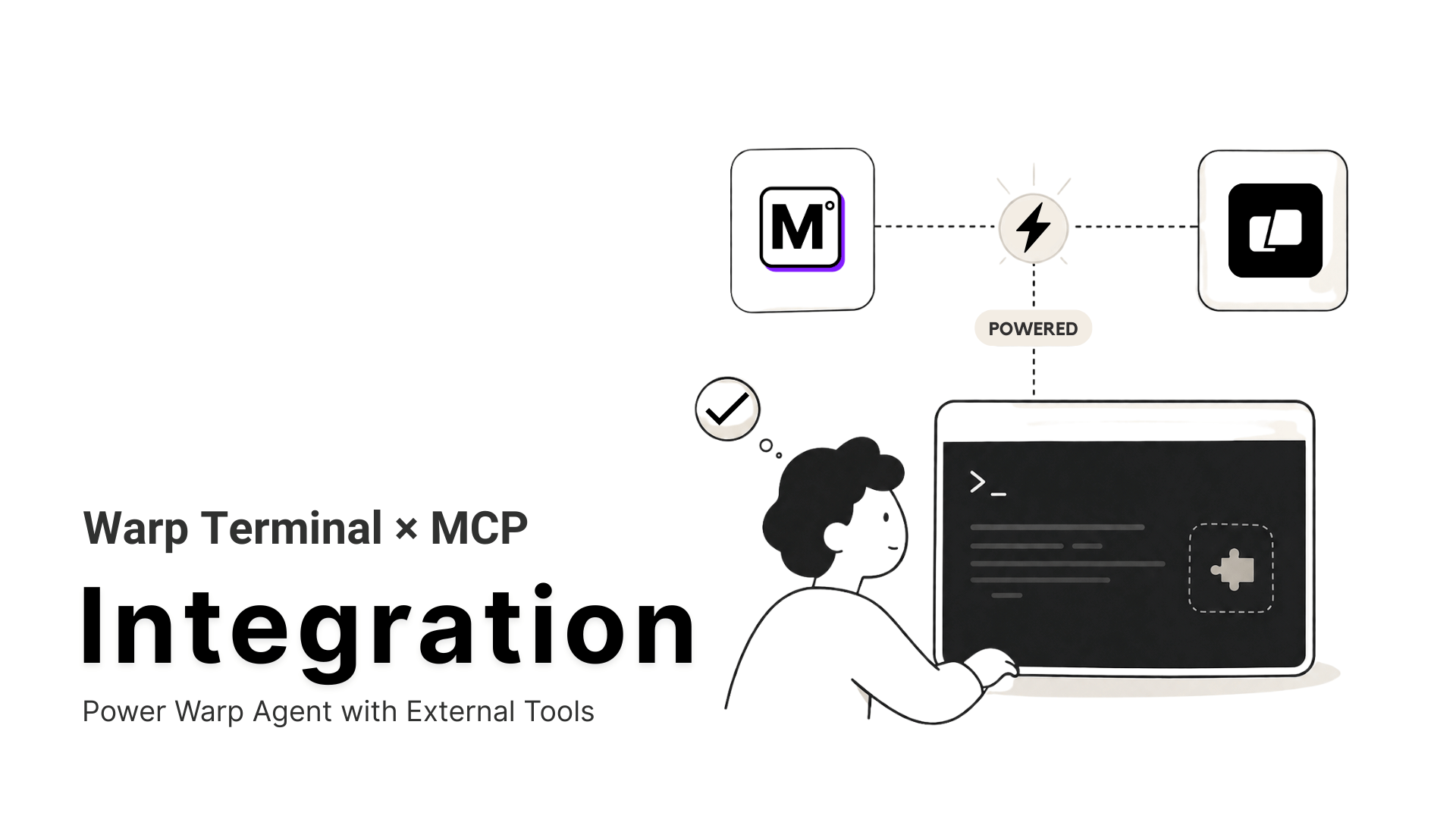
Warp’s agent can read a stack trace, write a fix, and run it without leaving the terminal. It cannot open a Linear ticket or look up a domain’s DNS records mid-task. Model Context Protocol (MCP) is an open standard that gives the agent callable tools for exactly those systems, so nothing gets copied into the chat by hand.
Warp first shipped MCP in Warp Preview in May 2025 and now documents it for the stable app. Four setup paths exist today. The + Add form suits one server on one machine, and a pasted JSON snippet adds several at once. File-based config travels with a repository, and the built-in /agent-add-mcp skill writes that file for the agent.
Naming shifted along the way. Launch posts from 2025 call the feature Agent Mode, while current docs call it the Warp Agent. This guide uses the current name
What Is Warp?

Warp is a terminal written in Rust. It groups each command and its output into a block with its own timestamp and exit code. Each block can be copied or shared on its own, so nobody hunts through scrollback for one command’s output.
The Warp Agent Runs Inside the Terminal
Describe a task in plain language and the Warp Agent plans the steps, runs the commands, and reads the output to decide what happens next. Autonomy is configurable, from approving every step to full autonomy. Warp’s GitHub README calls the product “an agentic development environment, born out of the terminal.” It adds that developers can use the built-in agent or bring a CLI agent such as Claude Code or Gemini CLI.
Platform, Licensing, and MCP History
- The client is open source under AGPL v3, with the
warpui_coreandwarpuiUI crates under MIT - Warp runs on macOS, Windows, and Linux
- MCP support first appeared in Warp Preview in May 2025 and now ships as a core agent capability in the app
Warp’s MCP documentation is the reference for anything outside this guide.
Why Connect MCP Servers to Warp?
The agent reasons well over the commands and files already in its session. Six gaps show where it stalls without a connected tool.
- Stale Dependency Data: Training data stops at a cutoff, so the agent cannot tell whether a package shipped a release after the lockfile last changed.
- Tickets Trapped in Another Tab: A Linear ticket or GitHub issue reaches the conversation only after someone pastes it in. A connected server lets the agent read the ticket, its comments and its status directly.
- Production Errors Behind a Dashboard: Comparing a staging deploy against a Sentry incident means opening the dashboard and describing what is on it. A Sentry server hands the agent the stack trace and the alert itself.
- Databases Behind a Human Middleman: Inspecting a live schema or running a read-only query means a teammate pastes table structures into the chat.
- Design Files Behind a Handoff: Details in a Figma file or a Notion doc arrive by copy and paste unless a server exposes them.
- Live Data Behind a Browser Tab: A domain’s DNS records or a live exchange rate send you to another window mid-task.
A connected server hands the agent callable tools to use mid-task, and the agent decides when a task needs one. Warp documents ready-made configs for GitHub, Sentry, Grafana, Linear, Chroma, Figma, Slack, Atlassian, and Notion, which cover trackers, errors, and design context.
Database access and one-off lookups need other sources. MCP360 covers lookups such as DNS records and WHOIS data through its gateway, and its Custom MCP Builder wraps an internal REST API that fronts your own data. Direct database queries call for a dedicated database MCP server.
Warp MCP Setup Requirements
Four checks prevent a failed first attempt.
- Run a Current Warp Version: File-based config and the
/agent-add-mcpskill are recent additions, and an older build may not show them. - Confirm Agent Usage: Warp’s agent states that the free plan does not include any bundled usage for the Warp Agent. A conversation that calls a connected tool needs a paid plan, a bring-your-own API key, a custom inference endpoint, or a SuperGrok or X Premium subscription. The MCP docs list no plan requirement for adding a server, and Warp pricing carries the current limits.
- Install Node.js for Command Servers: Local servers usually launch through
npx, so confirmnode -vprints a version. - Pick Global or Project Scope: A server every repository needs belongs in the global config. A server tied to one codebase, such as its own database, belongs in that project’s file.
Scope matters most when secrets are involved, and the file-based section below covers where keys belong.
Warp MCP Server Types: CLI vs URL
Warp accepts two server types through the + Add form, and any remote server can run as either one.
CLI Servers (Command)
A CLI server is a local process that Warp launches at startup and stops on exit. The config holds the command, its args, optional env variables, and a working_directory for commands that use relative paths.
Streamable HTTP or SSE Servers (URL)
A URL server points Warp at an endpoint that is already running, whether you host it or a vendor does. The config is a url plus optional headers for authentication.
| Server type | Where it runs | Config fields | Typical fit |
|---|---|---|---|
| CLI (Command) | Local process that Warp launches and stops | command, args, env, working_directory | Local tools such as a filesystem server, or a remote server wrapped with mcp-remote |
| URL (Streamable HTTP or SSE) | Endpoint already running elsewhere | url, headers | Hosted gateways and vendor servers |
Warp’s own docs show Sentry and Linear both ways, once as a URL and once as an npx mcp-remote command. MCP360 works as either type, with a URL for a direct connection or npx mcp-remote for the command form. The walkthrough below uses the URL type. Cursor takes the same URL through Cursor’s MCP setup, a different panel pointed at the same endpoint.
How to Add MCP Servers to Warp
The steps below connect MCP360, a hosted gateway that puts 100+ tools behind one URL. Any other URL-based server follows the same two fields, a name and a URL.
Step 1. Set Up Your MCP360 Server
- Log in to the MCP360 dashboard.
- Open an existing project or create a new one.
- Navigate to MCP Server from the sidebar.

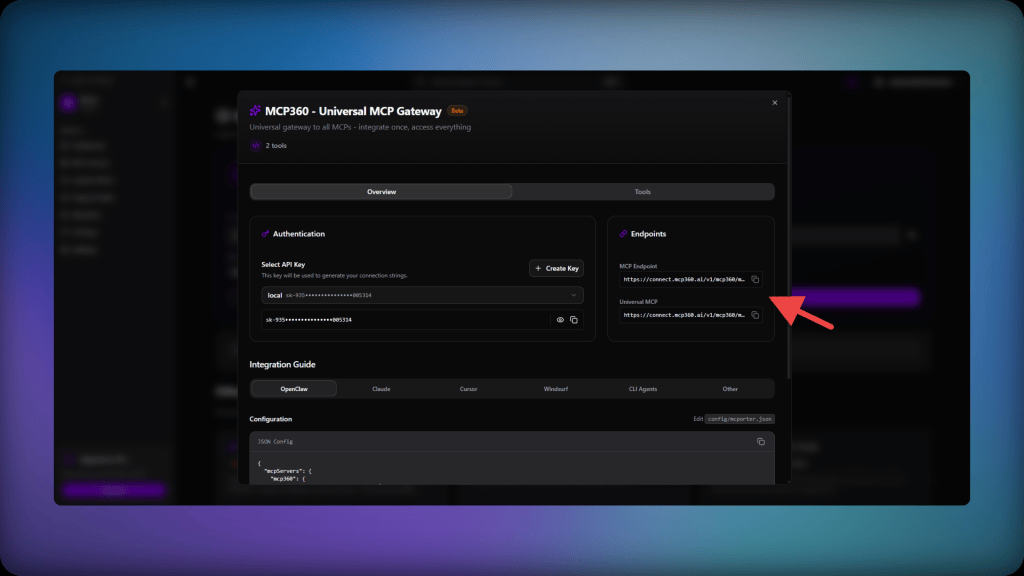
- Copy the URL of the tool you want to connect.
Step 2. Connect Warp to MCP360
Warp renames menus between releases, so these steps follow its docs as of October 2026
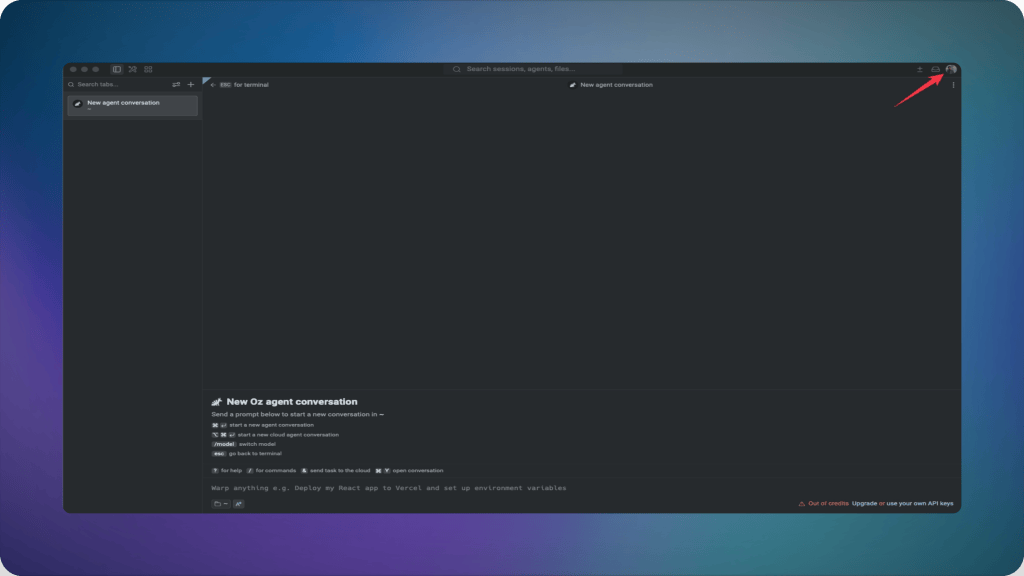
- Open the Warp app. Click your profile icon.
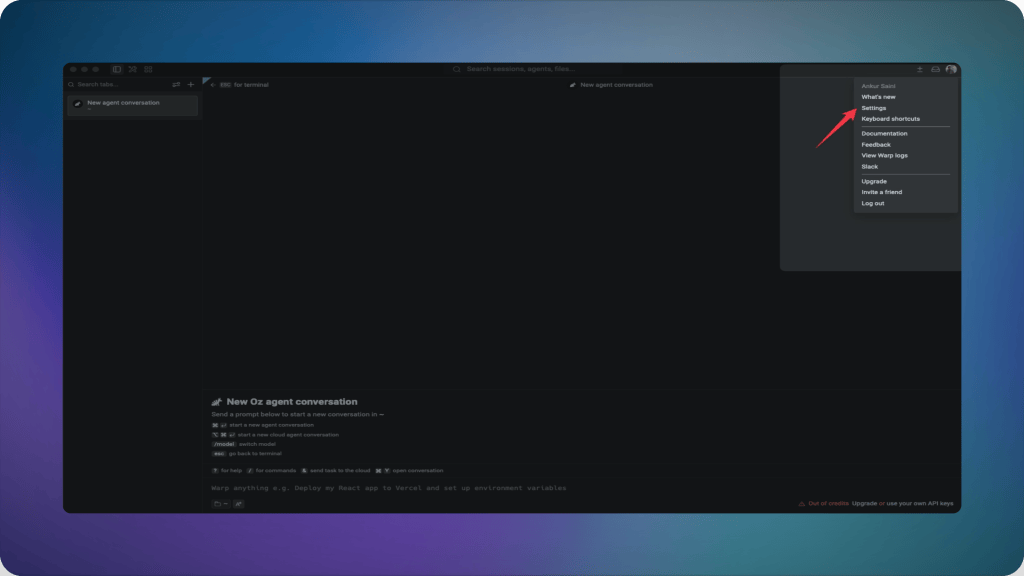
- In the top right corner of the header, open Settings, or reach the same page directly through Settings > Agents > MCP servers, Warp Drive under Personal, or by searching “Open MCP Servers” in the Command Palette.
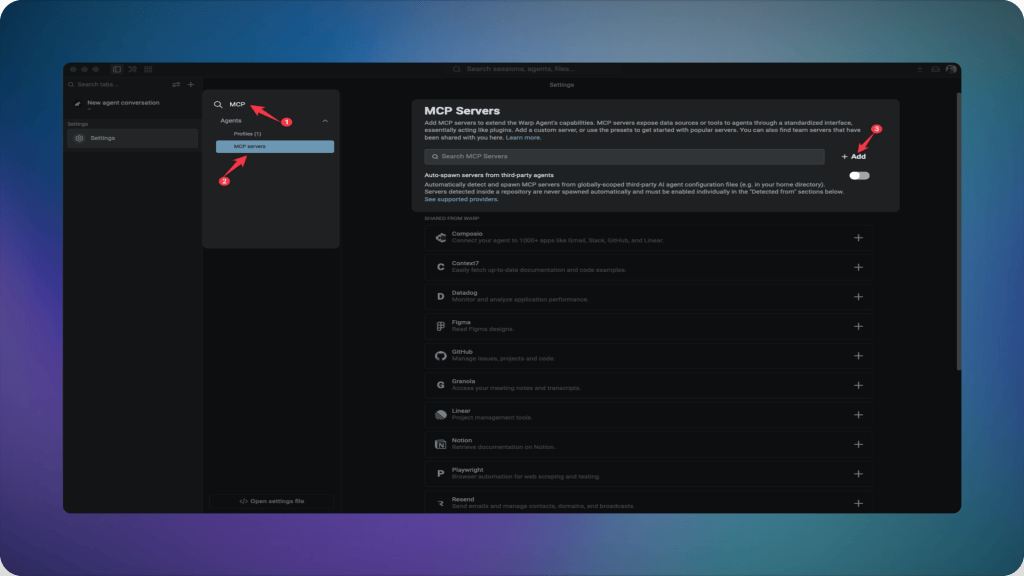
- Open MCP Servers under Agents.
- Click the + Add button.
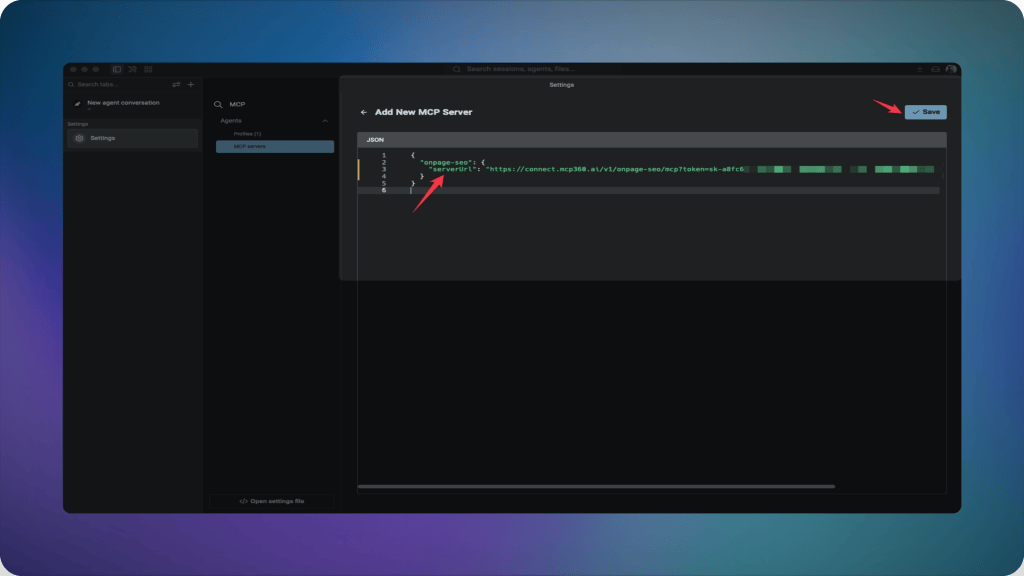
- Choose Streamable HTTP or SSE Server (URL), enter a server name, and paste the URL from Step 1.
- Click Save..
Step 3. Confirm the Connection
- Open the MCP servers page. It lists configured servers and shows which ones are running.
- Start a new Warp Agent conversation and ask it to call a tool, for example
Use MCP360 to check the WHOIS record for example.com. WHOIS lookups cost 1 credit, while Keyword Research costs 10, so a lookup keeps the test cheap. - Expect two entries in the server’s tool list. The gateway exposes
search_toolsandexecute_tool, and the agent loads the specific tool each task needs. - Click View Logs on the server entry if it fails to start. The log shows what blocked the connection.
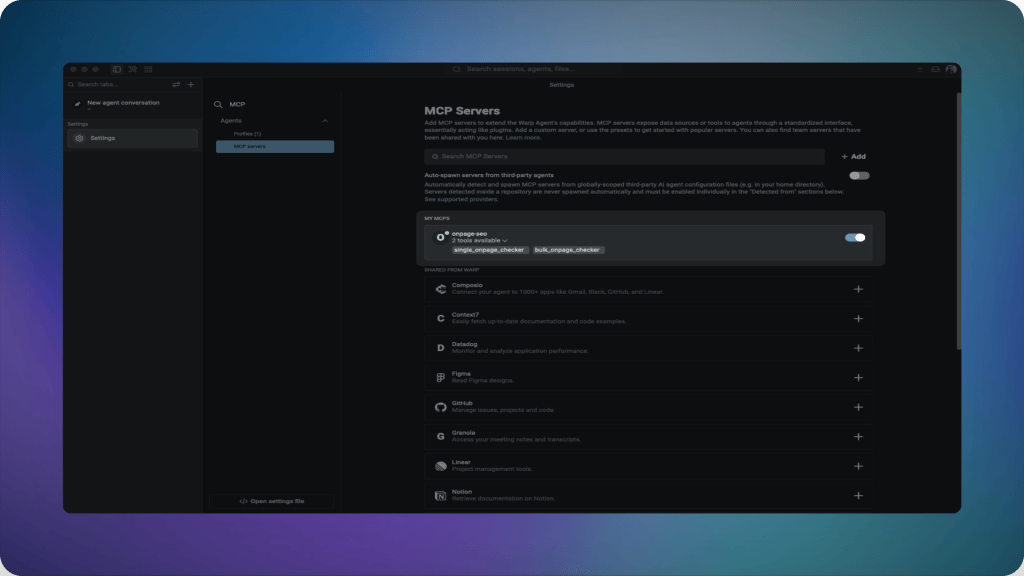
Repeat Steps 2 and 3 for any other server, including a GitHub server or an internal API wrapped with the Custom MCP Builder. That covers one machine. A server the whole team needs belongs in a config file.
Configure Warp MCP Servers with JSON Files
Servers added through Settings live on one machine, so each teammate repeats the setup by hand. File-based MCP puts the definition in a config file that can travel with a repository.
Where Warp Reads File-Based Config
| Provider | Global Config | Project Config | Auto-spawn |
|---|---|---|---|
| Warp | ~/.warp/.mcp.json |
.warp/.mcp.json at the project root |
On by default |
| Claude Code | ~/.claude.json |
.mcp.json at the project root |
Requires toggle |
| Codex | ~/.codex/config.toml |
.codex/config.toml at the project root |
Requires toggle |
| Other agents | ~/.agents/.mcp.json |
.agents/.mcp.json at the project root |
Requires toggle |
Warp reads the config files of Claude Code and Codex, so a server already defined for either tool needs no second entry. Global servers from those providers start automatically only after Auto-spawn servers from third-party agents is switched on under Settings > Agents > MCP servers.
Add Several Servers With One JSON Snippet
The + Add dialog accepts a pasted mcpServers block and adds every server in it at once.
{ "mcpServers": { "mcp360": { "url": "https://connect.mcp360.ai/v1/mcp360/mcp?token=YOUR_API_KEY" }, "filesystem": { "command": "npx", "args": ["-y", "@modelcontextprotocol/server-filesystem", "/path/to/allowed/files"] } }}
Replace YOUR_API_KEY with your own key, and keep any snippet that holds a key out of version control.
Let the Agent Write the File
The built-in /agent-add-mcp skill lets the Warp Agent create or update a config file from inside the conversation. Choose global or project scope, then review the generated file before the server starts. Warp also asks for approval before any edit to an MCP config file goes through, so an agent or automation cannot add a server silently.
Share a Server With Teammates
Team members can share a server from the MCP servers page with the share icon. Warp scrubs sensitive env values and replaces them with variables. Teammates find the server under Shared and enter their own values. A token embedded in a URL sits outside env, so remove it before sharing.
Approval Gates and Where Keys Belong
Global Warp servers start automatically. Project-scoped servers from any provider never auto-spawn, so a cloned repo cannot launch a command the moment it opens. Each one must be started from the MCP servers page, once per Warp session.
The NSA’s MCP advisory lists approval workflows that drift after the first consent among its structural gaps. Warp’s gates address a neighboring risk, a repo config that can launch a process. The MCP security hardening breakdown covers the full advisory.
Four habits keep API keys out of shared files.
- Store the MCP360 URL in Settings or in
~/.warp/.mcp.json, never in a committed file. - Commit only servers that carry no secrets to
.warp/.mcp.json. - Strip keys from View Logs output before sharing it, since logs may contain them.
- Treat any URL that embeds a token like a password. Warp’s docs note that many SSE servers expect exactly that.
Practical Benefits of Connecting MCP Servers to Warp
The gains depend on which servers get connected, and the essential MCP servers cover most first setups. Four patterns repeat across Warp setups.
- Debugging Gets Current Information: With a docs or registry server connected, the agent checks a package’s latest release or pulls live API documentation before it proposes a fix.
- Research Stays in the Terminal: Keyword volume and DNS records arrive in the same session as the task that needed them. The keyword research automation workflow shows the pattern with MCP360.
- Shared Repos Onboard Themselves: A committed
.warp/.mcp.jsonhands every teammate the same server definitions. Each person still approves and starts them once per Warp session. - One Connection Replaces a Stack of Servers: MCP360 loads tools on demand through
search_toolsandexecute_tool, so the agent’s tool list stays at two entries however many tools sit behind it. MCP context overload is the token cost this avoids.
Each pattern needs a different server, so test the one that matches your current task first.
Common Warp MCP Setup Errors and Troubleshooting Steps
Warp MCP failures usually match common MCP server connection issues. Click View Logs on the server entry first. Logs may contain API keys, so strip them before sharing.
Server Won’t Start or Shows a Transport Error
- Executable not found. Confirm the command, such as
npx, runs in a normal shell, and setworking_directorywhen the args use relative paths. - Connection error on a URL server. Confirm the endpoint has not moved. Warp’s own Sentry and Linear examples switched from
/sseto/mcpURLs between doc versions. - Restart the server from the MCP servers page after either fix.
Authentication Keeps Failing
- Check for expired credentials first, especially time-limited tokens in
envor headers. - Some servers authenticate through OAuth and open a browser window on first start.
- Switch to a CLI config with the token passed through
envwhen URL auth keeps failing. - As a last resort, run
rm -rf ~/.mcp-authto delete every stored MCP token, then re-authenticate each server.
A Project-Scoped Server Never Starts
- Warp never auto-spawns project-scoped servers, so a cloned repo cannot run commands on open. Start the server from the MCP servers page once per Warp session.
Tools Connect but the Agent Never Calls Them
- Name the tool in the prompt.
- Try a different model, since Warp’s docs note some work with MCP servers better than others.
- Use an agent conversation. Tool calls don’t happen in plain shell commands.
Frequently Asked Questions
What is an MCP server?
An MCP server is a program that exposes tools to an AI client through Model Context Protocol, an open standard for connecting agents to systems outside their training data. A GitHub server exposes issue-reading tools, and a Postgres server can run read-only queries. The client, such as the Warp Agent, decides when a task needs one of them.
How do I add an MCP server to Warp?
Open Settings, go to Agents, then MCP servers, and click + Add. Choose the Streamable HTTP or SSE Server (URL) type, enter a name, paste the server URL, and click Save. The MCP servers page lists the new entry, and View Logs shows startup errors. An MCP360 gateway URL works the same way and exposes 100+ tools through one entry.
What’s the difference between a CLI server and a URL server in Warp?
A CLI server is a local process that Warp launches from a command, arguments, and optional environment variables, then stops on exit. A URL server points Warp at an endpoint already running elsewhere over Streamable HTTP or SSE, with optional headers for authentication. Remote servers can run as either type, since npx mcp-remote wraps a URL as a command.
Where does Warp store MCP server configuration?
Servers added through + Add appear in Warp Drive under Personal, then MCP Servers. File-based definitions live in ~/.warp/.mcp.json globally and .warp/.mcp.json inside a repository. Warp also reads Claude Code’s ~/.claude.json and .mcp.json, plus Codex’s config.toml files, so existing definitions carry over once auto-spawn is enabled.
Why won’t my MCP server connect in Warp?
Check View Logs on the server entry first. A command server that cannot start usually has a wrong command or a relative path without working_directory. A URL server fails when the endpoint has moved or the credential has expired, which includes an MCP360 URL with a wrong or revoked API key. Restart the server from the MCP servers page after fixing either one.
Do I need a paid Warp plan to use MCP servers?
Warp’s MCP documentation lists no plan requirement for adding a server. Running a Warp Agent conversation is the part that needs usage, and the Free plan includes no bundled agent usage. A paid plan, a bring-your-own API key, a custom inference endpoint, or a SuperGrok or X Premium subscription all supply it.
Is it safe to commit .warp/.mcp.json to a repository?
Commit it only when the file holds servers without secrets. Warp never auto-spawns project-scoped servers and asks for approval before an MCP config edit goes through, so a cloned repo cannot launch a command on its own. Keep API keys and token-bearing URLs in Settings or the global config file instead.
What is MCP360 and how does it work with Warp?
MCP360 is a hosted gateway that puts 100+ tools behind a single URL, with a Custom MCP Builder for wrapping your own APIs. Warp reaches it as a URL server, through Settings or a global config file. The agent finds tools on demand through two meta-tools, search_tools and execute_tool, so one connection replaces a server per tool.
Conclusion
Warp’s agent will keep getting better at planning and running commands, but each call to a ticket tracker or a live data source still depends on a server outside the model. The same holds in VS Code’s native Copilot Chat setup, and every client accumulates one-off connections that someone has to maintain.
Start with one server through Settings and confirm the agent calls its tools. Move to file-based config once teammates need the same access, and keep API keys in the global file when you do. Connect Warp to the free MCP360 tier and browse the full tool catalog to see what the agent can reach.
Tags

Article by
RajniAI & Tech | Senior Content Writer
Rajni is a senior content writer covering AI agents, automation, and no-code tools. She writes across the AI space, from chatbots and customer support to MCP and agent workflows, focused on how businesses actually put these tools to work.