The TL;DR
Keyword research automation connects SEO workflows with AI agents, reducing manual keyword discovery, planning, and analysis work.
-
• What Keyword Research Automation Means
Keyword discovery, clustering, and intent analysis move directly through AI workflows instead of being handled through manual processing.
-
• Traditional SEO vs AI Workflows
Traditional SEO requires teams to move and manage keyword data across multiple tools, while AI workflows let keyword research pass directly between SEO systems and AI agents.
-
• The Outcome
SEO teams can plan faster, reduce repetitive research tasks, and turn keyword data into actionable content strategies more efficiently.
Keyword research is still treated as the starting point of SEO, but it takes up a large part of content planning time.
SEO tools can generate large keyword lists in seconds. The work starts after that. SEO managers, content marketers, and writers move between tools, export data, clean spreadsheets, check intent, and rebuild keyword structures for every content plan. Most of the effort sits in handling data that already exists inside the tools, not in the decisions that data is supposed to inform.
At the same time, content production has gotten faster. AI writing tools and automated publishing pipelines have reduced the time it takes to create and publish content. Keyword research has not changed at the same pace. It still depends on the same manual steps it always has, which creates a growing gap between how fast content can be produced and how fast it can be properly planned.
MCP360 addresses this by connecting keyword research directly into AI agent workflows, removing the need to move or assemble data manually between steps.
Why SEO Tools Keep Keyword Research Stuck in Manual Workflows
The problem with keyword research is not any single step. It is that the same sequence runs from scratch for every new topic. Pulling lists, filtering terms, grouping queries, and restructuring for content planning runs continuously in the background for any team publishing at volume.
Grouping and intent labeling depend on individual judgment. Two people researching the same topic produce different outputs, and that inconsistency compounds across how content clusters are built and topics are covered over time.
Writers wait for finalized keyword lists before starting work. That delay repeats across every piece in the pipeline, making research a permanent bottleneck between topic selection and content production.
Tools like Ahrefs and Semrush provide reliable keyword data. Structuring it for use still happens outside those tools, manually, in spreadsheets. They generate reports. They do not move data directly into the next stage of a workflow.
1. SEO work is not a connected pipeline: Keyword data sits in one system. Content planning, clustering, and briefing happen in separate environments: documents, spreadsheets, or CMS platforms. Each transition between stages requires a person to move and reorganize the data before the next step can begin.
2. APIs are built for retrieval, not for chaining: Most SEO platforms, even when they offer APIs, build those APIs for data retrieval only. They return keyword data in response to a request, but they do not support chaining that output into multi-step operations like intent classification, opportunity scoring, or content structure mapping within a single programmatic flow.
3. Interfaces are inconsistent across tools: Agents need tools that behave like functions: consistent inputs, structured outputs, and the ability to pass results directly into the next operation. SEO tools expose inconsistent interfaces. Some return structured JSON. Others return formatted reports. Many still rely on UI-driven workflows with no programmatic access at all.
4. Every new integration adds fragility: There is no shared contract across SEO tools, which means every new integration introduces a new format and new maintenance overhead. Multi-tool workflows become increasingly fragile as each additional tool adds its own layer of inconsistency.
5. The category was built for manual workflows: This is not a flaw in those tools. It is a description of the category they were built for: manual, human-driven workflows. Automated workflows require something structurally different, and the existing SEO tool category was not designed to provide it.
The gap is not about features. It is about architecture. Closing it requires tools built from the ground up for programmatic use: defined inputs, predictable outputs, and the ability to slot into a sequence without a person in the middle to bridge the steps.
The Architecture Shift in SEO Workflows with MCP
MCP, the Model Context Protocol, is an open standard introduced by Anthropic in November 2024 for how AI agents connect to external tools and data sources.
Before MCP, connecting an agent to an external tool required building a separate integration for each service, with custom authentication, request handling, and output parsing maintained individually. Each new tool added a new point of failure. When a service changed its API, every integration built on top of it had to be updated manually.
MCP replaces this with a single protocol. Tools expose themselves as callable functions with defined input schemas and structured responses. The agent interacts through one consistent interface regardless of what is on the other side, and the output of one tool passes directly into the next operation without reformatting in between.
For SEO workflows, this means keyword data, SERP information, and clustering outputs can all follow the same interaction pattern within one agent session. Each step receives the output of the previous one in a usable format. Research stops being a preparatory phase that precedes content work and becomes part of the execution cycle itself.
How to Set Up the Keyword Research Server in Claude
MCP360 exposes keyword research as a callable function inside an agent workflow. When triggered, it returns structured data in a single response: search volume, intent classification, keyword relationships, and competition signals, all in a consistent format.
Because the output follows a defined schema, it passes directly into the next operation without reformatting. The agent filters by competition level, groups by intent stage, scores by opportunity, and produces organized output in sequence, within one execution cycle. Keyword data does not leave the workflow to be manually reorganized. It moves through it.
Here are the steps to connect Keyword Research to Claude:
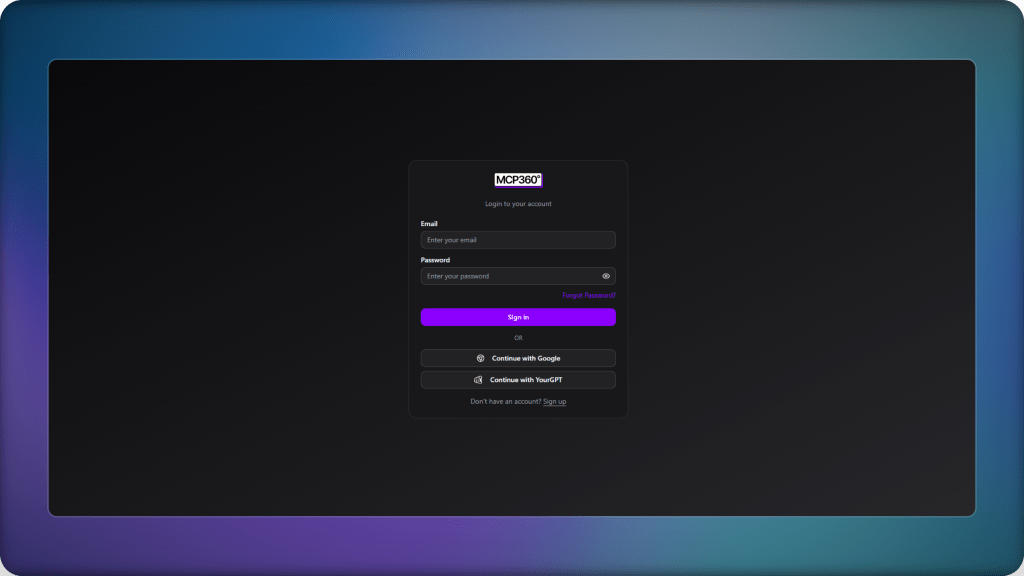
- Go to the MCP360 website and log in.
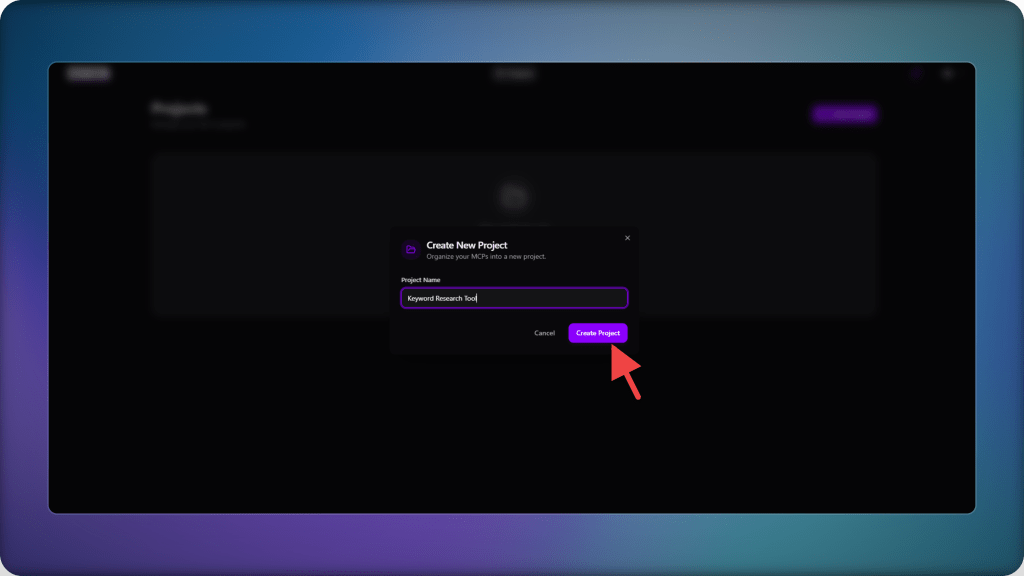
- Create a new project.
- Give it a clear name so it can be easily identified later.
- Open the project once it is created.
- Inside the project dashboard, go to the MCP servers section.
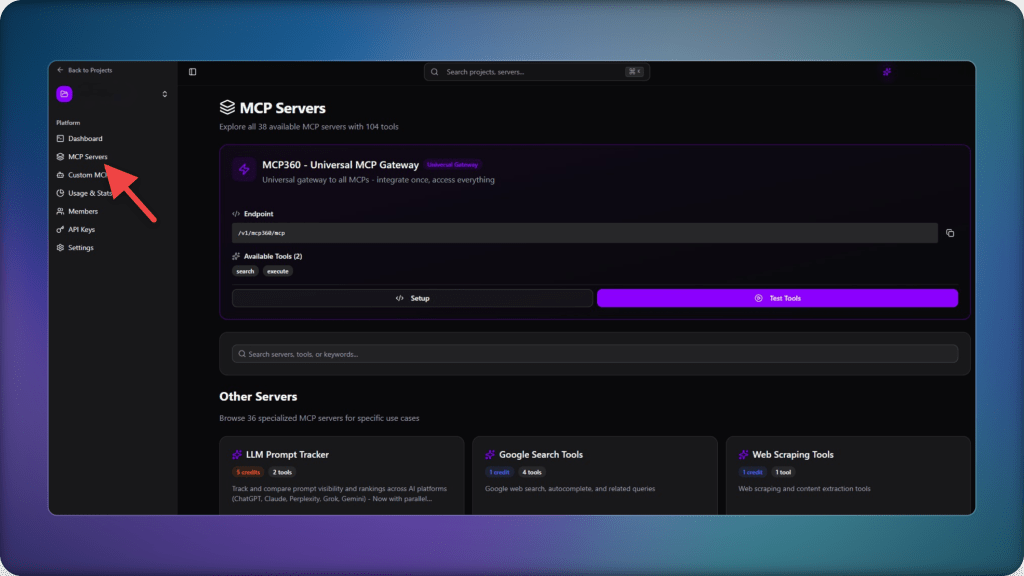
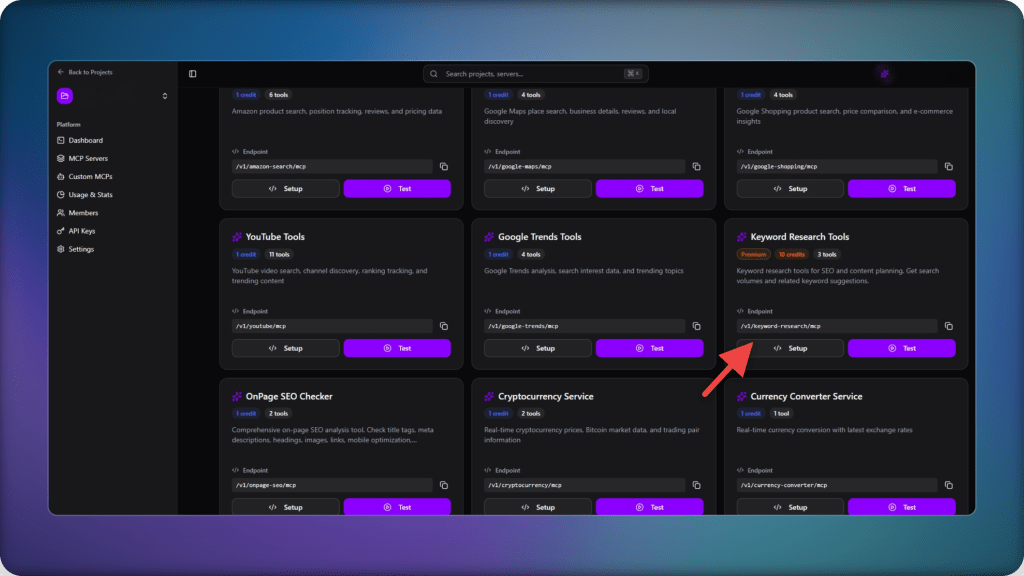
- Find the Keyword Research Tools server and click on setup.
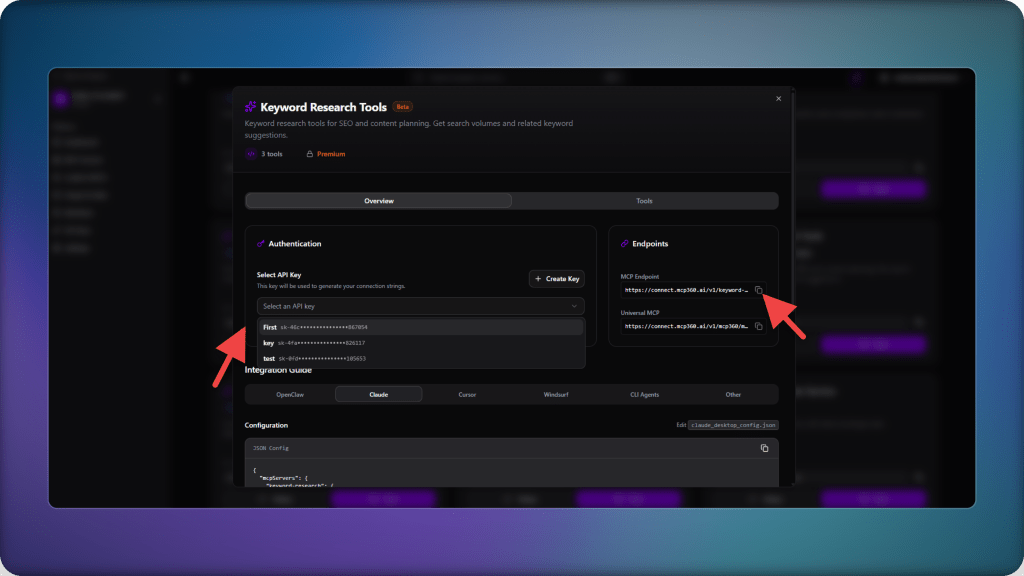
- Select API Key and copy the MCP endpoint URL shown on the screen. This endpoint will be used to connect with the AI agent.
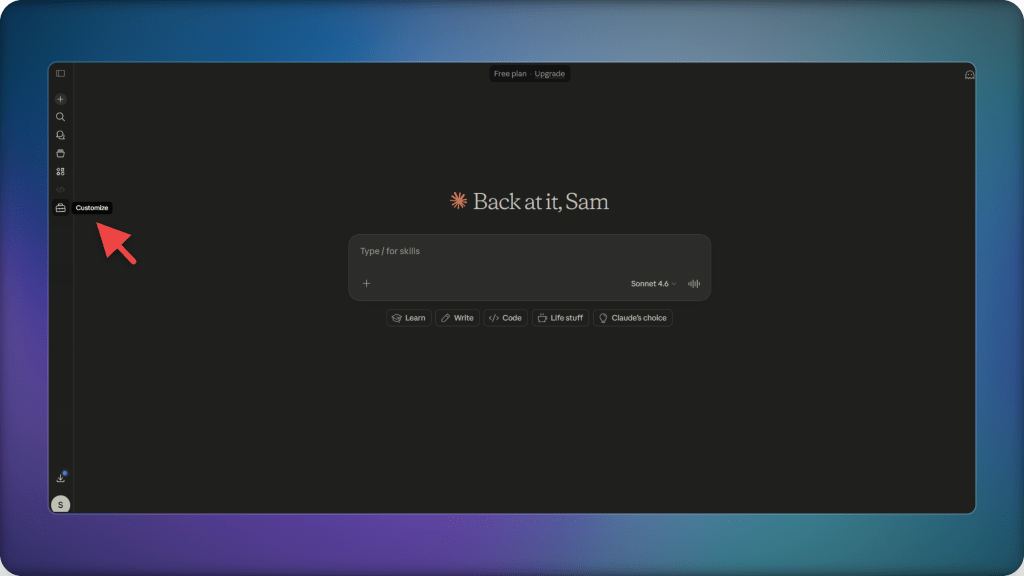
- Log in to Claude and open the customization settings.
- Go to connectors and click on add connectors.

- Name the connector (example: “Keyword Research”).
- Paste the copied MCP endpoint and click on add.

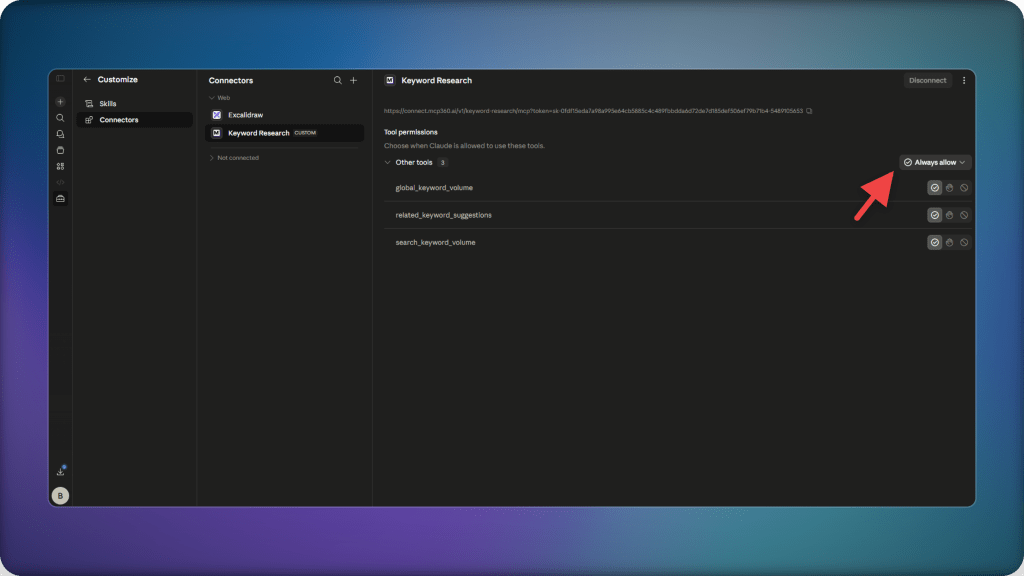
- The connector will now appear in your list of connectors. Open it and enable the required permissions before use.
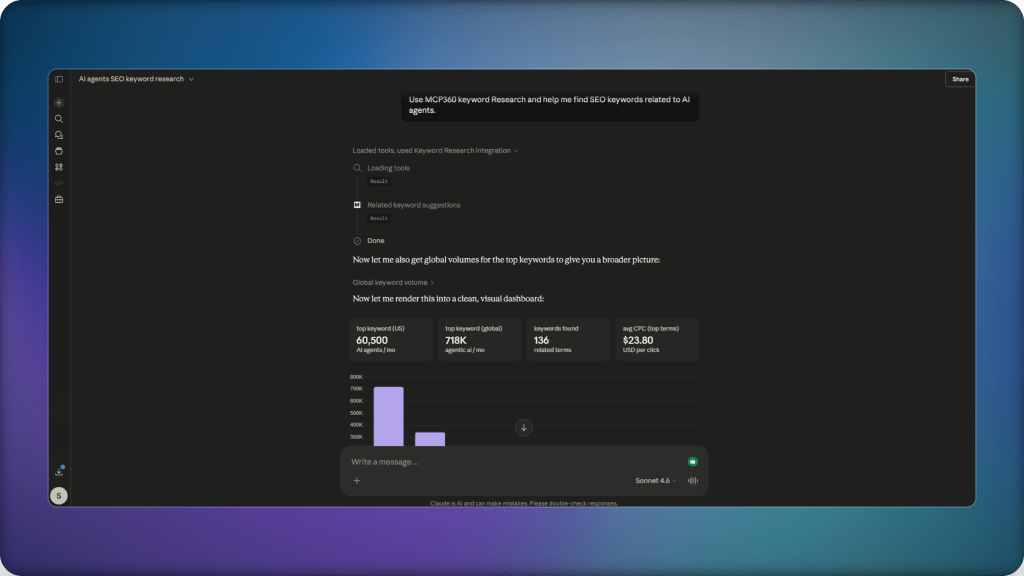
- Once connected, you can start asking keyword-related queries directly in Claude.
- Make sure your prompt clearly mentions using MCP360 for keyword retrieval so the agent routes the request through the connected server.
Use Cases: AI Agent Keyword Research with MCP360
The Keyword Research MCP connects keyword research, trend analysis, and content planning into a single agent workflow. Here is what that looks like in practice.
1. Finding high-intent keywords for a product or feature: High-intent keywords for a product like AI customer support software can be requested directly. The agent retrieves keyword data and returns structured results grouped by intent: transactional queries, comparison terms, and problem-based searches as separate categories, ready to map onto pages without additional sorting.
2. Building content clusters from a topic: A topic like AI SEO automation can be expanded into structured keyword clusters. The agent pulls related queries and groups them by relevance, forming distinct content directions for pillar pages and supporting articles. The grouping happens during retrieval, not afterward.
3. Turning a keyword into a content plan: A single keyword expands into a structured content plan organized by intent stage. Related terms are retrieved, grouped into awareness, consideration, and decision-level queries, and assigned to different content types within the same workflow.
4. Identifying trending topics before they peak: Google Trends data is pulled alongside keyword volume data within the same workflow. The agent retrieves rising search queries in a given category, cross-references them against existing keyword data, and flags topics gaining momentum before they reach peak competition.
5. Validating keyword strategy against seasonal and regional trends: Keyword lists can be cross-referenced with Google Trends data to surface seasonal patterns and regional variation in search demand. The agent returns a structured view of when and where demand is strongest, so scheduling and targeting decisions happen inside the same workflow.
Across all of these, the pattern is the same. The Keyword Research MCP removes the step where data leaves the workflow to be manually prepared before it can be used. Research, filtering, and planning happen in sequence, within a single execution cycle, without the handoffs that slow the process down.
Frequently Asked Questions
How to do keyword research for beginners?
Begin by choosing a topic, then use SEO tools to find related search terms. Focus on understanding search intent, grouping similar keywords together, and selecting terms based on demand and competition before building content around them.
What are the 4 types of keywords?
The four main types are short tail keywords, long tail keywords, informational keywords, and transactional keywords. Each type reflects a different search intent and content purpose.
How does MCP360 improve SEO keyword research efficiency?
MCP360 improves efficiency by letting AI agents access keyword data directly inside workflows, removing manual exports, tool switching, and spreadsheet-based restructuring.
Why is structured keyword output important for SEO workflows?
Structured output allows keyword data to move directly into clustering, briefing, and content planning without reformatting, reducing delays between research and execution.
How does MCP360 connect keyword research with AI agents?
MCP360 connects keyword tools through a single interface so AI agents can fetch, organize, and use keyword data within the same workflow step.
Why is traditional keyword research considered a manual process?
Traditional keyword research relies on exporting data from SEO tools, cleaning it in spreadsheets, and manually grouping keywords before they can be used in content planning.
What problems exist in traditional SEO keyword workflows?
Keyword data is spread across multiple tools and formats, which creates extra handling work, inconsistent clustering, and delays between research and content creation.
What kind of SEO tasks can be automated using keyword research workflows?
Keyword clustering, intent classification, content brief creation, topic expansion, and trend analysis can all be automated within AI driven keyword research workflows.
Conclusion
Keyword research is shifting from a preparatory phase to part of the content workflow itself.
The change is not primarily about speed, though research does run faster when it operates inside an agent workflow. The more significant change is structural. When keyword data arrives already organized by intent and grouped by topic at the moment it is needed, rather than prepared in advance through a separate manual process, it stops functioning as a blocking step and starts functioning as a direct input into briefing and content decisions.
This is what MCP infrastructure makes possible for SEO teams. With MCP360, keyword research becomes a callable function inside the same workflow where content is planned, not an isolated process that feeds into it after the fact. Building modern content operations means connecting these stages rather than keeping them sequential.

Article by
MitaliAI & Automation | Content Writer
Mitali is a content writer covering AI agents, automation, and no-code tools. Her writing spans the AI landscape, from support and sales automation to MCP integrations and agent workflows, with a focus on practical business use.