
The TL;DR
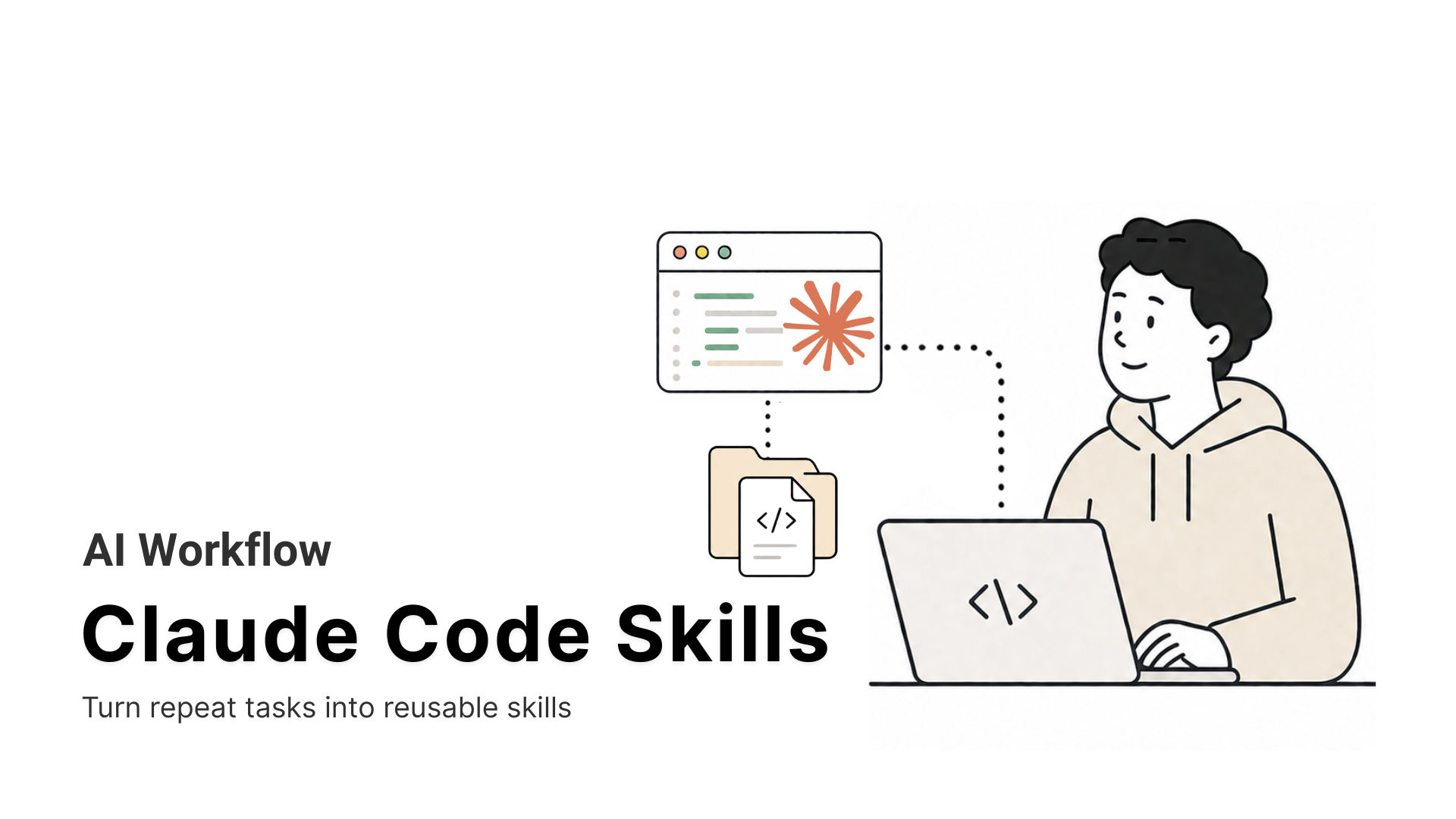
Claude Code skills are reusable folders of instructions that teach Claude your team’s exact workflow, so you do not need to explain the same process in every session.
-
• What They Are
A skill is a folder containing a SKILL.md file. Claude loads it only when a relevant task needs it, so you can keep many skills installed without slowing down unrelated work.
-
• Why They Matter
A short markdown file can replace long, repeated instructions. Skills can also be shared across a team, keeping workflows consistent instead of leaving important steps in one person’s memory.
-
• Difference From MCP
MCP connects Claude to external tools and systems. Skills teach Claude how to use those tools properly, or how to complete tasks it already has access to with greater consistency.
Anyone who uses Claude Code regularly eventually runs into the same problem. You explain your deployment process, review checklist, commit format, or project conventions, Claude follows them for one session, and then you have to provide the same instructions again.
Claude Code skills solve this by turning repeatable instructions into reusable files. A skill can teach Claude how your team reviews pull requests, validates releases, writes migration files, or handles internal tools. Claude loads those instructions only when they are relevant, so your workflow stays consistent without filling every session with copied prompts.
A basic skill is just a folder containing a SKILL.md file, and you can create one in a few minutes. More advanced skills can include scripts, templates, reference files, tool permissions, and isolated subagent workflows.
This guide explains how Claude Code skills work, how to create and test your first skill, where to store it, how skills differ from MCP servers and subagents, and how to review third-party skills before giving them access to your system.
What Are Claude Code Skills?

A Claude Code skill is a directory built around one required file, SKILL.md. That file holds YAML frontmatter telling Claude when to use the skill, followed by markdown instructions for what to run when it does. Everything else in the folder is optional, including scripts, templates, and reference files.
my-skill/├── SKILL.md # required, metadata and instructions├── reference.md # optional, loaded only when needed└── scripts/ └── validate.sh # optional, executed, not read into context
Custom commands, the older .claude/commands/ files, were folded into skills in a later Claude Code update. A command at .claude/commands/deploy.md and a skill at .claude/skills/deploy/SKILL.md both create the same /deploy shortcut and behave the same way. Existing command files still work. Skills add a directory for supporting files, per-skill tool permissions, and the ability for Claude to load them without being asked.
Claude Code skills follow the Agent Skills open standard, published by Anthropic and adopted by OpenAI’s Codex CLI, Cursor, and GitHub Copilot. Google built support for it into Antigravity CLI too, the tool that replaced Gemini CLI for most individual and free-tier users after Google retired those tiers on June 18, 2026. A skill written for Claude Code generally runs unchanged in any of these tools, because the format itself, a folder plus a markdown file, carries no vendor-specific code.
How Claude Code Skills Work

Claude Code skills are designed to stay out of the way until they’re needed. Instead of loading every instruction into every conversation, Claude decides whether a skill is relevant to the current task. If it is, the skill loads automatically. If not, it remains inactive and uses almost no context.
This selective loading lets you keep dozens or even hundreds of skills installed without slowing every session or filling the model’s context window with instructions that don’t apply.
The process happens in three stages.
1. Metadata loads when Claude starts
When Claude Code starts, it reads only the metadata from every installed skill, mainly the skill name and description.
The description acts as a trigger. Claude compares your request against every installed skill to determine whether one should be used.
Because only metadata is loaded at this stage, the overhead stays very small even with a large skill library.
2. The full skill loads only when needed
If Claude determines that a request matches a skill, it loads the entire SKILL.md file into the conversation.
For example, if you ask Claude to write a Conventional Commit message, it may automatically load your commit-message skill. If you ask it to review a pull request, it may instead load your review checklist.
Only the skills relevant to the current task become part of the active context.
3. Supporting files are opened on demand
A skill can include reference documents, templates, examples, datasets, or scripts alongside SKILL.md.
These files are not loaded automatically.
Claude reads them only if the instructions require them, keeping unnecessary content out of the context window. Shell scripts execute when called, but their source code does not become part of the conversation unless explicitly opened.
Claude Code Skills vs. MCP vs. Subagents

Progressive disclosure explains how skills stay light. The next question is where skills sit next to Claude Code’s other extension points, since people confuse the three constantly.
| Extension | Answers | Cost to Build |
|---|---|---|
| Skill | Claude does not know our exact procedure | A markdown file, usually created in minutes |
| MCP Server | Claude cannot reach this system at all | Real engineering time, authentication, and hosting |
| Subagent | This work would crowd out my main context | A markdown file with frontmatter |
They work together instead of competing. A subagent can call an MCP server to pull a pull request, then use a skill for your team’s review checklist while doing it, sometimes running on a different, more specialized model for that isolated work. Anthropic’s documentation confirms subagents can load and use skills exactly like the main session can.
Creating Your First Claude Code Skill
The whole process, from empty folder to a working /commit-message command, takes about five minutes once you know the steps.
Step 1. Create the skill directory
Personal skills live under your home directory and apply across every project. Project skills live inside a specific repository.
mkdir -p ~/.claude/skills/commit-message
Step 2. Write SKILL.md
Every SKILL.md needs YAML frontmatter between --- markers, then markdown instructions below it. Claude reads the description field to decide whether the skill applies, so it has to name both what the skill does and when to use it, written in the third person.
---name: commit-messagedescription: Generates a conventional-commit-formatted message from the staged git diff. Use when the user asks for a commit message or wants to commit staged changes.---## Staged changes!`git diff --staged`## InstructionsWrite a commit message in the format type(scope): summary, followed by ashort body explaining what changed and why. Base it only on the diff above.If nothing is staged, say so instead of guessing.
The !git diff –staged“ line injects dynamic context. Claude Code runs that shell command before Claude ever sees the file, then replaces the placeholder with the real diff output. The instructions arrive already grounded in actual data instead of a guess.
Step 3. Test it
Start a session inside a repository with staged changes. Either ask Claude for a commit message and let it find the skill on its own, or invoke it directly with /commit-message.
Claude Code watches skill folders for changes during a session, so edits to an existing SKILL.md apply immediately, no restart needed. A brand new top-level skills folder needs one restart before Claude Code picks it up.
Claude Code Skill Locations and Scope
Claude Code lets you install skills at different levels depending on whether they’re meant for yourself, a single repository, your organization, or a plugin. Choosing the right location makes skills easier to manage and share.
| Location | Path | Applies To |
|---|---|---|
| Enterprise |
Managed settings
|
Everyone in the organization |
| Personal |
~/.claude/skills/<name>/SKILL.md
|
All your projects |
| Project |
.claude/skills/<name>/SKILL.md
|
That project only |
| Plugin |
<plugin>/skills/<name>/SKILL.md
|
Wherever the plugin is enabled |
Inside Claude Code, every frontmatter field except description is technically optional, and the command name usually comes straight from the folder name. If you plan to reuse the skill in Claude.ai or through the API, the stricter cross-product rules apply. The name field is required, capped at 64 characters, lowercase letters, numbers, and hyphens only, and it cannot contain the words “claude” or “anthropic.” Following that rule from the start keeps a skill portable to both.
Nine Claude Code Skill Categories Worth Building
Once you know how to create a skill, the next question is what process should become one. The best candidates are repeatable tasks with clear rules, project-specific knowledge, or steps Claude regularly misses.
1. Library and API reference
Document internal libraries, CLI commands, naming conventions, required parameters, and common mistakes. This is useful when Claude repeatedly guesses how a private package or internal tool works.
2. Product verification
Define the checks Claude must run before reporting that a task is complete. A verification skill can open the application, test the changed workflow, inspect logs, or capture screenshots instead of relying only on a successful build.
3. Data fetching and analysis
Store approved table names, dashboard identifiers, query patterns, date rules, and reporting conventions. This helps Claude retrieve and interpret company data consistently.
4. Business process automation
Turn a repeatable internal process into one command. Examples include preparing a standup update, generating a release note, summarizing support trends, or formatting a weekly report.
5. Code scaffolding and templates
Provide the required structure for new services, components, migration files, tests, or configuration files. The skill can include your team’s preferred naming, folders, dependencies, and boilerplate.
6. Code quality and review
Encode review checklists, style rules, architecture constraints, and project-specific standards that Claude may not apply by default.
7. CI/CD and deployment
Document build commands, test requirements, smoke checks, rollout order, rollback conditions, and approval steps for a particular service.
8. Runbooks
Guide Claude through incident investigation using a fixed sequence of checks. A runbook skill can map symptoms to logs, dashboards, commands, and escalation steps.
9. Infrastructure operations
Cover recurring maintenance such as certificate checks, environment validation, backup verification, or service restarts. These skills should include strict guardrails for destructive commands.
Product verification is often one of the best places to start because coding agents can report success when the real feature is still broken. A strong verification skill records the checks that have caught real failures before, including UI behavior, integration responses, logs, and production-specific edge cases.
8 Best Claude Code Skills to Install in 2026
The nine categories above help with planning a custom skill. Installing one that already exists is usually faster, provided it solves a real problem instead of restating what Claude can already do on its own.
The eight skills below were chosen against three criteria.
- Does it close an actual gap in Claude Code’s default behavior
- Does it come from a named, accountable source, Anthropic, a partner company, or a named developer
- Does the install work as documented
MCP360 is ranked first for a different reason than the rest of the list. The other seven each teach Claude one task. MCP360 gives Claude Code a single connection to 100+ external tools and custom MCP servers, covering search, SEO, e-commerce, and more, which the first entry below explains in full.
1. MCP360 — Universal Gateway
MCP360 isn’t a single-purpose SKILL.md like the rest of this list. It works underneath your skills as a gateway, the layer that decides which external tool gets called rather than a skill that performs one specific job itself. Instead of installing and maintaining a separate skill or server for every category of task, you connect it once and every category becomes reachable through that single connection.
Features
- 100+ tools across multiple MCP servers (search engines, SEO and marketing intelligence, e-commerce, media, maps and travel, domain and network lookup, finance, productivity and verification), full breakdown in the tools catalog.
- Tools load on demand through
search_toolsandexecute_toolmeta-tools, so adding servers never bloats the context window the way installing many individual skills can. - No-code Custom MCP Builder, with an API-based mode (wrap any REST API with its credentials) and a code-based mode (run your own Python or JS).
- Chat Playground for testing calls before wiring them into a session, plus automatic failover when an upstream API breaks.
Best for
Builders who want broad, unpredictable tool access in one connection rather than standing up and maintaining a separate skill or server per task.
Installation
Add the gateway to Claude Code’s MCP config. For the full walkthrough, including auth and testing the connection, see the complete integration guide.
{ "mcpServers": { "mcp360": { "command": "npx", "args": [ "mcp-remote", "https://connect.mcp360.ai/v1/mcp360/mcp?token=YOUR_API_KEY" ] } }}}
2. frontend-design
frontend-design is a Anthropic’s own skill for building interfaces that don’t look like every other AI-generated page. It targets a specific, well-documented problem. Left to its own defaults, Claude tends toward a narrow, recognizable visual style regardless of what it’s asked to build. This skill loads a different set of design defaults and pushes generation toward interfaces that read as deliberately designed rather than templated.
Features
- Design-token system covering typography, color, and spacing, applied consistently across generated interfaces.
- Actively steers away from the generic “AI-generated” look, avoiding purple gradients, centered layouts, and rounded cards by default.
- Supports complex app patterns like state management and routing, well beyond single-file HTML or JSX artifacts.
- Works with shadcn/ui components for more production-ready output than a plain artifact.
Best for
Interactive prototypes, dashboards, and internal tool interfaces that need to look intentional rather than templated.
Installation
/plugin marketplace add anthropics/skills/plugin install example-skills@anthropic-agent-skills
3. Superpowers
Superpowers is a complete software development methodology built on composable skills, created by Jesse Vincent through his company, Prime Radiant. A single skill teaches Claude one task. Superpowers changes how Claude approaches an entire project, refusing to jump into code and working through design, planning, and verification as separate, enforced stages. Superpowers runs through Jesse Vincent’s own marketplace, not an Anthropic-run one.
Features
- A brainstorming skill activates before any code gets written, asking clarifying questions and saving a design document for review
- A writing-plans skill breaks approved work into tasks scoped to two to five minutes each, with exact file paths and verification steps attached
- Systematic-debugging and verification-before-completion skills enforce a root-cause investigation before a fix, and require proof of success before Claude reports a task done
- Subagent-driven-development dispatches a fresh subagent per task, with a two-stage review checking spec compliance and code quality separately
Best for
Teams who want Claude Code to follow one consistent, disciplined process across an entire project.
Installation
/plugin marketplace add obra/superpowers-marketplace/plugin install superpowers@superpowers-marketplace
4. skill-creator
skill-creator is a meta-skill, meaning its job is helping you build other skills rather than performing a task itself. Most custom skills get written once and never checked against a baseline, so nobody actually knows whether they help. skill-creator exists to close that gap, treating skill-writing as something you test rather than something you just hope works.
Features
- Scaffolds the folder structure and YAML frontmatter for a new skill automatically, instead of starting from a blank file.
- Runs the same prompt set with and without the skill enabled, so you can see the actual difference it makes.
- Tests each variant in a fresh session, so leftover context from writing the skill doesn’t quietly inflate the results.
- Grades output against assertions you define and reports a pass rate alongside the token and time cost the skill adds.
Best for
Anyone building more than one or two custom skills who wants to confirm each one earns its place instead of guessing.
Installation
/plugin marketplace add anthropics/skills/plugin install example-skills@anthropic-agent-skills
5. webapp-testing
webapp-testing is a verification skill built for a specific failure mode common to coding agents. Claude reports a change as done because the code compiles or a test suite passes, even when the actual page renders wrong or breaks on interaction. Rather than trusting Claude’s own account of what it built, this skill inserts an independent check between finishing a change and calling it complete.
Features
- Playwright-based automated browser testing of local web applications.
- Verifies actual rendered behavior in the browser, going beyond whether unit tests pass.
- Can capture screenshots as evidence of what was actually tested, rather than a text summary alone.
- Pairs naturally with debugging workflows to catch UI regressions before a change ships.
Best for
Front-end changes where “the tests pass” isn’t the same guarantee as “the page actually looks and works right.”
Installation
/plugin marketplace add anthropics/skills/plugin install example-skills@anthropic-agent-skills
6. Document Skills (docx, pdf, pptx, xlsx)
Document Skills is an Anthropic bundle of four document-format skills, the same ones that power Claude.ai’s built-in Word, PDF, PowerPoint, and Excel creation. Each format gets its own skill rather than one generic “documents” skill, since the underlying file structures and common failure points differ enough to need separate handling. Together they cover the bulk of office-document work a coding agent gets asked to do outside the codebase itself.
Features
- docx handles Word documents with tracked changes, comments, and formatting preservation
- pdf covers text and table extraction, form filling, and merging or splitting existing documents
- pptx generates PowerPoint presentations with layouts, templates, and charts
- xlsx creates and edits Excel spreadsheets with formulas, formatting, and data visualization intact
Best for
Any workflow that needs Claude to produce or edit real Office files rather than just describing what they should contain.
Installation
/plugin marketplace add anthropics/skills/plugin install document-skills@anthropic-agent-skills
7. brand-guidelines
brand-guidelines applies a brand’s colors, typography, and voice to everything Claude generates, so output doesn’t default to a generic style. Restating those rules in every conversation is the exact repetition problem it solves. Anthropic ships it pre-loaded with its own defaults as a working example, giving you a structure to adapt instead of a blank file.
Features
- A full-color system defined once, covering primary, secondary, neutral, and functional colors.
- Typography and type hierarchy specifications applied consistently across output.
- Works across multiple artifact types, including slides, documents, reports, and HTML pages.
- Structured as a template you can copy and swap in your own team’s brand instead of Anthropic’s.
Best for
Teams who want every artifact Claude produces to match company brand standards without restating them each session.
Installation
/plugin marketplace add anthropics/skills/plugin install example-skills@anthropic-agent-skills
8. Partner Skills (Notion, Figma, Atlassian, Canva)
Partner Skills are professionally built skills published by Anthropic’s partners rather than by the community, listed in the official Skills Directory alongside each partner’s own MCP connector. A community-written skill teaches Claude a general pattern, but a partner skill is written by the people who built the underlying tool, so it can encode conventions an outsider would otherwise have to guess at.
Features
- Notion skill applies the workspace’s actual page and database structure instead of a generic outline.
- Figma skill follows established component and variant naming so generated designs match the existing file.
- Atlassian skill formats tickets and fields the way the connected Jira or Confluence instance already expects.
- Canva skill pulls from existing brand templates rather than generating a layout from scratch.
Best for
Teams already using one of these tools daily who want Claude to follow its conventions instead of guessing at them.
Installation
Available through the Skills Directory, under Customize > Skills > Browse skills, alongside the matching MCP connector.
Using Claude Code Skills Effectively
A skill you built and a skill you installed from this list both run on the same settings.
Two ways a skill gets triggered
- Automatic. Claude loads a skill on its own when a request matches the description.
- Direct invocation. Type
/skill-name, optionally passing arguments that fill a$ARGUMENTSplaceholder in the skill’s body.
Controlling when a skill fires
Some skills should never fire without being asked.
disable-model-invocation: truestops Claude from triggering the skill itself. A deploy skill with real side effects is a good candidate, so a human decides when it runs, not Claude.user-invocable: falsehides a skill from the/menu while still letting Claude use it as background knowledge, useful for something like a legacy-system explainer that isn’t an action to trigger.context: forkruns the skill in an isolated subagent instead of inline in the main conversation, useful for research or PR-summary work that would otherwise fill up the working context.
Sharing skills with a team
- Small number of repos. Committing
.claude/skills/straight into version control is enough. - Larger teams. Package skills into a plugin and distribute them through an internal marketplace, so teammates choose what to install rather than inheriting every skill by default. This matters because each installed skill adds a small, permanent amount to the context budget.
Claude Code Skills Security Best Practices
Claude Code skills can run commands, access files, and use connected tools with the permissions of your active session. Treat every third-party skill like a software dependency by reviewing its source, limiting tool access, and testing it before using it with sensitive systems.
What a Skill Can Access
A skill runs with the full permissions of whatever session installs it. Installing one from outside your team is closer to installing an npm or PyPI package than opening a document. It can execute shell commands, read your file system, and use any tool it has been granted.
The Scale of the Problem
Snyk’s ToxicSkills research, published February 5, 2026, scanned 3,984 skills from the ClawHub and skills.sh registries.
- 1,467 skills, 36.82 percent, carried at least one security flaw
- 534 skills, 13.4 percent, had a critical issue, such as malware distribution or exposed credentials
- 76 skills carried confirmed malicious payloads
- 8 of those 76 were still publicly available on ClawHub at the time of publication
How Malicious Skills Slip Past Defenses
Datadog Security Labs documented a second risk in May 2026. Claude Code supports dynamic context commands, the !`command` syntax used for legitimate context injection.
These commands run before Claude ever sees the rendered skill. A malicious command hidden in setup instructions bypasses model-level prompt injection defenses entirely, since Claude never gets a chance to evaluate it.
Best Practices
- Review third-party skills before installing them, the same way you’d review a new dependency, especially anything with a setup step that downloads or pipes a script into a shell
- Scope
allowed-toolsdeliberately rather than granting broad tool access by default, and usedisallowed-toolsto block specific tools while an autonomous skill is active - Turn on
disableSkillShellExecutionfor skills coming from user, project, plugin, or added-directory sources when you can’t fully vet them. This blocks inline shell execution without affecting Anthropic’s own bundled skills. - Rotate credentials after installing any skill that touches API keys, cloud credentials, or financial access, if there’s any reason to doubt its source
Testing and Improving Claude Code Skills
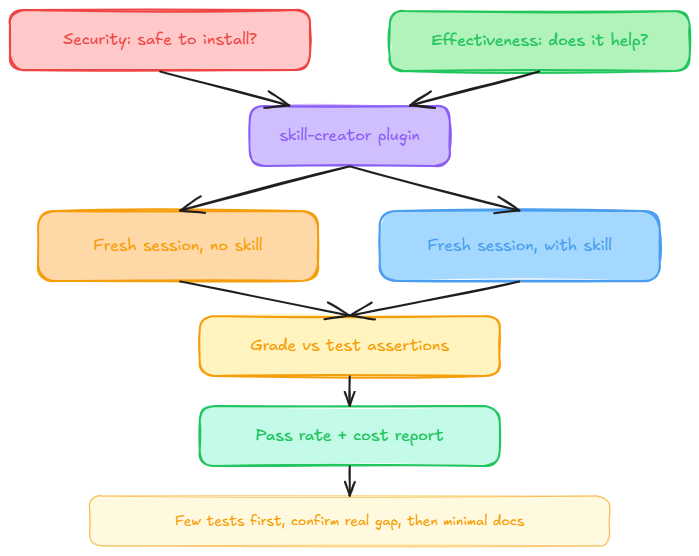
Security determines whether a skill is safe to install. A separate question is whether it helps once it’s running. Seeing a skill trigger only proves Claude found it, not that it did the right thing.
Anthropic’s own skill-creator plugin automates that comparison. It runs the same prompts with and without the skill enabled, in a fresh session each time so leftover context from writing the skill doesn’t mask gaps in the instructions. It then grades the output against assertions you define and reports a pass rate alongside the token and time cost the skill adds.
Anthropic’s general guidance is to build a handful of test cases before writing extensive documentation. Confirm the skill solves a real, observed gap first, then write the minimum instructions needed to close it.
Frequently Asked Questions
What are Claude Code skills?
A Claude Code skill is a folder with a SKILL.md file, YAML frontmatter plus markdown instructions, that Claude loads only when needed. Skills follow the open Agent Skills standard, so the same folder also works in Codex CLI, Gemini CLI’s Antigravity, Cursor, and GitHub Copilot. Write it once, and Claude applies it automatically from then on.
How are Claude Code skills different from MCP servers?
A skill teaches Claude how to do something, instructions loaded only when relevant. An MCP server gives Claude access to a system it can’t otherwise reach, like a database or API. They solve different problems and usually work together. A skill can tell Claude how to use the tools an MCP server provides.
How do I create my first Claude Code skill?
Create a folder under ~/.claude/skills/ or your project’s .claude/skills/ directory, then add a SKILL.md file inside it. Write a description naming what the skill does and when to use it, followed by markdown instructions. Test it by asking Claude something matching the description, or invoke it directly with /skill-name. Simple skills take about five minutes.
Where should I store a Claude Code skill?
Personal skills go in ~/.claude/skills/, applying across every project on your machine. Project skills go in .claude/skills/ inside a specific repo, so only that project sees them. Enterprise skills come from managed settings and apply org-wide. When names collide, enterprise overrides personal, and personal overrides project.
What is the best Claude Code skill to install first?
It depends on the gap you’re filling. For broad tool access across search, SEO, and e-commerce, MCP360 connects Claude Code to 100+ tools through one integration instead of a dozen separate installs. For UI work, Anthropic’s own frontend-design skill fixes the generic look Claude defaults to. Match the skill to the problem, not the popularity.
Can I connect Claude Code to my own internal APIs without building an MCP server?
Yes. Building a full MCP server takes real engineering time, authentication, and hosting. MCP360’s Custom MCP Builder wraps any REST API with its credentials and turns it into a callable tool without writing or hosting a server yourself. It also has a code-based mode for running your own Python or JavaScript when logic doesn’t map to one API call.
Do I need a separate skill or integration for every tool I want Claude Code to use?
No, though that’s the default pattern for single-purpose skills like Anthropic’s own. A gateway approach avoids that one-by-one setup. MCP360, for example, connects Claude Code to 100+ tools across multiple MCP servers through one integration, loading each tool on demand so adding categories never bloats the context window.
Is it safe to install a Claude Code skill built by someone else?
Not automatically. A skill can execute shell commands and use whatever tools you’ve granted it, closer to adding a package dependency than opening a document. Security research scanning thousands of public skills found a meaningful share carrying real vulnerabilities or malicious payloads. Review the source before installing, and rotate credentials if you have any doubt.
Conclusion
Claude Code skills turn repeatable instructions into reusable workflows. Start with one task your team explains often, such as commit formatting, code review, deployment checks, or product verification, and capture the exact steps in a focused SKILL.md file.
The quality of a skill depends less on its length and more on its precision. Use a clear description, define when the skill should run, include only the instructions and files it needs, and test it against real tasks before sharing it with your team.
Third-party skills deserve the same review as any other dependency. Check their source, inspect scripts and shell commands, limit tool access, and test them outside sensitive projects first.
A useful next step is to choose one repeated workflow this week, build a small skill for it, and compare the result with and without the skill enabled. That gives you a practical way to measure whether it improves consistency, reduces repeated prompting, and deserves a permanent place in your setup.
Tags

Article by
MitaliAI & Automation | Content Writer
Mitali is a content writer covering AI agents, automation, and no-code tools. Her writing spans the AI landscape, from support and sales automation to MCP integrations and agent workflows, with a focus on practical business use.