
The TL;DR
MCP provides one standard way for an AI system to find and call external tools instead of requiring a custom connection for each tool. MCP360 turns that connection process into a hosted, no-code setup rather than a development project.
-
• What Changes Once AI Can Act
Once a connected tool can send an email or modify a record, a bad instruction can create real consequences. Access controls and well-maintained servers matter as much as the initial setup.
-
• What MCP Actually Does
MCP standardizes how an AI model discovers and calls tools, allowing one server to work with multiple MCP-compatible clients without a custom connector for every pairing.
-
• How You Connect Without Code
Connecting a tool can be as simple as installing a one-click extension or adding a hosted gateway endpoint, such as MCP360, to your AI client. There is no server to build or host.
An AI assistant is only useful when it can work with the systems your team already relies on. Support may need it to update tickets, marketing may want it to check search performance, and engineering may need it to query internal databases. Traditionally, each connection required custom code, separate authentication, ongoing maintenance, and developer time.
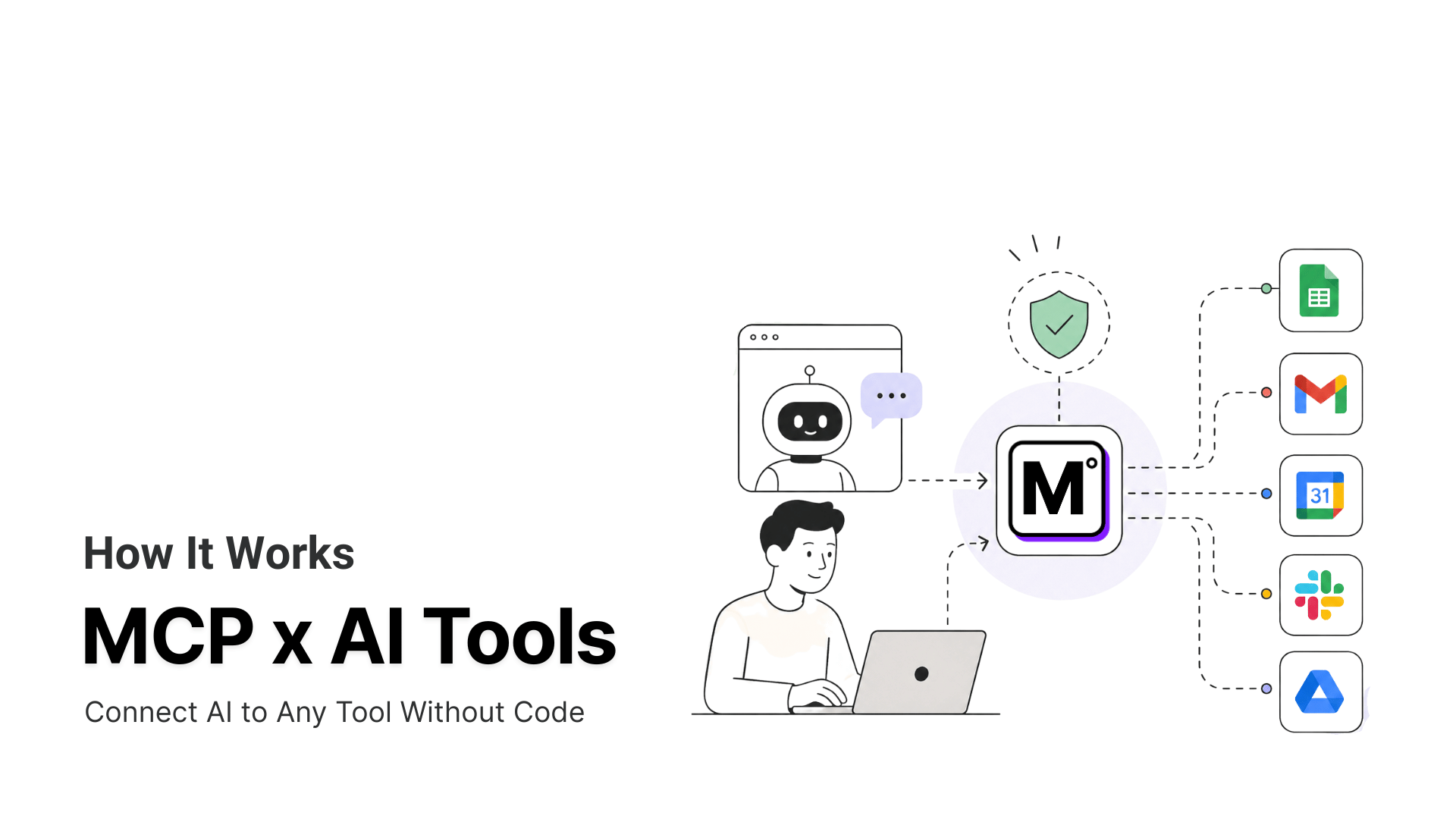
Model Context Protocol changes that. MCP gives AI systems a standard way to discover and use external tools, so teams can add new capabilities without building a custom integration for every platform. Instead of creating and maintaining one-off connectors, you connect the AI to an MCP-compatible server that exposes the tools it can use.
For non-technical teams, the practical benefit is faster setup and less dependency on engineering. A hosted gateway such as MCP360 can turn the process into installing an extension or adding a connection endpoint. This guide explains how MCP works behind the scenes, what changes once an AI can take real actions, and how to connect tools without writing or hosting code.
The N×M Integration Problem MCP Solves
Before MCP, connecting an AI model to an external system meant writing a dedicated integration for that specific pairing. A model that needed to query a database, call a search API, and read a project management tool needed three separate pieces of custom code, each with its own authentication, its own error handling, and its own maintenance schedule.
That cost multiplies fast. Three models needing five tools each is not fifteen simple connections, it’s fifteen distinct integrations, because each model-tool pairing speaks its own dialect. Anthropic named this the “N×M” integration problem when it introduced MCP in November 2024: N models, M tools, and a custom connector for every combination between them.
Teams ended up spending more engineering time maintaining connectors than building the features those connectors were supposed to support. A pricing API changes its response format and every integration built against it breaks quietly, sometimes for weeks before anyone notices.
What Is Model Context Protocol (MCP)?
MCP is an open specification for how an AI application talks to an external system. It breaks the connection into three parts, each with a specific job.
Host, Client, and Server
The host is the AI application the user interacts with, such as a chat application or an IDE. Inside the host, an MCP client manages a direct connection to one MCP server. The server is a program that exposes data or capabilities from an external system, such as a database, API, file store, or business application.
MCP uses JSON-RPC 2.0, messages for communication between clients and servers. Because the protocol defines a shared message format, the AI application and the external system do not need to use the same programming language or come from the same vendor.
What an MCP Server Can Expose
An MCP server can expose three core capabilities:
Resources provide context or readable data, such as files, database schemas, records, or API responses.
Prompts provide reusable instruction templates and structured workflows.
Tools are functions the AI can call, such as searching a database, sending an email, running a calculation, or creating a calendar event.
Local vs Remote MCP Connections
Local MCP servers commonly use stdio. In this setup, the AI application launches the server as a subprocess and exchanges messages through standard input and output. Remote MCP servers commonly use Streamable HTTP. The server provides a single MCP endpoint that accepts HTTP requests and can optionally stream responses and server messages using Server-Sent Events.
Our complete guide to Model Context Protocol covers each of these components in more depth.
How MCP Discovers and Calls Tools
Here’s the mechanism. When an AI client connects to an MCP server, the server doesn’t hand over raw access to whatever it wraps. It sends back a list of the tools it exposes, each one described by a name, a plain-language description of what it does, and a schema for what input it expects.
The Tool Discovery and Execution Flow
The model reads that tool list the same way it reads the rest of its context. When a task calls for one of those tools, the model generates a structured request naming the tool and filling in the required parameters. The server receives that request, runs the actual operation (the database query, the API call, the file write), and sends back a result the model can read and act on. The person using the AI approves sensitive actions along the way. Nothing here is exotic. It’s the same request-response pattern behind most APIs, standardized so the same discovery-and-call flow works no matter which tool or which model sits on either end.
Why MCP Tool Lists Become a Scaling Problem
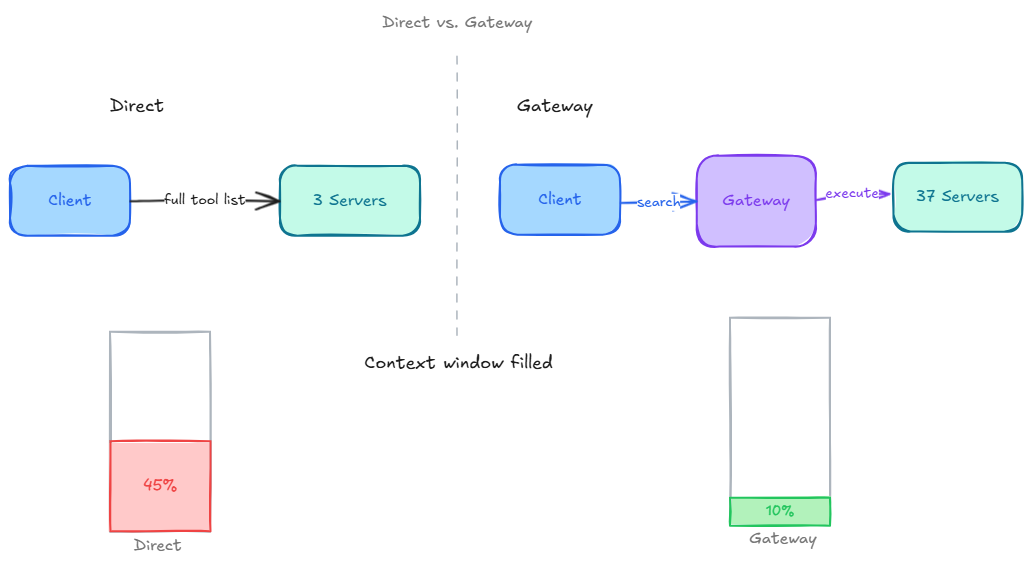
Every tool description a server exposes gets loaded into the model’s working context, and that adds up. Perplexity’s CTO said at a March 2026 conference that MCP tool descriptions can consume 40 to 50 percent of a context window before the agent does any real work, once enough servers are connected at once.
How Gateways Load Tools on Demand
The fix that’s emerged is a gateway layer that loads tool definitions only when needed instead of all at once. Rather than every connected server dumping its full tool list into context up front, the AI calls a small set of meta-tools, something like search_tools to find what’s relevant to the current task and execute_tool to run it, and only the tools actually needed get pulled in. MCP360 uses this exact pattern to expose more than 100 tools across 37 servers through a single connection without bloating context on every request. It’s a structural answer to a problem that gets worse the more tools a team connects, not a workaround for a small setup.
Connecting Your First Tool in Three Steps
The specification itself is a technical document, but using it usually isn’t. Some AI clients, like Claude Desktop’s Extensions directory, offer a one-click install for servers already in their catalog. For everything else, or for connecting many tools through one place, a hosted gateway is faster. Here’s what that looks like with MCP360.
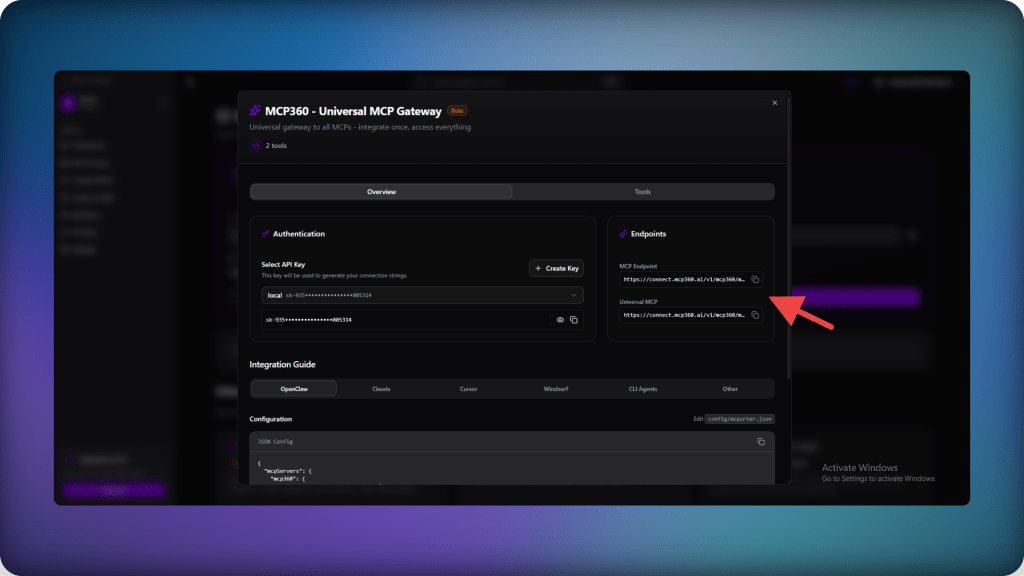
Step 1. Get your endpoint
From the MCP360 dashboard, copy the universal gateway configuration. This is a single JSON snippet that points your AI client at every tool the gateway exposes.
Step 2. Add it to your AI client
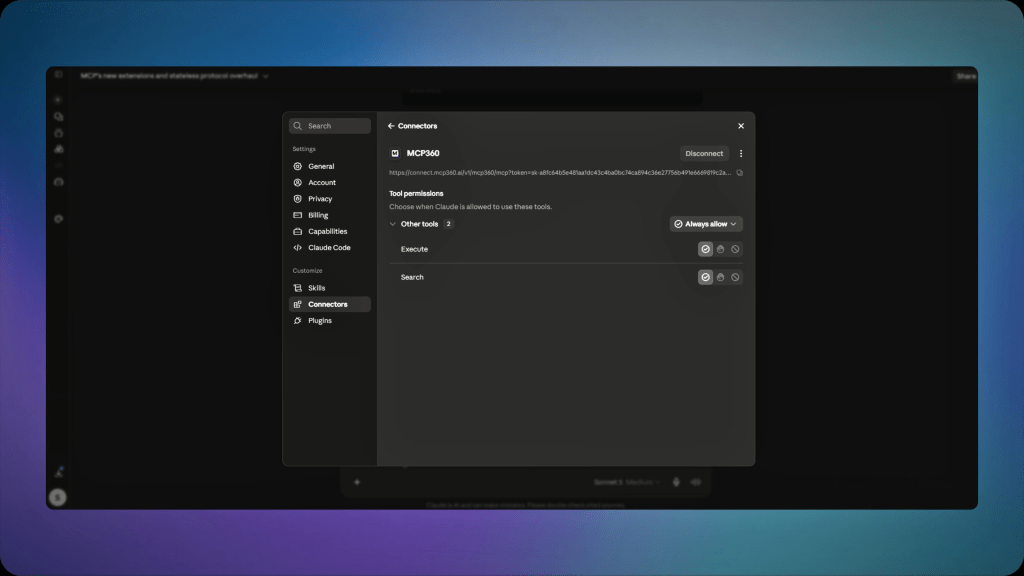
Paste that snippet into your client’s connector settings. In Claude, for example, this means opening settings, adding a custom connector, and pasting the configuration in. No script to run, no package to install.
Step 3. Ask for what you need
Once the connection is active, ask your AI assistant to do the task directly, something like “check current search volume for these five keywords” or “look up the WHOIS record for this domain.” The AI discovers the right tool on its own and calls it.
If the tool you need isn’t in the existing catalog, the no-code part goes further. MCP360’s Custom MCP Builder turns a REST API you already have into a usable tool through a form, not a script. Point it at your API’s endpoint, set the authentication method, and it’s ready to configure and deploy in minutes, without writing an MCP server by hand.
For the full walkthrough with Claude specifically, how to connect Claude with MCP360 covers each step in more detail. If a server doesn’t show up as connected after setup, common MCP server connection issues and fixes covers the usual causes.
How to Secure MCP Tool Connections
Securing MCP starts with limiting what each tool can access, requiring approval for sensitive actions, and using trusted servers. These controls reduce the risk of prompt injection, tool poisoning, and unintended changes to real systems.
Why Tool Access Raises the Stakes
Every one of these connections changes what can go wrong when something misbehaves. An AI system that can only generate text produces a bad paragraph at worst. An AI system that can call tools can send an email, modify a record, or move money, so a manipulated instruction has somewhere real to go.
Prompt Injection and Tool Poisoning
The OWASP MCP Top 10 project tracks this directly, and two risks show up across nearly every write-up on the topic.
- Prompt injection: Ranked the top vulnerability in the OWASP Top 10 for LLM Applications 2025, this happens when text the AI reads, a document, a webpage, a tool’s own output, contains hidden instructions the model follows as if they came from the user.
- Tool poisoning: A related variant where an attacker alters a tool’s own description or metadata so the model is misled about what a tool actually does, without the person approving the connection ever seeing the change.
Limit Permissions and Require Human Approval
The practical response isn’t avoiding MCP. It’s scoping what any given connection can actually touch.
- Give an agent read-only access where write access isn’t needed.
- Require a human approval step for anything destructive or hard to reverse, a database deletion, an outbound payment, a bulk update.
- Stick to servers with an active maintainer and a visible update history rather than an unmaintained community package.
- When picking a hosted gateway to route multiple tool connections through, check its security posture alongside its tool catalog. MCP360, for example, is SOC 2 Type II, GDPR, and ISO 27001 compliant, which matters because a gateway sitting between an AI system and dozens of tools becomes part of the trust boundary, not a convenience layer that sits outside it.
MCP VS Traditional API Integration
MCP does not replace REST APIs. It standardizes how AI systems use them. A traditional integration is built for one specific app and API, with custom logic for each action. An MCP server can wrap the same API and expose it through a common tool format that any MCP-compatible client can use.
The key difference is who selects and calls the action. In a traditional integration, a developer hardcodes the logic. With MCP, the model chooses the right tool based on its description. This allows the same server to work across Claude, Cursor, and custom AI applications without rebuilding the integration each time.
Here’s a side-by-side comparison table to see the actual difference:
| Comparison Point | Traditional API Integration | MCP |
|---|---|---|
| Who writes the calling logic | A developer, per action, per model | The model, based on the tool’s description |
| Reusable across AI clients | No, tied to that application’s integration code | Yes, any MCP-compatible client can use the same server |
| Adding a new AI client | Rewrite the integration for that client | Point the new client at the existing server |
| Discovery | A developer reads the documentation and hardcodes the call | The client requests a tool list, and the model selects one at runtime |
| Message format | Whatever format the API defines | Standardized JSON-RPC 2.0 |
| What still breaks | Hardcoded integration logic when the API’s response format changes | The server integration, but only once rather than once per client |
MCP vs Traditional APIs walks through the comparison in more detail for teams still weighing the two.
MCP’s Shift to Vendor-Neutral Governance
MCP moved beyond single-vendor control in December 2025 when Anthropic donated the protocol to the Agentic AI Foundation under the Linux Foundation. The foundation brings together Anthropic, Block, OpenAI, Google, Microsoft, AWS, Cloudflare, and Bloomberg.
Development now follows a shared governance model built around Working Groups, Interest Groups, and a formal Spec Enhancement Proposal process. This gives vendors and contributors a structured way to review changes, address production issues, and shape the protocol through open technical discussion.
For teams adopting MCP, this governance model reduces dependence on any one company. Broad support across Claude, ChatGPT, Cursor, Gemini, Microsoft Copilot, and VS Code also makes it more likely that an MCP server built today will remain useful across different AI clients as the ecosystem develops.
Frequently Asked Questions
How does MCP work?
MCP works by having an AI client connect to a server that publishes a list of the tools it exposes, each with a name, a description, and the inputs it expects. When a task needs one of those tools, the model sends a structured request naming it, the server runs the actual action, and it sends back a result the model can read and act on.
What is an MCP server?
An MCP server is the piece that exposes an actual capability to an AI system, a database, an API, a file system, or a specific action like sending an email. It exposes three kinds of things, resources for readable data, prompts for reusable instruction templates, and tools for actions the AI can trigger. The AI discovers what is available before it ever calls anything.
Do I need to know how to code to connect an AI to my tools with MCP?
No. Connecting a tool through MCP usually means installing a packaged extension or pasting a hosted endpoint into a settings panel, not writing or hosting a server. A gateway like MCP360 handles the server side entirely. Sign up, copy a configuration snippet from the dashboard, and paste it into your AI client's connector settings. The AI finds the right tool on its own from there.
What's the difference between MCP and a regular API?
With a regular API, a developer writes hand-coded logic for every action an AI should take, and that logic is tied to one app. With MCP, the model reads a tool's description and figures out which action fits the request, and the same server works across any MCP-compliant AI client, Claude, Cursor, or something built in-house, without a separate connector for each.
Is it safe to connect an AI system to my tools with MCP?
It's safer when access is scoped deliberately. Once an AI can act through a tool instead of only answering questions about it, a manipulated instruction has somewhere real to go, through prompt injection or a poisoned tool description. Give agents read-only access where possible, require approval for destructive actions, and stick to servers with an active maintainer. Scoping access tightly is what actually keeps this safe.
What is an MCP gateway, and why use one instead of connecting servers one by one?
An MCP gateway sits between an AI client and many MCP servers, so the AI connects once instead of managing a separate connection per tool. Connecting many servers directly can flood a model's context with tool descriptions, sometimes 40 to 50 percent of it before any real work happens. A gateway like MCP360 loads tool definitions on demand instead, using meta-tools that search for and run only what a task actually needs.
Can I turn my own API into an MCP tool without building a server?
Yes, through a no-code builder rather than writing an MCP server by hand. MCP360's Custom MCP Builder, for example, turns a REST API you already have into a usable tool through a form. Point it at your API's endpoint, set the authentication method, and it's ready to configure and deploy in minutes, no separate hosting or server code required.
Who controls MCP now?
Anthropic donated MCP to the Agentic AI Foundation, a directed fund under the Linux Foundation, in December 2025. Governance now runs through public Working Groups and a formal Spec Enhancement Proposal process rather than one company's roadmap. For anyone deciding whether to build on MCP, that matters because a server built today keeps working as client support and governance both keep shifting.
Conclusion
MCP solves the connection problem, but the real value comes from what happens after the connection is in place. Once an AI system can access external tools through a standard interface, teams can expand its capabilities without rebuilding the integration each time.
MCP360 makes that easier by providing a hosted gateway and a growing catalog of tools through one connection. As new tools are added, teams can make them available without writing new connector code or reworking the original setup. That reduces maintenance and makes it easier to test new workflows across support, marketing, sales, and internal operations.
The best way to adopt MCP is to start with one repetitive, low-risk task. Connect the tool your team checks most often, give the AI only the permissions it needs, and measure whether the workflow is accurate and reliable. Once that works, expand gradually to more tools and higher-impact actions.
The technical setup may take only a few minutes. The important decisions are which workflows to automate, what access to grant, and where human approval should remain. MCP360 can simplify the connection layer, but careful scoping is what turns that connection into a secure and useful AI workflow.
Tags

Article by
RajniAI & Tech | Senior Content Writer
Rajni is a senior content writer covering AI agents, automation, and no-code tools. She writes across the AI space, from chatbots and customer support to MCP and agent workflows, focused on how businesses actually put these tools to work.