
You’ve likely used AI assistants such as Claude, ChatGPT, or other large language models. In doing so, you’ve probably encountered a common limitation. The AI can reason, write, and analyse, but it works in isolation. It cannot access your company’s database, read internal documentation, or interact with the tools your team uses daily. To close that gap, developers often need to build separate integrations for each system. This process takes time and adds maintenance effort.
Model Context Protocol (MCP) changes this completely. It introduces a standard way for AI systems to connect securely with external tools, data sources, and applications. Simply to say, MCP acts as a universal connector. It allows your AI assistant to interact directly with the software and systems you already use.
This guide explains what MCP is. It explains why it matters. It also shows how it is changing AI’s role in practical, everyday work.
Understanding the Core Problem MCP Solves
Before diving into the technical aspects, it helps to understand the specific friction points that led to MCP’s development.
1. The Limitation of Context Windows
Large language models work within what is known as a “context window” — the amount of information they can remember during a single conversation. These windows have expanded over time, starting from a few thousand tokens. They have grown to several million. However, they still represent a fixed slice of information captured at one point in time.
In real projects, information changes constantly. You might need to query a database that updates every hour. You may have to review documentation that was edited yesterday. Alternatively, you might pull live pricing data from an API. In most setups, the AI cannot do this directly. Someone must act as the bridge, fetching the latest data and feeding it to the model context.
2. The Integration Complexity Problem
Companies have tried various approaches to connect AI with external systems. Some built custom APIs for specific use cases. Others created proprietary integration frameworks. Each solution worked for its specific scenario but created a fragmented landscape where every new connection required custom development work.
If you wanted your AI assistant to work with five different tools, you needed five different integration approaches. Scale that to dozens or hundreds of tools, and the complexity becomes untenable. Teams spent more time building and maintaining integrations than actually using them.
3. The Security and Control Challenge
Whenever AI systems connect to external data, security becomes a key concern. Organisations must decide what information the AI can access. They must determine which actions it can perform. They also need to decide how it authenticates to those systems. Earlier integration methods often compromised between convenience and security. Some were easy to build but unsafe; others were secure but too complex for smaller teams to manage.
Model Context Protocol (MCP) resolves these challenges with one standardised framework. It allows any AI model to connect securely to any properly configured data source or tool while giving teams full control over access, permissions, and behaviour.
What Is Model Context Protocol?
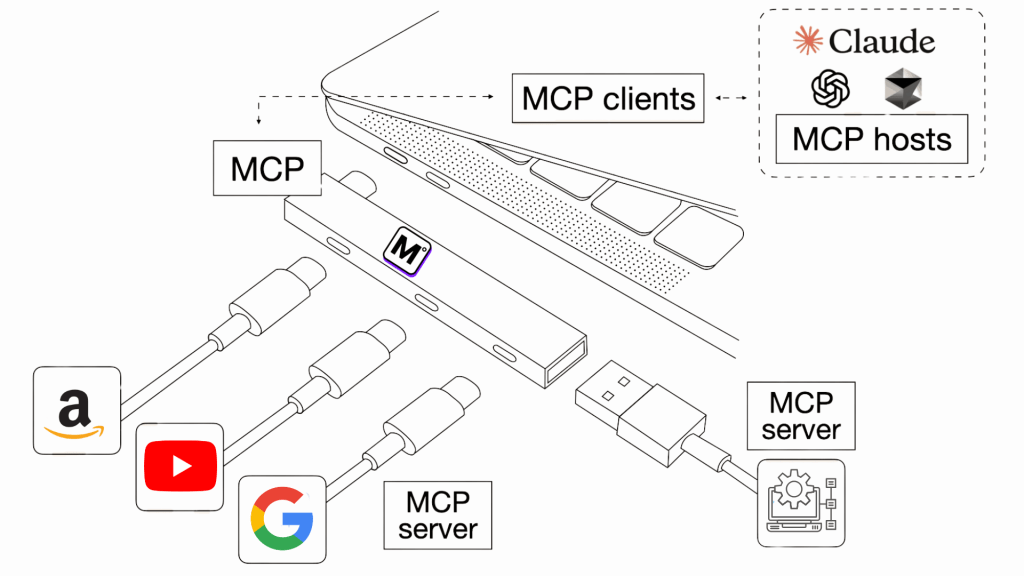
Model Context Protocol (MCP) is a specification that defines a clear set of rules for how AI models communicate with external systems. It functions as a common language that allows both sides to exchange information effectively.
In the same way that web browsers use HTTP to request web pages or email clients use SMTP to send messages, MCP standardises how AI models connect with tools, databases, and applications. This shared structure removes the need for building separate integrations each time an AI system interacts with a new service.
The Three Core Components
MCP defines three primary types of capabilities that external systems can expose to AI models:
1. Resources represent accessible information. This might be files in a repository, records in a database, or content from an API. When an AI model needs to read information from an external system, it requests resources through MCP. The protocol specifies how the model requests specific resources, how the system authenticates that request, and how it returns the data in a format the model can understand.
2. Prompts are instructions that help structure AI interactions. Rather than requiring users to craft complex prompts from scratch, systems can expose prompt templates through MCP. These templates can include placeholders for variables, making it easier to create consistent, high-quality interactions. For instance, a code review system might expose a “review this pull request” prompt that automatically structures the analysis in a way that matches your team’s standards.
3. Tools are action-oriented components that let AI models do things in other systems. Tools give them the ability to take action. This includes creating events on your calendar, updating information in databases, or starting automated processes. MCP clearly outlines the procedure. It explains how AI models request to use these tools. It covers sending the necessary information and receiving confirmation when the action is complete.
How MCP Communicates
MCP uses JSON-RPC 2.0 as its standard messaging format. This ensures consistent communication between clients and servers, regardless of the programming language or environment.
When a model needs data or wants to use a tool, it sends a structured MCP request. The server receives the request, verifies permissions, performs the action, and returns a clear response. This process is transparent to the user. The AI automatically fetches or executes what is needed as part of the conversation.
Transport Mechanisms
MCP supports different transport methods depending on where the server and client are running.
- Standard Input/Output (stdio) is used for local communication. The AI application runs the MCP server as a subprocess, exchanging data through standard input and output. This approach works well for local tools, file access, or development environments.
- Server-Sent Events (SSE) over HTTP is used for remote communication. It allows the AI client to interact with cloud-based tools, shared databases, or enterprise applications. Some newer implementations also support Streamable HTTP, an improved alternative to SSE for efficient streaming.
This flexibility means MCP can support everything from personal assistants running on a laptop. It also supports enterprise-scale integrations that connect multiple cloud services.
How MCP Solves the N×M Problem
In traditional AI and software integrations, every model must connect separately to every tool or data source it needs. If there are N models and M tools, this results in N×M unique integrations. Each one requires separate coding, authentication, and maintenance. As the number of tools grows, the complexity increases rapidly and becomes difficult to manage.
Model Context Protocol (MCP) removes this complexity by introducing a shared communication standard. Each model no longer needs to build a direct link to every tool. Instead, each model only needs to implement an MCP client once. Similarly, each tool needs to provide an MCP server once. Once both sides follow the same protocol, they can interact automatically.
This changes the pattern from N×M connections to N+M connections. Every new model can immediately access every existing MCP-compliant tool without custom development.
The reason this works is that MCP standardises how models describe requests and how tools describe their capabilities. This means any model that understands the protocol can communicate with any tool that exposes it. This applies regardless of platform, language, or function. It creates an open and reusable integration layer where everything speaks the same format.
Development becomes faster. Maintenance becomes easier. The entire system remains consistent even as new models or tools are added.
How To Use MCP in Real World?
Understanding the architecture is useful. However, the real value of Model Context Protocol (MCP) appears when you start using it in practical setups. This section explains how to get started. It shows where to configure it. It also demonstrates how to connect your AI assistant to real tools.
Step 1 – Create an MCP360 Account
Go to MCP360 and create your account. Once inside the dashboard, you will find key sections:
- MCP Servers – pre-built and custom connectors
- Custom MCPs – for your internal tools or APIs
- Usage & Stats – to track credits and activity
- Members – to manage team access and permissions
MCP360 acts as your central workspace to manage and monitor all connected integrations.
Step 2 – Choose or Copy the MCP Server
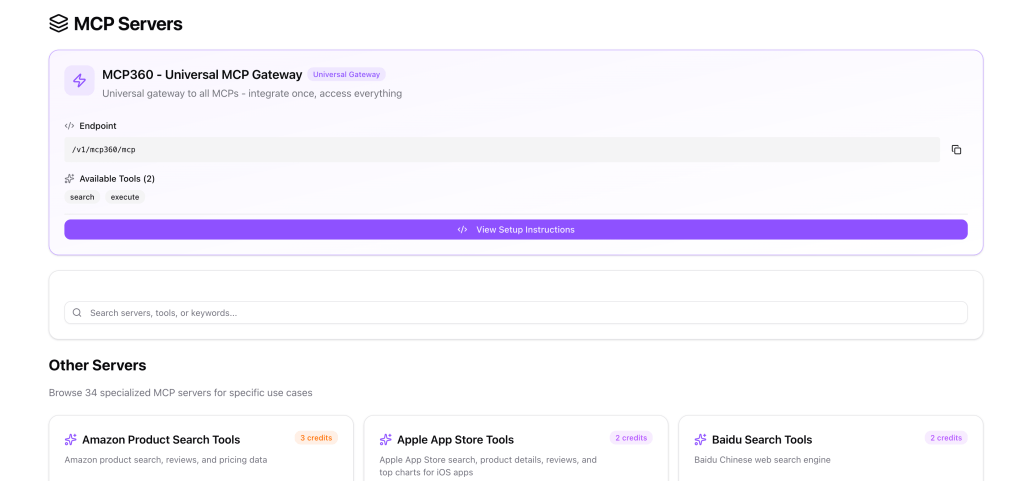
Open the MCP Servers tab. You will see two options for connection:
1. Universal Gateway (/v1/mcp360/mcp)
A single endpoint that connects your AI agent to all MCP tools enables full capabilities for your AI agent. This allows broad access without the need for individual setup.
2. Specialised Servers
Each server provides a focused capability such as:
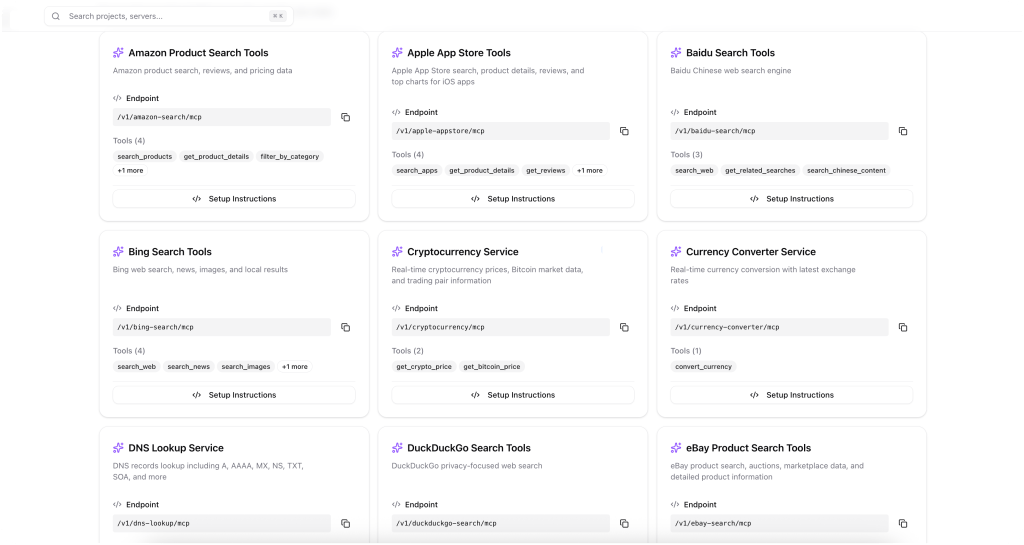
Click View Setup Instructions or copy the endpoint URL to use it in your configuration.
Step 3 – Configure MCP in Your AI Tool
Next, connect MCP to your preferred environment such as Claude Desktop, Cursor, or Windsurf.
For example, in Claude Desktop Web, edit your configuration. Steps to apply:
- Locate the settings
- In settings click on Add custom Connector
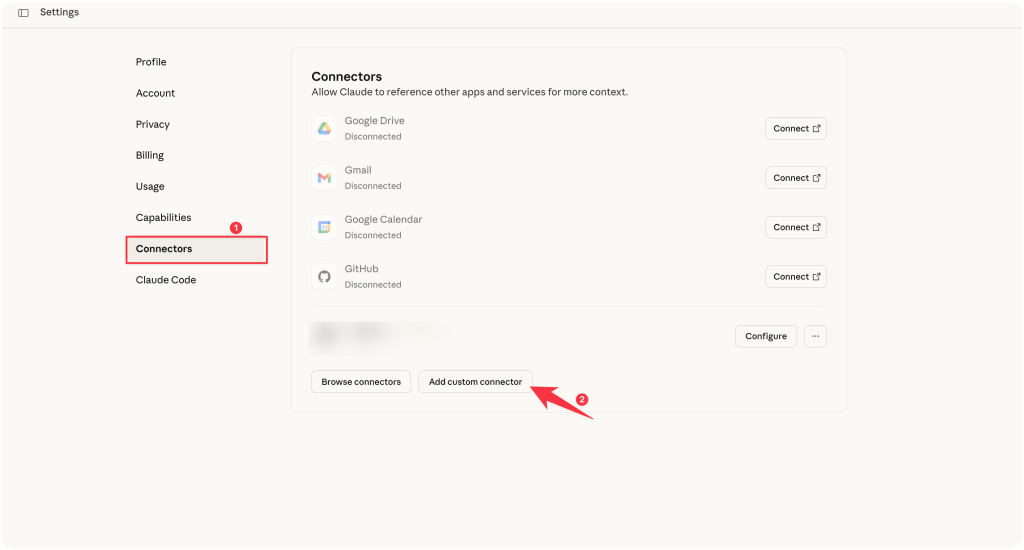
- Paste the configuration above.

- Click ‘Add’ and restart Claude Desktop.
- Check for the hammer icon in the bottom-right corner to confirm that MCP is active.
Step 4 – Start Using the Tools
Once configured, your AI agent can now call MCP tools directly.

You simply ask the AI to perform a task, and it communicates with the connected tool through MCP automatically.
Step 5 – Extend and Customise Your Setup
From the MCP360 dashboard, you can:
- Build Custom MCPs for internal databases or APIs (coming soon).
- Upgrade your plan to access 100 + ready-made MCPs.
This lets you scale your AI integrations without additional engineering work.
MCP connects isolated AI systems into a unified ecosystem. Instead of handling many different APIs, you connect once and use all tools securely and consistently. Whether you use Claude, Cursor, YourGPT, or a custom AI agent, MCP360 simplifies integration. It makes the process faster and more controlled. AI can act directly on live data and automate real-world tasks.
Challenges and Limitations in MCP
The Model Context Protocol (MCP) provides a standard approach for connecting AI models with external tools. While useful, several challenges limit its practical adoption.
1. Integration Complexity
Adopting MCP often requires changes to existing systems. Moving from custom-built APIs to a shared protocol can involve restructuring codebases and adapting to new workflows. Teams may also need time to understand MCP’s technical design and communication model.
2. Security Risks
Centralising access to multiple tools and data sources introduces security concerns. Although MCP supports authentication and access controls, there remains a chance of exposing sensitive information if not properly configured. Additional security practices are needed to minimise these risks.
3. Scalability and Performance
Managing numerous tool connections under high load can reduce responsiveness. As the number of integrations grows, maintaining low latency and stable performance may require optimisation and possibly new infrastructure.
4. Early Adoption and Limited Support
Since MCP is a recent development, its ecosystem is still maturing. Documentation, developer discussions, and implementation references remain limited compared to established protocols, which can slow adoption in larger projects. Platforms such as MCP360 address these gaps by providing structured resources, community support, and implementation guidance.
5. Dependence on Model Capabilities
The benefits of MCP depend on the capabilities of the underlying AI models. Models with limited context handling or computational resources may not fully support dynamic tool interaction, reducing overall effectiveness.
6. Evolving Standard
MCP is still developing, and future updates to its specification may require system adjustments. This ongoing evolution can affect long-term planning and stability for early adopters.
Frequently Asked Questions
How does MCP work?
MCP follows a client-server architecture where the AI application sends requests through an MCP client. MCP servers then provide access to tools, data sources, and applications, returning results in a format the AI can process.
What is the difference between MCP and an API?
An API connects an application to a single service. MCP is a standardised layer that allows AI systems to access multiple tools and APIs through a unified interface without requiring separate integrations.
Why was MCP created?
MCP was created to simplify how AI systems connect with external tools, data, and applications by removing the need for repeated custom integrations across different systems.
What are the main components of MCP?
MCP consists of three core components: resources, prompts, and tools. Resources provide data, prompts guide interactions, and tools enable AI to perform actions in external systems.
Can MCP work with existing APIs and databases?
Yes. MCP can connect with existing APIs, databases, file systems, and business tools, allowing AI systems to use existing infrastructure without major modifications.
What is an MCP gateway?
An MCP gateway is a single entry point that connects AI applications to multiple MCP servers, simplifying setup by centralising access through one endpoint.
The Future of MCP
The Model Context Protocol (MCP) has the potential to influence how AI models connect and communicate with external systems. Its development suggests several likely directions for the future.
1. Broader Industry Adoption
Organisations recognise the value of structured and context-aware integrations. As a result, MCP may progress toward becoming a standard for AI interaction. Established technology providers, including OpenAI and Google, could integrate or extend MCP to improve compatibility across their platforms.
2. Expansion of the MCP Ecosystem
MCP is an open protocol. This openness allows it to support a growing set of compatible tools and services. This environment can encourage third-party developers to create integrations and extensions. These integrations and extensions align with the protocol. They improve usability and simplify system connectivity.

Article by
HimanshuHead of Growth & Engineering
Himanshu is Head of Growth & Engineering, writing about AI agents, MCP, and no-code automation from a go-to-market view. He covers how teams evaluate, adopt, and get real value from AI tools, translating what the tech does into what it means for a business.