
The TL;DR
AI agents often fail in real workflows because they don’t have access to live systems, so they end up making decisions based on outdated or incomplete information.
-
• Real-Time Access Gap
Agents without live tool access can’t verify things like hiring status, company details, or data accuracy at the moment of execution, which breaks real workflows.
-
• MCP360 + YourGPT Integration
MCP360 provides live data connectivity while YourGPT handles workflow orchestration, allowing agents to act on verified, up-to-date information instead of assumptions.
A sales representative asks the AI to check whether a prospect’s company is actively hiring for a specific role, confirm the company’s primary operating location, and verify whether a recently shared email address is valid before sending a follow-up.
Without access to live systems or tools, the agent can only respond with assumptions based on outdated signals or stop the workflow altogether. The sales workflow either goes out with incorrect assumptions or never happens, despite clear intent and available data.
The issue is not the AI. It is the absence of real-time verification. When agents cannot query external tools at the moment of execution, they are forced to approximate or defer, which limits their usefulness in real workflows.
AI agents now operate inside real business processes. They answer customer questions, assist sales conversations, and trigger actions across internal systems. Each response often influences a decision or an outcome.
YourGPT is built to manage this responsibility through orchestration. It coordinates multi-step actions, maintains context across channels, and ensures agents follow defined workflows rather than acting independently.
Accurate execution depends on access to live information. Product data, availability, rankings, and operational signals change continuously and must be checked at the moment an action is taken.
This blog explains how integrating MCP360 with YourGPT allows agents to access current data from external tools and use it correctly in workflows, ensuring reliable automation.
The Real Problem: AI Agents Need Data, Not Just Intelligence
Modern AI models are remarkably capable at understanding language and generating responses. What they struggle with is accuracy when handling information that changes constantly, like prices, availability, rankings, locations, and real-time metrics.
Ask an AI agent about a product price without data access, and it might:
- Invent a number based on training data from months ago.
- Provide a cautious non-answer like “Prices vary, please check the website.”
- Pull outdated information that misleads the customer.
The issue compounds when you’re running AI agents for customer support, sales, or operations. Your agents need to access:
- Current product pricing across multiple platforms
- Real-time availability for flights or inventory
- Up-to-date SEO rankings and competitor data
- Accurate location information from maps
- Live data from your business systems
Connecting these data sources individually means managing authentication for each API. You also have to handle different response formats and deal with rate limits. Maintaining connections as services change is another challenge. Most teams abandon the effort halfway through.
MCP360: The Universal Gateway

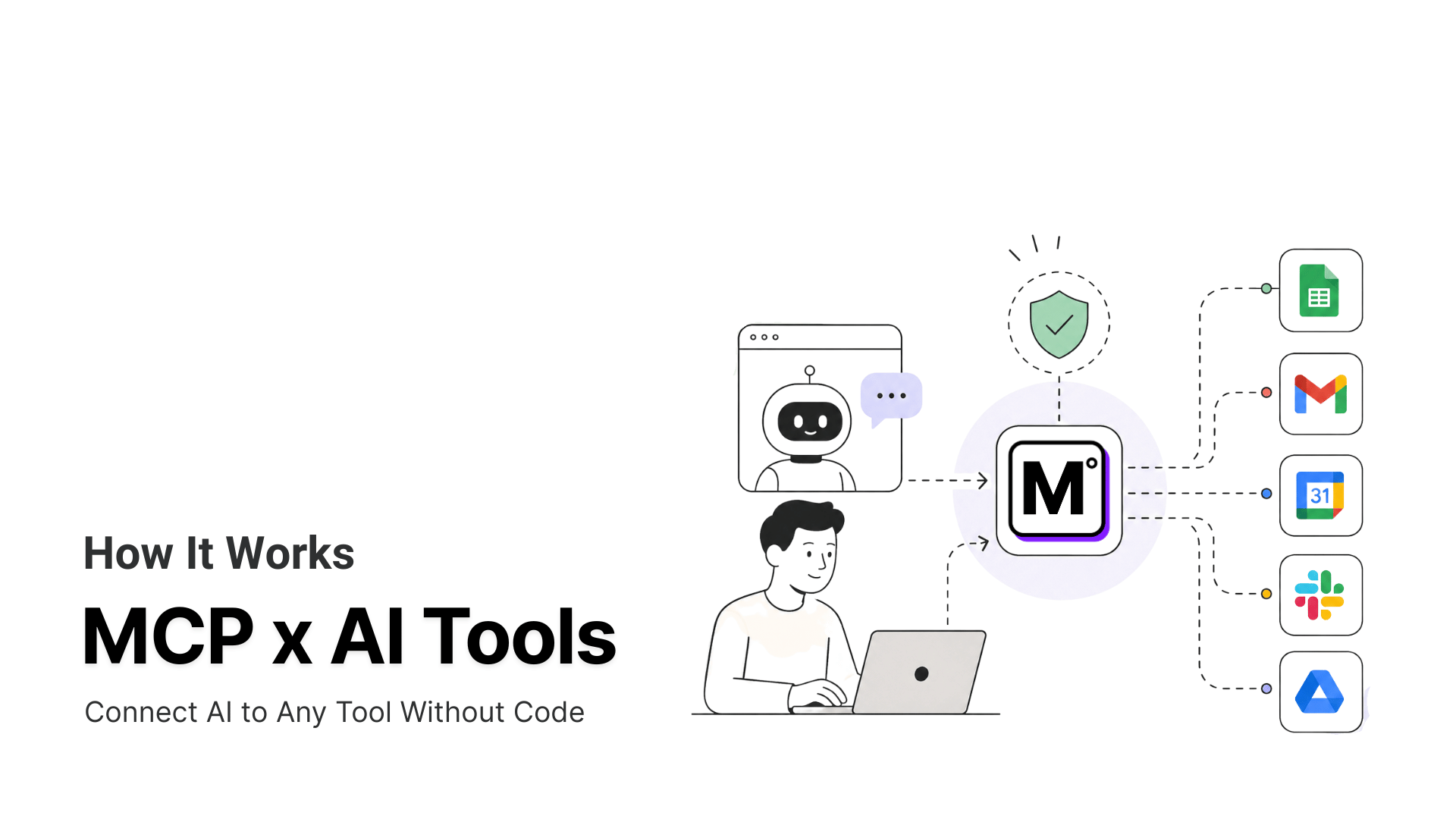
MCP360 is a unified MCP gateway that connects AI agents to 100+ tools through a single integration. You no longer need to manually set up dozens of separate tools. Each tool would normally need its own setup, authentication, API keys, and billing. Instead, you integrate once with MCP360. This provides instant access to the entire marketplace of tools.
The platform automatically routes requests to the appropriate tools based on task requirements, without cluttering your AI agent’s context window. This allows your agents to access web search, SEO analysis, and e-commerce data. They can use domain tools, conduct keyword research, and carry out web scraping. Moreover, they can gather market intelligence, all through one configuration block.
MCP360 eliminates the traditional trade-offs AI teams face: configuration overhead, context degradation, integration complexity, and maintenance burden. When external APIs change or new tools are added to the marketplace, MCP360 handles updates automatically. Your existing integrations continue working without manual intervention.
Teams building AI agents can gain from MCP360. Any system supporting the Model Context Protocol standard can also gain. It offers a single subscription. It also provides one setup and access to a continuously expanding library of capabilities. This lets you focus on building intelligent systems rather than managing integrations.
YourGPT: The AI Agent Platform
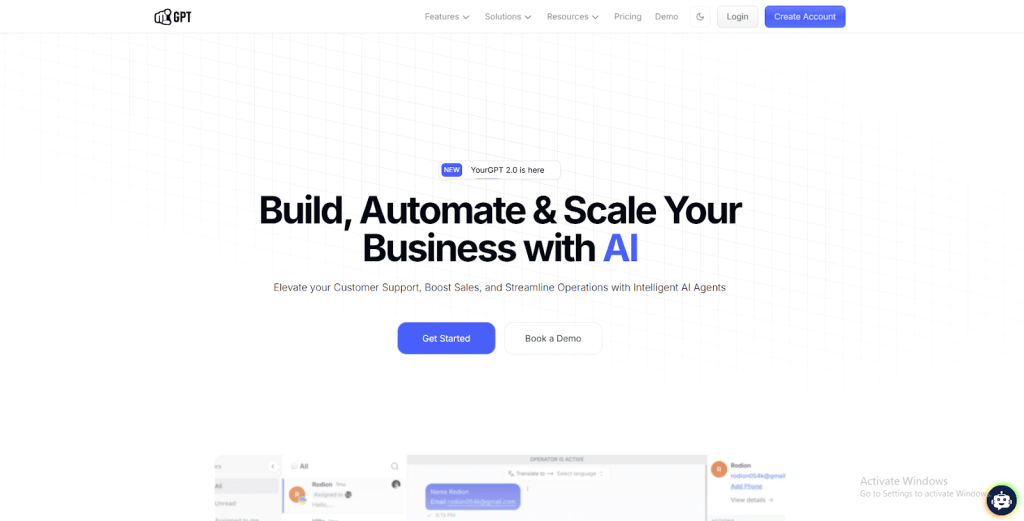
YourGPT is an AI-first platform. It helps businesses building and deploying AI agents for customer support, sales, and operations. These agents work across websites, apps, and messaging channels. It goes beyond basic chatbots by performing multi-step tasks in real time and supporting complex workflows.
Core capabilities:
- Creates AI agents that work seamlessly across websites, apps, and messaging platforms like WhatsApp.
- Provides a no-code builder for standard workflows, with advanced configuration options for complex scenarios.
- Manages multi-steps execution while retaining context throughout the interaction.
- Understands multiple modalities including text, voice messages, and images.
- Deploys agents across all channels from a single, centralized configuration.
- Includes an AI helpdesk to effectively manage and organize knowledge.
Why Connect MCP360 with YourGPT?
MCP360 provides AI agents with reliable access to external tools, while YourGPT supplies the necessary process logic. By combining these capabilities, YourGPT enables the creation of agents that handle complex tasks without custom integrations. MCP360 also ensures execution consistency. This approach significantly reduces setup time. It cuts maintenance costs, accelerating the transition from concept to automated workflow with minimal technical friction.
- Tool Access: MCP360 provides a single gateway to 100+ tools, while YourGPT turns them into ready-to-use automation, eliminating fragmented integrations.
- Reliable Execution: Standardized responses and automatic failover ensure that AI agents produce consistent results, reducing errors in workflows.
- Faster Workflow Deployment: Teams can quickly build or update automation without backend setup using MCP360 tools and YourGPT workflow management.
- Reduced Maintenance Burden: MCP360 handles the infrastructure and service upkeep, allowing YourGPT to focus solely on workflow logic.
- Scalable Automation: Together, MCP360 and YourGPT enable agents and workflows to scale efficiently, without adding operational complexity.
Now that we know how both platforms work together, the next step is putting these features into practice. Here’s how you can connect MCP360 and YourGPT to start using them in your workflows.
What This Enables
The use cases are limited only by your imagination. Here are just a few examples of what you can build:
1. Travel and booking: Someone needs flight information to a specific destination. Your agent retrieves current options using MCP360’s flight data access. It compares prices and presents the best matches based on the customer’s stated preferences.
2. SEO and competitive research: Your team needs current ranking data for specific keywords. The agent queries MCP360’s SEO tools, pulls current SERP positions, and generates a comparison showing your site’s performance against competitors.
3. Location-based queries: When a customer asks for the nearest store, your agent accesses map data through MCP360. It identifies relevant locations based on the customer’s current area and provides precise directions.
4. E-commerce Scenarios: When a customer asks about product availability in amazon, the YourGPT agent identifies the item. It queries current inventory through MCP360. The agent instantly responds with accurate stock levels and pricing to your users.
5. Custom Integrations: For unique requirements, you are not limited to pre-built tools. You can develop a custom MCP server to connect your specific internal systems or proprietary databases. Your agent then securely interacts with these custom endpoints to execute specialized workflows tailored exactly to your business.
Setup Guide to Connect MCP360 with YourGPT
Connecting MCP360 with YourGPT allows you to turn your MCP360 tools and APIs into a single, streamlined automation environment. YourGPT triggers MCP360 tools automatically with the right context, giving you faster, more consistent workflows. Follow these steps to set it up:
Step 1: Grab Your MCP360 Tools
- Log in to your MCP360 dashboard.
- Open an existing project or create a new one.
- From the sidebar, click to the MCP servers.
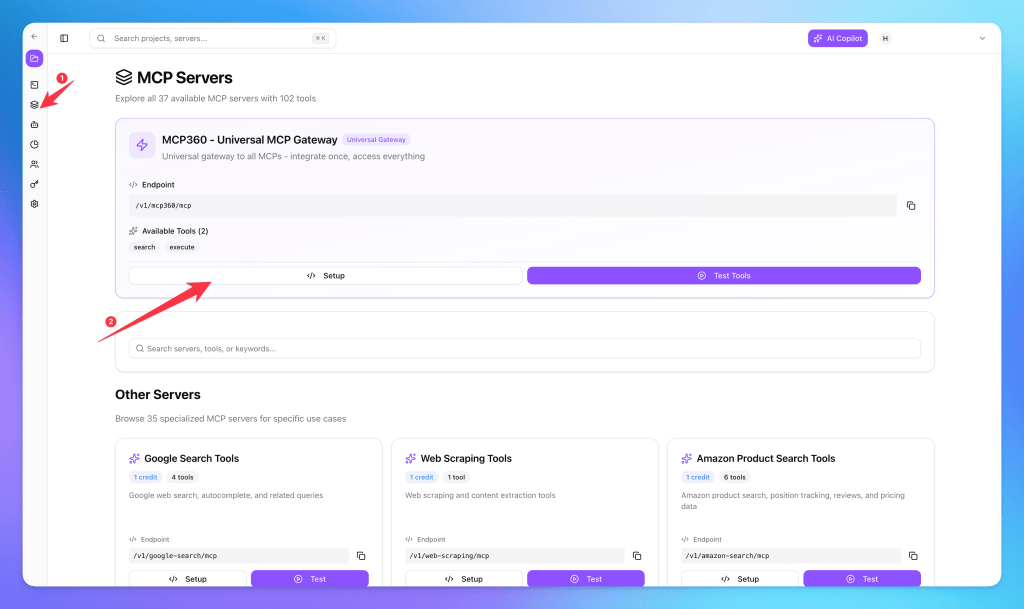
- Find the tool you want to use. Alternatively, use the universal MCP to access all the tools. We will copy the URL for the universal gateway.

Step 2: Open YourGPT
- Log in to YourGPT.
- Go to the Dashboard.
- From the sidebar, click Functions, then select MCP Servers.
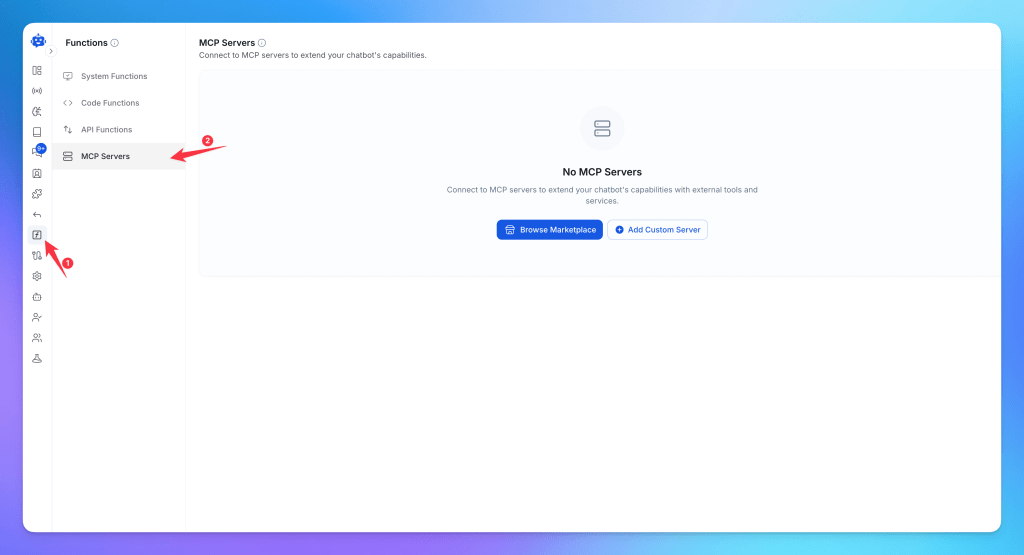
- Paste the MCP URL that you have copied earlier (like this https://connect.mcp360.ai/v1/mcp360/mcp?token=YOUR_KEY)

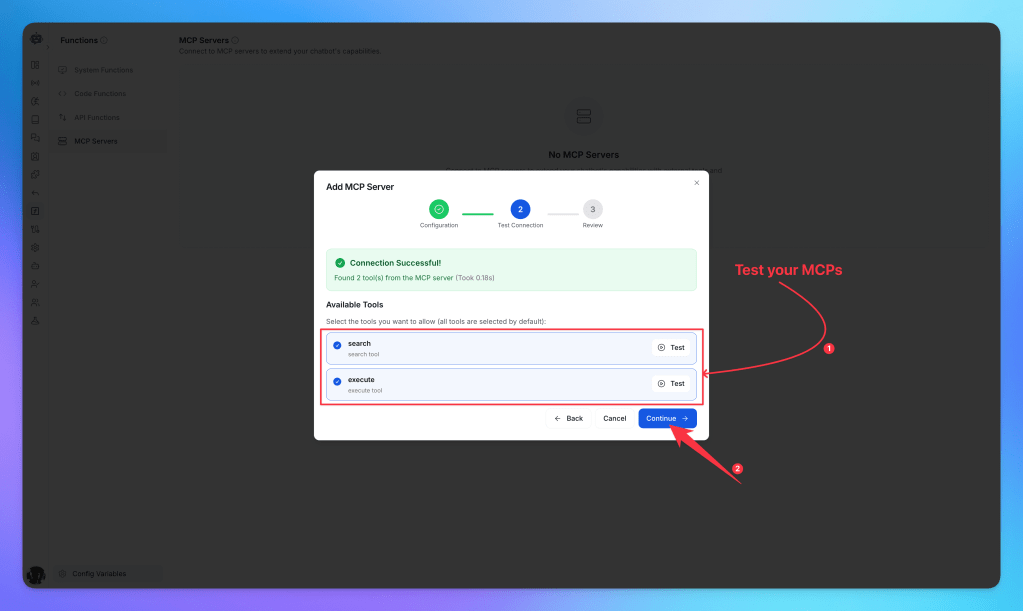
- Test the connection to ensure that YourGPT is functioning properly.
- Once the testing is successful, click on the “continue” button.
- Click Create Function to start adding your MCP server.
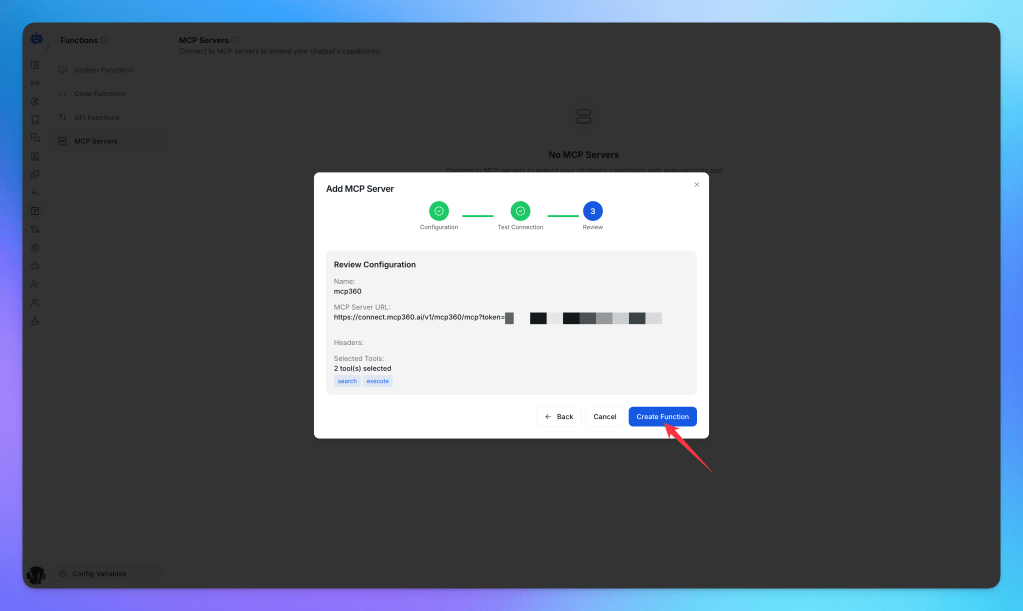
- Once the connection is successful, you’ll see all the tools from your MCP server.
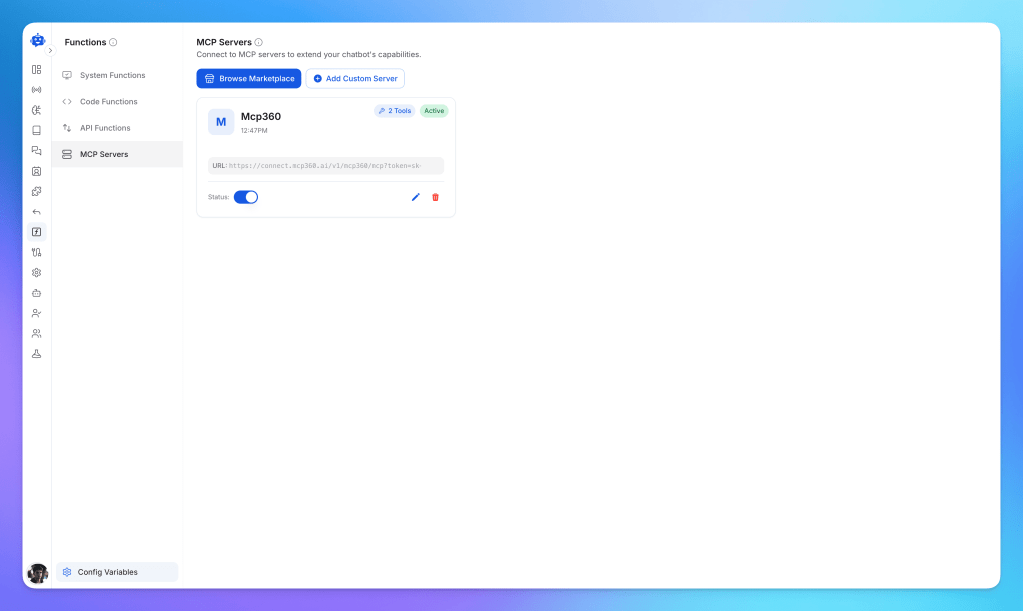
- Your MCP server is now set up. It’s time to test it! Navigate to the YourGPT integration section and click on the widget URL.
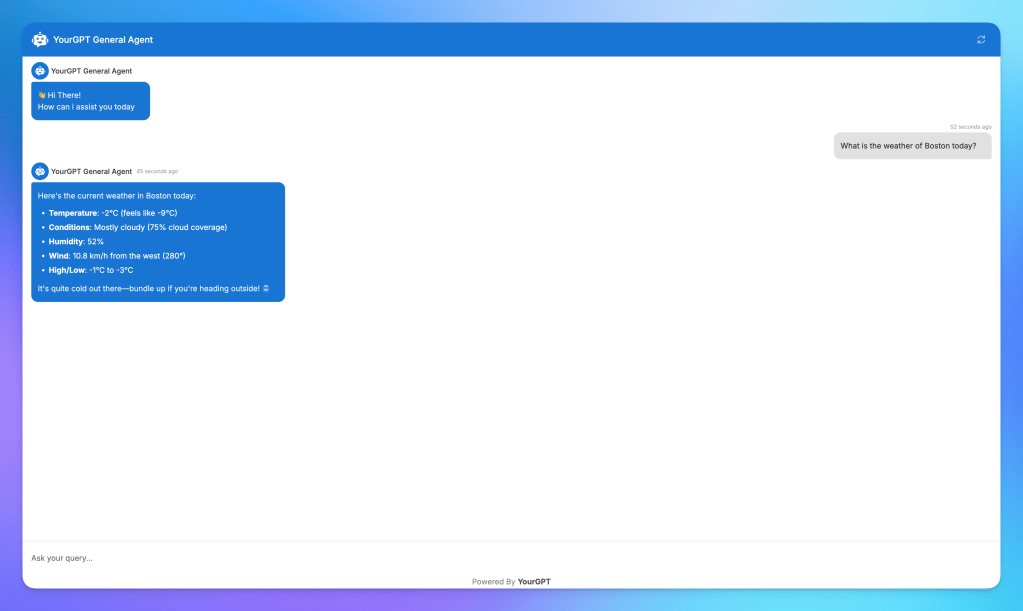
YourGPT is now connected to your MCP360 server. You can access all your MCP tools directly. Run automated workflows seamlessly. Test features without worrying about setups or manual configuration.
Major Benefits & Business Impact
Integrating MCP360 with YourGPT combines tool access and workflow automation, giving teams a simpler, more reliable AI setup. This integration delivers real business impact:
Operational Advantages
1. Centralized Tool Access: AI agents access 100+ tools for search, SEO, e-commerce, and analytics through a single gateway. This removes the need to manage multiple APIs or credentials.
2. Consistent and Reliable Execution: Standardized responses ensure workflows run the same way every time. Automatic failover reduces errors and improves predictability.
3. Faster Workflow Development: Teams can build, test, and deploy workflows quickly without backend setup. This accelerates automation rollout and reduces development delays.
4. Minimal Maintenance Overhead: MCP360 handles infrastructure, tool updates, and service reliability. This allows YourGPT to focus solely on workflow logic rather than technical upkeep.
Business-Level Impact
These outcomes translate operational improvements into strategic value.
1. Scalable AI Operations: Organizations can expand workflows and add more agents without increasing complexity or engineering load.
2. Lower Costs Over Time: Reduced maintenance, fewer integration issues, and consistent execution cut technical debt and operational spend.
Frequently Asked Questions
Why do AI agents fail in real workflows even when the model is capable?
AI agents often fail because they lack access to live data. Without real-time information, they can provide outdated answers, inaccurate results, or incomplete actions.
What does it mean to connect an MCP server to an AI agent?
Connecting an MCP server gives an AI agent access to external tools and live data through a standardized interface, allowing it to perform actions beyond its built-in knowledge.
What’s the difference between MCP360 and YourGPT?
MCP360 provides access to external tools and live data, while YourGPT manages the agent’s logic, workflows, and decision-making. Together, they enable agents to take action using real-time information.
How do I connect MCP360 to YourGPT?
Copy your MCP360 gateway URL, open the MCP Servers section in YourGPT, paste the URL, test the connection, and create the function. The connected tools will then be available to your agent.
Do I need to set up each external tool separately?
No. MCP360 provides a single integration point for multiple tools, eliminating the need to configure and maintain separate APIs individually.
What tasks can a YourGPT agent perform after connecting MCP360?
A connected agent can access live data for tasks such as SEO research, product monitoring, location lookups, market research, and other automated workflows.
Can I connect my own internal systems?
Yes. You can create custom MCP servers that expose internal applications, databases, or business systems as tools for your AI agent.
What happens when APIs change or new tools are added?
The gateway manages tool updates and integrations, helping existing workflows continue to work without requiring manual changes for every API update.
Conclusion
Modern AI agents already handle language understanding and response generation at a high level. What determines their real-world usefulness is whether they can ground those responses in current, verifiable information. This requires direct access to external systems and a structured way to apply that data within workflows.
The integration between MCP360 and YourGPT addresses this at the system level. MCP360 acts as a standardized gateway to external tools and data sources. YourGPT provides full orchestration by defining when tools are called, how results are interpreted, and how multi-step actions are executed within a workflow. Together, they enable AI agents to work with live data in a controlled, repeatable way.
This architecture improves reliability across research, marketing, sales, support and more. Agents can reference current pricing, availability, rankings, and location data without custom integrations or manual coordination. Teams reduce integration overhead and focus on shaping agent behavior rather than maintaining infrastructure.
As AI agents take on greater responsibility inside business systems, consistency and accuracy become structural requirements. Connecting MCP360 with YourGPT establishes a foundation where agents function as dependable components of operational workflows, not just conversational interfaces.

Article by
MitaliAI & Automation | Content Writer
Mitali is a content writer covering AI agents, automation, and no-code tools. Her writing spans the AI landscape, from support and sales automation to MCP integrations and agent workflows, with a focus on practical business use.