
The TL;DR
ChatGPT connects to MCP servers through Developer Mode. Since the feature name and setup menus have changed several times, this guide covers the current process and uses MCP360 as a practical example.
-
• Why ChatGPT MCP Guides Go Stale Fast
ChatGPT’s MCP support moved from connectors to apps in December 2025, then into a plugins layer in July 2026. As a result, many older guides point to settings and menus that no longer exist.
-
• What Developer Mode Changes
Developer Mode allows ChatGPT to use the read and write tools exposed by an MCP server you register. MCP360 provides one gateway URL that connects ChatGPT to more than 100 tools.
-
• What Changes Once It Is Connected
ChatGPT can run SEO audits, retrieve SERP data, verify email addresses, and complete other tool-based tasks directly inside the conversation using live results instead of relying only on training data.
Since launch, ChatGPT has evolved from a reactive chatbot into an AI agent that can research markets, help with shopping, generate images, analyze data, and automate routine tasks. It turns complex information into insights that save teams real time and support faster decisions.
But even a capable model falls short without direct access to live data and business tools. Workflows fragment when integrations are missing, teams end up switching between dashboards, and time gets spent on repetitive execution instead of on decisions and growth.
That’s where MCP makes a difference. It connects ChatGPT to external tools and data sources, giving it structured, reliable access instead of guesswork. The result is an AI that can perform real-world tasks quickly and consistently, not just describe how they’d be done.
Setup takes about 5 to 10 minutes. Once it’s connected, ChatGPT can verify emails, run SEO audits, pull competitor analysis, and handle market research, along with whatever else your use case calls for, without switching between tools manually.
The Problems With a Tool-less ChatGPT
ChatGPT is a powerful AI assistant for generating text, providing insights, and assisting with research. However, without external tool integration, it faces significant limitations for real-world business workflows.
ChatGPT operates in isolation from business tools like:
- SEO platforms (Ahrefs, SEMrush, Moz)
- Market research databases (Google Trends)
- Custom Tools
The Result: ChatGPT’s outputs may be theoretically accurate. However, they lack real-time business data. This makes recommendations less actionable and requires manual verification against actual systems.
- Limited Access to Tools and Data: ChatGPT cannot directly connect to external systems. This includes SEO platforms, CRMs, or market research databases. As a result, its outputs may be accurate in theory but not fully relevant to current business needs.
- Challenges in Scaling Workflows: Many tasks require combining multiple tools and data sources. Without integration, ChatGPT cannot automate these multi-step processes, meaning teams must intervene manually, which slows down work
- Gaps in Data Accuracy: ChatGPT cannot verify real-time information from different systems. Such shortcomings can lead to incomplete, outdated, or inconsistent insights, making it harder to base decisions on reliable data.
- Increased Operational Effort: Extending ChatGPT with manual setups, scripts, or APIs consumes time and technical resources. Teams must manage both the AI outputs and the underlying tools, adding extra work.
- Limited Strategic Impact: Without integrated data access, ChatGPT struggles to offer practical recommendations for critical business decisions. This limitation reduces its overall effectiveness in driving growth.
For Example:
- A marketing team asks ChatGPT: “What keywords should we target?”
- Without tool access, ChatGPT provides general keyword strategies (Maybe hallucinated output)
- With MCP 360 integration, ChatGPT analyzes actual competitor data via Ahrefs and provides specific, data-backed keyword recommendations with search volumes and difficulty scores
Using ChatGPT alone can uncover hidden inefficiencies; disconnected workflows and limited data access can slow productivity and reduce business impact.
What ChatGPT MCP Support Actually Means
MCP stands for Model Context Protocol, an open standard Anthropic published in November 2024 so that any AI assistant can talk to any external tool through one shared format. A developer builds one MCP server, and any MCP-compatible client, including Claude, ChatGPT, and Cursor, can use it without a custom integration.
OpenAI brought MCP into the ChatGPT interface itself, and the feature has gone through two name changes since:
- Started as “connectors:” This is what OpenAI called the feature when MCP support first shipped inside ChatGPT.
- Became “apps” on December 17, 2025: OpenAI renamed connectors to apps, and the underlying capability stayed the same.
- Folded into “plugins” on July 9, 2026: OpenAI migrated the app directory into a new Plugin directory, where a plugin can bundle skills, apps, and templates together.
Apps are still the actual integrations that connect ChatGPT to outside data. Plugins are just the current way to find and manage them.
None of this is related to the original ChatGPT Plugins from 2023, which OpenAI shut down the following year. If a tutorial tells you to look for a “Plugin Store” in the ChatGPT sidebar, it’s describing a product that no longer exists.
The setting that actually matters for connecting an MCP server is Developer Mode. It gives ChatGPT full read and write access to any MCP server you register, not just the read-only search and fetch tools that early connectors supported. For the full mechanics of how the protocol works, see our complete guide to Model Context Protocol.
How to Connect ChatGPT to MCP
To connect MCP with ChatGPT, we will be using MCP360 as a live practical example. This integration gives ChatGPT access to MCP360’s 120+ tools through a single connection. Once configured, you can execute automated workflows using natural language commands without switching platforms.
Setup Time: 10-15 minutes
Skill Level: Beginner (no coding required)
Requirements: ChatGPT Plus or Enterprise account, active MCP360 subscription
Prerequisites Checklist
Before starting, ensure you have:
- ✅ Active ChatGPT Plus subscription ($20/month) or ChatGPT Enterprise account
- ✅ MCP360 account with at least one project created (Sign up at MCP360.ai)
- ✅ Access to ChatGPT’s advanced settings (Developer Mode capability)
Step 1: Firstly, you need to get MCP Tools
- Log in to your MCP360 dashboard.
- Open an existing project or create a new project.
- Navigate to the MCP Server option in the sidebar.
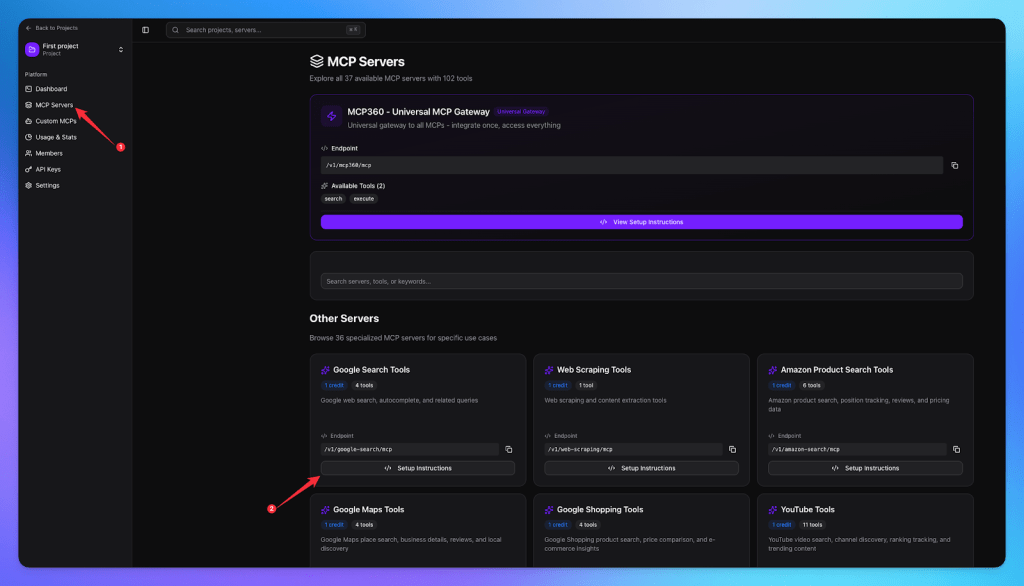
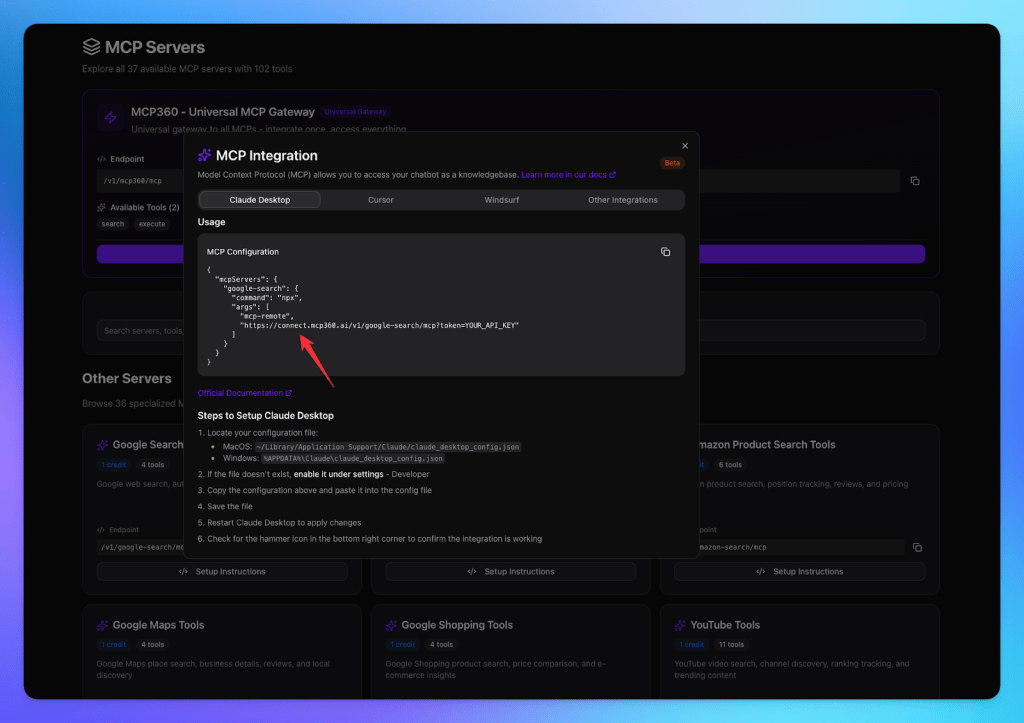
- Please copy the URL of the tool you wish to integrate.
Step 2: For the next step, open ChatGPT
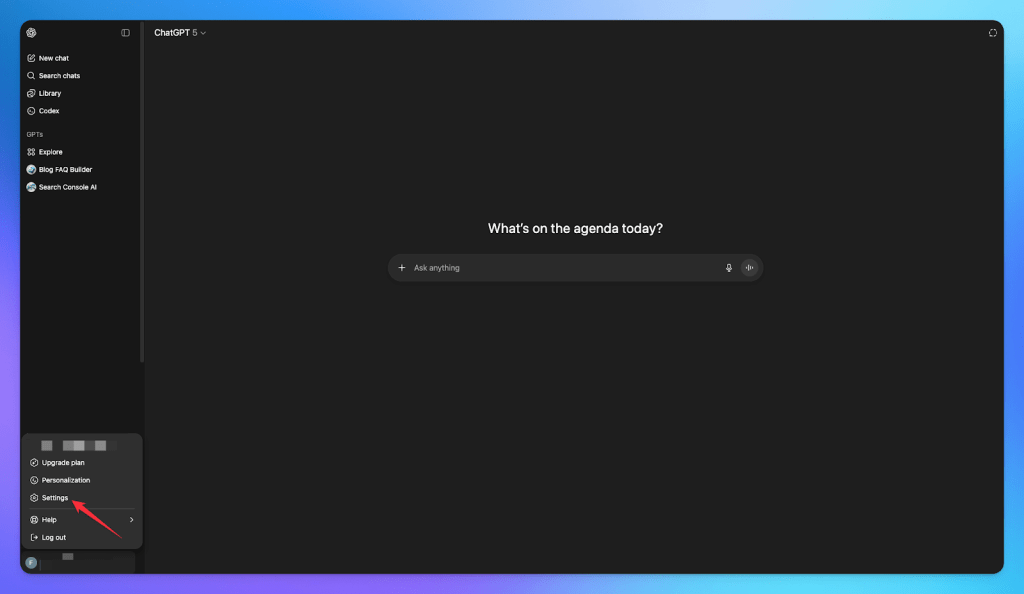
- Log in to your ChatGPT account.
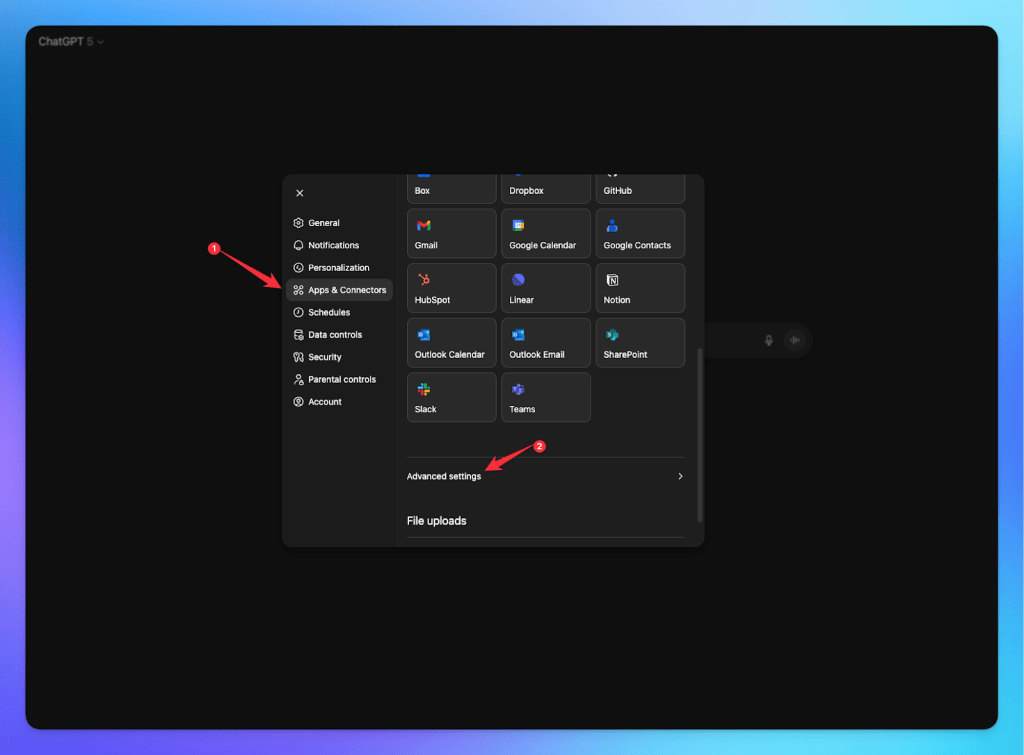
- Navigate to Settings → Apps & Connectors
- Open the Advanced Settings.
- Enable Developer Mode.
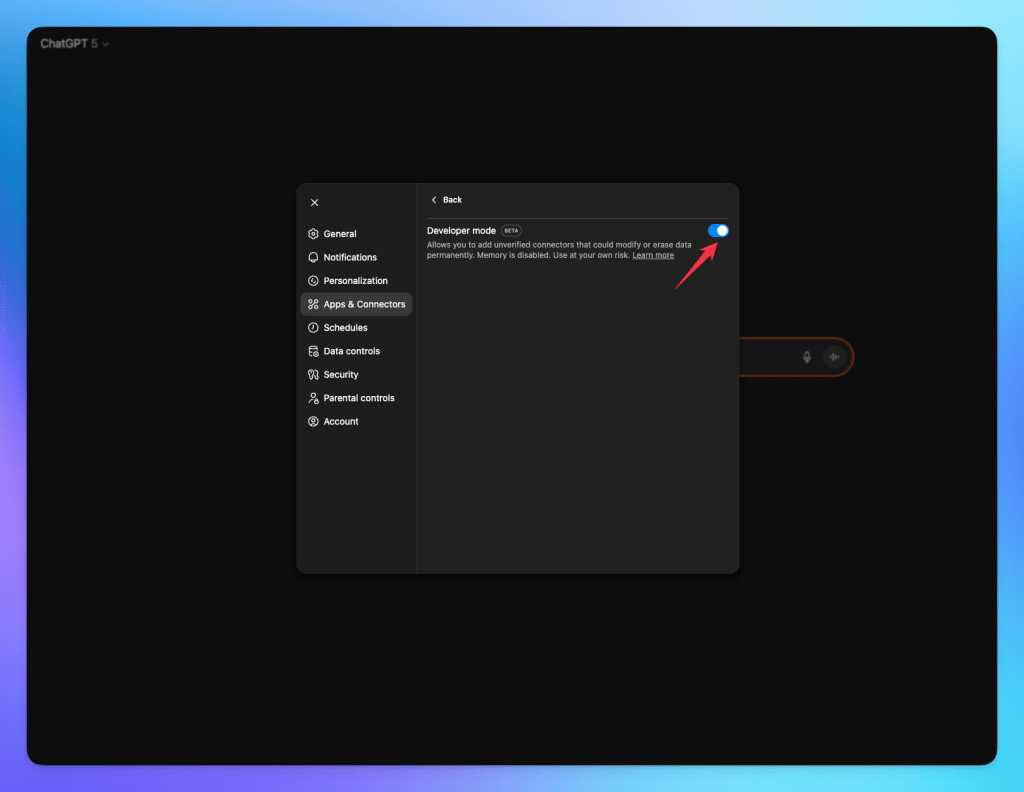
Step 3: Connect MCP Server
- The Create Connector option will now be available.
- Click on Create Connector.
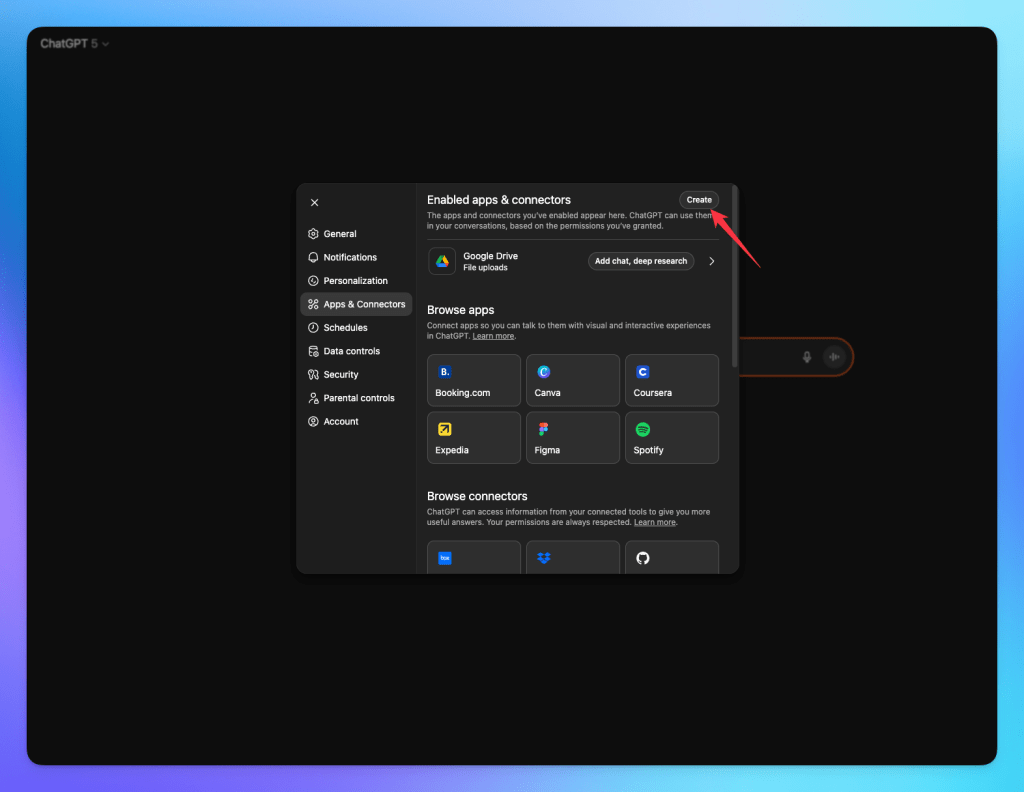
- Select a name for your connector.
- Please paste the MCP Server URL along with the required token.
- Click Create to add the MCP Server.
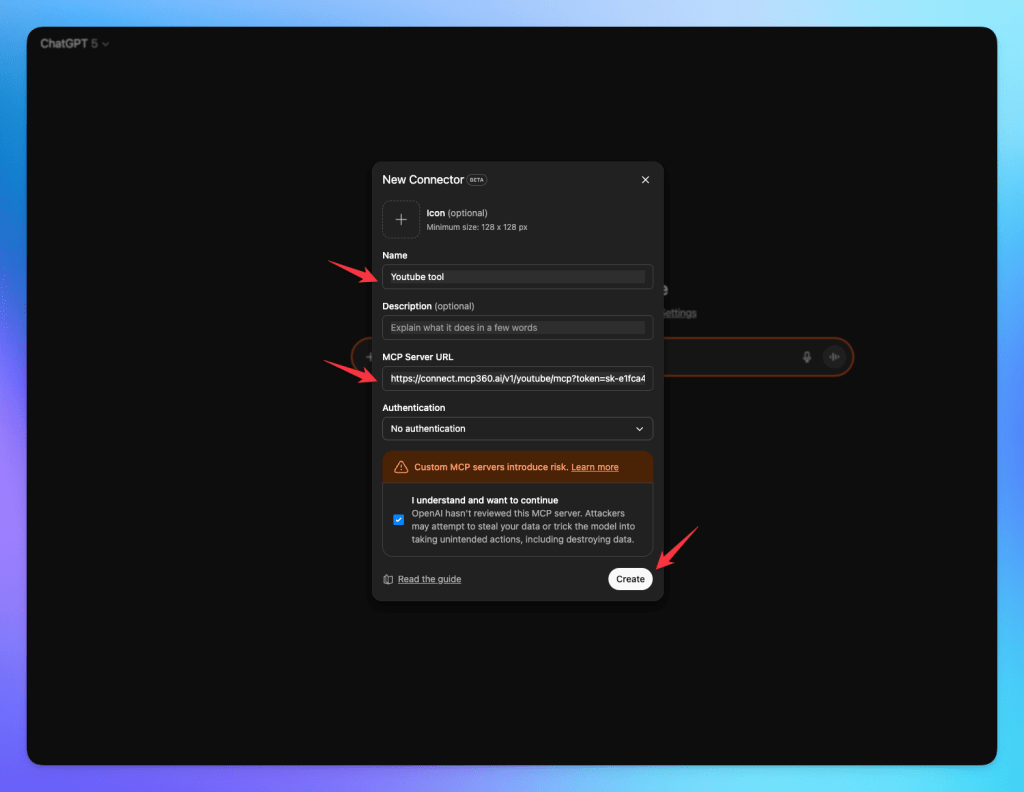
- Your added MCP server will be in the apps and connectors section. Once the server has added the tools, you can view them.
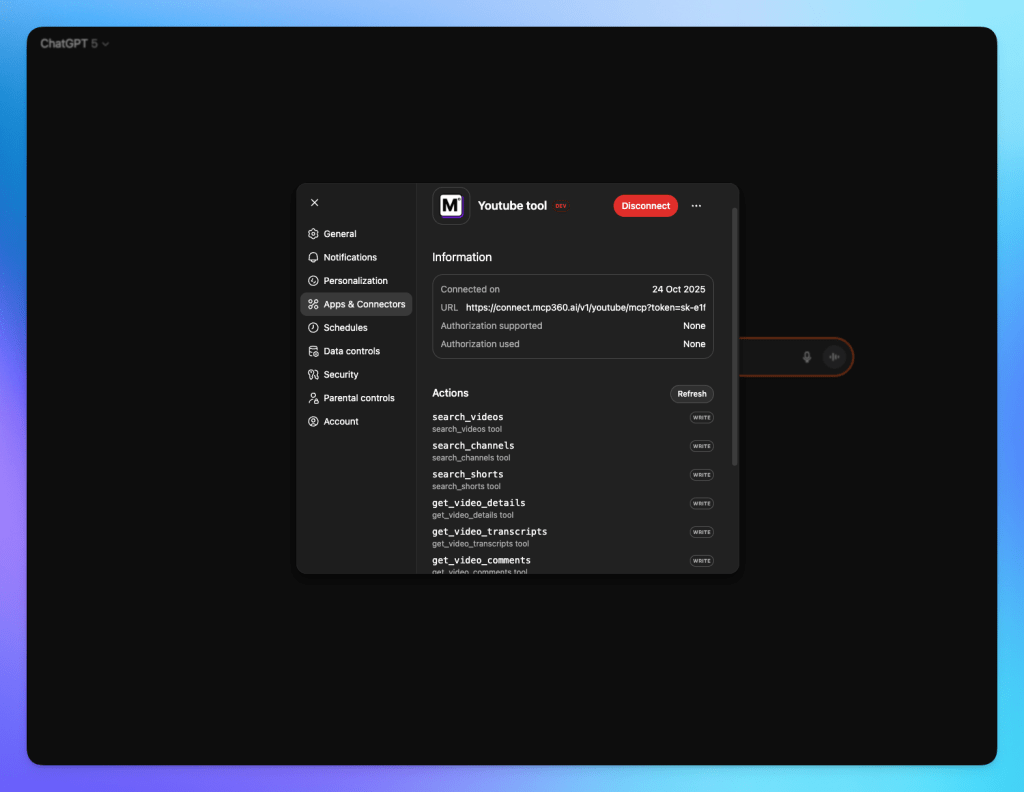
You’re all set. ChatGPT is now fully linked to your MCP360 server. It can access any MCP tool with the required conditions and run them seamlessly. This integration lets you automate workflows more efficiently while managing tasks directly through ChatGPT.
What this Integration Enables
Connecting ChatGPT with MCP360 changes how teams create, run, and maintain automated tasks. Instead of coordinating multiple tools or managing execution manually, workflows run directly through a single conversational interface. The result is faster execution, fewer errors, and far less operational friction.
- Centralized automation across all tools: ChatGPT becomes the single interface to trigger any tool inside MCP360. No switching dashboards or searching for endpoints. Your entire tool ecosystem works from one place.
- Faster execution with fewer manual steps: Every task can be executed instantly from within ChatGPT. This includes running scripts, calling APIs, and processing data. This cuts setup time, eliminates context-switching, and speeds up daily operations.
- Consistent & error-free tool usage: ChatGPT automatically sends the right parameters to MCP360 tools, following OpenAI’s MCP integration standard. This means cleaner execution, fewer mistakes, and predictable outputs every time.
- Smarter workflow design: Instead of manually building long automation chains, ChatGPT can sequence MCP360 tools based on your prompts. This provides smarter orchestration. You get flexible, intelligent workflows without complex configurations.
- Better collaboration for teams: Anyone on the team, not just developers, can run MCP tools through natural language. This reduces dependency, increases accessibility, and speeds up iteration cycles.
- Real-Time Testing & Debugging: Need to test a tool, update an input, or fix a workflow? You can do it instantly on ChatGPT without touching the MCP360 dashboard.
- Scalable Automation With Zero Overhead: As your number of tools or workflows grows, you don’t need new scripts or integrations. ChatGPT automatically adapts, making your system future-proof and easier to maintain.
These changes not only save time but also create new opportunities for innovation and smarter decision-making. Let’s summarize why this integration is a game-changer for businesses.
Frequently Asked Questions
Can ChatGPT connect to MCP servers?
Yes. ChatGPT supports MCP via custom connectors, allowing it to use external tools during conversations. It only works with remote HTTPS MCP servers, not local ones.
What is ChatGPT Developer Mode?
A beta feature that enables full MCP tool access. It allows ChatGPT to read data and perform actions through connected tools. Available on paid plans under Settings → Apps & Connectors → Advanced Settings.
How do I connect ChatGPT to MCP360?
Copy your MCP360 server URL, go to ChatGPT Settings → Apps & Connectors, enable Developer Mode, create a connector, paste the URL with token, and save. Tools will appear in your workspace.
Do I need a paid plan to use MCP connectors?
Yes. MCP connectors require Developer Mode, available only on paid plans like Plus, Pro, Team, or Enterprise. MCP360 account access is also required.
Why connect ChatGPT to external tools?
Because ChatGPT alone cannot access live data. MCP tools enable real-time information, automation, and more accurate, data-driven outputs.
Is it safe to connect third-party MCP servers?
Only if trusted. Use verified servers and avoid unknown sources. ChatGPT includes safeguards like action confirmations and limited memory in Developer Mode.
How is MCP360 different from individual tool integrations?
MCP360 uses a single integration to access 100+ tools, removing the need to manage separate APIs, tokens, and updates for each tool.
Why doesn’t ChatGPT use MCP tools automatically?
It may default to basic tools unless Developer Mode is enabled. Even then, it often requires explicit prompts to trigger specific tool usage.
Conclusion
ChatGPT MCP support turns Developer Mode from a novelty setting into the difference between a model that guesses and one that checks. The setup itself takes about ten minutes once you have a gateway URL to point it at.
Start with one connector before adding a second. Confirm ChatGPT can actually call your tools and return real numbers, not confident-sounding guesses, then decide whether you need more. If you’re testing this with MCP360, the free plan’s 100 monthly credits are enough to run that first check without committing to anything.

Article by
RajniAI & Tech | Senior Content Writer
Rajni is a senior content writer covering AI agents, automation, and no-code tools. She writes across the AI space, from chatbots and customer support to MCP and agent workflows, focused on how businesses actually put these tools to work.