AI agents become unreliable the moment they depend on external systems without clear execution boundaries. Live search, data enrichment, audits, and automations introduce failure modes that most agent stacks cannot surface or control.
When agents break, the issue is rarely reasoning. It is tool access, schema drift, hidden errors, or silent partial failures. Without isolation, debugging turns into guesswork and workflows degrade without obvious signals.
This guide focuses on building a stable execution foundation with OpenClaw and MCP360. The emphasis is on inspectable runtimes, explicit tool contracts, and failure isolation so agents remain dependable under real operational conditions.

The TL;DR
OpenClaw is a personal assistant agent runtime that can run tools, automations, and workflows. MCP is the standard protocol for connecting agents to external tools, and MCP360 provides a unified gateway to access 100+ tools and custom MCPs through one endpoint.
-
• What this guide sets up
You will install OpenClaw from scratch and connect it to MCP360 so your agent can perform real actions such as search, scraping, audits, enrichment, and automation instead of just chatting.
-
• How tools are connected
MCP acts as the standard interface between agents and external systems, while MCP360 simplifies access by routing all tools through a single, unified gateway.
-
• Who this guide is for
This guide works for both developers and non technical operators. If you can copy and paste commands and follow checklists, you can complete the entire setup without prior infrastructure experience.
What Is OpenClaw?
OpenClaw is an open-source self-hosted agent runtime designed to run AI agents as long-lived systems rather than short-lived scripts or chat sessions. Instead of treating an agent as a prompt wrapped around a model call, OpenClaw treats it as a managed process with state, health, tooling, and execution boundaries.
At a practical level, OpenClaw sits between three distinct layers:
- The agent logic, which decides what to do
- The runtime, which manages execution, state, memory, and lifecycle
- The tools, which provide access to the outside world
These layers are intentionally separated. An agent can fail while the runtime remains healthy. A tool can be unavailable while the agent logic stays intact. Each failure mode is observable and diagnosable in isolation.
This separation makes it much easier to answer a critical question when something breaks:
Is the problem the agent, the runtime, or the tools?
Most frameworks collapse these concerns into a single abstraction. When something goes wrong, you are left guessing whether the model, the prompt, the tool call, or the execution loop is at fault. OpenClaw does not do this. It enforces clear boundaries, explicit health checks, and independent verification paths so failures are localized instead of cascading.
As a result, OpenClaw is suited for production workloads where agents must run continuously, recover cleanly, and integrate with external systems without becoming opaque or fragile.
The Challenge With AI Agents Is Tools
Once you move past conversation and into execution, tools become the real constraint.
Live data sources, external APIs, authentication flows, rate limits, schema changes, and partial failures introduce complexity far faster than most agent stacks anticipate. This is the point where many agent projects slow down or quietly fail, not because the model is weak, but because the system around it is brittle.
Without a clear structure for tool access, teams typically end up with:
- One off integrations built ad hoc for each use case
- Inconsistent output formats across similar services
- Debugging that requires digging through raw API responses
- Agents that behave unpredictably depending on which tool they invoke
At that stage, improving prompts or switching models does not fix the underlying issue. The agent is making decisions on top of an unstable foundation.
This is not a prompting problem. It is a systems problem. Tools need to be treated as first class components
OpenClaw Installation and Runtime Setup
Before building workflows or attaching agents to tools, you need a stable runtime. This section walks through the exact sequence required to install OpenClaw, bring the gateway online, and validate MCP tooling independently. The goal is to eliminate hidden failures early so every downstream workflow runs on a known-good foundation.
Step 1. Install OpenClaw
Install OpenClaw globally so it behaves like a system runtime rather than a local project dependency.
npm i -g openclawopenclaw --version
You should see a valid version number. If the command fails or returns nothing, resolve the installation issue before moving forward. Continuing without a confirmed runtime will cause cascading failures later.
Step 2. Run the Initial Configuration
Initialize OpenClaw using the built-in configuration wizard.
openclaw configure
If you are testing locally, you can skip channel setup. The critical requirement is that the runtime and model configuration complete successfully. This step defines where OpenClaw stores state, how execution is orchestrated, and how the runtime lifecycle is managed.
Step 3. Start the Gateway and Verify Health
Start the gateway process.
openclaw gateway
Check the gateway status.
openclaw gateway status
Run a full health check.
openclaw doctor
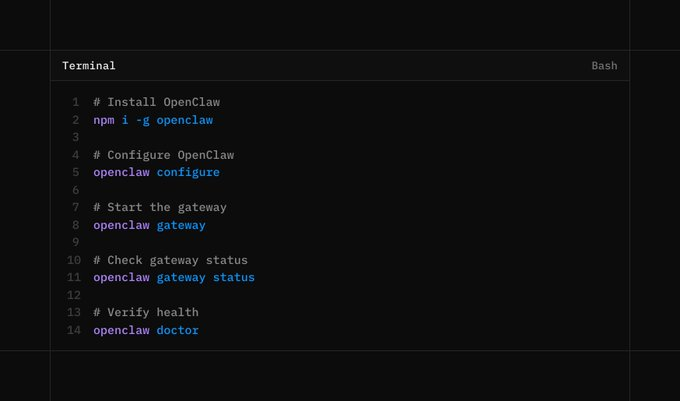
All checks must pass. Do not skip verification. Most downstream tool failures trace back to an unhealthy or partially started gateway.
Step 4. Install MCP Tooling for Inspection
Although OpenClaw can consume MCP tools directly, you need a separate inspection layer to debug and validate MCP servers in isolation.
Install the MCP CLI.
npm i -g mcportermcporter --version

This separation is intentional. It allows you to verify tool access independently of any agent logic, which is essential for reliable debugging.
Step 5. Get Your MCP360 Endpoint
Create an MCP360 account and generate an MCP endpoint from the dashboard.
This endpoint behaves like a credential.
- Do not commit it to git
- Do not share it publicly
- Rotate it immediately if it leaks
Treat this URL with the same care as an API key.
Step 6. Create a Stable MCP Configuration Directory
mcporter relies on relative paths for configuration. To avoid confusion and accidental misconfiguration, create a dedicated workspace.
mkdir -p ~/mcpcd ~/mcp
This directory becomes the canonical location for MCP configuration and inspection.
Step 7. Register MCP360 as an MCP Server
For OpenClaw, setup can be very simple. You can paste the MCP360 endpoint directly and let OpenClaw configure MCP360 automatically. If you prefer to see each step or want more control over the setup, you can follow the manual configuration steps below.
Create a directory to keep MCP configuration consistent
Register MCP360 with mcporter.
mcporter config add mcp360 \ --command 'npx mcp-remote "https://connect.mcp360.ai/v1/mcp360/mcp?token=YOUR_TOKEN"'
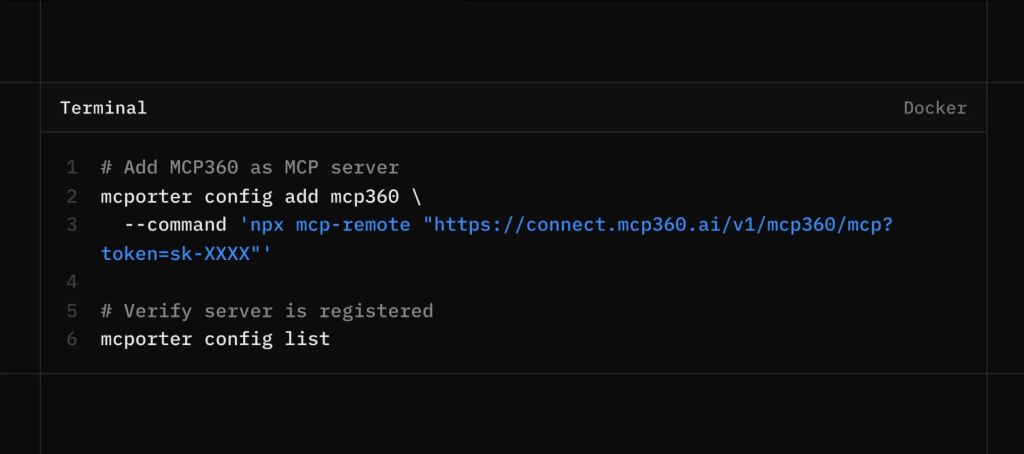
Confirm the registration.
mcporter config list
If nothing appears, you are likely running the command from the wrong directory. mcporter reads configuration relative to the current path.
Step 8. Verify Tool Access
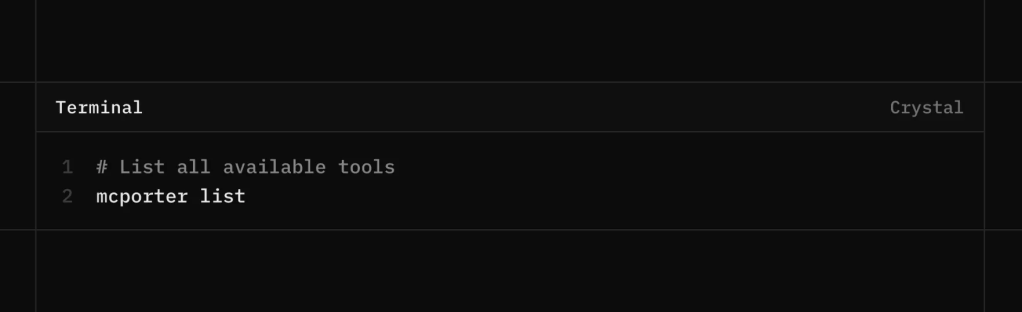
List the exposed tools and their schemas.
mcporter list
If this returns structured tool definitions, your MCP connection is functioning correctly.
At this point, you have verified the following:
- MCP360 is reachable
- Tool schemas are discoverable
- The transport layer is stable
Only after these checks pass should you rely on these tools inside agent workflows. This verification step is what separates dependable systems from brittle demos.
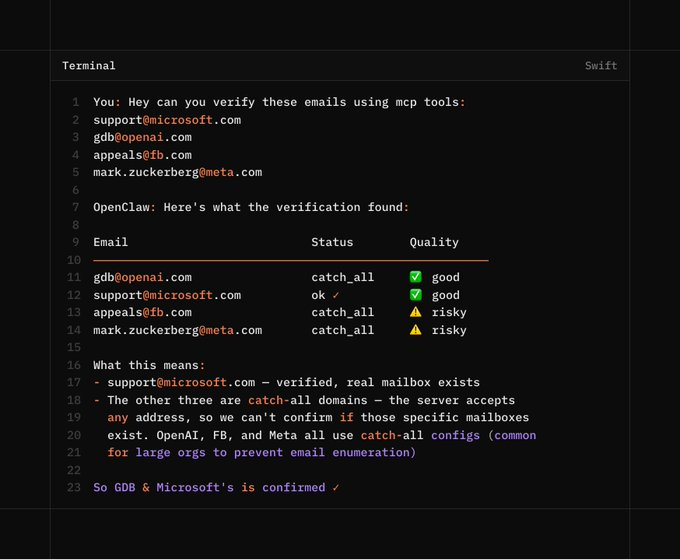
Use OpenClaw tui to run OpenClaw in the terminal instead of the dashboard. Let’s see this in an example to verify the email.
Practical Use Cases Enabled by This Setup
This setup is built for operational workloads. Each use case below depends on consistent tool execution, traceable inputs, and debuggable outputs. Without those properties, these workflows do not scale or hold up in production.
- Multi-source research with deduplication:
The agent queries multiple search engines in parallel such as Google, Bing, DuckDuckGo, Baidu, and regional alternatives. Results are normalized, clustered by semantic similarity, and deduplicated before synthesis. This prevents source echoing and produces a consolidated research output with clear attribution and confidence signals. - Trend and news monitoring across signals:
The agent combines Google Trends time series, Google News article velocity, and YouTube publishing and engagement data. By correlating these signals, it can separate transient spikes from sustained momentum and explain why a topic is rising rather than simply reporting that it is. - SEO workflows grounded in live SERPs:
The agent performs keyword discovery, validates competitiveness against real search results, tracks ranking changes over time, and runs on page audits based on actual page structure. Underperformance is explained using concrete factors such as missing entities, weak internal linking, or dominant SERP features. - E-commerce research and price monitoring:
The agent compares pricing, availability, and seller behavior across multiple marketplaces and tracks changes longitudinally. Sudden price shifts, stock exhaustion, or abnormal discounting are flagged with source level traceability so issues can be audited rather than guessed. - Local business and market analysis:
Using maps, reviews, and geolocation data, the agent analyzes competitor density, review volume, and sentiment distribution within a defined radius. This enables practical insights like identifying underserved areas or understanding why nearby competitors outperform in local search. - Travel planning:
Flights, hotels, weather forecasts, and currency data are pulled from separate tools and merged into a single plan. Recommendations are justified through explicit tradeoffs such as cost versus seasonality or exchange rate impact, not generic suggestions. - Lead validation and enrichment:
The agent verifies email deliverability, checks domain reputation, and enriches leads using public data sources. Invalid or low quality leads are filtered early, and each enrichment field is tagged with its source and freshness for downstream sales or ops use.
All of these workflows rely on one core property: reliable, inspectable tool access. When every call is observable and debuggable, agents move beyond question answering and become dependable systems that execute real work.
Frequently Asked Questions
What is OpenClaw?
OpenClaw is an open-source agent runtime that lets AI agents run continuously with memory, tool access, and state management instead of operating as temporary chat sessions.
What does OpenClaw do?
OpenClaw helps AI agents perform actions such as searching the web, accessing tools, automating tasks, and processing data through connected integrations.
How do I install OpenClaw?
Install OpenClaw with npm i -g openclaw, verify the installation, complete the setup process, and start the OpenClaw gateway.
How do I add MCP tools to OpenClaw?
Generate an MCP endpoint, add it as a server in OpenClaw, and verify that the tools are available before using them in your agent workflows.
Why use mcporter with OpenClaw?
mcporter helps you inspect MCP servers, view available tools, and confirm that connections are working before an agent uses them.
Why do AI agents become unreliable when using external tools?
External tools can fail because of API errors, authentication issues, rate limits, or service outages. These problems often affect reliability more than the AI model itself.
Should I treat an MCP endpoint like a password?
Yes. An MCP endpoint provides access to tools and services, so it should be stored securely and never shared publicly.
How can I connect multiple tools to OpenClaw without separate integrations?
Use a gateway such as MCP360 to access multiple tools through a single MCP endpoint instead of managing individual integrations.
Conclusion
Autonomous systems are becoming practical. Agents are starting to handle real work across departments which raises the bar for how these systems need to be built.
As models continue to improve, they will make autonomous agents far more capable than they are today. That increased capability also raises the cost of weak execution. When boundaries remain unclear, a single tool failure can quietly distort an entire system. Clear separation between agent logic, runtime behavior, and tool access keeps these systems reliable and understandable as autonomy grows.
If agents are going to operate continuously and make real decisions, they must be grounded in infrastructure that can be inspected, debugged, and trusted over time. That foundation is what allows autonomy to scale without losing control.
Tags

Article by
HimanshuHead of Growth & Engineering
Himanshu is Head of Growth & Engineering, writing about AI agents, MCP, and no-code automation from a go-to-market view. He covers how teams evaluate, adopt, and get real value from AI tools, translating what the tech does into what it means for a business.