The TL;DR
AI agents can manage outreach workflows, but most still validate email addresses before execution instead of checking them in real time during the workflow.
-
• The Problem
Validation results can become outdated by the time emails are sent, allowing invalid addresses, catch-all domains, and risky emails to enter campaigns.
-
• MCP360 Workflow
MCP360 connects email validation directly into the agent workflow, so emails are verified in real time before moving forward for sending or routing.
-
• The Outcome
Outreach campaigns become cleaner, bounce rates are reduced, and sender reputation is better protected throughout execution.
AI agents can already draft emails, manage outreach sequences, and handle campaign workflows. Where things break down is the data underneath those workflows. Unverified emails move through sending flows without being checked, and the consequences compound: bounced sends, spam trap hits, and a sender reputation that takes weeks to recover once an ESP flags your domain.
The failure is not in what the agent can do. That’s where verification fits into the process. Validation still runs in separate tools, before the workflow starts, producing a result the agent accepts without any ability to act on it differently per record.
MCP360 changes that by connecting an email validation and verification server directly into the agent’s workflow. Emails are checked during execution, not before it, and the agent uses those results immediately to filter, route, or block records before any send action runs.
This article covers how that process works, how to set up the MCP360 integration with Claude, and how it changes the role validation plays in outreach execution.
What Email Validation with AI Agents Means
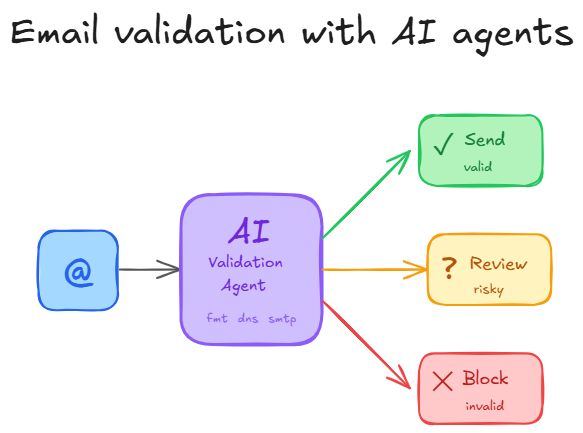
Email validation with AI agents is the process of checking an email address during an active workflow and using the result immediately. Instead of treating validation as a separate cleanup step, the agent uses signals like validity, risk, disposability, and deliverability to decide whether a contact should move forward, be reviewed, or be stopped.
In a normal setup, email addresses are collected first, exported to a validation tool, cleaned in bulk, and then pushed back into a CRM, spreadsheet, or outreach platform. That works for static lists, but it creates delay. The system only knows whether an address is valid after a separate validation step has already finished.
An AI agent handles this differently. When the agent receives a lead, form submission, signup, or contact record, it can validate the email address during the same workflow. The result is not just stored as a note. It changes what the agent does next.
For example, a valid business email can move into enrichment, scoring, CRM creation, or outreach. A disposable email can be blocked before it enters the pipeline. A risky email can be routed for manual review or excluded from automated campaigns. An invalid email can trigger a correction request instead of wasting an outbound sequence.
This makes email validation operational. The validation result becomes a live control signal inside the workflow. It helps the agent decide whether to continue, pause, reject, enrich, or escalate a record.
The output also needs to be structured. A useful validation response should include a status such as valid, invalid, risky, disposable, or unknown, along with supporting signals like domain quality, MX availability, mailbox confidence, role-based address detection, and deliverability risk. This gives the agent enough context to make different decisions for different records instead of treating every email the same way.
Traditional Email Validation vs AI Agent Workflows
The real difference is not whether one system can check an email better than the other. The difference is whether the validation result sits outside the workflow or directly controls what the workflow does next.
How MCP Connects Email Validation to AI Agent Workflows

MCP helps AI agents use email validation as a callable tool inside a workflow. Instead of treating validation as a separate service that needs custom integration, MCP gives the agent a standard way to call the validation tool, pass structured input, and receive structured output.
In practice, this means the agent can validate an email address while it is processing a lead, contact, signup, or support request. The result is not stored for later review only. It can be used immediately to decide what should happen next.
What MCP changes in email validation
First, MCP gives the agent a consistent interface for tool access. The agent can call an email validation tool with inputs such as an email address, contact ID, source, or workflow context without needing provider-specific logic inside the main workflow.
Second, MCP makes the validation result easier to use during execution. A validation response can include fields such as status, risk level, disposable email detection, domain checks, and deliverability signals. Because the result is structured, the agent can use it directly in filtering, routing, classification, CRM updates, or outreach approval.
Third, MCP keeps validation inside the active workflow. The agent does not need to export a list, wait for a cleaned file, and import the result somewhere else. It can call the validation tool at runtime and use the response in the same flow.
MCP does not make an email address more deliverable by itself. The validation provider still performs the actual check. MCP improves how that check is exposed to the agent, how the result is returned, and how quickly the workflow can act on it.
Connect MCP360 Email Validation with AI Agents
Email validation setup inside AI agent workflows requires connecting the MCP server so the tool becomes accessible during execution. Once connected, the validation function can be called directly within the agent workflow instead of being used as a separate external process.
The setup involves a few configuration steps to link the MCP endpoint with your agent environment and enable the validation tool for use inside workflows.
Here are the steps to connect the email validation server to your AI agent environment: Open the MCP360 website and log in.
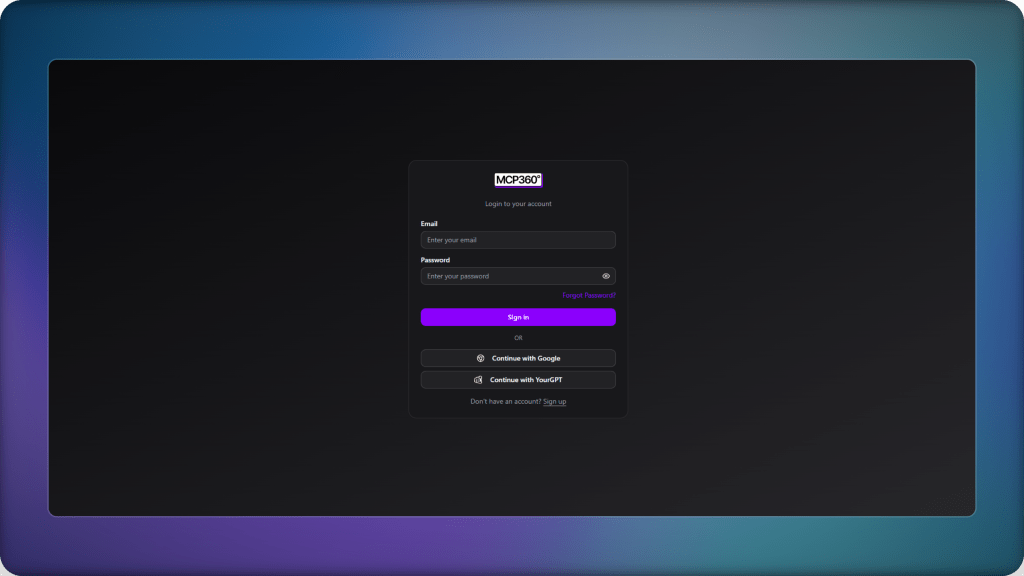
- Create a new project and assign it a clear name for easy identification later.

- Open the project after it is created. Inside the project dashboard, navigate to the MCP servers section.
- Locate the Email Validation and Verification server and select setup.
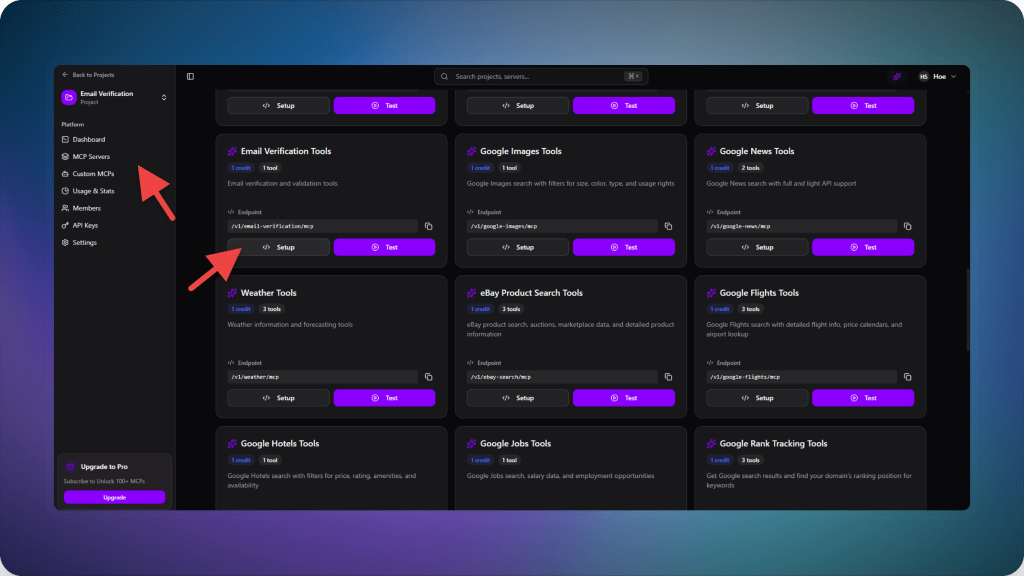
- Select API Key and copy the MCP endpoint URL displayed on the screen. This endpoint is used to connect the server with your AI agent.
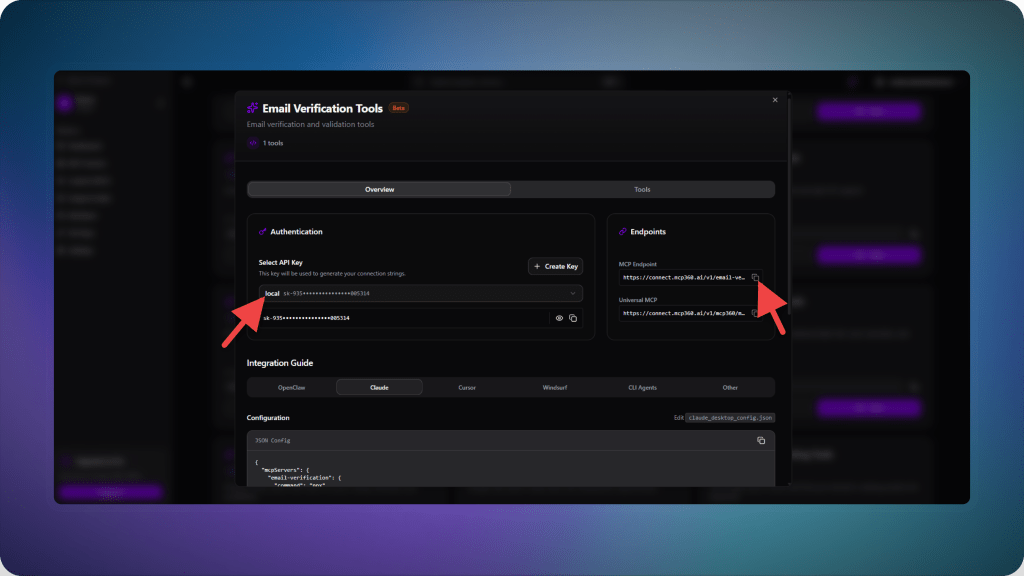
- Log in to Claude and open the customization settings.

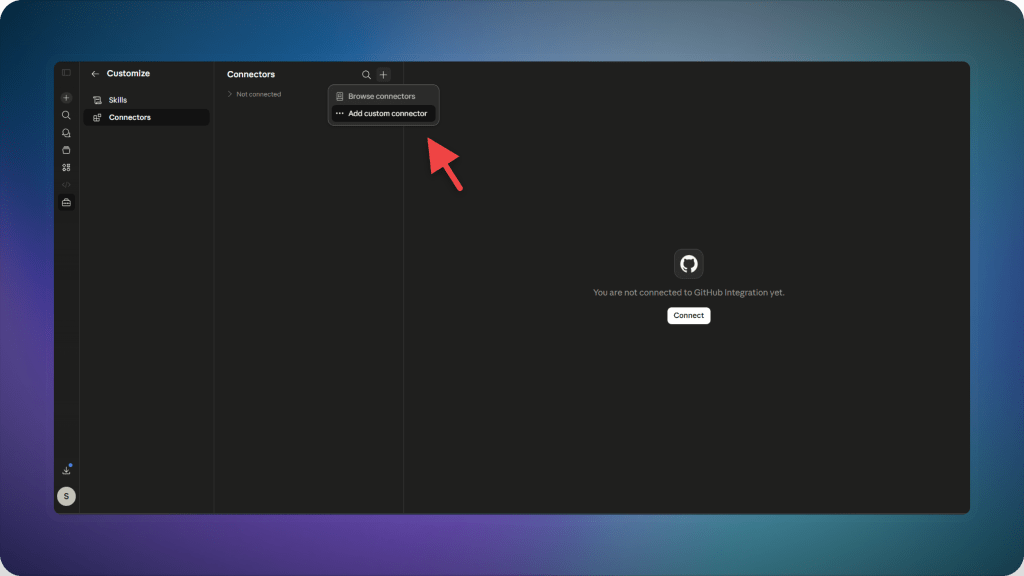
- Go to connectors and select add connector.
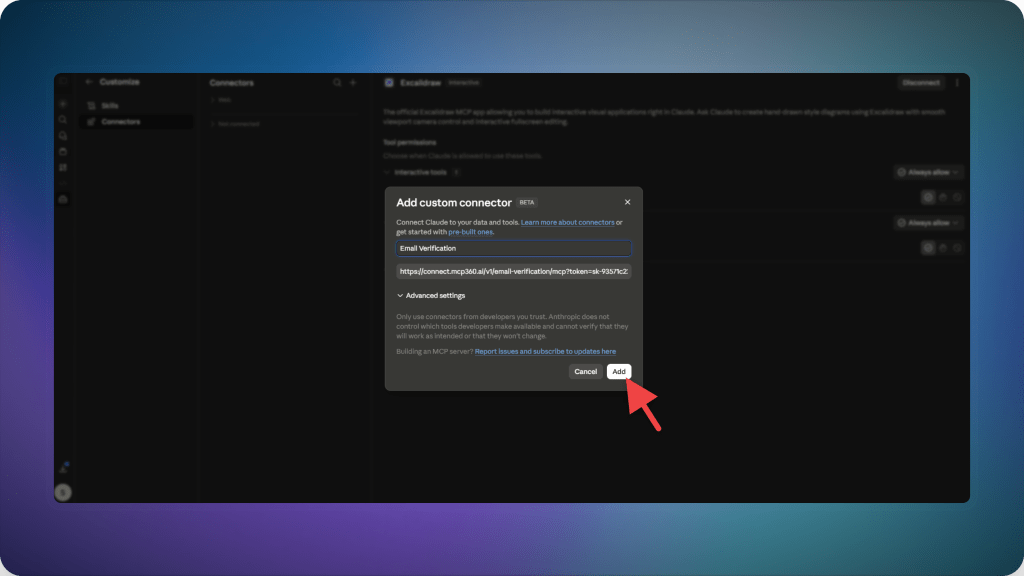
- Name the connector “Email Verification” and paste the copied MCP endpoint, then click add.
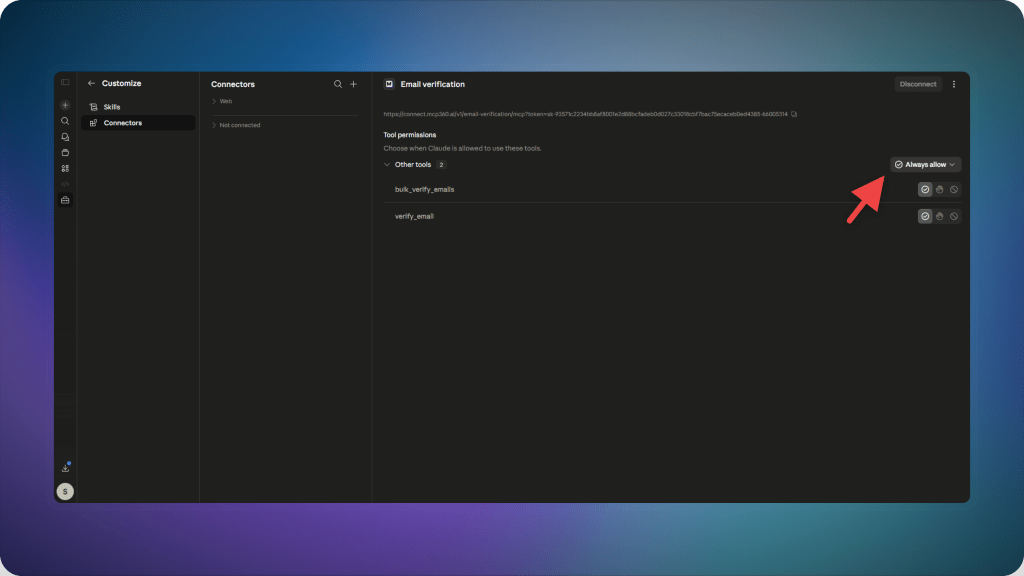
- The connector will appear in your connectors list. Open it and enable the required permissions before use.
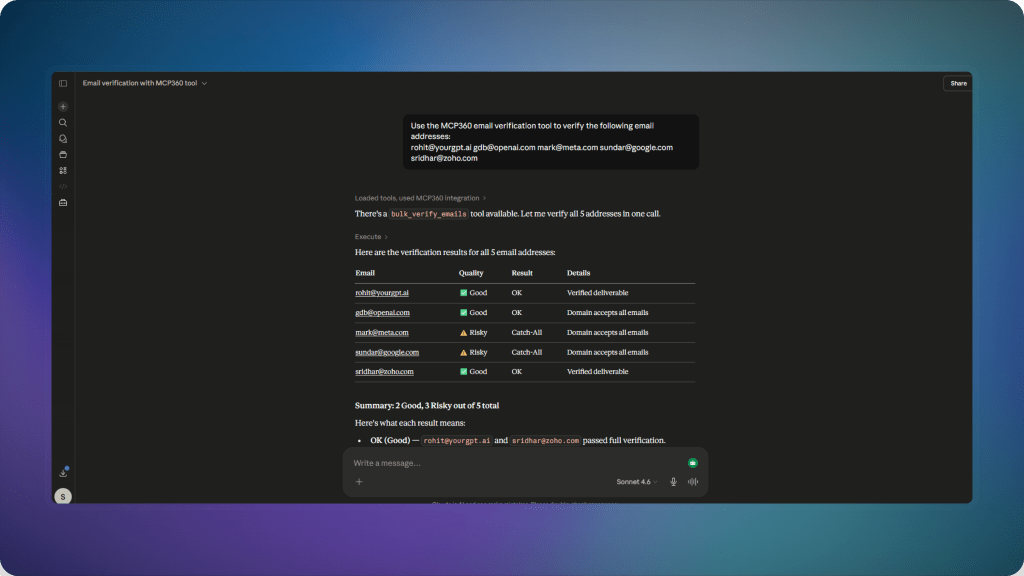
- Once connected, you can ask Claude email verification questions directly. Just be sure to clearly specify MCP360 for email validation so the request is routed through the correct server.
AI Agent Email Validation Use Cases with MCP360
Email validation in AI agent workflows is used during execution to decide whether an email should be sent to or excluded. The MCP server returns structured results, and the agent uses those results immediately within the same workflow step.
- Cleaning lead lists before sending: Before any outreach sequence starts, each address in the list is run through validation. Addresses that come back as invalid or undeliverable are dropped from the flow at that point. Nothing invalid reaches the sending step, which matters because ESPs track bounce rates at the domain level and will throttle or block senders whose rates climb above acceptable thresholds.
- Filtering risky or suspicious emails during execution: Addresses flagged as risky, including disposable domains and addresses showing signs of being spam traps, are separated before the agent proceeds. Rather than a manual review step that someone has to run after the fact, the agent handles this during execution and moves on with a cleaner list.
- Preventing bounce-related sending: Invalid domains, recently expired addresses, and unreachable mail servers are identified during the validation step and removed from the send queue. Keeping bounce rates below the thresholds set by major inbox providers, Google’s is currently 0.10% for spam complaints, is one of the more consequential variables in long-term deliverability.
- Deciding send eligibility inside a single workflow step: Each address is evaluated and routed within the same execution context. The agent does not hand off to another system or wait for a batch result. Valid addresses proceed. Everything else is filtered, logged, or flagged depending on how the workflow is configured.
Email validation here functions as an execution-time decision step, where results directly control which records move forward in the workflow and which are stopped before sending.
Frequently Asked Questions
What is email validation in AI agent workflows?
Email validation in AI workflows means checking whether an email is valid while the workflow is running and using that result immediately to decide whether to proceed or stop processing that record.
Why is real time email validation important for outreach campaigns?
Real time validation helps prevent sending emails to invalid or inactive addresses. This reduces bounce rates and protects domain reputation during outreach.
How does MCP360 change email validation in AI workflows?
MCP360 connects validation tools directly into the workflow so checks happen during execution. This allows the agent to act on each result immediately instead of relying on pre-processed lists.
What problems happen when email validation is done before the workflow?
When validation is done earlier in a separate step, the email data can change or become outdated before sending. This leads to failed deliveries and unnecessary sends.
How do AI agents use email validation results during workflows?
AI agents use validation results as execution signals. Valid emails move forward, risky ones can be filtered or reviewed, and invalid emails are removed from the process before sending.
What changes when email validation runs inside MCP360?
MCP360 allows email validation to be called during workflow execution rather than as a separate step. This keeps decisions tied to current data instead of earlier snapshots and reduces breakdowns caused by outdated information.
What makes AI agent based email validation different from traditional tools?
Traditional tools validate emails in a separate step before use. AI agents validate emails during the workflow and use the result immediately to decide whether to send, block, or route each record.
Can email validation be used for routing decisions in AI workflows?
Yes. Validation results can be used to route records into different paths such as outreach, review, enrichment, or rejection based on the email’s status and risk level.
Conclusion
Email validation loses value when it sits outside execution. In most setups, results are generated early and reused later, even when email conditions have changed by the time sending happens.
A more reliable structure is to run validation at the point where the agent is processing data. Each email is checked during execution, and the result is used immediately to decide whether it moves forward, gets filtered, or is blocked.
MCP360 provides email validation as a runtime function inside AI agent workflows, so validation happens during execution and directly affects routing and sending decisions instead of existing as a separate step.
For teams building agent-based workflows, the key shift is placement. Validation needs to sit inside execution so decisions reflect the current state of the data rather than earlier snapshots.
Tags

Article by
RajniAI & Tech | Senior Content Writer
Rajni is a senior content writer covering AI agents, automation, and no-code tools. She writes across the AI space, from chatbots and customer support to MCP and agent workflows, focused on how businesses actually put these tools to work.