
The TL;DR
n8n pricing looks different heading into the second half of 2026. An AI credit system now sits on top of executions, and native Model Context Protocol support changes who the platform actually fits.
-
• What Changed in 2026
n8n’s cloud plans now bill in euros, ship monthly AI Assistant credits alongside execution limits, and connect to outside tools through two native MCP nodes instead of custom HTTP calls.
-
• The Real Cost
Self-hosting stays free through the Community Edition, but n8n Cloud runs from €20 a month on Starter to €667 on Business, billed by executions rather than by step or task.
-
• Where It Still Falls Short
G2 and Capterra reviewers rate n8n highly for flexibility, but the same reviews keep flagging the same learning curve, debugging difficulty, and hard execution caps that pushed teams toward alternatives last year.
n8n built its reputation as a free, open-source workflow automation tool for technical teams. In 2026, that description undersells what the platform actually became.
The 2.0 release shipped a native AI Agent node built on LangChain, two dedicated nodes for the Model Context Protocol, and enough momentum to get compared with code-first agent frameworks like LangGraph instead of just no-code automation tools. None of that happened quietly, and none of it is optional context for anyone evaluating the platform now.
In this review, you’ll find what n8n offers in 2026, how its pricing works, where it stands out, where it still falls short, and whether it’s the right choice for your workflows.
What is n8n?

n8n (pronounced “n-eight-n,” short for nodemation) is an open source workflow automation platform built around a node-based visual canvas. Jan Oberhauser founded the company in Berlin in 2019, and n8n ships under a fair-code license, meaning the source stays visible and self-hosting stays free, while a handful of enterprise features sit behind a paid license.
Every workflow is a sequence of nodes. A trigger node starts the run, action nodes call APIs or transform data, and code nodes drop in raw JavaScript or Python wherever the drag-and-drop canvas reaches its limits. That mix of visual building and real code is what separates n8n from Zapier and Make, both of which stay closer to pure no-code.
Where n8n Stands After a Year of Growth
A few numbers frame where n8n sits going into the second half of 2026:
- GitHub traction: 198,352 stars on the core repository, per n8n’s own site.
- Named customers: Fender, Amadeus, Mercedes-Benz, and NVIDIA appear among n8n’s self-reported logos.
- Node library: Past 400 built-in integrations, covering the usual SaaS names (Slack, HubSpot, Notion, Google Workspace), databases, cloud infrastructure, and a growing set of AI-native connectors for Claude, Gemini, and vector stores like Pinecone and Qdrant.
None of that explains why n8n keeps showing up in 2026 roundups next to LangGraph and CrewAI. The AI Agent node handles that job, the biggest addition to n8n’s lineup this year, and it’s worth understanding before the pricing math makes sense.
n8n AI Agent Features
n8n’s node canvas has always centered on connecting apps. What changed with n8n 2.0, released in January 2026, is that a workflow can now hand a decision to a language model instead of following a path you hard-coded in advance.
AI Agent Architecture in n8n
n8n 2.0 shipped native LangChain integration with more than 70 AI-specific nodes, built around a root node and sub-node architecture:
- Root nodes: Define the main agent logic, with the AI Agent node itself reasoning over what to do next using LangChain-powered logic.
- Model sub-nodes: Plug in the language model the agent reasons with.
- Memory sub-nodes: Give the agent short or long-term recall across steps.
- Tool sub-nodes: Define the specific actions the agent is allowed to call.
A trigger starts the run, and everything downstream flows through that structure, the reason n8n gets compared to code-first agent frameworks now instead of just Zapier and Make.
n8n MCP Client vs MCP Server Trigger
Two native nodes connect that AI Agent node to the outside world, both built around the Model Context Protocol, the open standard that lets an AI agent discover and call external tools through one consistent interface instead of a custom integration per service.
- MCP Client Tool node: Lets an n8n AI Agent call tools exposed by an outside MCP server.
- MCP Server Trigger node: Runs the other direction, turning an n8n workflow itself into an MCP server that other AI clients can call.
Point the MCP Client Tool node at MCP360’s gateway endpoint and an n8n agent picks up access to 100+ tools across search, SEO, scraping, and data APIs through that one connection, without adding a separate node for each individual service it needs to reach. The setup itself is a short node configuration inside an existing workflow rather than a rebuild, which is the appeal for teams that already have working n8n workflows and just need broader tool access added.
400+ Integrations and Custom Code Support
Outside the AI layer, n8n’s core strength hasn’t changed. The platform ships more than 400 built-in nodes, and a code node drops in JavaScript or Python wherever a prebuilt connector doesn’t exist or doesn’t do exactly what you need. That combination, visual building with a code escape hatch, is the reason developers keep choosing n8n over pure no-code tools even when the learning curve runs steeper.
On security, hosted plans keep customer data on servers in Frankfurt, encrypted secrets storage ships on every tier, and SSO, SAML, and LDAP are gated to Business and above, a gap for smaller teams handling regulated data or compliance-heavy workflows on a Starter or Pro plan.
n8n Pricing in 2026 Explained Plan by Plan
n8n publishes five effective tiers once the free Community Edition is counted, and every figure below reflects the official pricing page as of July 2026, billed annually.
| Plan | Price (billed annually) | Executions/month | Hosting | Notable Extras |
|---|---|---|---|---|
| Community Edition | Free | Unlimited | Self-hosted | No AI Assistant yet, no SSO, forum support only |
| Starter | 20€/month | 2,500 | n8n Cloud | 1 shared project, 5 concurrent executions, 2,300 AI credits/month |
| Pro | 50€/month | 10,000 | n8n Cloud | 3 shared projects, 20 concurrent executions, up to 13,700 AI credits/month, admin roles, workflow history |
| Business | 667€/month | 40,000 | Self-hosted | 6 shared projects, SSO, SAML and LDAP, Git-based version control, 30-day insights |
| Enterprise | Custom | Custom | n8n Cloud or self-hosted | Unlimited shared projects, 200+ concurrent executions, dedicated support with an SLA, invoice billing |
A few pricing details apply across all cloud tiers:
- Annual billing: Saves 17% against the monthly rate.
- The Start-up Plan: Cuts the Business tier in half for companies under 20 employees.
- Business plan overages: Bill separately, at 4,000€ for every extra bucket of 300,000 executions.
- Hosted-plan data: Lives on servers in Frankfurt, Germany.
How n8n Execution Pricing Works
The billing unit is the core product difference here, and it’s easiest to see side by side:
- Zapier counts every completed action as a task, so a ten-step Zap running once burns ten tasks.
- Make counts every module run as an operation or credit under its current model.
- n8n counts one execution per full workflow run, no matter how many nodes fire inside it.
A two-step workflow and a fifty-step workflow both cost n8n exactly one execution when triggered once, which is the strongest case for n8n over per-step billing once a workflow gets complex.
n8n Community Edition (Free Self-Hosting)
- Same core engine: Everything the paid plans run, minus SSO, audit logging, and the newer AI Assistant.
- No execution cap: You’re the one paying for the server instead of n8n, so there’s no ceiling to hit.
- A common starting point: Most teams testing n8n seriously begin here or on a Docker container, then decide whether n8n Cloud’s managed hosting is worth 20€ a month instead of running their own infrastructure.
- A license key requirement on Business: Self-hosted teams on that tier still need a key that checks in with n8n’s license server daily to stay active.
How n8n AI Credits Work
Those AI credits in the pricing table above are easy to confuse with the cost of running your own AI Agent workflows, and they are not the same thing.
- AI Assistant credits: 2,300/month on Starter, up to 13,700/month on Pro, metering n8n’s own natural-language workflow builder, the in-editor assistant that drafts a workflow from a prompt. They refresh monthly, don’t roll over, and run out fast on any Firecrawl-style scraping loop or heavy debugging session.
- AI Agent node calls: These bill separately. A model you wire into a workflow yourself calls OpenAI, Claude, or Gemini directly through your own API key, completely apart from your n8n plan or its AI credits.
Both meters run independently of each other, and neither one limits what the AI Agent node itself can do once a workflow is live.
Where n8n Wins
Four strengths come up consistently across G2 reviews and the feature set covered above:
- Ease of use once past setup: The single most-cited trait on G2, at 77 reviews, with the flexible open-source model close behind at 72. Reviewers who came from Zapier or Make describe a steep ramp-up period, then more flexibility than either platform gave them once they’re past it.
- Execution-based pricing that rewards complexity: A two-step workflow and a fifty-step workflow both cost n8n exactly one execution when triggered once, the strongest case for choosing n8n over Zapier’s per-task or Make’s per-operation billing as a workflow grows.
- Integration breadth: Cited in 42 G2 reviews and backed by more than 400 built-in nodes, plus a code node for anything a prebuilt connector doesn’t cover.
- Native AI Agent and MCP support: LangChain-powered orchestration, memory sub-nodes, and two dedicated MCP nodes put n8n ahead of Zapier and Make on AI-agent depth, the reason it gets compared to code-first frameworks like LangGraph now instead of just no-code tools.
Capterra reviewers back this up independently, several describe n8n as noticeably cheaper than Zapier or Microsoft Power Automate for comparable workflows, and point to the same self-hosting flexibility G2 reviewers cite as a reason to switch.
Where n8n Falls Short
The friction splits into two categories, what reviewers actually complain about and what the product itself is still missing.
Common User Complaints
- The learning curve, a direct complaint in 39 G2 reviews, with another 23 calling out specifically how hard it is for non-developers to get comfortable.
- Missing cost-control features and unclear AI usage warnings, flagged in 17 reviews.
- Interface design frustrations, in 14 reviews.
- Pricing described as expensive, particularly for startups, in 13 reviews.
None of this is about what n8n can build. It’s about how much technical comfort the platform assumes before a workflow runs reliably, and how hard it is to see where a complex one actually broke.
Product Gaps Worth Knowing Before You Commit
- No persistent memory: Context doesn’t carry across sessions without wiring in an external database yourself.
- Debugging gets harder at scale: Node counts and branching logic compound the difficulty, especially once an AI Agent node is choosing its own path at runtime.
- No built-in workflow testing: There’s no native way to check expected outputs before deploying a change.
- Version control is Business-only: Git-based tracking only ships on the Business plan, so Starter and Pro teams fall back to manual exports to track who changed what.
- Execution caps stop work with little warning: Several independent testers report that Starter and Pro cloud plans halt every workflow the moment you hit the monthly execution cap, with no grace period until the next billing cycle, though n8n’s own FAQ only spells out overage billing explicitly for the Business tier.
These gaps don’t show up in the aggregate star rating, which is exactly why the score alone is worth a closer look.
n8n Ratings Across G2 and Capterra
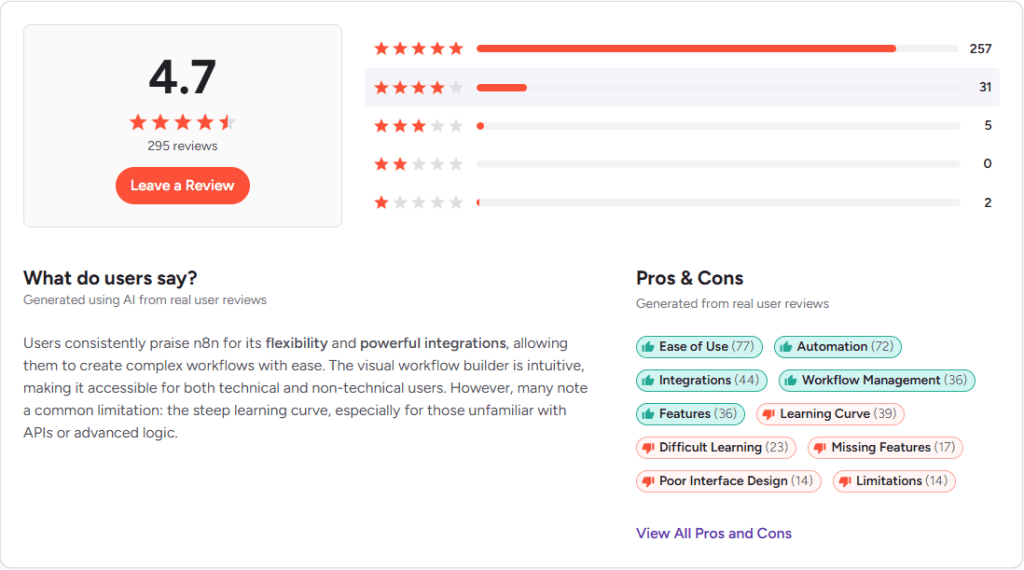
n8n holds a 4.7 out of 5 rating on G2 across 287 reviews as of July 2026, placed in G2’s Cloud Data Integration and iPaaS categories.

Capterra shows a similar picture, with n8n’s rating sitting around 4.6 out of 5 across roughly 45 verified reviews. The two scores track closely enough to trust, which isn’t always the case when a product’s ratings get compared across review platforms.
Best n8n Alternatives
n8n’s limitations are consistent enough across production users that they’re worth weighing against what Zapier and Make solve well instead.
| If Your Priority Is | Choose | Why |
|---|---|---|
| Self-hosting with unlimited executions and full data control | n8n Community Edition | Free forever, and pricing scales with execution volume rather than workflow complexity |
| The widest app catalog with the least setup effort | Zapier | 9,000+ apps, the fastest non-technical onboarding, and MCP bundled into every paid plan |
| Predictable low-cost automation without managing a server | Make | Free plan includes 1,000 credits a month, and Core starts around $9 to $12 a month for 10,000 credits |
Zapier’s Free plan gives 100 tasks a month on two-step Zaps, and its paid Professional tier starts from $19.99 a month for multi-step workflows, scaling with a task-volume slider that runs well past a million tasks a month at the high end. Teams evaluating Zapier’s MCP tooling specifically run into a different tradeoff, since every MCP tool call draws two tasks from the plan’s quota. Make undercuts both on price per unit, but its credit model requires more attention as scenarios branch, since every module in a scenario draws from the same monthly allowance.
None of that makes n8n the wrong choice. It means the decision comes down to what’s actually costing your team time today, memory, debugging visibility, non-technical access, or raw pricing predictability, not which platform has the longest feature list. A full comparison of nine platforms teams weigh against n8n, including Pipedream, Workato, and CrewAI, breaks each one down against those specific constraints.
Frequently Asked Questions
What is n8n?
n8n is an open source workflow automation platform built around a node-based visual canvas, letting teams connect apps, transform data, and add AI agents without writing full applications. Founded in 2019 by Jan Oberhauser in Berlin, it ships under a fair-code license, so the self-hosted Community Edition stays free while a handful of enterprise features sit behind a paid license.
Is n8n free to use?
Yes, n8n’s Community Edition is free to self-host, with no execution limits and access to every core feature except SSO, audit logging, and the newer AI Assistant. You do need your own server, so hosting becomes the real cost. n8n also offers managed cloud plans starting at 20 euros a month if you’d rather not run the infrastructure yourself.
How much does n8n cost in 2026?
n8n Cloud starts at 20 euros a month for Starter (2,500 executions), rising to 50 euros for Pro (10,000 executions) and 667 euros for the self-hosted Business plan (40,000 executions), all billed annually. Enterprise pricing is custom. Every cloud tier also includes a monthly allowance of AI Assistant credits, and annual billing saves 17% against the monthly rate.
What counts as an execution in n8n’s pricing?
An execution is one complete run of a workflow, no matter how many steps or nodes it contains. A two-step workflow and a fifty-step workflow both use exactly one execution when triggered once. That’s different from Zapier, which counts each completed action as a separate task, or Make, which counts each module run as an operation.
Does n8n support MCP?
Yes. n8n ships two native nodes built around the Model Context Protocol, the MCP Client Tool node, which lets an AI Agent call tools on an outside MCP server, and the MCP Server Trigger node, which turns an n8n workflow into an MCP server other AI clients can call. Pointing the MCP Client Tool node at MCP360’s gateway gives an n8n agent access to 100+ tools through one connection.
How does n8n’s pricing compare to Zapier’s?
n8n bills by execution, one charge per full workflow run regardless of step count, while Zapier bills by task, charging for every completed action inside a Zap. Zapier’s Free plan gives 100 tasks a month on two-step Zaps, and Professional starts from $19.99 a month. For workflows with more than a few steps, n8n’s execution model usually works out cheaper at similar volume.
Should I self-host n8n or use n8n Cloud?
Self-host if you’re comfortable running a server and want unlimited executions at no software cost, the Community Edition is free forever. Choose n8n Cloud if you’d rather skip infrastructure work, since Starter runs 20 euros a month for 2,500 managed executions. Business-tier features like SSO and Git version control require a paid license even on a self-hosted instance.
Can n8n connect to more tools than its built-in nodes?
Yes. n8n ships more than 400 built-in nodes, and a code node adds JavaScript or Python wherever a prebuilt connector doesn’t exist. For broader reach without building a new node, n8n’s MCP Client Tool node can connect to MCP360’s gateway, which adds 100+ tools across search, SEO, scraping, and data APIs through a single configuration instead of one node per service.
Is n8n worth it in 2026?
It depends on your execution volume and technical comfort. n8n rewards teams that know their usage and are willing to self-host once volume gets expensive, and it’s less forgiving for teams testing the AI Agent node casually, since AI credits meter separately from executions. Native MCP support, including a direct connection to MCP360 for broader tool access, is one of the strongest reasons to test it in 2026.
Conclusion
n8n’s 2026 pricing rewards teams that already know their execution volume and are willing to self-host once that volume gets expensive. It’s less forgiving of teams that want to try the AI Agent node casually, since the AI credit system adds a second number to watch on top of executions.
Before committing to a tier, run one real workflow through the free trial or the self-hosted Community Edition, the kind built on actual production data rather than a demo Slack notification, and see where your specific mix of execution volume, node count, and debugging needs lands on the table above. The MCP nodes and the 400-plus node library will still be there once the pricing decision is settled. What’s worth testing first is whether your team can live with n8n’s learning curve long enough to reach the point where the execution-based pricing actually pays off.

Article by
RajniAI & Tech | Senior Content Writer
Rajni is a senior content writer covering AI agents, automation, and no-code tools. She writes across the AI space, from chatbots and customer support to MCP and agent workflows, focused on how businesses actually put these tools to work.