

The TL;DR
An n8n AI Agent can reason through a workflow, but it needs a connected tool to access data or take actions outside n8n’s built-in nodes.
-
• The MCP Client Tool Node
The MCP Client Tool node lets an n8n AI Agent call tools hosted on an external MCP server through one endpoint, removing the need to build and maintain a separate custom node for every integration.
-
• Gateway vs Manual Integration
The MCP server an agent connects to determines which tools become available and how much setup remains manual. A broader gateway can provide access to multiple tools through one connection, while direct server integrations require more individual configuration.
-
• A Working Example With MCP360
This guide walks through connecting MCP360 to an n8n AI Agent, testing the connection, fixing the first common setup errors, and showing what the agent can do once the external MCP tools are available.
Building truly intelligent AI agents requires more than just a Large Language Model (LLM). It requires connectivity. Yet achieving that connectivity means managing APIs, authentication, and data formats for dozens of different tools.
An n8n AI Agent node runs into this immediately. Ask it to check a domain’s current SEO metrics or pull today’s search volume for a keyword, and it either guesses or tells you plainly it can’t, because nothing in the workflow gives it a way to reach outside n8n’s own node library. That gap only gets more expensive to patch by hand as more tools join a workflow.
The Model Context Protocol closes that gap. It gives n8n a standard way to reach an external MCP server, so connecting one to a workflow’s AI Agent means pointing the MCP Client Tool node at it, not building a custom n8n node from scratch.
What is n8n?

n8n is a workflow automation platform built around a visual canvas. Instead of writing custom scripts to connect apps and services, teams drag nodes onto a canvas, wire them together, and get a working automation without touching a line of code, unless the workflow specifically calls for one.
n8n handles the workflow logic on its own. Giving an agent inside that workflow a tool outside n8n’s native library needs a different mechanism, covered next.
n8n’s Built-In Features
- Visual Workflow Builder: Drag and connect steps on a canvas, no coding required to wire an automation together.
- Hundreds of Pre-Built Integrations: Connect popular apps and services without writing custom code for each one.
- Custom Code Nodes: Drop in a small script when a workflow needs logic beyond what a pre-built node covers.
- Flexible Triggers and Scheduling: Fire a workflow off an event, a webhook, or a fixed schedule.
- Advanced Logic: Branch with conditions, loop over data, and filter results inside the workflow itself.
- Self-Hosted or Cloud Deployment: Run n8n on your own server for full control, or use the cloud version to skip infrastructure.
- Credential Management: Store API keys and tokens in n8n’s credential system instead of hardcoding them into a workflow.
How the n8n MCP Client Tool Works
n8n ships two separate MCP nodes, and mixing them up is where most confusion starts.
MCP Server Trigger: Expose n8n Workflows
This node turns an n8n workflow into an MCP server, exposing that workflow’s own tools so an external AI client, Claude Desktop or Cursor, can call them. That’s a different job, with n8n as the thing being connected to, not the thing doing the connecting.
MCP Client Tool: Connect External MCP Servers
This node sits inside an AI Agent’s tool list and lets that agent call tools hosted on an MCP server somewhere else. Configure it with a server endpoint and an authentication method, Bearer token, header auth, or OAuth2, and the agent can discover and invoke whatever tools that server exposes. No custom parsing, no per-tool node.
A separate, standalone MCP Client node also exists for calling a server from any single step in a workflow, without an Agent making the decision. That’s useful for a fixed, one-tool lookup. This post sticks to the Tool node, since that’s what lets an agent choose which tool to call on its own.
Point that endpoint at a single-purpose MCP server and the agent gets one tool. Point it at a gateway and the agent gets everything the gateway carries, through the same node.
Limitations of n8n’s Built-In Integrations
n8n covers hundreds of apps natively, so most workflows never hit a gap. The gap shows up the moment a task needs something outside that list, keyword volume from a research tool, a live domain lookup, an internal system nobody at n8n has built a node for. An agent asked to check one anyway does one of two things. It guesses at an answer it can’t verify, or it tells you plainly it has no way to check.
Two common patches exist, and both scale badly.
- The Custom Code patch: Wire a Custom Code node straight to the API. That works for one tool. Add a second, and two different auth schemes, two response shapes, and two rate limits now live inside the workflow, each one your problem to maintain. Add a third and the workflow spends more of its logic parsing API responses than deciding what to do with them. The API doesn’t have to change for this to become a maintenance job. It only has to grow.
- Self-hosted MCP servers: Run a dedicated MCP server per tool instead, and the response-format problem goes away, since every server speaks the same protocol. What doesn’t go away is server sprawl. Each tool is still its own process to run, patch, and keep online.
Either path scales the workload right alongside the tool count. A gateway exists to close exactly that gap
3 Ways to Connect New Tools to an n8n AI Agent
The three approaches stack up like this.
| Approach | Setup Effort | Maintenance | Scales to Many Tools |
|---|---|---|---|
| HTTP Request node per API | Medium, with one node configuration per call | You manage every API change and authentication flow | Poorly, as the workflow expands quickly |
| Self-hosted MCP server per tool | Medium to high, since each server must be run and exposed | One server to patch and monitor per tool | Medium, but infrastructure and maintenance costs compound per tool |
| MCP gateway with one endpoint and many tools | Low, with one configuration block | Handled at the gateway | Yes, adding tool 10 requires the same connection setup as tool 1 |
How to Integrate MCP with n8n: Step-by-Step
This integration allows you to access MCP360′s 100+ tools & custom MCP directly in n8n workflows. Once configured, AI agents can orchestrate tasks across multiple tools without switching platforms or managing individual API connections.
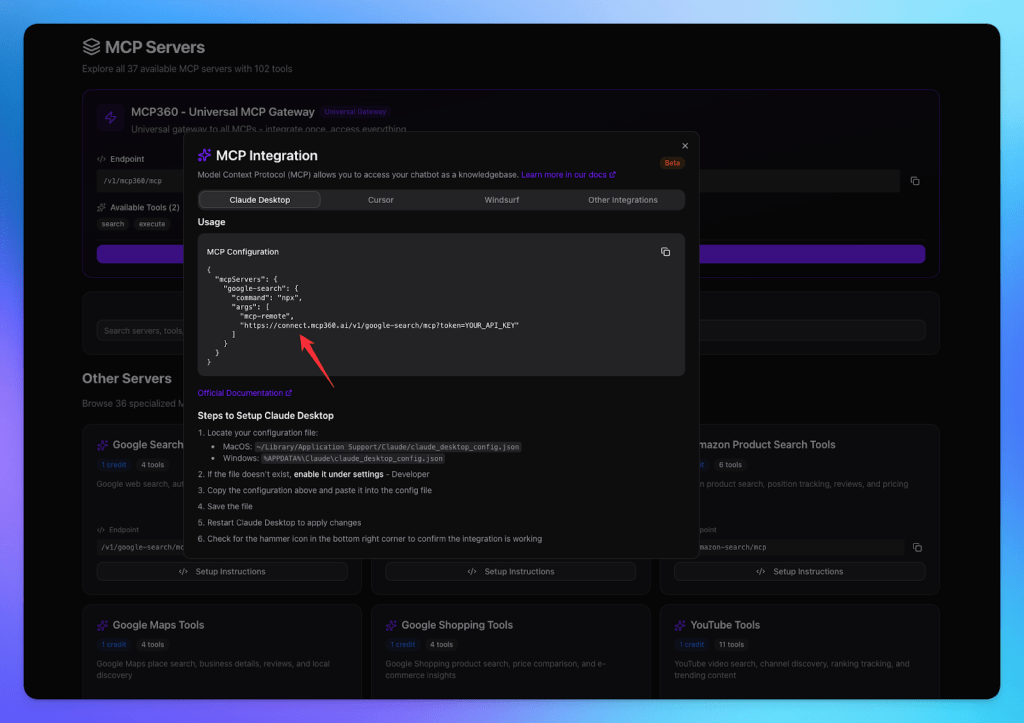
Step 1: Copy Your MCP Server URL.
- Log in to your MCP360 dashboard.
- Open an existing project or create a new one.
- Go to the MCP Server option in the sidebar.

- Copy the link of the tool you want to integrate.
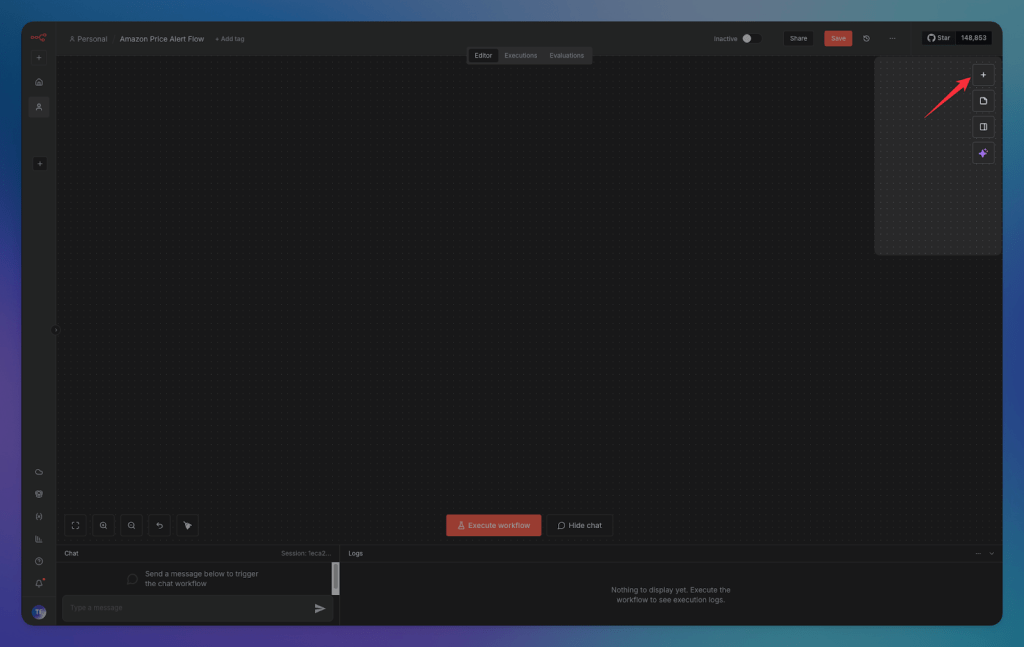
Step 2: Create an n8n Workflow.
- Log in to your n8n account.
- Create a new workflow.

- Add a node by clicking the + button in the sidebar.
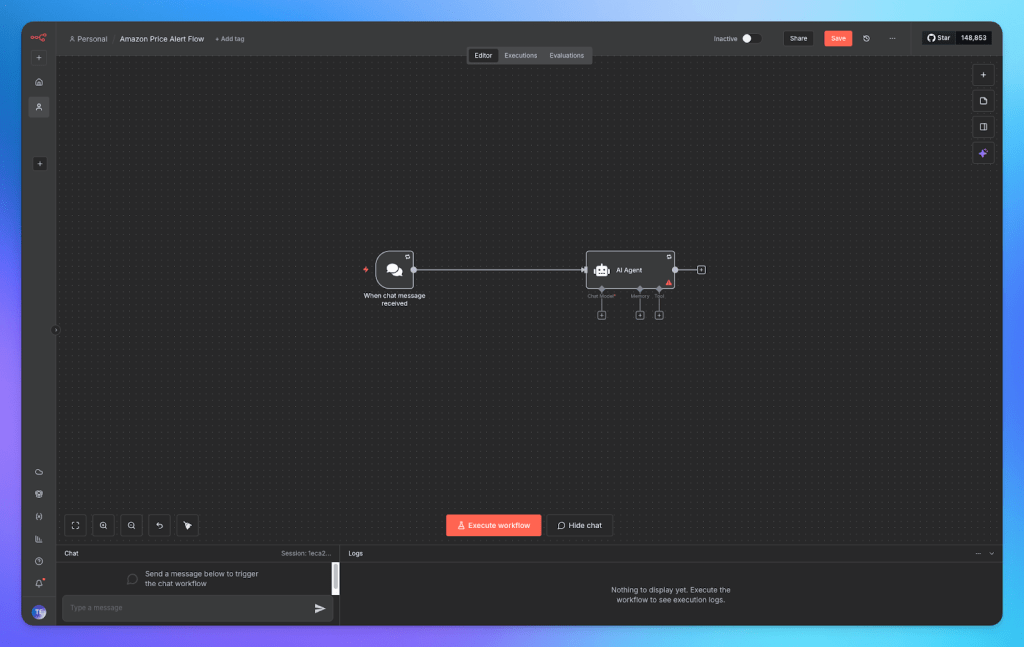
Step 3: Add an AI Agent Node.
- Add the AI Agent node to your workflow.
- Connect the AI model with the AI agent.
Step 4: Connect the MCP Client Tool
- Click the + button to add your MCP tool.

- Search and add the MCP Client Tool node.

- Enter the tool link you copied from MCP360.
- Set the server transport to HTTP Streamable and give credentials if required.

- Link the AI Agent node with the MCP tool node in your workflow.
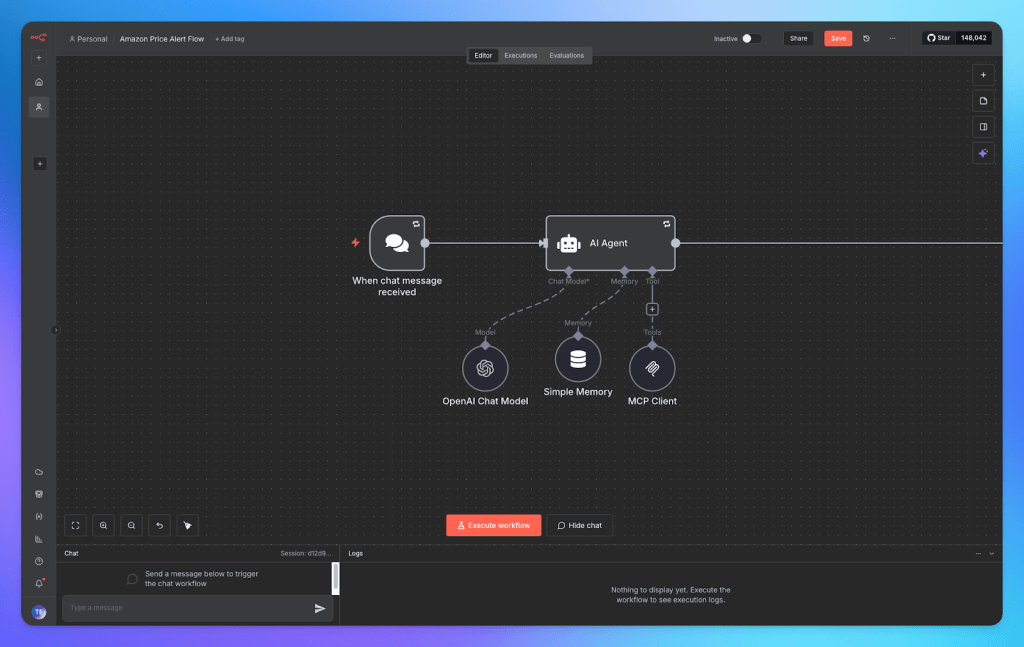
Once connected, your n8n workflow can now access any MCP360 tool. Run your workflow to test inputs and outputs. You’re all set! Automation is now efficient and seamless.
Use Cases for n8n MCP Integration
Once one gateway tool works inside an agent, adding the next is a config change inside the same node, not a new integration project. A few patterns worth building first.
- Price-drop alerts for e-commerce: Point the MCP Client Tool node at the Amazon Product Search tool, and a scheduled workflow can check a competitor’s listing, compare it against the last recorded price, and post to Slack only when something changes. No scraping code to write, no separate cron job to babysit.
- Competitor and own-site SEO scans: Wire the node to the Web Scraping and OnPage SEO Checker tools, and a weekly run can pull a competitor’s pricing and technical SEO signals, check them against your own site, and compile the gap into one report instead of two separate manual checks.
- Domain checks before outreach: An agent that pulls WHOIS and DNS data for a prospect’s domain before a rep opens the account can hand over registration age and hosting details in the same message that queues the outreach email.
- Keyword and trend validation before a brief goes out: The keyword research and Google Trends tools let an agent check search volume, difficulty, and momentum for a topic before a writer starts drafting, so the brief already answers whether the topic is worth the hour.
- News and market signal monitoring: Connect the node to the Google News tool, and an agent watching a fixed set of sources can flag a competitor announcement or industry shift the same day it happens, instead of a team finding out a week later.
Each of these reuses the same MCP Client Tool node from the walkthrough above. The only thing that changes between them is which tool from the catalog the agent points at.
Troubleshoot n8n MCP Connection Issues
Most first-connection failures land in one of four places.
- 401 Unauthorized: The token in the node’s auth field doesn’t match what the gateway expects. Check for a stray space, an expired key, or a mismatch between Bearer auth and whatever the endpoint actually requires.
- Empty tool list: The endpoint URL is wrong, or the transport setting doesn’t match the server. The gateway’s hosted endpoint expects HTTP Streamable specifically, not SSE.
- Agent ignores the tool: Two usual causes stand out. The connected chat model doesn’t support function calling, or the tool’s description is too vague for the model to recognize when to use it. A one-line system prompt addition, telling the agent to use the available tool for live data before answering, often fixes this without touching the node config.
- Fails only after activation: Confirm the workflow itself is active. The MCP Client Tool node only responds when the workflow it lives in is switched on, and a test-mode run doesn’t always catch that before deploy.
For failures that don’t match these four, MCP360’s dedicated troubleshooting guide covers connection issues by layer, transport, and auth type.
Frequently Asked Questions
What is an MCP server?
An MCP server exposes a set of callable tools, search, data lookups, or API calls, that follow the Model Context Protocol so any compatible AI client or agent can discover and use them the same way. Instead of a custom integration per tool, an agent talks to the server once and gets a standard list of what it can call and how to call it.
Does n8n have its own MCP server, or do I need a separate one?
n8n ships two different things that get confused for each other. It has a native MCP server for letting an AI client build and edit n8n workflows themselves, and separate MCP Client Tool and MCP Server Trigger nodes for connecting a workflow’s own AI Agent to outside tools. This guide covers the second one, giving an agent inside your workflow new tools to call.
What is the difference between n8n’s MCP Server Trigger and MCP Client Tool nodes?
MCP Server Trigger turns an n8n workflow into an MCP server, exposing that workflow’s own tools so an external AI client like Claude Desktop can call them. MCP Client Tool does the opposite, sitting inside an AI Agent node and letting that agent call tools hosted on an external MCP server. Connecting an outside gateway to n8n uses the Client Tool node specifically.
Why does my n8n MCP Client Tool node return a 401 error?
A 401 means the token in the node’s authentication field does not match what the server expects. Check for a stray space or an expired API key first, then confirm the authentication method, Bearer token, header auth, or OAuth2, matches what the server actually requires. A mismatch between the auth type selected and the server’s expected format causes this too.
Why is the tool list empty after connecting the MCP Client Tool node?
This usually means the endpoint URL is wrong or the transport setting does not match what the server expects. MCP360’s hosted endpoint, for example, requires Server Transport set to HTTP Streamable rather than SSE. Confirm the URL was copied in full, then check the transport dropdown matches the gateway’s documented setting before troubleshooting anything else.
Can I connect more than one MCP server to an n8n agent?
Yes, and each one gets its own MCP Client Tool node connected to the same AI Agent. A gateway like MCP360 simplifies this further, since one endpoint already carries its full tool catalog, so adding a new capability from that catalog is a config change rather than a second integration to build and maintain.
Do I need to write code to connect MCP360 to n8n?
No. The setup happens inside n8n’s visual editor. Copy an endpoint URL from the MCP360 dashboard, paste it into the MCP Client Tool node’s SSE Endpoint field, set the transport to HTTP Streamable, and add an API key. Custom Code nodes only come into play if a workflow needs logic beyond what the built-in nodes already handle.
What can I do once MCP360 is connected to my n8n workflows?
Once the node is wired in, an agent can call any tool in MCP360’s catalog, price tracking on Amazon, keyword and trend research, domain lookups, SEO scans, or news monitoring, without a separate integration for each. Adding a new capability later means pointing the same node at a different tool, not building anything new.
Conclusion
The endpoint configured above doesn’t need touching again. MCP360 adds new tools to the same gateway every month, and the workflow’s agent can reach any of them the moment they show up, without a new SSE Endpoint field to fill in or a new credential to manage. The plumbing side of this is finished.
Deciding which of those tools earns a place in the agent’s toolkit is a separate, ongoing call, not a one-time setup step. A workflow with three well-chosen tools outperforms one with fifteen the agent barely uses.
Start with the one manual lookup your team repeats most this week. Wire it in, confirm it runs clean, then let the next tool earn its spot the same way. It’s a smaller project than it looks from the outside, and it’s what turns a chat-only agent into something that checks the work for you.

Article by
RajniAI & Tech | Senior Content Writer
Rajni is a senior content writer covering AI agents, automation, and no-code tools. She writes across the AI space, from chatbots and customer support to MCP and agent workflows, focused on how businesses actually put these tools to work.