
The TL;DR
Firecrawl turned JavaScript-heavy parts of the web into content AI agents can actually read, and its official MCP server is one reason many agent stacks reach for it first.
-
• The Credit Math
Firecrawl bills in credits rather than flat page counts, and different tools consume credits at different rates. That means the plan you choose may not line up neatly with the workload your agents actually run.
-
• The Rollover Trap
Unused credits expire at the end of each billing cycle, and there is no overage option to absorb a sudden spike in usage during a busier month.
-
• When to Look Elsewhere
Teams that need pay-as-you-go billing, stronger anti-bot bypass capabilities, or a free self-hosted option may find alternatives such as Apify, Scrapfly, or Crawl4AI better suited to their requirements.
Firecrawl shows up on every shortlist for giving an agent live web access, and the docs make it look simple enough to try. What’s harder to tell from a demo, a pricing page, or a README is whether it’s actually worth paying for once a real workload is running against it.
So we ran that test ourselves instead of taking the marketing at its word. We connected Firecrawl’s official MCP server, put a real combined workload through it, and checked what it actually cost against the credit dashboard, not what the pricing page implied it would.
That’s the answer this review is built around, tested, not assumed. By the end, you’ll know whether Firecrawl is actually worth it for your workload, not just in theory.
What Firecrawl Actually Does
Firecrawl sits between an AI agent and the live web. Instead of building your own JavaScript rendering, proxy rotation, and HTML cleanup pipeline, an agent calls a tool like firecrawl_scrape the same way it calls any other function, and Firecrawl handles the rendering, anti-bot handling, and conversion to clean markdown or structured JSON underneath.
That tool-calling pattern comes from the Model Context Protocol itself, which is what lets the same connection work identically across Claude, Cursor, Windsurf, and VS Code.
The Tool Set
Six core operations do most of the work:
- Search: Finds pages across the open web and returns full content, not just snippets.
- Scrape: Converts a single URL into clean output.
- Crawl: Walks an entire site.
- Map: Discovers every URL on a domain without pulling their content.
- Interact: Clicks, types, and scrolls on a page before extraction.
- Agent: Takes a plain-language prompt, runs asynchronously, and handles the searching and navigating on its own.
Parse, Extract, five research tools for papers and GitHub repos, and eight monitor tools for recurring page checks round out the toolkit, more than a dozen tool categories behind one MCP connection.
SDK, Client, and MCP Support
Firecrawl’s SDKs cover nine languages with v2 parity, Python, Node.js, Go, Java, Elixir, Rust, Ruby, PHP with Laravel support, and .NET, the four newest (Go, Ruby, PHP, .NET) added in a single recent release. The MCP server connects to Claude, Cursor, Windsurf, VS Code, and any other MCP-compatible client with the same config block. A hosted, keyless endpoint also covers scrape, search, and interact without an account, rate-limited, for teams that want to test before committing.
Running Firecrawl alongside several other MCP servers raises a separate problem, keeping every client’s config file in sync. An open-source config manager like mTarsier handles that from one place.
The project is open source under the AGPL-3.0 license (SDKs are MIT), backed by Y Combinator. As of August 2026, the main repository has 159,600 stars, 9,100 forks, and 411 watchers, and the MCP server repository carries 7,100 stars and 830 forks.
When Firecrawl Is Better Than Building Your Own Scraper
For a single site, you probably would build it yourself. The math changes once JavaScript rendering, proxy rotation, and anti-bot bypass become a recurring problem rather than a one-off script. Firecrawl’s value is maintaining that infrastructure so your team doesn’t have to, which is also why the credit system and plan structure matter as much as the feature list covered next.
Hands-On Firecrawl MCP Review
Everything above comes from documentation, the changelog, and other reviews. For this section, we set up that same MCP connection ourselves in Claude, using Firecrawl’s own dashboard rather than a manual config file, and ran a real combined workload through it to see what actually showed up on the credit dashboard afterward.
Getting Started, Step by Step
- Sign in to your Firecrawl account and open the dashboard.
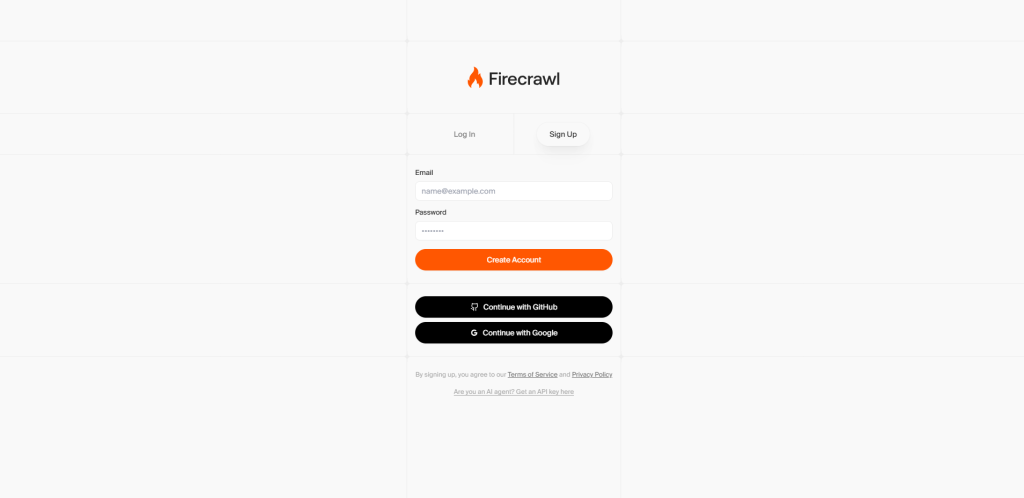
- Click Settings, then MCP, then MCP guide connection, which generates a ready-to-use MCP URL.
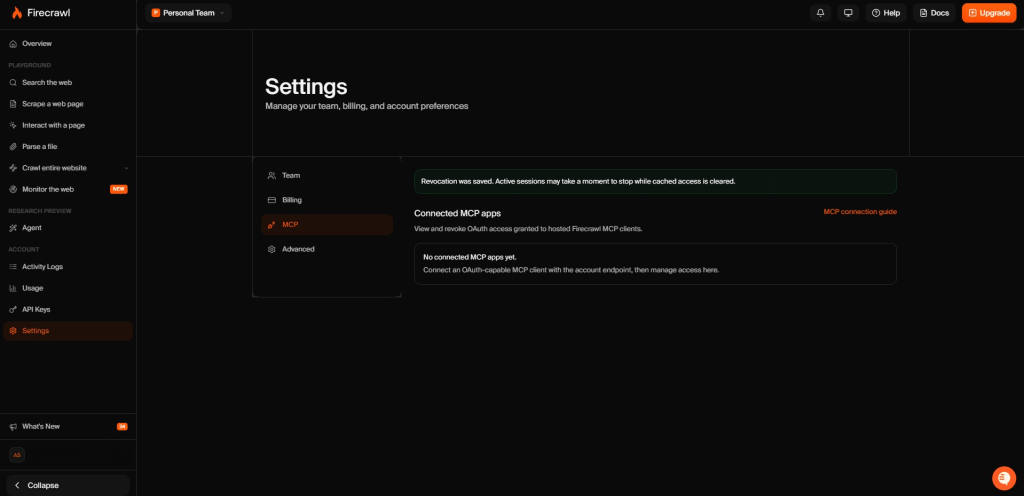
- Copy that URL, open Claude, go to Settings, and click Connectors.

- Click Add custom connector, give it a clear name, paste the Firecrawl MCP URL, and click Add.
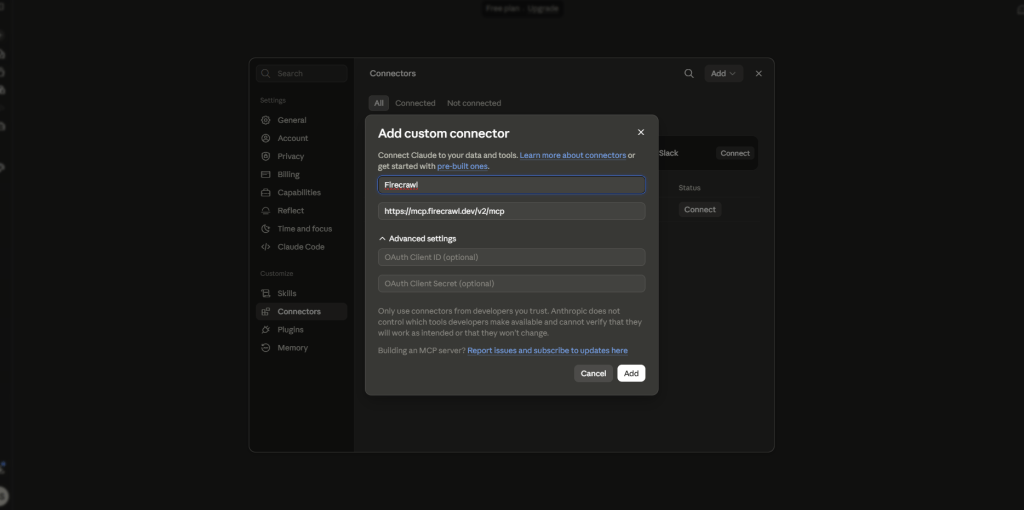
- Allow access when Claude asks for permission.
- Run a test prompt that exercises the tools you plan to use, not just one. We ran a combined prompt covering scrape, search, map, and a small crawl.

- Check the Usage page on Firecrawl’s dashboard to see exactly what that prompt cost.
Cursor, Windsurf, and VS Code don’t have Claude’s connector UI, so those clients still rely on the config-file method: env FIRECRAWL_API_KEY=fc-YOUR_API_KEY npx -y firecrawl-mcp, with the exact file location differing by client. If the tools don’t show up after a restart, a bad API key or a misconfigured connection is almost always the cause.
Firecrawl Credit Usage Test
- The observed cost was double the documented estimate: That combined prompt cost 14 credits, confirmed on Firecrawl’s Usage dashboard, against a Free plan balance of 1,000 credits refreshing monthly. Published rates predict roughly 7 credits for the same four calls.
- A likely culprit is format, not the crawl: JSON extraction and Enhanced Mode both add credits on top of the base rate, covered with exact figures in the pricing breakdown below. Either one showing up in our test would explain most of the gap.
- The dashboard doesn’t break costs down per call: Firecrawl’s Usage page shows a daily total only, so confirming the exact cause isn’t possible from the account side alone.
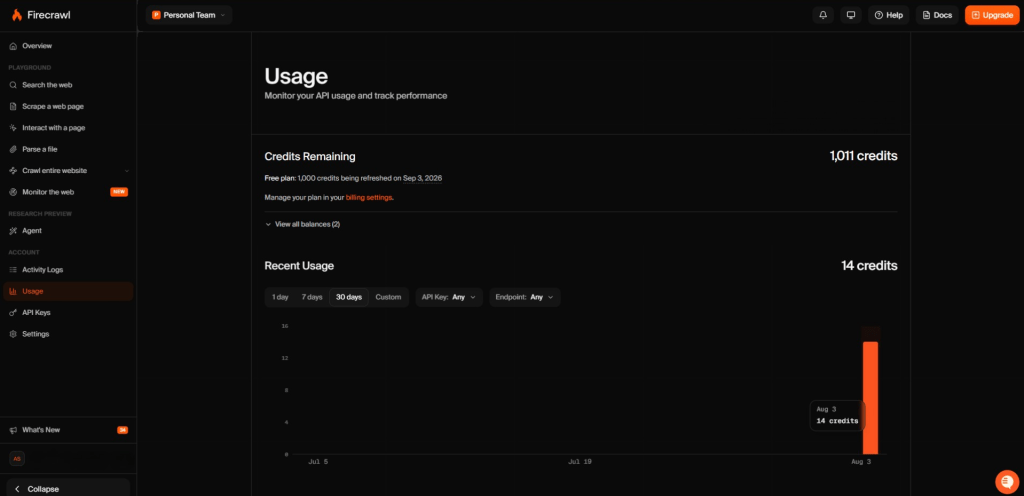
Whichever explanation is right, the lesson holds. Treat the published credit table as a floor, not a forecast. Run a small real test before sizing a plan to a real workload, and budget off what the dashboard actually shows.
A few mistakes show up often enough in the first week to flag directly.
- Pulling markdown for every scrape when JSON with a schema would return a smaller result, though as the finding above shows, JSON isn’t necessarily the cheaper option credit-wise.
- Passing a list of URLs into one scrape call instead of calling scrape once per URL, or reaching for the batch endpoint outside MCP for that case.
- Setting a crawl limit too high on the first run and getting a token overflow instead of a clean result.
Firecrawl Pricing in 2026
Firecrawl runs on a credit system across six tiers. Figures below are from Firecrawl’s live pricing page as of August 2026.
| Plan | Price (billed yearly) | Monthly Credits | Concurrent Requests | Support |
|---|---|---|---|---|
| Free | $0 | 1,000 | 2 | Community |
| Hobby | $16/mo | 5,000 | 5 | Basic |
| Standard | $83/mo | 100,000 | 50 | Standard |
| Growth | $333/mo | 500,000 | 100 | Priority |
| Scale | $599/mo | 1,000,000 | 150 | Priority |
| Enterprise | Custom | Unlimited pages | Custom | Dedicated, with SLA |
Every tier above Free bills yearly at the price shown, monthly billing costs more. Every plan also includes 1,000 bonus search credits a month, separate from the base allocation.
How Firecrawl Credits Work
- Scrape, crawl, map, and monitor cost 1 credit per page or check.
- Search costs 2 credits per 10 results, though the bonus search credits cover roughly 5,000 results before touching the main pool.
- Interact costs 2 credits per browser minute.
- Agent includes 5 free runs a day, then variable, task-based pricing.
- JSON-schema extraction and Enhanced Mode each add roughly 4 credits on top of the base rate, per independent trackers (Firecrawl’s own FAQ confirms the surcharge without itemizing it), and Stealth Mode runs closer to 5x.
Firecrawl’s No-Rollover Credit Policy
Credits reset every billing cycle on self-serve plans, rollover only kicks in on Scale and Enterprise. That penalizes uneven usage: a research sprint followed by a quiet month, a bulk import, a seasonal spike, and there’s no pay-as-you-go tier to absorb any of it either. Firecrawl also charges for any page it fetches successfully even when the target site returns an error, only failures on Firecrawl’s own side, like a timeout, go uncharged.
Estimated Monthly Costs
| Monthly Usage | Plan That Covers It | Cost | Note |
|---|---|---|---|
| 4,000 pages | Hobby (5,000 credits) | $16/mo | Headroom mostly unused |
| 90,000 pages | Standard (100,000 credits) | $83/mo | A close, efficient fit |
| 120,000 pages | Growth (500,000 credits) | $333/mo | 4x the spend for 20% more volume, with no tier in between |

“Got the impression, that this company tries to push all users to pay now”
Using Firecrawl in Production
Firecrawl ships changes at a steady pace, most of it additive rather than disruptive. The clearest exception is the move from the v1 API to v2.
Firecrawl v2 Migration Changes
The migration is documented in a dedicated guide rather than treated as a footnote. Real breaking changes for anyone still on v1:
- Format strings changed for basic outputs (markdown, html, rawHtml, links, summary, images).
- The old
parsePDFoption was replaced by aparsersarray. - JSON, change-tracking, and screenshot formats moved from flat parameters to an object-based structure.
Not everyone had a smooth rollout. In Firecrawl’s own Discord community-help channel, one developer flagged the v2 SDK upgrade as a breaking change with no visible migration guide and no CHANGELOG.md at the time, the same “was this an unannounced breaking change” pattern that shows up around any fast-moving API. Firecrawl has since published the migration guide referenced above, so that specific gap appears resolved, but it’s a fair data point on what early adopters of a version bump can run into.
Security, Updates, and Maintenance
Firecrawl hasn’t had a publicly disclosed security incident as of this research, and its GitHub releases show routine hygiene worth checking for in any vendor:
- Recent CVE patches across several dependencies, including handlebars, path-to-regexp, fast-xml-parser, and rollup.
- Hardening against SSRF attacks in its Playwright-based rendering service.
- SOC 2 Type II certification.
- A new team activity endpoint listing recent scrape, crawl, and extract jobs with pagination, useful for anyone who wants a record of what an agent actually did.
None of this points to Firecrawl being unstable. It points to an API still evolving fast enough that pinning a specific format or endpoint in production code is worth revisiting each time a major version ships.
The more relevant risk with any scraping tool isn’t the vendor’s own security record, though. It’s what happens to the content it fetches once your agent reads it. Treat anything a scraped page returns as untrusted input, not instructions, since a page can carry hidden text aimed at steering an agent that reads it, a prompt injection risk that applies to any scraping tool, not just Firecrawl.
What Firecrawl Users Say
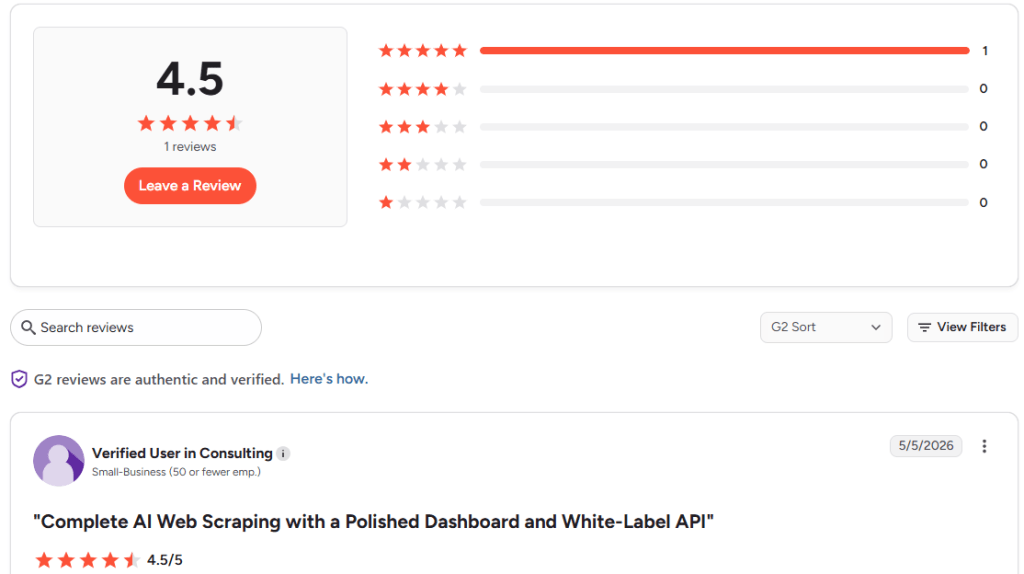
G2 shows exactly one review for Firecrawl as of this writing, 4.5 out of 5, from a verified small-business user in consulting, posted in May 2026. For a project with 159,600 GitHub stars, that’s an extremely thin formal sample, and it settles the disagreement between earlier trackers, some implying a large G2 review base, others claiming none at all. Product Hunt shows a smaller but more active and consistently positive set of reviews and founder testimonials.
What Users Praise
- Clean, LLM-ready markdown that removes the need for a separate HTML-parsing step.
- Reliable handling of JavaScript-heavy and dynamic sites that trip up simpler scrapers.
- A fast path from signup to a working integration, commonly described as an afternoon’s work rather than a multi-day project.
- A polished dashboard and clear enough documentation to white-label directly into another product, per the G2 review above.
What Users Flag
- The credit rollover policy is the most consistently repeated complaint across independent trackers and community threads, the same friction point covered in the pricing section above.
- Credit costs climb fast once JSON extraction or Enhanced Mode enter the picture, echoing the exact gap our own test run hit.
- Anti-bot mechanisms on harder targets still get through sometimes, per the G2 reviewer’s own experience.
- Concurrency on the lower tiers slows down large parallel crawls, a limitation Firecrawl addresses by raising concurrent-request limits at each higher plan tier rather than offering a standalone concurrency add-on.
None of this contradicts the picture the rest of this review paints. The praise centers on what Firecrawl is built to do well, turning messy pages into clean data. The complaints center almost entirely on the credit and rollover mechanics covered above, not on the core product failing to work.
“the markdown chunks from Firecrawl lead to really poor retrieval in the vector DB”
Best Firecrawl Alternatives
Firecrawl fits teams that want a managed API for LLM-ready output without running scraping infrastructure themselves. Outside that profile, a few alternatives solve the problem differently.
- Apify takes a marketplace approach, with 55,000-plus pre-built scrapers, called Actors, covering most named sites directly. Free with $5 monthly credit, then $29 to $999 a month, plus pay-as-you-go overflow (Apify’s own credits don’t roll over either). Best for a specific target like LinkedIn or Amazon without building against Firecrawl’s general endpoints.
- Scrapfly leads on anti-bot bypass depth, with one credit pool spanning its scrape, browser, and screenshot products. Cost scales with bypass difficulty, from 1 credit for a plain fetch up to many more for a full stealth session. Free key ships with 1,000 credits, paid tiers add pay-as-you-go overflow. Best for the toughest anti-bot walls.
- MCP360 takes a gateway approach instead of a dedicated scraping tool. Its Web Scraping server covers basic extraction at 1 credit per use, bundled with 100+ other tools across search, SEO, and data APIs. Pricing runs $0 to $333 a month. Best for occasional scraping that doesn’t justify a separate subscription on its own.
- Crawl4AI is free and open source, installed with a single
pip installcommand and run on your own infrastructure, no hosted service, no per-page bill. More than 75,000 GitHub stars, one of the most-starred crawlers on GitHub. Best for teams with engineering time to spend instead of budget.
Is Firecrawl Right for You
Choose Firecrawl If
- LLM-ready output matters more than building your own HTML-cleanup pipeline, and steady, forecastable scraping volume fits a fixed monthly credit budget.
- The official MCP server’s tool set, scrape, crawl, map, search, interact, agent, parse, extract, and monitor, covers most of what an agent-building team needs behind one connection.
- Subscription billing works fine, and pay-as-you-go isn’t a requirement for matching spiky usage.
Consider Alternatives If
- The workload is genuinely irregular, a research sprint one month and near-zero the next, where Firecrawl’s no-rollover policy quietly taxes every quiet month.
- Instagram, TikTok, or YouTube are among the actual targets, which Firecrawl explicitly restricts regardless of plan tier.
- Hard anti-bot walls are the real bottleneck, where Scrapfly or Bright Data’s specialized bypass work outperforms Firecrawl’s general-purpose handling.
- Scraping is a small, occasional part of a much larger toolkit already built around search, SEO, or other data APIs, where MCP360’s bundled Web Scraping server avoids a second subscription.
- Budget is the constraint and engineering time is available instead, where Crawl4AI removes the credit system entirely at the cost of running your own infrastructure.
The credit system is the one part of this decision worth testing before a card gets charged. Run a real week of the actual workload through the Free tier, and check the credit burn against what a full month would look like. Treat Firecrawl’s live pricing page as the source of truth over any review, including this one, since plan pricing, credit costs, and rate limits have all shifted before.
If that trial week shows a good fit, the setup steps above get a working connection running in minutes. If it doesn’t, the alternatives above map a specific replacement onto whichever gap actually blocked it.
Frequently Asked Questions
What is Firecrawl?
Firecrawl is a web data API built for AI applications. It converts any URL into clean markdown, structured JSON, or a screenshot, handling JavaScript rendering and anti-bot bypass automatically. Developers connect it to agents through an official MCP server, so tools like Claude or Cursor can scrape and search the live web directly.
Is Firecrawl free?
Yes, Firecrawl’s Free plan gives 1,000 credits a month at no cost, enough for roughly 1,000 basic scrapes. Paid plans start at $16 a month for 5,000 credits. Credits reset every cycle and don’t roll over on any self-serve plan, so unused capacity from a quiet month disappears.
Does Firecrawl work with Claude and other MCP clients?
Yes. Firecrawl ships an official MCP server that connects to Claude, Cursor, Windsurf, VS Code, and any other MCP-compatible client. Firecrawl’s dashboard generates a ready-to-use MCP URL to paste into Claude’s Connectors settings directly, no manual config file needed, though Cursor and VS Code still use the config-file method.
Why do Firecrawl credits run out faster than expected?
Credit costs vary by feature. A basic scrape costs 1 credit, but JSON extraction and Enhanced Mode each add roughly 4 credits, and Stealth Mode runs closer to 5 times the base rate. Our own test found a mixed batch of calls cost double the documented estimate. MCP360’s Web Scraping tool avoids this by charging a flat 1 credit per use, with less depth than Firecrawl’s crawl and anti-bot handling.
Do Firecrawl credits roll over?
No. Unused credits expire at the end of every billing cycle on Free, Hobby, Standard, and Growth. Rollover only applies on Scale and Enterprise. This is the most common complaint from reviewers, since it penalizes teams with uneven, seasonal, or bursty scraping schedules.
Is Firecrawl open source?
Yes, the core project is open source under the AGPL-3.0 license, with SDKs under MIT. It’s backed by Y Combinator, and its main GitHub repository has more than 159,000 stars. For a fully free, self-hosted option instead, Crawl4AI removes the credit system entirely.
What are the best Firecrawl alternatives?
It depends on the gap. Apify fits a specific named site like LinkedIn or Amazon through its 55,000-plus Actors. Scrapfly leads on anti-bot bypass depth. MCP360’s bundled Web Scraping server suits occasional scraping alongside other tools like search and SEO. Crawl4AI removes the credit system for teams with engineering time to self-host.
How does MCP360 compare to Firecrawl on price?
MCP360’s Web Scraping server costs 1 credit per use, bundled inside a plan that also covers 100-plus other tools across search, SEO, and data APIs, starting free and scaling to $333 a month. Firecrawl’s plans are scraping-only, starting at $16 a month for 5,000 credits, with deeper crawl and anti-bot handling MCP360 doesn’t replicate.

Article by
RajniAI & Tech | Senior Content Writer
Rajni is a senior content writer covering AI agents, automation, and no-code tools. She writes across the AI space, from chatbots and customer support to MCP and agent workflows, focused on how businesses actually put these tools to work.