The TL;DR
An MCP tool is a function an AI model can call to take a real action, like running a search, querying a database, or sending an email, instead of only generating text.
-
• What a Tool Does
The action primitive of MCP, a model-controlled function that can change state, unlike read-only resources and reusable prompts.
-
• How You Use Them
A client finds tools with
tools/listand runs them withtools/call, so you connect a server to a client like Claude and ask in plain language. -
• The Catch
A tool’s description is trusted by the model but hidden from you, which is why tool poisoning is a real risk and vetting plus human approval matter.
AI models are strong at reasoning and weak at acting. A model can draft a SQL query but cannot run it against your warehouse. It can describe an email but cannot send it. The Model Context Protocol closes that gap, and tools are the part of the protocol that does the actual work. When people ask what their AI agent can “do,” they are almost always asking about tools.
This guide covers what an MCP tool is, how it differs from the other things an MCP server exposes, what happens on the wire when a model calls one, how to connect and use tools in a real client, and where the security risks sit. The mechanics below come from the MCP specification, not from a summary of it.
What Is an MCP Tool?
A tool is an executable function that an MCP server exposes to a model. The Model Context Protocol is an open standard for connecting AI systems to outside tools and data. Anthropic introduced it in November 2024. OpenAI adopted MCP in March 2025 and Google followed the next month.
By the time Anthropic donated the protocol to the Agentic AI Foundation under the Linux Foundation that December, both companies were already backing it, alongside Microsoft and AWS. Within that standard, a server can expose three kinds of capability, and tools are the action-oriented one.
Core Components of an MCP Tool
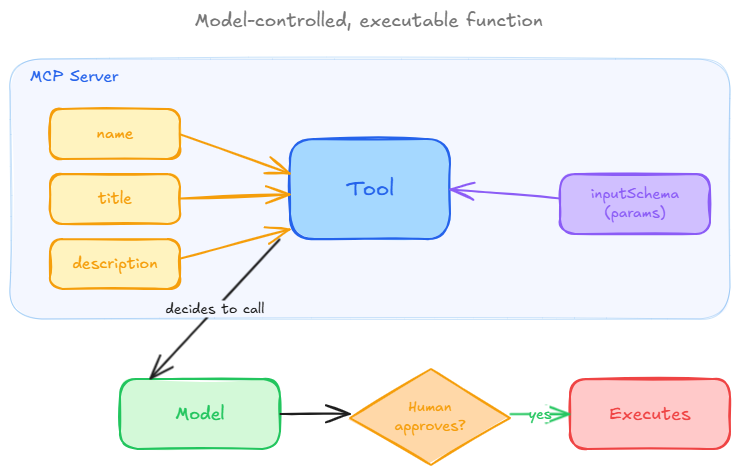
The spec describes tools as model-controlled. The model decides when to invoke one based on the conversation, with a human in the loop able to approve or deny the call. A calculator that adds two numbers, a function that creates a GitHub issue, and a query that pulls live pricing from an API are all tools.
Every tool carries metadata so the model knows what it is and how to call it, a unique name, an optional title, a description, and an inputSchema written in JSON Schema. A weather tool, for example, declares that it needs a location string, and the model fills that argument from the user’s request.
That self-description is the point. A model can discover and call tools it was never trained on, because each one announces its own name, purpose, and expected inputs. Add a new server, and its tools work without retraining anything.
Tools vs Resources vs Prompts
An MCP server can expose more than tools, and mixing them up leads to wrong assumptions about what an agent can do. The protocol defines three primitives, each controlled by a different party.
| Primitive | What It Is | Who Controls It | Example |
|---|---|---|---|
| Tools | Executable actions that can change state or call external systems | Model-controlled (model chooses when to call) | Send an email, create a calendar event, run a search |
| Resources | Read-only data the model can pull in as context | Application-controlled | A file, a database record, an API response |
| Prompts | Reusable templates that structure an interaction | User-controlled | A “review this pull request” template |
The line that matters most is tools versus resources. A resource returns data and has no side effects, similar to a GET request. A tool performs an operation and can modify something, closer to a POST. When a reader asks “can my agent update the ticket,” they are asking about a tool, not a resource. Knowing which primitive you’re dealing with tells you which capability a given task needs.
Once you know that, the next question is what actually happens on the wire when a tool gets called.
How an MCP Tool Call Works
The flow has two steps the protocol names directly, discovery and invocation. Both run as JSON-RPC 2.0 messages between the client and the server, so the exchange looks the same regardless of language or platform.
Discovery Happens Through tools/list
When a client connects, it asks the server what tools exist. The server replies with an array of tool definitions, each carrying its name, description, and inputSchema. If the catalog is large, the response can paginate with a nextCursor value. A single tool in a tools/list response looks like this.
{ "tools": [ { "name": "get_weather", "title": "Weather Information Provider", "description": "Get current weather information for a location", "inputSchema": { "type": "object", "properties": { "location": { "type": "string", "description": "City name or zip code" } }, "required": ["location"] } } ]}
Invocation happens through tools/call
Once the model picks a tool, the client sends a request naming the tool and supplying its arguments.
{ "jsonrpc": "2.0", "id": 2, "method": "tools/call", "params": { "name": "get_weather", "arguments": { "location": "New York" } }}
The server runs the operation and returns a content array holding text, an image, or an embedded resource. A tool can also declare an outputSchema and return structured data in a structuredContent field for the client to validate.
Errors live inside the result, not as protocol-level failures. A failed tool call still returns normally, with isError set to true and a message explaining what went wrong, so the model can see the failure and react. A server can also flag that its tool list changed by sending notifications/tools/list_changed, telling the client to re-run tools/list. That mechanism is what makes dynamic tool sets possible.
How to Use MCP Tools in a Real Client
Reading the protocol is one thing. Connecting tools to an agent you actually use comes down to five steps. The walkthrough below connects one server to Claude. Cursor, VS Code, and Windsurf follow the same idea, with the endpoint going into a config file instead of connector settings.
Step 1. Pick a Server That Has the Tools You Need
A tool lives inside a server, so start by choosing the server that exposes the action you want. A GitHub server gives you issue and pull-request tools. A filesystem server gives you read and write tools. A search server gives you web-search tools. You can run a server yourself or pull one from a catalog, using MCP360’s 10 essential MCP servers roundup as a faster starting point than searching one tool at a time. Each server gets its own endpoint, so you connect just the one you need.
Step 2. Connect the Server to Claude
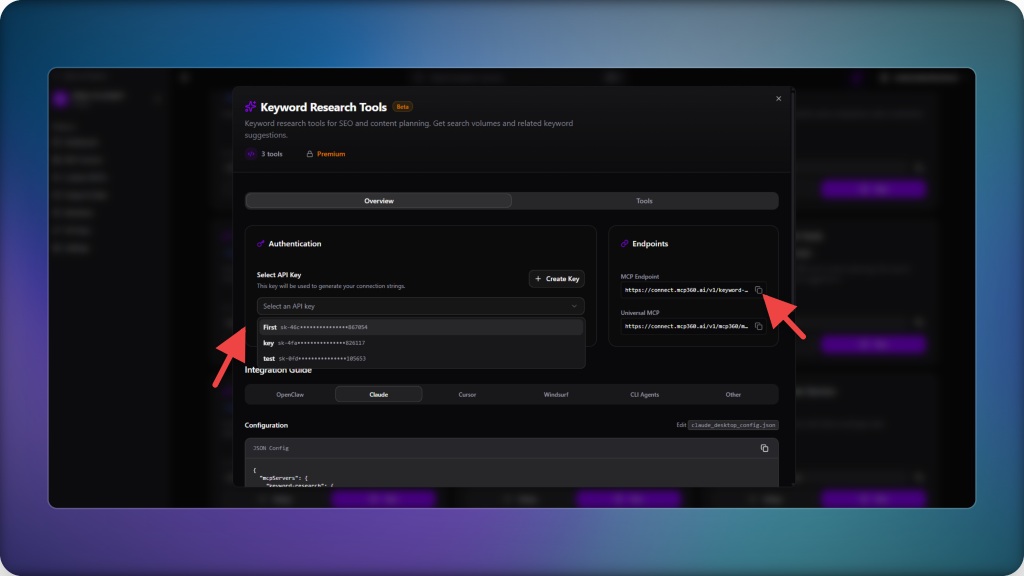
The connection has two halves. Copy the server’s endpoint from MCP360, then add that endpoint to Claude as a connector, whether you’re on web, desktop, or Code. The example below uses the Keyword Research Tools server.
Generate tool endpoint:
- Log in to MCP360 and create a new project. Give it a clear name you will recognize later.

- Open the project and go to the MCP servers section of the dashboard.

- Find the Keyword Research Tools server and click Setup.

- Select API Key and copy the MCP endpoint URL shown on screen. That endpoint is what Claude connects to.
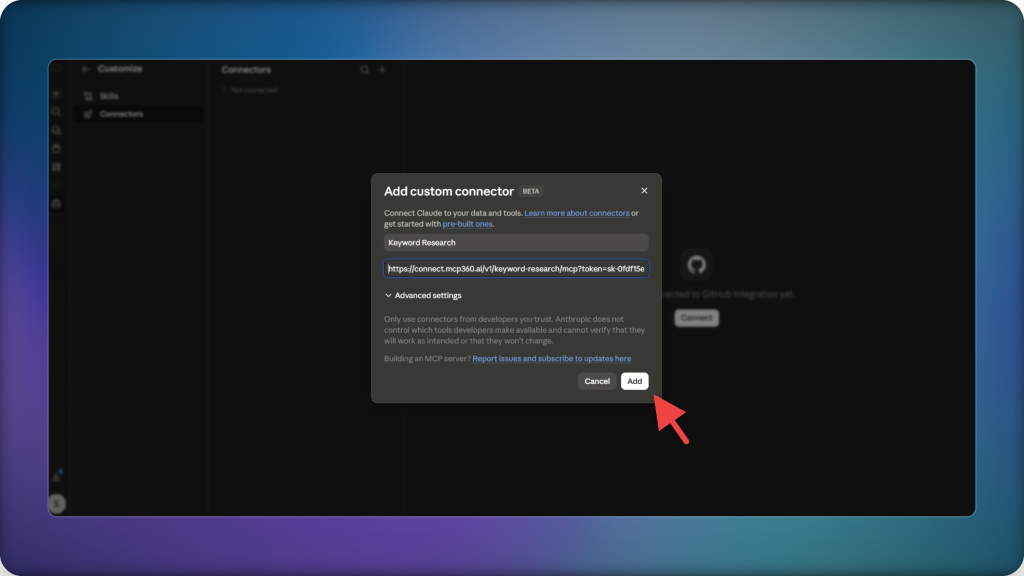
Add a custom connector in Claude:
- Open Claude’s customization settings and go to Connectors, then click Add connector.

- Name the connector something recognizable, for example “Keyword Research.”
- Paste the endpoint you copied and click Add.
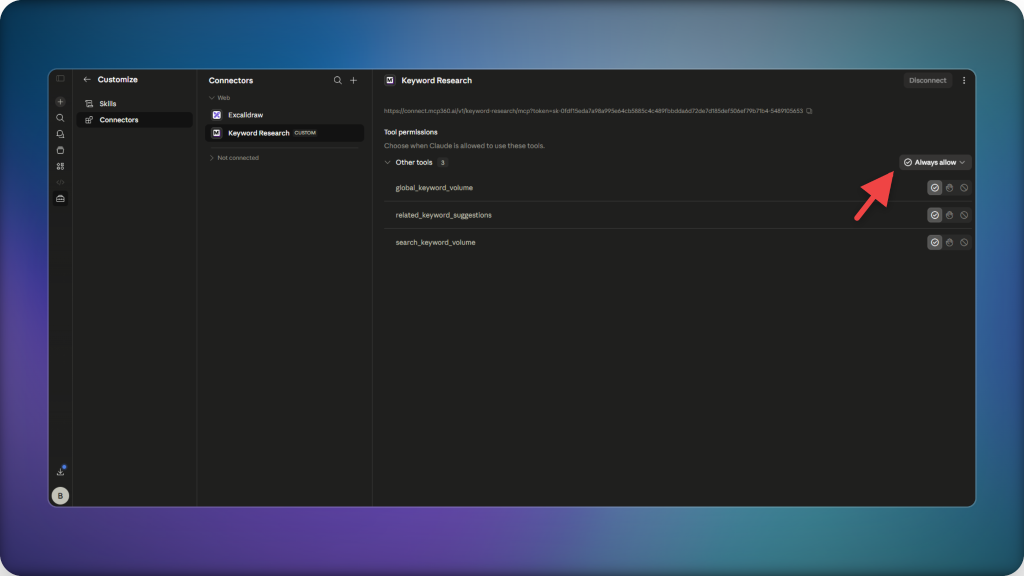
- The connector appears in your list. Open it and enable the permissions it needs before first use.
Step 3. Confirm the Tools Loaded
Once the connector is added and permissions are enabled, Claude runs tools/list against the server, and the keyword research tools appear under that connector. If tools don’t show up, the issue is usually a wrong endpoint or a missing permission, not the tools themselves.
Step 4. Call a Tool in Plain Language
Tool invocation isn’t manual. Describe the task, and the model maps it to the right tool. With the keyword research server connected, a prompt like “use MCP360 to pull search volume and related keywords for ai chatbots” is enough. Naming MCP360 in the prompt helps route the request to the right server, and the tools/call exchange happens automatically.

This is also where MCP differs from wiring up a raw API yourself. A direct API call means defining schemas, writing handlers, and repeating that work for every model you support. A tool skips all of that because the server already describes itself, and any MCP client can read that description.
Step 5. Decide What Happens After the Result
A tool returns data, and often the next step is another action, filtering rows, approving a change, submitting a form. In a plain chat flow, each of those becomes a new prompt. MCP Apps extend tools so the result renders as an interface you act on directly, useful once your agent’s work grows into full tasks, apps, and extensions instead of one-shot calls.
Security and Risk in MCP Tools
Tools carry the risk in MCP because they’re the part that takes action. A model trusts a tool’s description to decide what the tool does, and that description is usually hidden from the person using the agent. Whatever sits inside it reaches the model, not your eyes.
Three risks follow from that gap.
Tool Poisoning
A malicious server hides instructions inside a tool’s metadata. The tool looks harmless, but the model reads and acts on the hidden text anyway.
- Invariant Labs documented the technique in 2025, showing a malicious server sharing context with a legitimate WhatsApp server exfiltrate a user’s message history, with no user error and no network exploit involved.
- Microsoft and OWASP both classify it as indirect prompt injection, cataloged as LLM01 in the OWASP Top 10 for LLM applications.
Rug Pulls
A server changes a tool’s definition after a user has already approved it, and most clients never flag the change.
- Simon Willison’s early analysis argued that clients should show tool descriptions up front and alert on any later change. Many still don’t.
- CVE-2025-54136, disclosed in Cursor, is the clearest example on record. An attacker who could edit an already-approved MCP configuration file swapped in a malicious command with no re-prompt from the editor, reaching persistent code execution.
Over-Privileged Access and Credential Sprawl
Broad permissions turn a single poisoned tool into a much larger breach.
- Servers that each hold their own long-lived API keys multiply that exposure.
- OWASP tracks this separately as LLM06, Excessive Agency, granted when a model has more functionality, permissions, or autonomy than a task actually requires.
Defenses That Actually Help
No single control closes all three gaps, so the defenses stack instead of compete.
- Keep a human in the loop for tool approvals. The spec recommends this by design.
- Review tool descriptions before granting access, and pick clients that surface changes to them.
- Scope credentials tightly instead of handing tools long-lived keys.
- Connect servers from vetted sources. A tool is only as trustworthy as its publisher.
Recent updates to the MCP spec and NSA/CISA guidance directly address several of these risks.
Frequently Asked Questions
What are MCP tools?
MCP tools are executable functions that an MCP server exposes to an AI model, letting it search a database, send an email, or call an API instead of only generating text. Each tool carries a name, a description, and an input schema written in JSON Schema, so a model can discover what a tool does and call it correctly without being trained on that specific tool.
What is the difference between MCP tools and resources?
Tools perform actions and can change state, similar to a POST request, while resources only return read-only data for context, similar to a GET request. A model decides on its own when to call a tool, but an application or user typically controls when a resource gets pulled in. If a task needs to update a record or send a message, that calls for a tool, not a resource.
How does an MCP tool call actually work?
An MCP tool call runs in two steps over JSON-RPC 2.0. First, the client sends a tools/list request, and the server replies with every available tool’s name, description, and input schema. Once the model picks one, the client sends a tools/call request carrying the arguments, and the server runs the operation and returns the result, flagging isError as true if something went wrong.
How do I connect an MCP tool to Claude?
Pick a server that exposes the tool you need, copy its MCP endpoint, and add it in Claude under Connectors. After enabling the connector’s permissions, Claude runs tools/list automatically and the tool becomes usable in plain language right away. MCP360 provides ready-made endpoints for over 100 tools, so you can connect a server like Keyword Research without building or hosting one yourself.
What is MCP tool poisoning?
MCP tool poisoning is an attack where malicious instructions are hidden inside a tool’s metadata, invisible to the person using the agent but fully readable by the model. The model follows those hidden instructions while the tool still looks harmless on the surface. Microsoft and OWASP both classify it as indirect prompt injection. Connecting only vetted servers, the approach a catalog like MCP360 takes, reduces this exposure.
What is an MCP rug pull?
A rug pull happens when a server changes a tool’s definition after a user has already approved it, and most clients never flag the change. CVE-2025-54136, disclosed in Cursor, showed an attacker swap an approved MCP configuration for a malicious command with no re-prompt, reaching persistent code execution. Clients that show tool descriptions up front and alert on later changes are the main defense against this.
Is it safe to connect third-party MCP tools?
Third-party MCP tools carry real risk because a model trusts a tool’s description without you seeing it, so safety comes down to vetting the source, scoping credentials tightly, and keeping a human in the loop for approvals. A single gateway that vets its catalog, like MCP360, also cuts down the credential sprawl that comes from running a separate long-lived key for every server you connect.
Do I need to write code to use MCP tools?
No. Once a tool is connected to a client like Claude, you describe the task in plain language and the model matches it to the right tool automatically, filling in the arguments itself. Writing code only comes in on the server side, when someone builds or configures the tool in the first place, not when you’re simply using one that’s already connected.
Conclusion
Tools are what move an AI model from describing work to doing it. As MCP adoption grows and the number of available servers expands, the harder question becomes how an agent reaches the right tool safely, without drowning the model in context or trusting an unvetted publisher.
MCP360 puts a single catalog of 100+ tools behind one integration and surfaces each tool on demand through its search_tools and execute_tool meta-tools. An agent loads only what a task needs, and a team connects once instead of standing up and securing every server on its own.
The trust boundary and the context budget stop being a server-by-server chore. As agents take on more real work, that’s what separates a model that can talk about your systems from one that can act on them.
Browse the marketplace and connect a server in minutes to see it for yourself.

Article by
RajniAI & Tech | Senior Content Writer
Rajni is a senior content writer covering AI agents, automation, and no-code tools. She writes across the AI space, from chatbots and customer support to MCP and agent workflows, focused on how businesses actually put these tools to work.