The TL;DR
MCP’s July 28, 2026 spec introduces three connected but separate updates: a formal Extensions framework, MCP Apps, and MCP Tasks. Existing implementations remain unaffected until the final specification ships.
-
• MCP Tasks Replace Blocking Calls
Long-running operations return a durable task handle instead of keeping the connection open. Tasks are also moving from an experimental core feature into a standalone extension.
-
• Extensions Get a Formal Process
The new framework supports features such as Apps and Tasks without adding them directly to the core protocol. Extensions receive reverse-DNS identifiers and follow a formal approval process.
-
• The Clock Is Running
The release candidate was locked on May 21, 2026, with the final specification scheduled for July 28, 2026. Implementations built around session IDs will need updates because the final release includes breaking changes.
MCP’s 2026 updates have arrived through several announcements, each describing a different part of the protocol’s evolution. The March post introduced the Extensions framework, the May release candidate outlined the next spec revision, and the June SDK update made early implementations available to test.
That rollout has made the current status easy to misread. Tasks, Apps, and Extensions are related, but they sit at different layers and follow different release timelines. Extensions provides the framework. Apps is already available across supported clients. Tasks is moving from an experimental core capability into a standalone extension with a defined migration path.
This blog explains how the three features fit together, what is available now, what changes when the July 28 specification ships, and what MCP server developers should review before then.
What Changes in the MCP 2026-07-28 Spec
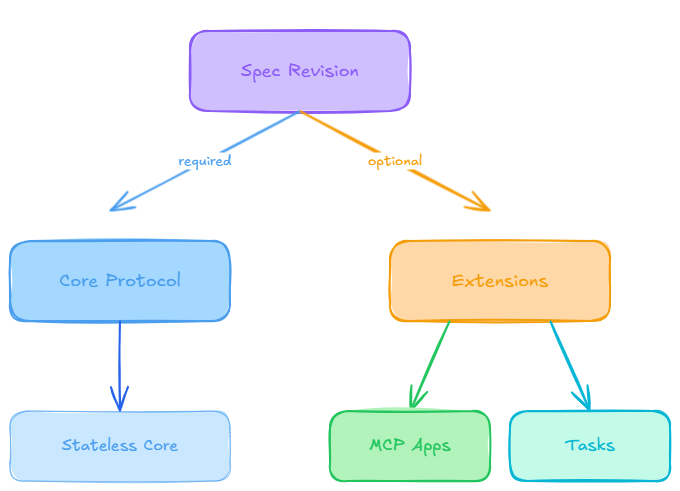
On May 21, 2026, the MCP maintainers published the release candidate for specification version 2026-07-28. It is the protocol’s largest revision since launch, introducing a stateless core, stronger OAuth and OpenID Connect authorization, a formal deprecation policy, and a first-class Extensions framework.
The stateless redesign is important for infrastructure, but it is not the focus of this article. The more relevant change is that MCP now has a formal way to add new capabilities without placing every feature inside the core protocol.
A specification revision defines the base protocol that clients and servers use to communicate. Extensions sit on top of that base and remain optional. Clients and servers advertise which extensions they support, and features are enabled only when both sides recognize them. When an extension is unsupported, the implementation can fall back to standard MCP behavior rather than breaking the entire connection.
MCP Apps and MCP Tasks show how this model works. Apps allow servers to return interactive interfaces such as forms, dashboards, and multi-step workflows inside supported clients. Tasks represent durable, long-running operations that clients can monitor through polling and deferred result retrieval. Tasks were also redesigned and moved out of the core protocol so they can evolve independently as an official extension.
The release does not force an immediate migration. Although adopting the new protocol revision may require code changes, July 28, 2026 is not a shutdown date for existing implementations. Beta SDKs for Python, TypeScript, Go, and C# are already available for testing, while existing clients and servers can continue using earlier protocol versions and migrate on their own schedule.
How MCP Extensions Expand the Protocol
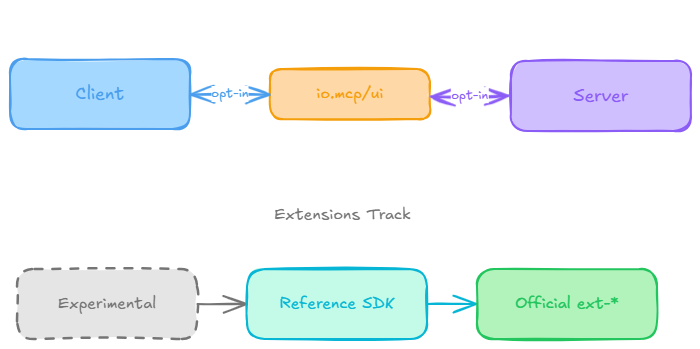
Extensions existed informally before this release, but they had no shared identifier scheme and no formal review process. SEP-2133 fixes that. Under the new framework:
- Extensions carry reverse-DNS identifiers, the same naming pattern used for Java packages. Official extensions use the
io.modelcontextprotocolprefix. A third-party extension would use a domain the author actually owns, for examplecom.example/my-extension. - Extensions live in their own
ext-*repositories with delegated maintainers, and version independently of the core spec. A breaking change to an extension doesn’t force a new core spec release. - Extensions are negotiated per connection, not assumed. A client declares which extensions it supports in its
initializerequest, and a server does the same in its response. Something like this on the client side:
{ "capabilities": { "extensions": { "io.modelcontextprotocol/ui": { "mimeTypes": ["text/html;profile=mcp-app"] } } }}
- Extensions are always opt-in and disabled by default. If a server supports MCP Apps but a client doesn’t declare it, the server is expected to fall back to plain text or structured data rather than assume the UI will render.
There’s also a new Extensions Track in the SEP process, which gives an idea a path from experimental prototype to official extension. An extension starts in an experimental-ext-* repository tied to a Working Group, gets at least one reference implementation in an official SDK, then goes through the same review Standards Track SEPs get before it’s promoted. This release includes exactly two official extensions built through that pipeline: MCP Apps and MCP Tasks.
The upside for anyone running MCP servers is a smaller core protocol. New capabilities don’t become mandatory for every client and server just because a few teams need them. They stabilize as extensions first, and only fold into the base spec, if ever, once they’ve proven themselves in production.
MCP Apps in the Extensions Framework
MCP Apps let a tool return an interactive HTML interface instead of plain text, rendered inline inside the conversation rather than in a separate browser tab. The idea shipped as a proposal (SEP-1865) in November 2025, went live as the first official MCP extension on January 26, 2026, and this release folds it formally into the new Extensions Track.
How It Works
A tool description points to a ui:// resource through a _meta.ui.resourceUri field. The host preloads that resource, fetches the HTML, and renders it in a sandboxed iframe alongside the tool’s response. From there, the app and the host talk over a JSON-RPC dialect carried on postMessage, so the app can request further tool calls or send data back to the model without the user typing another prompt. The mechanics haven’t changed since launch.

Where It Renders Today
Client support is what’s actually changed. At launch, MCP Apps worked in a handful of clients. As of July 2026, per the official extension support matrix, it renders in eleven:
- Claude (web) and Claude Desktop
- VS Code GitHub Copilot and Microsoft 365 Copilot
- ChatGPT and Cursor
- Goose, Postman, MCPJam, Archestra.AI, and PostHog Code
That list is community-maintained and moves faster than most spec documentation, so recheck it before you rely on any single client’s support.
For a deeper look at what MCP Apps makes possible, filterable dashboards, approval forms, live monitoring views, see our full breakdown of MCP Apps use cases.
MCP Tasks as an Extension

Tasks solves a narrower, more infrastructural problem than Apps does. Not every tool call finishes instantly. CI pipelines, batch imports, and anything waiting on human approval can take minutes or longer, and holding a connection open for that entire window doesn’t work well against timeouts, unreliable networks, or a client that restarts mid-call.
Tasks shipped experimentally as part of the core spec in the 2025-11-25 release. Production use surfaced enough redesign work, according to the maintainers, that the right home for it turned out to be an extension rather than a permanent core feature. The redesigned version works like this:
- The client advertises support for
io.modelcontextprotocol/tasksin its per-request capabilities. - When a server decides a call will run long, it responds with a task handle (
resultType: "task") instead of blocking, including ataskId, a TTL, and a suggested polling interval. - The client polls with
tasks/getuntil the task reaches a terminal state. - If the task needs input mid-flight, an approval on a large batch job, for example, it moves to
input_required, and the client answers throughtasks/update. - The client can call
tasks/cancelat any point, though cancellation is cooperative rather than guaranteed.
| Status | What It Means |
|---|---|
working
|
The operation is still running. |
input_required
|
The server is waiting for additional information from the client. |
completed
|
The operation finished successfully. Its output is available in the result field.
|
failed
|
The operation failed with a JSON-RPC error. Details are available in the error field.
|
cancelled
|
The operation was cancelled, although some servers may not be able to guarantee immediate cancellation. |
Security Risks in MCP Apps and Tasks
MCP Apps and Tasks expand what clients can do, but they also introduce new trust boundaries. Apps render interactive interfaces inside conversations, while Tasks can continue running beyond a single request or connection.
- MCP Apps Need UI Isolation : MCP Apps should run in a restricted sandbox that blocks access to the host page’s DOM, cookies, local storage, and other sensitive browser data. App actions should pass through structured messages so the host can validate, log, approve, or block them. Clients can also restrict permissions such as opening links or accessing the camera.
- Task IDs Must Be Protected : Servers should only create Tasks for clients that explicitly declare support for the extension. Because a task may survive reconnects or client restarts, its ID should be treated like a sensitive credential. It should not appear in public logs, URLs, analytics, or exposed error messages.
- Extensions Must Be Explicitly Enabled : Extensions are optional and negotiated during initialization. A server cannot assume that a client supports UI rendering or long-running Tasks. Apps-enabled tools should still return useful text or structured data when the client does not support the extension.
- Server Vetting Still Matters : Sandboxing and extension negotiation reduce risk, but they do not make every MCP server trustworthy. Teams should still apply strong authentication, least-privilege access, audit logging, and careful server review.
For shared gateways such as MCP360, teams should check which connected tools request UI rendering, task creation, external links, or sensitive permissions before enabling them broadly.
MCP 2026-07-28 Upgrade Checklist
This release does not require an immediate migration. Existing stable SDKs will continue to work, and servers built against the 2025-11-25 specification can still connect with newer clients through protocol-version negotiation. Even so, it is worth reviewing the main changes before July 28 rather than waiting until the final release.
- Migrating From Experimental Tasks: Anyone who shipped against the 2025-11-25 experimental Tasks API needs to move to the new lifecycle. The API shape changed enough that this isn’t optional once you want current behavior.
- Building an MCP App: Check the client support matrix before assuming a given host will render it. Support varies by client and updates frequently.
- Testing a Production Server: Install the relevant beta SDK on a branch and run real traffic against it rather than just the happy path. The beta SDK release notes include migration guides for Python, TypeScript, Go, and C#.
- Starting From Scratch With MCP: If you’re new to Model Context Protocol, read our complete MCP guide first. It covers the fundamentals you’ll need to understand the extension concepts discussed here.
- Fixing Session-Routing Failures: The stateless core, a separate change from the three extensions covered here, is built to eliminate exactly this failure mode. See our piece on MCP server connection issues for the pattern and the fix.
None of these are large lifts on their own. Handled now, they’re a short checklist. Ignored, they’re the kind of thing that turns up as a production incident after July 28.
Frequently Asked Questions
What is MCP Apps?
MCP Apps is the first official Model Context Protocol extension. It lets a tool return an interactive HTML interface, a dashboard, a chart, a form, instead of plain text, and renders it inline in the conversation. The idea shipped as a proposal in November 2025 and went live as an official extension on January 26, 2026.
What is an MCP extension?
An MCP extension is an optional capability layered on top of the core Model Context Protocol spec, negotiated per connection rather than required everywhere. Extensions carry reverse-DNS identifiers and version independently of the core spec. MCP Apps and MCP Tasks are the two official examples so far. A catalog like MCP360’s, bundling 100+ tools behind one integration, relies on this to add new capabilities without forcing every tool to match.
Is MCP Tasks the same feature that shipped in the 2025-11-25 spec?
No. Tasks first shipped as an experimental core feature in the 2025-11-25 spec. Production use surfaced enough problems that it moved into its own official extension for 2026-07-28, with a different polling shape and server-directed task creation. Anyone who built against the old experimental API faces a real migration, not a drop-in upgrade.
Which AI clients support MCP Apps right now?
As of July 2026, MCP Apps renders in eleven clients per the official extension support matrix: Claude, Claude Desktop, VS Code GitHub Copilot, Microsoft 365 Copilot, Goose, Postman, MCPJam, ChatGPT, Cursor, Archestra.AI, and PostHog Code. That list moves fast, so check it before assuming a host renders your app. Client support is separate from gateway choice. Connecting through MCP360 doesn’t change what a client can render.
Do I need to update my MCP server before July 28, 2026?
Not immediately. The release candidate locked May 21, 2026, and the final spec publishes July 28, but nothing currently running breaks on that date. A server built against 2025-11-25 keeps working, and newer clients fall back to the old handshake when they connect to it. The real deadline is for anyone who built against the experimental Tasks API, which does need a migration.
Is it safe to let an MCP App render inside my AI client?
Largely, yes. MCP Apps run inside an isolated sandbox that can’t reach the parent page’s DOM, cookies, or local storage. Every user action becomes a structured event the host can log or block before it runs. Hosts can also restrict what an app requests, like link-opening or camera access. That sandboxing doesn’t replace ordinary vetting, so review any third-party MCP server before connecting it.
What happened to tasks/list in the new MCP Tasks extension?
It was removed entirely in the 2026-07-28 redesign. Listing every task safely isn’t possible without the session state the stateless core just removed, so the method doesn’t exist anymore. Clients track task IDs themselves, from the handle returned when a task is created, instead of asking the server for a full list. It’s one of the concrete changes anyone migrating off the experimental API needs to handle.
How do I know which extensions an MCP server supports before connecting it?
Extension support isn’t uniform. Each server negotiates its own set at connection time, and extensions are opt-in by default, so neither side can assume the other supports anything beyond the core protocol. If you run many servers behind a shared gateway, like MCP360’s single connection to 100+ tools, check which servers request UI rendering or task creation before turning those on broadly.
Conclusion
The MCP 2026-07-28 update shows how the protocol is maturing. Instead of adding every new capability to the core, MCP now uses optional extensions that teams can adopt only when they serve a clear purpose.
For most developers, there is no immediate migration pressure. Existing implementations can continue working. MCP Apps mainly gains a formal governance and versioning model, while MCP Tasks requires attention from teams that used the earlier experimental API.
The best approach is to adopt each extension based on product needs. Use Apps when an interactive interface improves the experience, and Tasks when an operation must continue beyond a single request. Always keep a fallback for clients that do not support the extension.
Before upgrading production systems, test the release-candidate SDKs around capability negotiation, authorization, task persistence, and backward compatibility.
The goal is not to support every new feature. It is to choose the extensions that make your MCP implementation more useful, reliable, and secure.

Article by
MitaliAI & Automation | Content Writer
Mitali is a content writer covering AI agents, automation, and no-code tools. Her writing spans the AI landscape, from support and sales automation to MCP integrations and agent workflows, with a focus on practical business use.