
The TL;DR
Composio connects AI agents to more than a thousand SaaS tools through one SDK, handling OAuth and API integrations so teams do not need to build them from scratch.
-
• What’s Changing on August 15
Composio’s pricing structure is being overhauled, and the entry tier’s monthly tool-call allowance drops from 200,000 to 50,000. For teams operating near that limit, overage costs may increase by roughly 10x to 13x.
-
• The Reliability Catch
The SDK is still pre-1.0 and has shipped breaking changes through minor releases, including six such changes in the last six months. Its 4.9 out of 5 G2 rating is also based on only seven reviews.
-
• What Happened in May
A security incident began with a compromised employee Gmail OAuth token rather than an advanced AI exploit. Composio responded by requiring key rotation and moving toward a zero-trust credential model.
Composio is an AI agent integration platform that connects agents to more than a thousand SaaS tools through a single SDK. It has quickly become one of the better-known platforms in the space. But choosing an integration platform is about more than features. Pricing, reliability, and how a platform handles change matter just as much once it becomes part of your production stack.
The platform is at one of those turning points. Its pricing changes on August 15, 2026, and the company is still implementing long-term improvements following its May 2026 security incident. This review looks beyond the marketing pages to evaluate where the platform stands today.
Composio is integration infrastructure you build into your AI agent, not a consumer AI tool you can judge after a few prompts. To understand whether it’s the right fit, you need to look beyond the demo. This review evaluates Composio’s architecture, features, pricing, developer experience, user reviews, security, and alternatives to help you make an informed decision.
What Composio Actually Does
Composio sits between an AI agent and the SaaS tools it needs to touch. Instead of building a Gmail integration, a Slack integration, and a Salesforce integration from scratch, each with its own OAuth flow and quirks, Composio maintains those connections and exposes them as callable actions. An agent calls GMAIL_SEND_EMAIL the same way it calls any other function, and Composio handles token refresh, rate limiting, and retries underneath.
The Toolkit Catalog
The catalog runs to 1,050 toolkits as of this writing, per Composio’s toolkits page, covering more than 20,000 individual tool actions across CRM, developer tools, HR, finance, and marketing categories, from Gmail and Slack down to long-tail SaaS tools most platforms skip. That raw count includes some churn worth knowing about. Composio’s own changelog shows 26 toolkits deprecated outright and roughly 230 individual tools flagged across 70+ apps as of early 2026, so the catalog is large and actively being pruned at the same time.
SDK, Framework, and MCP Support
The SDK ships for TypeScript and Python, MIT-licensed on GitHub with 29.1k stars, and plugs into OpenAI, Anthropic, LangChain, LangGraph, LlamaIndex, CrewAI, AutoGen, and half a dozen other agent frameworks. An MCP layer covers teams standardizing on the Model Context Protocol instead, and a related consumer product called Rube puts the same catalog in front of Cursor and Claude Code without a developer account.
Why Not Build This Yourself
For one or two tools, you probably would. The math changes around the tenth integration, when every SaaS provider has its own token refresh quirks, its own rate limits, and its own way of silently expiring a connection. Composio’s actual value is maintaining that plumbing across a thousand-plus providers so your team maintains none of it, which is also exactly why the breaking-changes pattern in the next section matters. You’re trading integration work for a dependency on someone else’s release schedule.
Building AI Agents with Composio
Composio ships constantly, several releases a month by its own changelog, and it’s honest about the tradeoff that comes with that pace. The SDK is still pre-1.0, and Composio says so directly in its own release notes when explaining why a breaking change shipped as a minor version bump instead of a major one. Composio moves quickly enough that production teams should expect a breaking change every few weeks, not every few years.
Three examples from the last six months make the pattern concrete.
- Polling got throttled: The default interval jumped from 1 minute to 15 minutes in May, so anything needing near-real-time triggers now needs its own OAuth app to get that speed back.
- 1,445 tool names changed in one release: A single March update renamed 1,445 tool slugs and consolidated 30-plus toolkits.
DELETE_A_GISTbecameDELETE_GIST, one example among many, and any code that hardcoded a tool name straight from the docs had something to fix. - The core OAuth endpoint was retired:
POST /connected_accountsstopped working for managed auth on a hard cutover date, July 3, 2026, forcing a migration to a new/linkflow.
Two smaller changes followed the same pattern. Composio pulled its managed Twitter credentials outright in February, and quietly removed the CLI flags that scripted CI logins depended on.
None of these individually is a reason to avoid Composio. Together, they describe a platform where “we integrated it in 30 minutes” (a real, common G2 comme and “we had to re-verify our integration after an unannounced-feeling breaking change” (a pattern the changelog itself documents) can both be true depending on when you signed up and how tightly your code is coupled to specific tool names, endpoints, or SDK internals.
Composio Review: Testing the Setup Experience
Everything above comes from documentation, the changelog, and other people’s reviews. For this section, we have created a Composio account, connected a calendar toolkit through the dashboard, and run the setup through the Playground the way a new user would. We have also tried a plain-language request instead of picking a specific tool, to see how Composio behaved as a router rather than a fixed function call.
Getting Started, Step by Step
- Sign in with an existing account, or create one.
- Open Toolkits from the sidebar.

- Select an app and add its tool to the project.

- Name the config if you want to, then create the auth config.
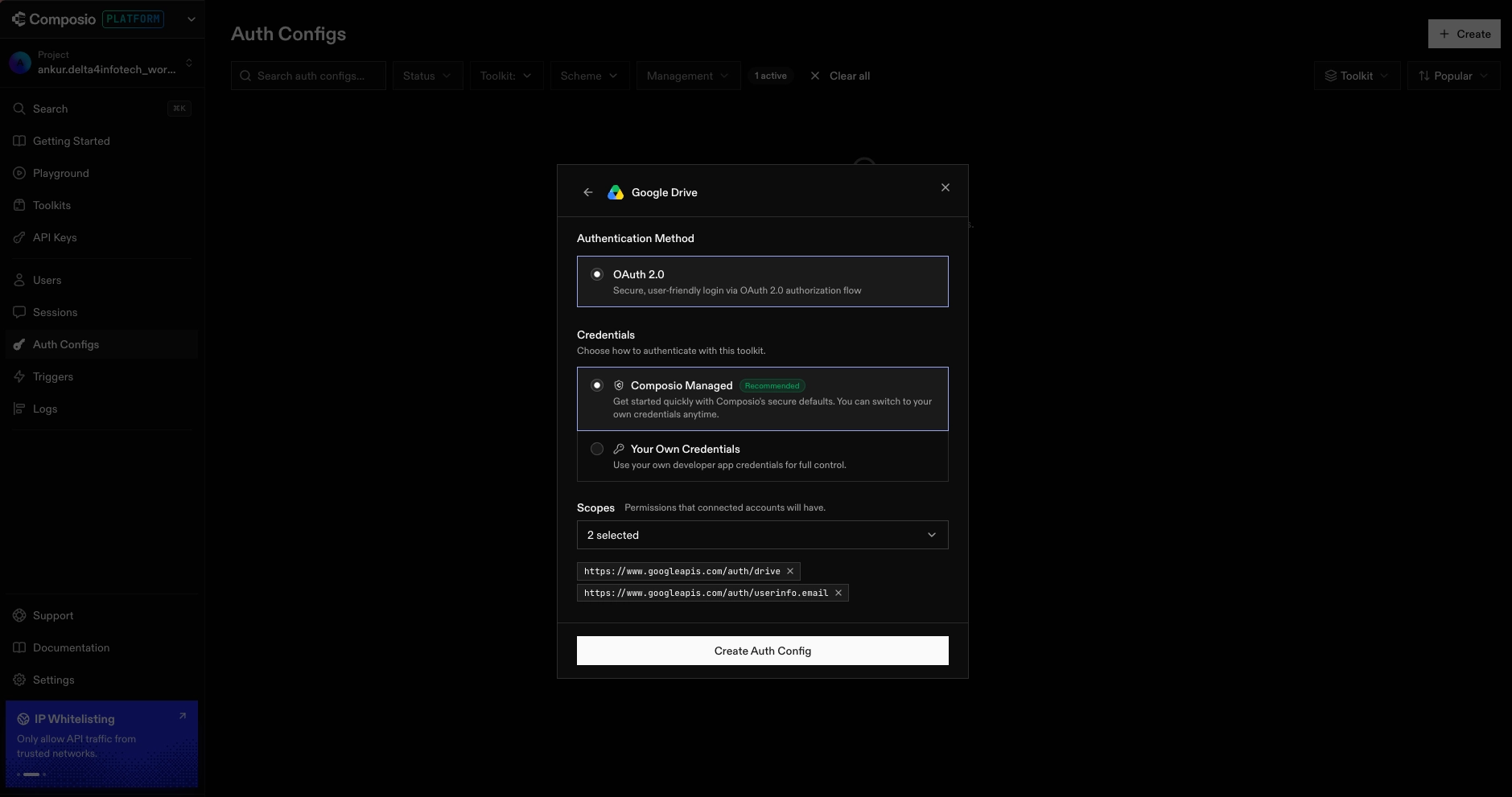
- Open the Playground from the sidebar.
- Select the tool imported from Toolkits, then a specific action inside it.
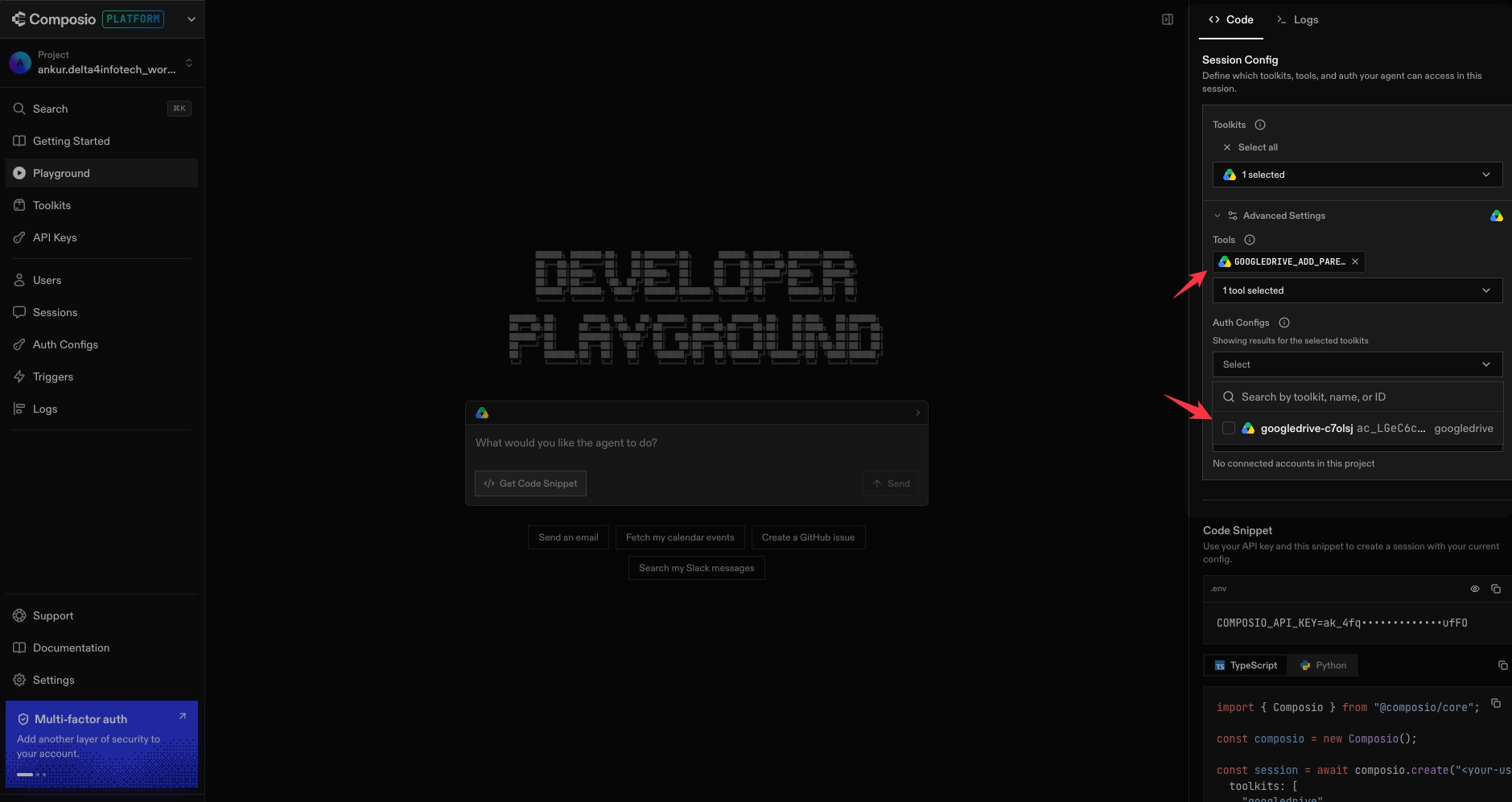
- Attach the auth config created in step 4.
- Type a command into the Playground’s input box to test the tool.
- To use Composio from actual code rather than the Playground, install its package separately.

The core path works. Connecting a toolkit and calling it from the Playground took roughly the time G2 reviewers describe. What happens around that path is a different story.
Where the Dashboard Contradicts Itself
- Two-factor auth contradicts itself: Settings shows “Two-factor authentication” toggled on and confirmed enabled, but the sidebar nags with a “Multi-factor auth, add another layer of security to your account” banner on every page, Getting Started, Playground, Toolkits, all of them, as if 2FA had never been set up. Anyone who actually enabled it keeps being told they haven’t.
- The API key page contradicts the rest of the dashboard: The API Keys page reads “Create an API key, get started by creating your first key for this project,” while the Playground and Getting Started snippets already display a live masked key, as though one exists and works.
- The toolkit search counter doesn’t update: Searching for a nonsense term correctly shows “No toolkits match your search,” but the header above it still reads the full unfiltered count, 1,069 toolkits at the time of testing, instead of reflecting the filtered result.
- Limited Tool Visibility Adds Friction: When tool labels aren’t immediately recognizable, users spend more time double-checking their selection instead of focusing on testing and iteration.

Where the Workflow Actually Breaks
- The “Create config” button disappears exactly when you need it: On a project with no existing configs, the button to create one doesn’t show up, a real first-time-setup blocker, not a cosmetic gap.

- The agent guesses the wrong service and doesn’t ask: A plain-language request to fetch calendar events triggered an Outlook connection automatically instead of asking which provider to use. Anyone not using Outlook gets a wrong first guess with no visible fallback.
- An interrupted auth flow leaves permanent debris: Cancelling that Outlook connection partway through left a permanent Auth Config and Connected Account stuck in “Initializing” status, with no option to clean it up.
- That same interruption never shows up in the audit log: The Sessions log for that project shows zero errors and omits the attempted call entirely, so a failed connection attempt leaves no trace of having happened.
None of these individually breaks the platform. But the pattern lines up with what the G2 reviews and the May security incident both point at separately. The dashboard and the audit trail don’t always reflect what actually happened, and that gap matters more once you’re relying on Composio’s own logs to tell you what your agent did.
Composio Pricing in 2026
Composio prices on tool-call volume, not seats. Here’s what’s live today, and what takes over in two weeks.
Current Pricing (Live Through August 15)
| Plan | Price | Tool Calls Included | Overage |
|---|---|---|---|
| Totally Free | $0/month | 20,000 per month | None |
| Ridiculously Cheap | $29/month | 200,000 per month | $0.299 per 1,000 tool calls |
| Serious Business | $229/month | 2,000,000 per month | $0.249 per 1,000 tool calls |
| Enterprise | Custom pricing | Flexible | Custom, with a dedicated SLA and SOC 2 support |
Verified against composio.dev/pricing, July 30, 2026.
Some tool calls cost more than others. Search APIs, sandboxed code execution, and ML inference calls run roughly 3x the standard rate, per Composio’s documentation, with their own separate quota (1,000 calls on Free, 5,000 on Ridiculously Cheap, 50,000 on Serious Business) and higher overage pricing, $0.897 per 1,000 on Ridiculously Cheap or $0.747 per 1,000 on Serious Business.
Composio’s Pricing Changes on August 15, 2026
Composio’s updated pricing page shows a new lineup.
| Plan | Price | Tool Calls Included | Notable Additions |
|---|---|---|---|
| Free | $0/month | 20,000 per month | 20,000 trigger events and 3 team members |
| Pro | $29/month | 50,000 per month | Custom tools and MCP, white-labeling, and unlimited team members |
| Business | $599/month | 50,000 per month | Everything in Pro, plus IP allowlisting, Slack support, and higher rate limits |
| Enterprise | Custom pricing | Custom | VPC, enhanced compliance, and dedicated support |
Overage on the new structure runs $4 per 1,000 tool calls ($3 per 1,000 via Composio’s “Sessions” execution pattern), plus separate metering for trigger events, LLM tokens, sandbox compute, and file storage.
Monthly Cost Examples
Tables of tiers are easy to skim past. Here’s what two realistic monthly volumes actually cost under each structure.
| Monthly Usage | Current Pricing | New Pricing (August 15+) | Increase |
|---|---|---|---|
| 100,000 tool calls | $29/month flat, comfortably within the Ridiculously Cheap plan’s 200,000-call allowance | $179 to $229/month, including the $29 Pro plan plus 50,000 overage calls at $3 to $4 per 1,000 | Roughly 6x to 8x |
| 300,000 tool calls | About $58.90/month, including the Ridiculously Cheap plan’s $29 fee plus 100,000 overage calls at $0.299 per 1,000 | $779 to $1,029/month, including the $29 Pro plan plus 250,000 overage calls at $3 to $4 per 1,000 | Roughly 13x to 17x |
The overage rate is doing most of the damage here. It runs $0.25 to $0.30 per 1,000 calls today and jumps to $3 to $4 per 1,000 after August 15, a roughly 10x to 13x increase in the marginal rate alone. A team whose usage sits comfortably inside the included quota barely notices this change. A team that regularly runs over, which is common once agents are doing real production work rather than a demo, is exactly who this repricing targets.
Two things matter beyond the sticker price. The entry paid tier keeps its $29 price but loses volume, dropping from 200,000 tool calls a month to 50,000, and the jump from Pro to Business, $29 to $599, buys IP allowlisting, Slack support, and higher rate limits rather than a large capacity increase. There’s also a lock-in window, sign up before August 15 and Composio treats you as an existing customer, keeping current plans and limits through December 31, 2026.
Review and Rating
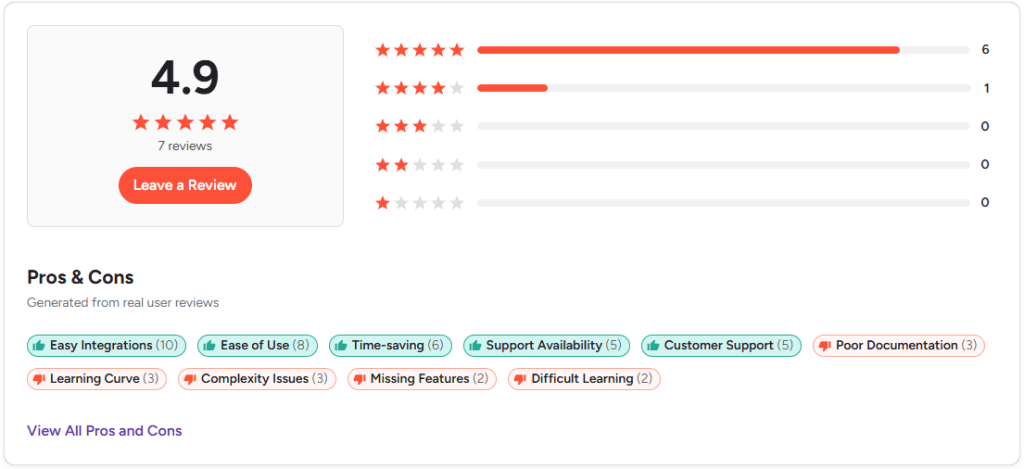
Composio’s G2 page shows a 4.9 rating out of 5 on average. That’s a strong number, and it comes with a caveat the star rating alone doesn’t show. It’s built on 7 reviews. For a platform that claims over 100,000 developers, that’s a thin sample, and most detailed community feedback shows up in GitHub issues rather than formal review sites.
What Reviewers Praise
- Easy integrations (10 mentions). One reviewer connected Gmail and Drive in 30 minutes ahead of a product demo.
- Ease of use (8 mentions).
- Time saved on integration work (6 mentions).
- Responsive customer support (10 mentions across two related tags).
What Reviewers Flag
- Complexity in advanced setups (3 mentions).
- Steep learning curve for less experienced developers (3 mentions).
- Documentation gaps around edge-case configuration (3 mentions).
- Occasional missing actions (2 mentions), though reviewers credited Composio’s team with adding them quickly after being asked.
- Cost at large-scale implementation (1 mention, enterprise reviewer).

“You’re paying hundreds of dollars and there’s no way out.”
Common Developer Issues
G2’s curated tags only go so far, and without Reddit access, the most honest substitute is Composio’s own public GitHub Issues, real bug reports with dates and reproduction steps, not aggregated sentiment. A pattern shows up fast once you start reading them. OAuth setup is where things go wrong, and it recurs across toolkits that have nothing else in common.
- Strava (April 2026, open): OAuth2 connection fails with an invalid client_id error on every attempt.
- Google Drive (April 2026, closed via support): Restricting the default OAuth app to read-only scope triggers Google’s “this app is blocked” warning, since the managed integration requests broader access by default.
- Google Ads: Every
GOOGLEADS_*tool call fails with a developer-token error, traced to Composio’s own Google Cloud project rather than the end user’s. - Twitter/X (closed): The OAuth2 authorization URL pointed at a deprecated
twitter.comdomain and returned a 404 until the fix shipped. - Spotify via Claude Code (May 2026): The MCP connection tool doesn’t expose the parameter Spotify’s auth flow requires, so the connection can’t complete from inside an MCP session even with valid credentials.
Read together, the pattern matches what G2 reviewers already said in softer language. The default path for mainstream toolkits works about as advertised. The moment you need a restricted scope, a specific developer token, or a less mainstream integration, budget real debugging time rather than assuming it’ll be as fast as the Gmail demo.
Composio’s Security and Incident History
A platform whose entire job is holding OAuth tokens and API keys for hundreds of connected SaaS accounts deserves scrutiny on how it’s handled incidents, not just its uptime badge.
The May 2026 Security Incident
Composio disclosed a security incident in May 2026. The entry point was mundane, not the “sophisticated AI attack” headlines implied at the time. An attacker compromised a Composio employee’s Gmail OAuth token, used it to intercept sign-in emails, and worked from there into an internal monitoring tool, then into the automated systems that fix connector errors, until they could run code inside Composio’s own tool-execution sandbox. An OAuth-token-management company was breached by way of a stolen OAuth token. Independent researchers who reviewed the disclosure, including P0 Security, called it an architecture problem, a monitoring system that could also trigger fixes, with no boundary between the two.
- Scope: Roughly 0.3% of active connected accounts were affected, GitHub tokens made up the largest share at 5,001 connections.
- Response: Composio rotated all developer API keys within 48 hours, revoked OAuth tokens across roughly 100 toolkits, and moved toward zero-trust key custody with API keys visible only at creation time going forward.
Composio’s own status page shows the aftermath rippling into the dashboard for days after disclosure, with member management and the tools playground both degraded before being restored on May 26.
Composio Alternatives Worth Comparing
Composio fits a specific slot. It works well for developer teams that want a large pre-built action catalog and don’t need deep customization of how each tool works. Outside that profile, a few alternatives solve the problem differently.
- MCP360 takes a gateway approach. One MCP connection exposes 100+ tools across search, SEO, scraping, and data APIs, using a meta-tool discovery pattern so an agent only loads the tool definitions it needs for a given task instead of the whole catalog up front. Pricing runs on published, self-serve tiers from $0 to $333 a month rather than custom quotes, with SOC 2 Type II, GDPR, and ISO 27001 compliance.
- Arcade offers a more open, community-contributed connector ecosystem and, per its own comparison of the two platforms, gives consistent tool access across every plan rather than gating some integrations behind a “Premium Tool Call” tier the way Composio does.
- Merge trades raw action execution for standardized, normalized data models across whole software categories such as HRIS, ATS, CRM, and accounting. It’s a better fit for RAG pipelines and analytics that need consistent field structures, and it brings a more thoroughly documented compliance program, including SOC 2 Type II, HIPAA support, and a dedicated PII redaction layer.
- Zapier brings its 8,000-plus app ecosystem and 13-year enterprise track record, with task-based pricing instead of Composio’s per-tool-call model. It positions itself as a complete orchestration platform rather than an integration layer for agent code, including no-code workflow building for non-developers, a category worth comparing against nine similar platforms if pricing model is your deciding factor.
A direct side-by-side comparison of MCP360 and Composio covers integration counts, setup speed, and security controls in more depth.
Is Composio Right for You
Choose Composio If
- Composio is a good fit if a large, pre-built action catalog matters more to you than customizing how individual tools behave.
- Documentation gaps and the occasional OAuth-scope surprise past the default configuration don’t scare you off.
- Python or TypeScript SDK support across a dozen-plus agent frameworks, without picking just one, is the flexibility you need.
Consider Alternatives If
- Your code depends on stable tool names, 1-minute polling triggers, or strict semantic versioning.
- If you need standardized data models instead of raw tool actions.
- Governed, audit-logged access for a regulated industry is the requirement. Workato is built for that specifically.
- Two weeks isn’t much time to decide without running your own usage through the worked pricing examples above.
- The workload touches sensitive customer credentials, and the May 2026 incident report hasn’t been read yet.
Composio still does the core job well enough that the “connected Gmail and Drive in 30 minutes” story holds up across real reviews. It’s also fast-moving, pre-1.0 infrastructure that can reshape its own API, pricing, or credentials with little notice, fine for a prototype, a harder call for anything touching customer data. Sign up before August 15 if the current quotas matter to you, and read the incident report either way.
Frequently Asked Questions
What is Composio?
Composio is an AI agent integration platform that connects agents to more than a thousand SaaS tools, including Gmail, Slack, and Salesforce, through a single SDK. Instead of building separate OAuth flows and API integrations for each tool, developers call one function and Composio handles authentication, token refresh, and rate limiting behind the scenes. It ships for TypeScript and Python and supports a dozen-plus agent frameworks.
Is Composio free to use?
Yes, Composio has a free tier that includes 20,000 tool calls a month with community support, enough for testing and small projects. Paid plans start at $29 a month for higher volume, and pricing is set to change on August 15, 2026, when the entry paid tier’s included tool calls drop from 200,000 to 50,000. Anyone signing up should check the live pricing page for the current structure before committing.
Is Composio worth it in 2026?
It depends on your usage and timing. Composio is worth it if a wide, pre-built action catalog matters more than customizing individual tools, and if occasional documentation gaps and OAuth friction don’t slow your team down. It’s a harder call if your workload touches sensitive customer credentials, since a May 2026 security incident and a steep pricing change on August 15 both deserve a close read before committing a budget line.
What changes in Composio’s pricing on August 15, 2026?
Composio’s plan names and structure change entirely. The current Free, $29, and $229 tiers shift to a Free plan, a $29 Pro plan, and a $599 Business plan, and the included tool calls on the $29 tier drop from 200,000 to 50,000 a month. Overage pricing jumps from roughly $0.25 to $0.30 per 1,000 calls to $3 to $4 per 1,000, a steep enough shift that some teams compare it against flat, published pricing like MCP360’s tiers before deciding.
What happened in Composio’s May 2026 security incident?
An attacker compromised the Gmail OAuth token of a Composio employee, used it to intercept sign-in emails, and escalated access into internal systems until they could run code inside Composio’s tool-execution sandbox. Roughly 0.3% of active connected accounts were affected, GitHub tokens made up the largest share at 5,001 connections. Composio responded with mandatory API key rotation, bulk token revocation across about 100 toolkits, and a move toward zero-trust credential handling.
Is Composio open source?
Yes, Composio’s SDK is open source and MIT-licensed on GitHub, where it carries more than 29,000 stars and ships for both TypeScript and Python. The open-source part covers the client library that developers use to call tools, not the underlying toolkit connections or infrastructure, which remain hosted and managed by Composio. The project is still pre-1.0, and breaking changes have shipped as minor version releases.
What are the best alternatives to Composio?
The right alternative depends on what you need. MCP360 uses a unified gateway model with published, self-serve pricing from $0 to $333 a month. Arcade offers more consistent tool access across every plan. Merge fits better when you need standardized data models instead of raw action calls. Zapier suits non-developer teams with its larger app ecosystem, and Workato targets regulated industries that need audit-logged access on every call.
Should I build integrations myself instead of using Composio?
For one or two tools, building it yourself is often simpler. The calculation changes around the tenth integration, once every provider brings its own token refresh quirks, rate limits, and expiration behavior to maintain. Composio’s value is absorbing that maintenance across a thousand-plus providers, though it means depending on someone else’s release schedule. Gateway-style platforms like MCP360 take a different approach, exposing tools through one connection instead of a large pre-built catalog.

Article by
RajniAI & Tech | Senior Content Writer
Rajni is a senior content writer covering AI agents, automation, and no-code tools. She writes across the AI space, from chatbots and customer support to MCP and agent workflows, focused on how businesses actually put these tools to work.