
The TL;DR
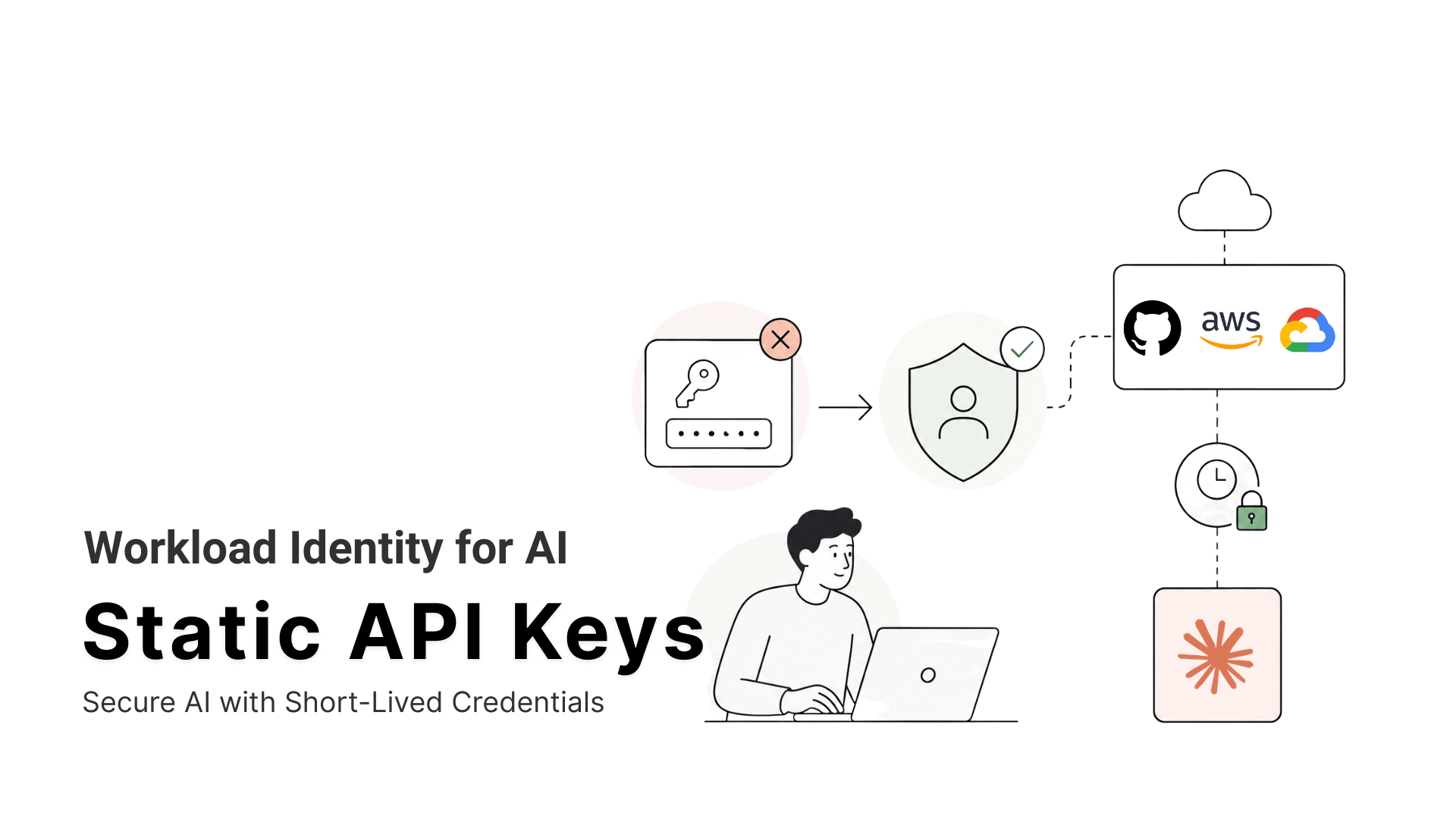
Anthropic’s Workload Identity Federation replaces long-lived Claude API keys with short-lived tokens issued through an identity provider your organization already uses.
-
• The Leak Problem
Static API keys do not expire automatically and provide little visibility into which workload is using them. When exposed in repositories, logs, or configuration files, they can remain valid until someone manually revokes them.
-
• How the Exchange Works
A workload running through an identity provider such as AWS or GitHub Actions requests a signed identity token. Anthropic validates that token against a federation rule and issues a short-lived Claude access token without requiring a stored API key.
-
• Security Still Needs Attention
Federation is only as secure as the identity provider and policies behind it. Existing API keys can also override the federated setup, so teams should remove unused credentials and migrate workloads gradually while monitoring both authentication paths.
Every Claude API key you’ve ever generated is still active right now, unless you went back and revoked it yourself. That’s the whole design flaw of a static secret. Mint it once, and it keeps working in a CI runner or a laptop’s .env file until somebody remembers to kill it. Most people don’t remember.
Cloud providers solved this for their own APIs years ago. AWS, Google Cloud, and GitHub Actions have let workloads swap a short-lived identity token for cloud access instead of storing a static key, for the better part of a decade. AI providers took longer to catch up. OpenAI shipped workload identity federation for its own API on May 26, 2026. Anthropic followed roughly three weeks later, on June 17, 2026, when WIF went generally available on the Claude Platform.
Here’s what changed, how the token exchange actually works, and how to move a workload off a static key without any downtime.
Static API Key Security Risks
A sk-ant key carries no expiration by default and no record of which workload is using it. Whoever holds the string gets the access, whether that’s your GitHub Actions runner or an attacker who found it three forks deep in a public repository. The scale of that risk isn’t hypothetical. GitGuardian’s 2026 report on secrets sprawl put numbers on it.
- 28.65 million new secrets leaked on public GitHub in 2025, a 34% jump over 2024
- 81% year over year growth in leaked AI service credentials, with eight of the ten fastest growing leak categories tied to AI services
- 24,008 unique secrets found in public MCP configuration files, of which 2,117 (8.8%) were confirmed still valid
- 3.2% of Claude Code assisted commits leaked a secret, more than double the 1.5% baseline across all public GitHub commits
- 64% of the secrets GitGuardian confirmed valid in 2022 were still valid and exploitable when the company retested them in January 2026
That third number is worth sitting with if you work on MCP tooling. Part of the blame sits with the tooling’s own onboarding material. Popular MCP setup guides routinely tell developers to paste an API key directly into a config file or a command line argument, because that’s the fastest way to get a demo running.
None of this needs a sophisticated attacker. A key copied into a Slack thread during an incident. A .env file that made it into a Docker image. A fork of a public repository that still carries the original commit history. Static credentials fail quietly, and they stay failed for years. That’s the problem WIF is built to remove.
What Is Workload Identity Federation (WIF)?
Workload Identity Federation is a way for a piece of software, not a person, to prove its identity to an API. A workload presents a signed token from an identity provider it already trusts. The receiving service checks that token against a pre-configured trust rule and issues a short-lived, scoped credential in exchange. No long-lived secret is created, stored, or rotated anywhere in that exchange.
How Cloud Platforms Use WIF
The pattern comes straight from cloud infrastructure. AWS IAM Roles for Service Accounts, Google Cloud’s Workload Identity, and Azure’s Workload ID have used it to let Kubernetes pods reach cloud APIs for years. Anthropic and OpenAI are now applying the same trust model to their own APIs.
Why AI Platforms Adopted WIF
The mechanism follows RFC 7523’s JWT bearer grant. Two things changed to bring this pattern to AI APIs specifically. OIDC capable identity providers, AWS, Google Cloud, Azure, GitHub Actions, Kubernetes, SPIFFE, and Okta among them, are now common enough that most production workloads already have a native identity to federate from. And AI providers finally built the trust rule infrastructure to accept those tokens on their own side. SPIFFE, the CNCF graduated open standard for workload identity, generalizes the same idea further. A workload gets a short-lived, cryptographically verifiable identity derived from what it is and where it’s running, not from a secret somebody handed it.
How Claude Workload Identity Federation Works
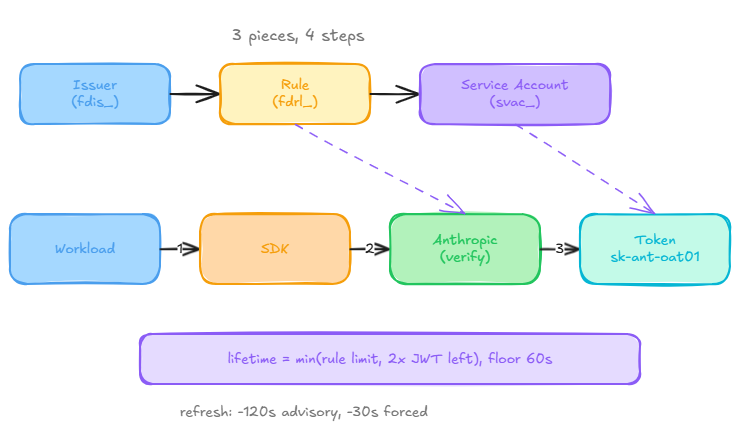
Anthropic’s implementation is built around three resources, configured once in the Claude Console under Settings → Workload identity, per Anthropic’s documentation.
Claude WIF Components
- Service account (svac_) is a named identity that belongs to your organization rather than to a person. It has no email, no password, and no Console login. It’s the identity a minted token acts as, and the entry your audit logs point back to.
- Federation issuer (fdis_) registers an identity provider with your organization. Registering an issuer is a statement that JWTs signed by that provider, whether that’s your production EKS cluster or your GitHub Actions tenant, may assert workload identity for your org.
- Federation rule (fdrl_) is the bridge between the two. It says a JWT from issuer X, carrying claims that look like Y, mints a token for service account Z with scope S. Rules can match on subject prefix, audience, exact claim values, or a CEL expression for more complex logic.
Claude WIF Token Exchange Process
- The workload’s identity provider issues it a JWT at runtime. On most platforms this happens without any code you write, a Kubernetes projected service account token or the GitHub Actions OIDC endpoint handles it automatically.
- The SDK posts that JWT to
POST /v1/oauth/token, following the RFC 7523 JWT bearer grant. - Anthropic verifies the signature against the issuer’s JWKS and checks the JWT’s claims against the federation rule.
- Anthropic returns a short-lived
sk-ant-oat01token scoped to the target service account.
None of this asks anything of your application code beyond pointing the SDK at the right federation rule. The exchange, the verification, and the refresh all happen underneath it.
Token Lifetime and Refresh
The minted token’s lifetime is the shorter of two numbers, the rule’s configured value (default 3,600 seconds) and twice the remaining lifetime of the upstream JWT. That result never drops below 60 seconds. The second bound matters. A compromised upstream identity can’t mint a Claude token that outlives it by any real margin.
The SDK refreshes on a two-tier schedule modeled on botocore. It attempts an advisory refresh 120 seconds before the token expires, and it forces a mandatory refresh at the 30 second mark. A failed exchange at that second point raises an error, because the cached token is too close to expiry to trust.
How to Migrate from API Keys to WIF
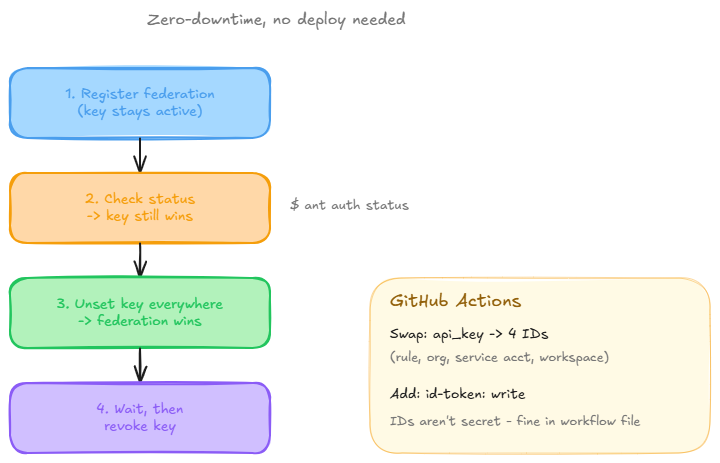
Anthropic built this migration to run without downtime, which means there’s no reason to treat it as a big bang cutover.
- Set up federation while the old key stays in place: Register the issuer, create the service account, and write the federation rule, all while the existing ANTHROPIC_API_KEY environment variable keeps doing its job in the background.
- Check which credential is actually winning: Run
ant auth statusfrom inside the workload. Because ANTHROPIC_API_KEY sits above every federation tier in the SDK’s resolution order, the static key will still be the one answering requests at this point, even with federation fully wired up. - Unset the key everywhere it’s been injected: Container environment, CI secrets, shell profiles, wherever it’s hiding. Run
ant auth statusagain. Once it reports the federated source, the workload has actually switched. - Let it run, then revoke the key: Give the workload a stretch of time on the federated token before touching anything in the Console. Once you’re confident, delete the key under Settings → API keys.
That’s the whole migration, and none of it required a deploy.
Migrating a GitHub Actions Workflow
Swap the anthropic_api_key input for four identifiers, anthropic_federation_rule_id, anthropic_organization_id, anthropic_service_account_id, and anthropic_workspace_id. Grant the job id-token write access under permissions so the runner can request its own OIDC token. None of those four values are sensitive, so they can sit directly in the workflow file or in repository variables.
Workload Identity Federation Security Best Practices
Anthropic’s own documentation is direct about this. WIF strengthens your security posture. It doesn’t complete the security story by itself. Federated authentication is only as strong as the identity provider signing the JWT, and the gaps tend to show up in three places.
1. Use Strict Federation Rule Matching : A federation rule that only checks a JWT’s iss claim and accepts any sub value grants access to every workload in that AWS account or Kubernetes cluster, well beyond the one you meant to trust. Match on the narrowest claim your identity provider offers.
- AWS, the full IAM role ARN and account ID
- Google Cloud, the numeric service account ID
- Kubernetes, the namespace and service account name together
2. WIF Only Secures Claude API Access : It solves authentication to the Claude API and nothing past it. An agent that reasons over a support ticket, checks a CRM, and updates a ticketing system through separate MCP servers still needs credentials for each of those systems. None of them inherit the trust you just configured for Claude.
Treat these three as a checklist, not a reason to skip WIF. For a closer look at what security teams should be watching on the MCP side itself, see our breakdown of MCP security hardening under the new spec and NSA and CISA guidance.
Workload Identity Federation Limitations
Anthropic’s Workload Identity Federation replaces static credentials only for authentication to the direct Claude API. It allows a workload to exchange identity from a supported provider for a short-lived Claude access token, but it does not automatically secure the external tools, databases, or services that an AI agent may call afterward.
That distinction becomes more important as agent systems grow. A workflow may use WIF for Claude while still relying on separate credentials for search, billing, CRM, ecommerce, storage, and internal APIs. Splitting work across multiple agents can increase the number of integrations, identities, and permission boundaries the team must manage.
Key limitations
- Claude API scope only: WIF secures access to Anthropic’s API. It does not automatically authenticate the agent to third-party tools or internal systems.
- Identity-provider dependency: Security depends on the configuration of the connected identity provider, including issuer trust, audience restrictions, claims, roles, and token policies.
- No automatic least privilege: Short-lived tokens reduce credential exposure, but teams must still define which workloads may call Claude and what connected tools they may use.
- Existing keys still need removal: WIF does not automatically eliminate API keys already stored in environment variables, CI secrets, containers, or deployment platforms.
- Migration requires inventory: Teams need to identify every workload using Claude, update its authentication path, test token exchange and refresh, and then revoke obsolete credentials.
- Tool credentials remain separate: Every external API or MCP server may still require its own authorization model unless access is consolidated or centrally managed.
- Operational complexity remains: Token exchange failures, clock skew, incorrect claims, expired identity-provider tokens, and misconfigured federation rules can still interrupt workloads.
MCP Authorization Does Not Eliminate Downstream Credentials
MCP defines a standard way for clients to connect to servers and includes authorization mechanisms for protected remote servers. However, the MCP server is still responsible for securely reaching the services behind its tools. A CRM tool may need OAuth, a search API may require a vendor key, and an internal database may rely on service identities or network-level access.
A gateway such as MCP360 can consolidate part of that tool-access layer. MCP360 states that one authentication token can provide access to more than 100 MCP servers and tools through a unified gateway. This is separate from Claude API authentication: WIF protects the model connection, while the gateway manages access to its tool catalog.
Together, the architecture becomes easier to reason about:
- Model identity layer: Anthropic WIF authenticates the workload to the Claude API.
- Tool-access layer: MCP or an MCP gateway connects the agent to approved external capabilities.
- Downstream authorization layer: Each tool or gateway enforces permissions for the actual API, account, or resource.
- Governance layer: Teams define scopes, logging, revocation, approval rules, and human checks for sensitive actions.
The Future of AI Authentication Without API Keys
Anthropic and OpenAI shipping WIF within three weeks of each other in mid 2026 wasn’t a coincidence. Keyless auth is becoming the default expectation for any API a production workload calls, the same way it already is for cloud infrastructure.
The scale behind that shift has a number attached. CyberArk’s 2025 Identity Security Landscape survey put the ratio of machine identities to human ones at 82 to 1 across the organizations it polled, and that ratio only grows as agent fleets expand. A shared secret handed out at that scale isn’t a credential strategy. It’s a liability with a login prompt.
Both providers converged on OIDC based federation instead of inventing a proprietary scheme apiece. A workload that already federates into AWS or Google Cloud doesn’t need new infrastructure to federate into Claude or OpenAI’s API. It needs one more trust rule pointed at a provider it already runs.
Frequently Asked Questions
What is workload identity federation and how does it work?
Workload identity federation lets a workload trade a signed identity token from a trusted provider, such as AWS, Google Cloud, or GitHub Actions, for a short-lived access token at its destination. Instead of storing a long-lived API key, it proves identity at request time. The pattern extends to AI APIs like the Claude Platform.
What is a service account?
A service account is a named, non-human identity representing a workload rather than a person. It has no email, password, or login, so access and audit logs tie to a specific application or pipeline instead of a shared credential. On the Claude Platform, it’s the identity a federated token acts as.
What is the difference between an API key and a service account on the Claude Platform?
An API key is a static credential that works indefinitely until manually revoked, with no link to who is using it. A service account is a named identity with credentials minted on demand through federation, expiring in as little as 60 seconds and leaving a clear audit trail.
Does my existing Claude API key stop working once I set up Workload Identity Federation?
No. Static API keys and Workload Identity Federation work side by side, so setting up federation doesn’t break anything using the old key. That overlap is intentional. Anthropic’s migration path has teams configure federation first, confirm it works, then remove the key, so migration happens one workload at a time.
Why does my Claude workload still use the API key after I configure federation?
ANTHROPIC_API_KEY sits above every federation tier in the SDK’s credential precedence chain, so a leftover key still set anywhere in the environment gets used silently instead of the federated token. Anthropic documents this as expected behavior, not a bug. Check which credential is active, then unset the key everywhere it was injected.
Does Workload Identity Federation secure the other tools my AI agent uses through MCP?
No, that’s a common point of confusion. Workload Identity Federation only covers authentication to the Claude API. An agent calling a search API or CRM through separate MCP servers still needs its own credential for each, since none inherit Claude’s trust. MCP360, for example, consolidates that sprawl behind one integration.
How do I manage credentials across multiple MCP servers for one AI agent?
Each MCP server an agent connects to typically needs its own credential, which multiplies fast with more tools. Rather than storing a separate key per tool, teams often consolidate through a unified MCP gateway. MCP360, for example, lets one integration and one API key reach 100+ tools across dozens of servers.
What is the difference between Claude’s Workload Identity Federation and an MCP gateway like MCP360?
Workload Identity Federation governs how a workload authenticates to the Claude API, replacing a static key with a short-lived token. MCP360 operates one layer over, governing how an agent reaches its tools through MCP servers, and consolidates dozens of tool credentials into one integration. Most production stacks need both.
Conclusion
Static API keys were a practical shortcut when better workload authentication options were limited. For the Claude API, Workload Identity Federation now gives teams a safer alternative built around short-lived credentials and verifiable workload identity.
The most useful next step is not a full migration plan. Start with the workload that would create the largest impact if its key leaked, such as a CI pipeline, production service, or shared automation account. Document its current permissions, create a narrowly scoped federation rule, test token exchange and failure handling, then remove the old key only after the new path is stable.
WIF secures the connection to Claude, but it does not automatically secure the external tools that an agent calls. Search APIs, CRMs, databases, and MCP servers still need their own access controls. For teams using Claude with broader tool access, the MCP360 integration guide covers that second layer and shows how to keep model authentication and tool authentication separate, auditable, and easier to manage.

Article by
MitaliAI & Automation | Content Writer
Mitali is a content writer covering AI agents, automation, and no-code tools. Her writing spans the AI landscape, from support and sales automation to MCP integrations and agent workflows, with a focus on practical business use.