
The TL;DR
A business can rank at the top of Google’s local results and still get skipped whenever ChatGPT, Perplexity, or Google AI Overviews recommends businesses for the same search.
-
• Two Different Scorecards
Local rankings and AI recommendations depend on separate signals. Performing well in Google’s local results does not guarantee that the business will appear in AI-generated answers.
-
• The Reporting Gap
Local SEO audits usually measure Google visibility, while GEO audits check AI-generated recommendations. When these reports are run separately, businesses may never see where potential customers are being lost.
-
• One Connected Workflow
An agent built with MCP360 and Claude checks local search results and AI answers in a single pass, making it clear where the two visibility scores align and where they pull apart.
Local SEO and GEO run on different signals, and the mismatch between them produces shortfalls that standard reporting was never built to catch. A business can rank at the top of Google’s local pack and still be completely absent when someone asks ChatGPT, Perplexity, or Google AI Overviews to recommend the same kind of business in the same area.
The businesses that do get named in those AI-generated answers aren’t chosen by ranking position. They’re chosen by how consistently and credibly they show up across multiple independent sources, things like Google Business Profile, review platforms, and local citations. Skip auditing local search and AI visibility together, and that mismatch keeps growing without ever appearing in a report.
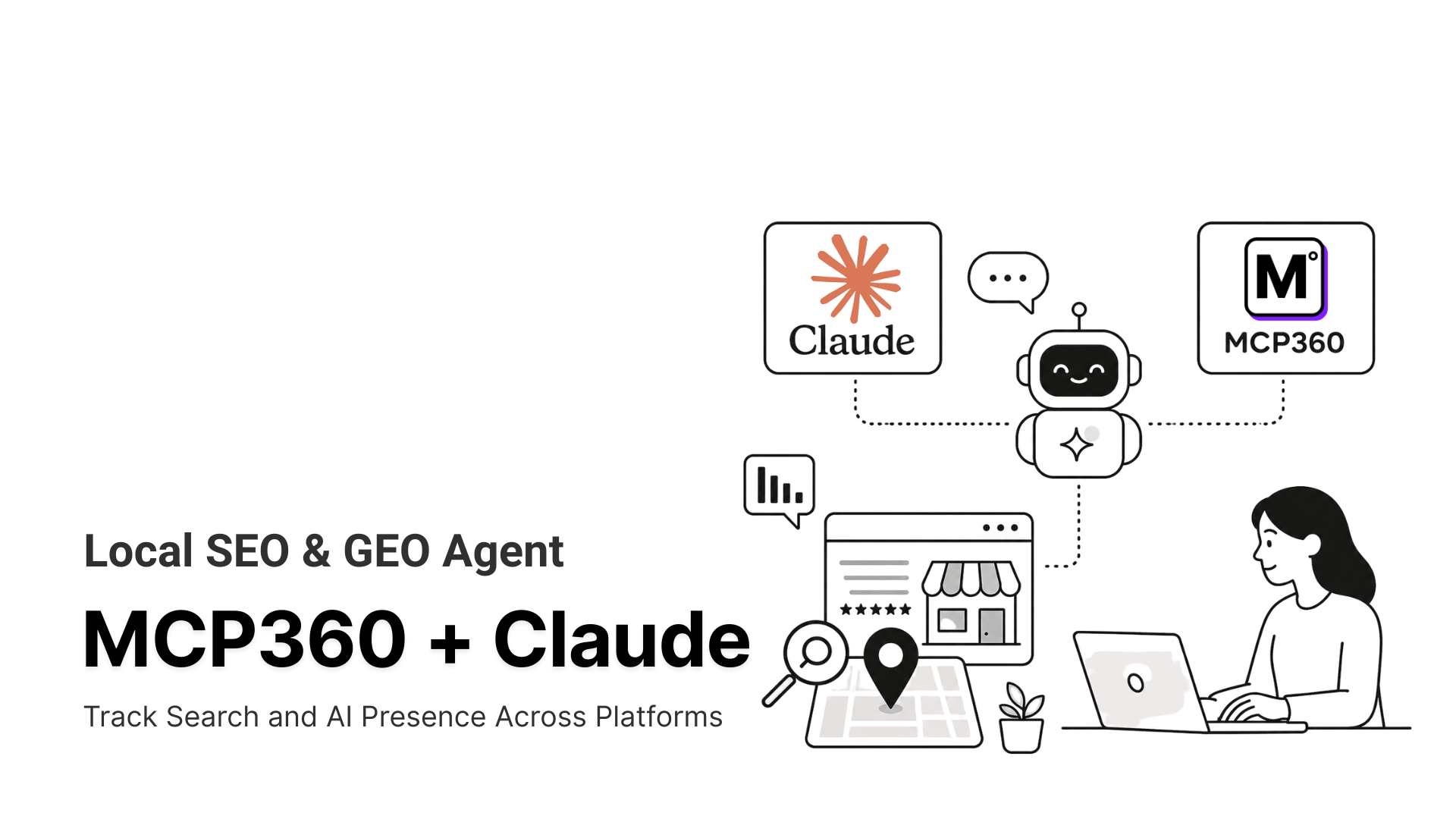
A Local SEO and GEO Agent built with MCP360 and Claude closes that shortfall. It researches both visibility surfaces in one connected workflow and shows exactly where the gaps sit and what’s driving them. This guide covers what the agent does, how to build it, and where it delivers the most value.
Why a #1 Local Ranking Still Does Not Guarantee an AI Recommendation
A local ranking and an AI recommendation get built from completely different evidence, which is exactly why topping the local pack doesn’t guarantee a spot in an AI-generated answer. Ask ChatGPT which dentist to visit, ask Perplexity for a plumber nearby, or pull up a recommendation through Google AI Overviews, and the answer isn’t a ranked list of links. It’s a synthesized response naming two or three specific businesses. Those businesses aren’t necessarily the ones ranking highest in traditional search.
Google’s own local ranking factors come down to three things, relevance, distance, and prominence. AI recommendation engines build confidence differently. They look for agreement across multiple independent sources before naming a business at all.
That agreement shows up in four places.
- The same name, address, phone number, and category matching everywhere the business is listed, from Apple Maps and Bing Places down to the directories nobody checks
- Rating levels and sentiment themes across review platforms, not just Google, since AI systems pull from the wider review record
- Mentions in local publications and independent websites that confirm a business exists and matters, without any input from the business itself
- Clear service pages and schema markup that AI crawlers can read and cross-reference against outside sources
A business can be strong on one of these and thin on the rest. Rank first locally, skip AI Overviews entirely, and one of these four gaps is almost always why. Most audits never catch it, because local rankings and AI visibility get checked as two completely separate jobs.
The Blind Spot in Auditing Local SEO and GEO Separately
Run local SEO and GEO as two separate workflows and the cost shows up nowhere. No dashboard flags it. No report explains it. The business just loses customers it never knew it was losing.
Local SEO audits are built around Google. They surface ranking positions, profile quality, review volume, and local pack competitors. Here’s what they leave out.
- Whether the business appears when someone asks an AI platform for a recommendation
- Which sources the AI drew from when it generated that answer
- Why a competitor with weaker rankings keeps getting named instead
GEO analysis has the opposite blind spot. It confirms whether a business shows up in ChatGPT or Perplexity output and which sources get cited, but without local search data next to it, there’s no way to tell whether the shortfall comes from weak listing data, thin review distribution, or gaps in the citation categories AI platforms lean on most.
The two disciplines pull from the same raw material and grade it differently. A review that pushes a local ranking up doesn’t carry the same weight when an AI model decides whether to trust and name that business. A citation that builds local authority does double duty for AI credibility. Miss one inconsistent listing and it can quietly undercut both signals at once. Checking both signals together, instead of running two separate audits, is the whole case for building an agent that does exactly that.
What a Local SEO & GEO Agent Does
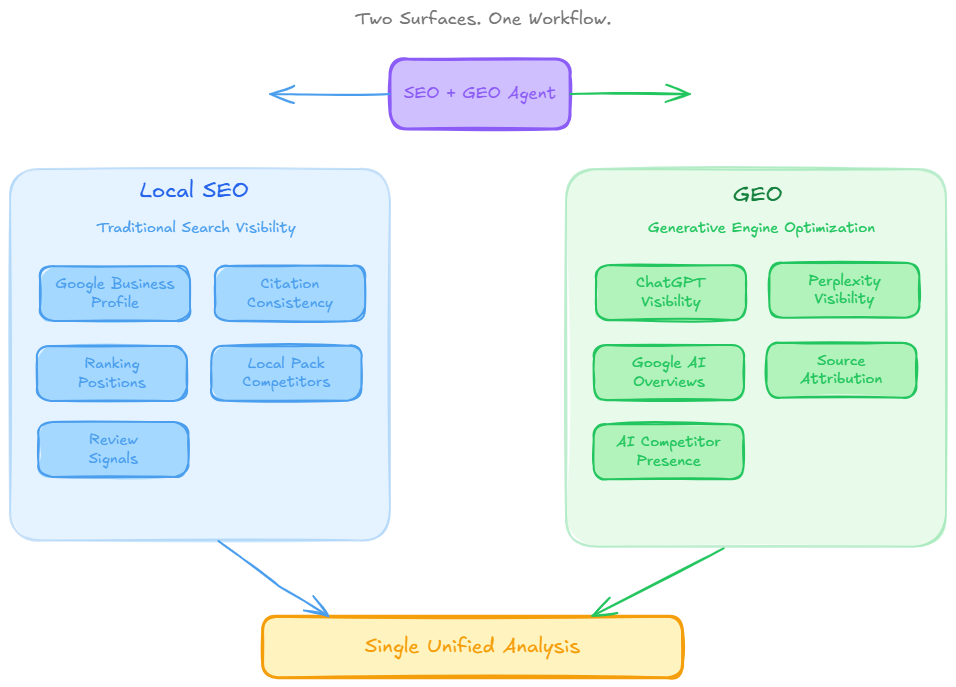
A Local SEO & GEO Agent checks one business against both surfaces at once, the ranking signals and the AI recommendation signals, and lines up what it finds so the mismatch is visible in one place instead of buried in two separate reports.
GEO, short for Generative Engine Optimization, is the term for that second half. It comes from a Princeton, Georgia Tech, IIT Delhi, and Allen Institute for AI research team, first circulated as a preprint in late 2023 and formally published in the KDD 2024 conference proceedings, the paper credited with coining the term. The related term AEO, Answer Engine Optimization, covers similar ground from a narrower angle, becoming the direct answer to one specific question rather than a broadly cited source.
Most agent builder platforms handle one of these surfaces or the other. This agent runs on MCP360, built on the Model Context Protocol, the open standard that lets an AI model reach outside tools through one consistent interface. Running both checks through that same connection means one conversation with Claude covers what used to take two separate tools.
How to Build the Agent with MCP360 and Claude
Building this specific agent means pointing Claude at the servers that cover local data and search visibility, the same keyword research and search tools that show up across the wider catalog of MCP servers behind the gateway. None of it requires touching code, and the whole setup takes a few minutes.
Step 1. Create a project in MCP360
Log in to MCP360 and open the dashboard. Create a new project or open an existing one used for marketing or SEO workflows.

Step 2. Enable the Universal MCP Server
Open the MCP Servers section from the dashboard. Search for the Universal MCP Server and open its setup screen. This server provides the data access layer for local SEO and GEO research workflows.
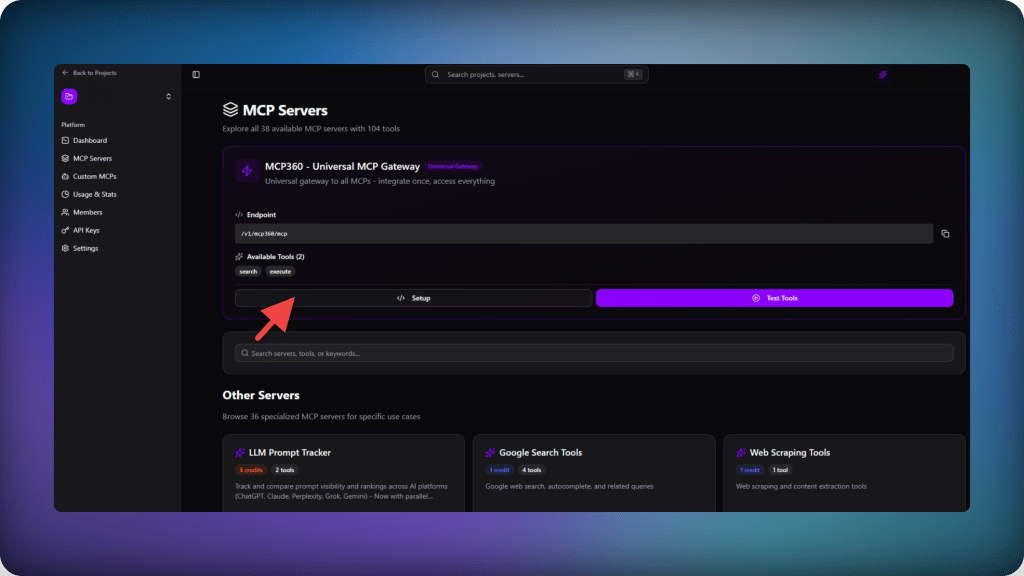
Step 3. Generate the MCP endpoint
Inside the server setup screen, generate the MCP endpoint linked to your API key. Copy the endpoint and store it securely. This endpoint is required to connect MCP360 with Claude.

Step 4. Connect MCP360 to Claude
In Claude Web, open Settings, go to Connectors, and select Add Custom Connector. Paste the gateway link and token, name the connector something recognizable like Universal Gateway, and save.
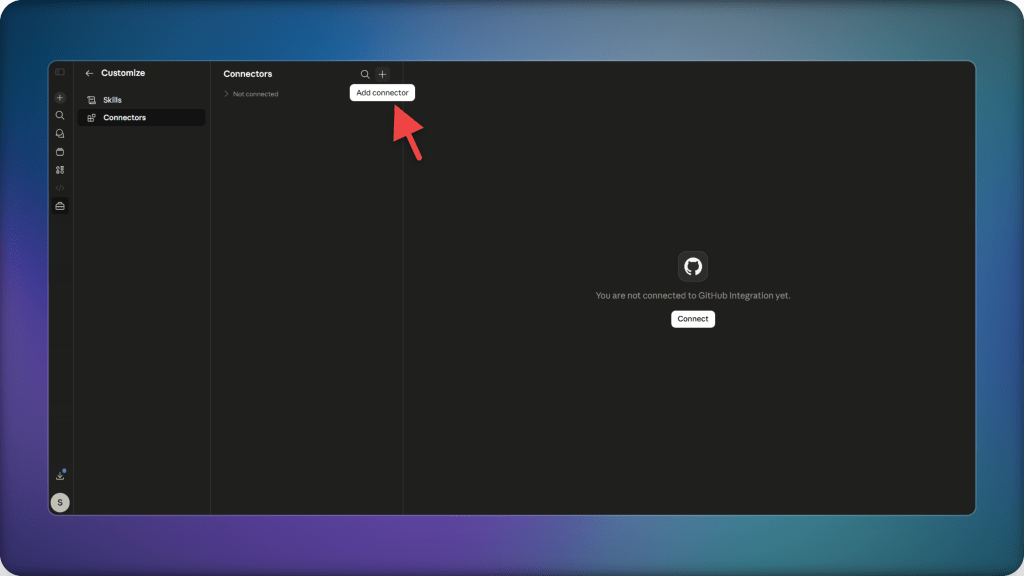
Claude Desktop and Claude Code connect the same gateway through a config file instead of a settings menu, covered step by step in the guide to connecting Claude Web, Desktop, and Code to MCP360.
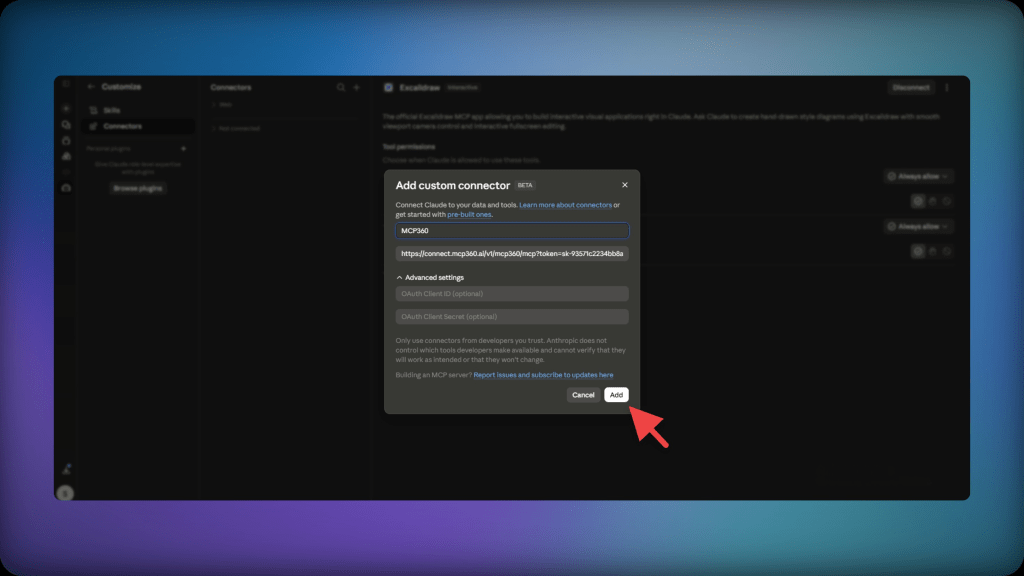
Step 5. Start using the agent workflow
With MCP360 connected, you can now ask the Claude agent any question related to local SEO and GEO research.
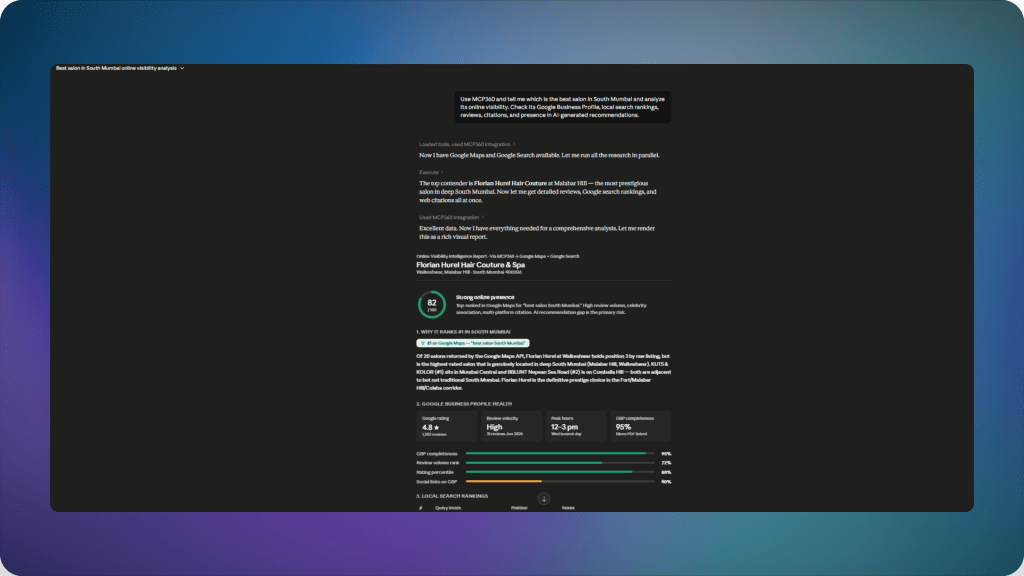
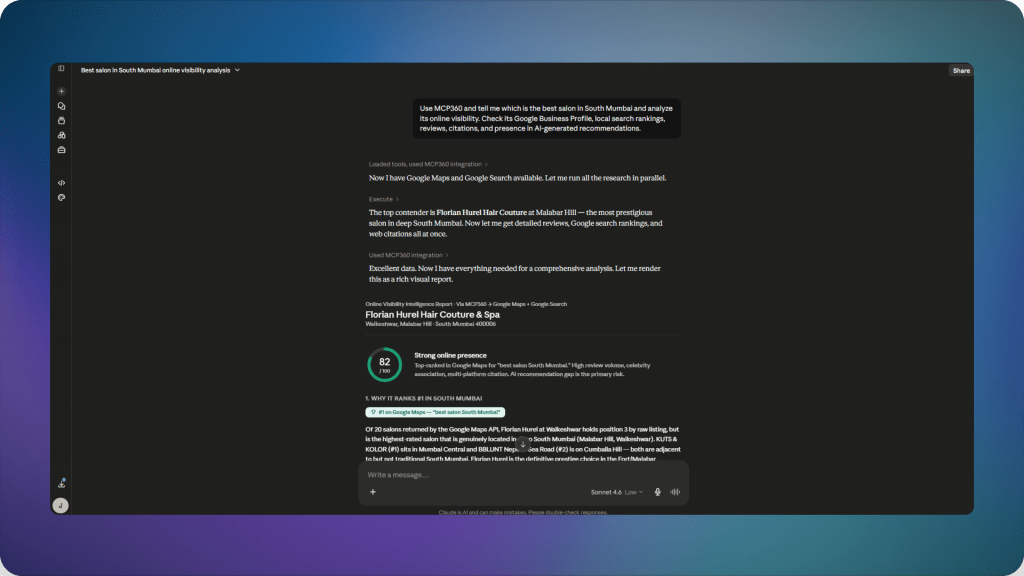
If the connector doesn’t show up after reloading Claude, the token or link is almost always the culprit. Common connection issues cover the usual fixes. Once the connector is live, this is what starts showing up in a Claude conversation.
What Becomes Possible After Building the Agent
Six capabilities become available the moment the gateway connects, each one pulling from a different corner of the tool catalog.
1. Business Listing Analysis
Compares business data across Google Business Profile, Apple Maps, Bing Places, and major directories, and flags mismatches in categories, hours, and contact details. Fixing those fields improves the local ranking and the AI recommendation at once, since both read the same listing.
2. Ranking and AI Visibility Breakdown
Clean listings solve part of it. The rest comes down to what’s driving the ranking itself, proximity, category alignment, review velocity, mapped against AI recommendation presence. A business that dominates the local pack but never gets named in an AI answer usually traces back to thin citations or missing structured content.
3. AI Mention and Source Analysis
On the AI side of that same gap, this checks whether an AI model mentions the business at all, how it’s described, and where that came from. It’s the same citations and mentions data AEO tracking runs on, just narrowed to one business and one market.
4. Content and Citation Coverage Mapping
Citations feed both scores above, so the next question is where they’re coming from. Maps citation volume across Yelp, Foursquare, Yellow Pages, and industry directories against competitors, and shows which categories a competitor covers that the client doesn’t.
5. Review Sentiment and Rating Analysis
Reviews carry weight on both sides too. Surfaces recurring patterns in how customers describe the business, then flags when that same language shows up in its AI-generated description, independent of star rating.
6. Cross-Channel Visibility Synthesis
Bring the five capabilities together and a sixth emerges. One view combines rankings, listing quality, citations, reviews, and AI recommendation presence, showing where a business is strong locally but invisible in AI answers, and where competitors lead on both fronts. Run it across a dozen locations, and it flags which one is dragging down an otherwise strong brand.
Those six capabilities cover both sides of the mismatch in a single check, which is the whole reason to build this rather than juggling two disconnected tools.
Frequently Asked Questions
What is Generative Engine Optimization (GEO)?
Generative Engine Optimization is the practice of shaping a business’s online presence so AI tools like ChatGPT, Perplexity, and Google AI Overviews are more likely to name it in a generated answer. It grew out of a 2023 research paper later published at the KDD 2024 conference. Unlike traditional SEO, GEO measures whether an AI trusts a business enough to mention it, not where a page ranks.
What’s the difference between GEO and AEO?
GEO, short for Generative Engine Optimization, and AEO, short for Answer Engine Optimization, overlap so much that most practitioners use the terms interchangeably. GEO focuses broadly on how AI-generated answers describe and cite a business across platforms like ChatGPT and Perplexity. AEO leans narrower, aiming to become the direct answer to one specific question. Both rely on the same groundwork of consistent listings and clear content.
Why does a business rank #1 locally but still get skipped by ChatGPT or Perplexity?
Local rankings and AI recommendations get scored by completely different systems. Google’s local pack weighs relevance, distance, and prominence. AI platforms instead look for agreement across independent sources, matching business listings, review sentiment, citations, and structured content, before naming a business in a generated answer. A business can dominate the local pack and still have gaps in that outside agreement, which is why it gets left out of AI answers entirely.
What is NAP consistency and why does it matter for AI recommendations?
NAP stands for name, address, and phone number. These details need to match exactly across Google Business Profile, Apple Maps, Bing Places, and local directories. AI systems use that consistency as a trust signal when deciding whether a business is legitimate enough to recommend. Conflicting details across sources make an AI more likely to skip a business entirely, even if its Google ranking looks strong.
Can I build my own local SEO and GEO tracker instead of buying a SaaS audit tool?
Yes. Most tools in this space are paid SaaS platforms built for agencies to resell, not something a team assembles itself. An alternative is connecting an AI model like Claude to a gateway such as MCP360, which pulls business listing, review, and citation data through one integration and lets Claude check both local rankings and AI recommendation visibility directly, without a separate subscription for each data source.
How does an AI model decide which business to recommend?
An AI model builds confidence in a business by checking for agreement across several independent signals rather than a single ranking score. It looks at whether listing details match across platforms, what reviews say and where, whether independent sites and directories mention the business, and whether its own site has clear, structured content the model can read. Strong signals in most of these areas make a recommendation far more likely.
What’s the easiest way to connect Claude to tools like Google Business Profile or citation data?
The fastest route is a single gateway connection rather than wiring up each data source separately. MCP360 works this way, connecting Claude to external tools including business listings, review platforms, and citation sources through one integration and an API token, instead of a separate connector for every service. In Claude Web, that connection is added once under Settings and Connectors, then reused for every query afterward.
Do I need to run local SEO and GEO audits separately, or can one check cover both?
They don’t have to stay separate, even though most tooling treats them that way. Local SEO audits and GEO checks pull from overlapping raw material, the same reviews, citations, and listings, just graded through different rules. Connecting an agent through MCP360 lets Claude pull both traditional ranking data and AI recommendation data in one workflow, so a mismatch between the two shows up immediately instead of hiding across two separate reports.
Conclusion
Most local SEO reports never mention AI recommendations. Most GEO reports never mention local rankings. That gap in the tooling, not in the businesses themselves, is why the mismatch keeps costing customers nobody notices losing.
Build the agent, then point it at a business you already know well, yours or a client’s. Compare what the local pack says against what ChatGPT or Perplexity actually recommend when someone asks the identical thing. The distance between those two answers is usually where the real work starts. The same build slots into the AI tools and MCP servers agencies already lean on for marketing teams, and a team already running a lead generation agent on MCP360 can point that same connection at local visibility work instead of standing up a second integration.
Local rankings still matter. They just stopped being the whole picture the day AI-generated answers started naming businesses instead of listing them.
Create a free MCP360 account, connect it to Claude using the steps above, and run this comparison against your own Google Business Profile before running it for a client.

Article by
RajniAI & Tech | Senior Content Writer
Rajni is a senior content writer covering AI agents, automation, and no-code tools. She writes across the AI space, from chatbots and customer support to MCP and agent workflows, focused on how businesses actually put these tools to work.