

The TL;DR
Prompt tracking in AEO and marketing focuses on how users ask questions inside AI answer engines and how brands show up in those answers.
-
• What Prompt Tracking Means
Prompt tracking in AEO and marketing means tracking the real questions buyers ask inside AI answer engines, then measuring whether your brand appears, how it appears, which competitors appear, and which sources the AI cites.
-
• SEO vs AEO Tracking
In SEO, you track keywords. In AEO, you track prompts.
Marketing teams now compete for visibility inside AI-generated answers as much as search results.
A buyer may ask ChatGPT, Perplexity, Gemini, or Claude, “What is the best AI customer support agent for an ecommerce store?” The answer can shape which brands they trust, compare, and shortlist.
The problem is visibility. Most teams cannot clearly see which prompts mention their brand, which answers cite their website, which competitors appear more often, or which sources influence the response. Traditional SEO tools track keywords and rankings. Analytics tools track website behavior. AI answer visibility requires a separate layer: prompt-level tracking.
This is where AEO becomes important. As buyers use AI tools to ask product questions, compare vendors, and find recommendations, marketing teams need to understand how their brand appears inside those answers.
Prompt tracking fills this gap. It records the prompts that matter to your category, captures AI-generated answers, tracks brand mentions and citations, and compares how visibility changes across tools, prompts, and competitors.
Prompt tracking becomes a new visibility system. Instead of only asking, “Where do we rank on Google?” teams can ask, “When buyers ask AI for recommendations, are we included, cited, and described accurately?”
What Prompt Tracking Actually Means in Marketing Workflows
Prompt tracking is the practice of systematically capturing and organizing every interaction with a language model. It records the exact prompt, the model and its settings, the generated output, and important metadata such as campaign name, channel, audience segment, and date.
Basic chat logs do not provide this level of structure. Prompt tracking turns each prompt into a distinct, searchable unit. Teams can then reference, compare, and reuse prompts across campaigns.
For marketing teams, the prompt serves as a key control point. Small changes in wording can shift positioning, offer framing, brand tone, keyword emphasis, or compliance rules. These input changes directly affect campaign performance. Without proper tracking, teams compare final assets while missing the reasons behind the differences.
Prompt tracking enables teams to build clear prompt variants, test them against defined metrics, and keep the strongest versions. Connecting it with Google Analytics or HubSpot allows teams to link specific prompt variants to measurable results such as CTR, open rates, and conversion lift within consistent attribution periods.
This approach turns prompts into a reusable library. The library organizes versions by channel, funnel stage, and brand requirements, with performance data attached to each entry.
Where SEO Metrics Stop and AEO Measurement Begins
Search performance is built around known surfaces. A page ranks, earns impressions, gets clicks, and sends traffic to a site. That journey can be measured through tools like Google Search Console, Google Analytics, and CRM platforms.
AI answer engines create a different path. A buyer can ask a detailed product question, receive a shortlist, compare options, and form an opinion before visiting any website. In that journey, the important marketing event is the answer itself.
This creates a measurement gap.
AEO teams need to understand more than whether a page ranks. They need to know whether their brand appears inside relevant AI answers, whether the answer cites their website, whether competitors appear with stronger framing, and whether the response reflects their actual positioning.
Several signals become important:
- Prompt coverage: Which high-intent buyer prompts include your brand?
- Citation quality: Does the answer cite your website, a third-party source, a competitor page, or an outdated article?
- Competitor overlap: Which brands appear beside you, above you, or instead of you?
- Positioning accuracy: Does the answer describe your product correctly, or does it miss core capabilities?
- Source influence: Which pages, directories, reviews, comparisons, or documentation shape the answer?
- Visibility movement: Is your presence improving or declining across repeated prompt checks?
These signals are difficult to capture through traditional SEO or analytics tools because the user interaction happens inside the answer engine. The website visit may come later, or it may never happen.
Prompt tracking gives marketing teams a way to measure this hidden layer. It turns AI answer visibility into something observable: the prompt asked, the answer returned, the brands mentioned, the sources cited, and the changes over time.
How MCP360 Helps Marketing Teams Track Prompt-Level AI Visibility
MCP360 helps marketing teams understand how their brand appears across the prompts buyers ask in AI answer engines.
Instead of manually checking the same questions across ChatGPT, Claude, Perplexity, Gemini, or other AI tools, teams can use MCP360 to run prompt checks, capture responses, and compare visibility patterns over time.
The LLM Prompt Tracker MCP server records the prompt, the AI-generated answer, the brands mentioned, the sources cited, and the context around each result. This gives teams a structured view of how their brand performs across category prompts, comparison prompts, alternative prompts, and problem-aware buyer questions.
For example, a team can track prompts such as:
- “Best AI tools for ecommerce”
- “Best Plumbing service in Calgary”
For each prompt, MCP360 helps answer practical marketing questions:
- Does our brand appear in the answer?
- Is our website cited?
- Which competitors are included?
- How is our product described?
- Which sources influence the answer?
- Has our visibility improved or declined over time?
This makes prompt tracking useful for generative engine optimisation because it turns AI visibility into a measurable workflow. Teams can identify prompts they already own, prompts where competitors dominate, and prompts where better content, stronger citations, or clearer positioning may improve visibility.
How to Connect the LLM Prompt Tracker MCP Server with Claude
This setup connects MCP360 with Claude and enables the LLM Prompt Tracker so prompts can be captured and compared during usage.
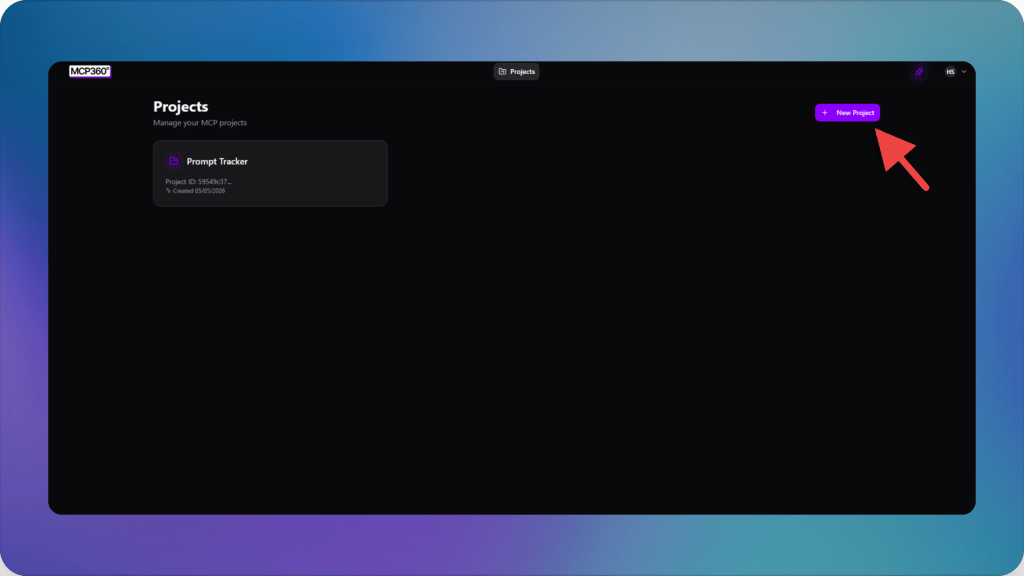
Step 1: Create a Project in MCP360
- Log in to your MCP360 account and go to the dashboard.
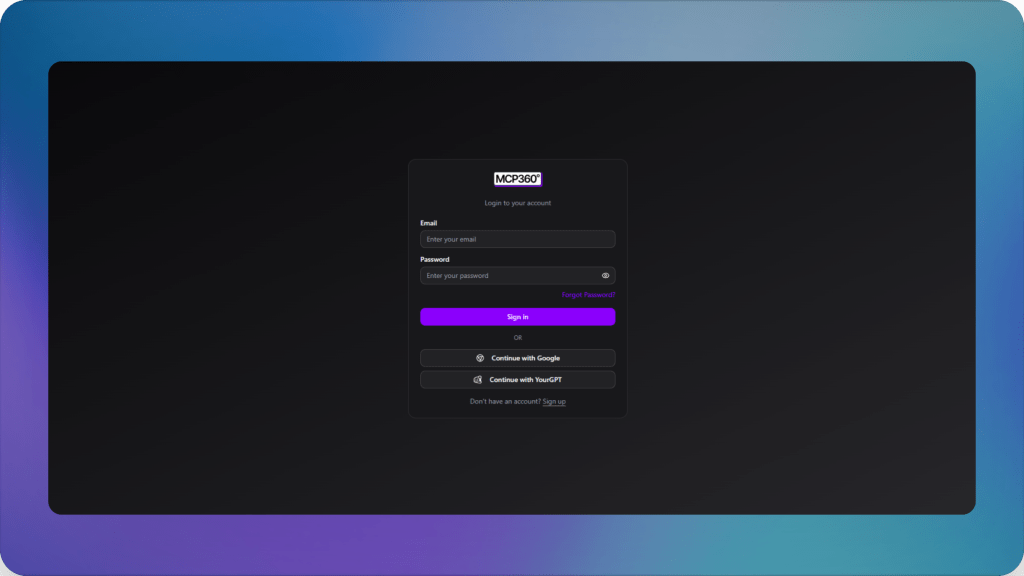
- If you already have a project for marketing campaigns, open it. Otherwise, create a new project.
- Confirm you are in the right project by checking the project name at the top of the screen. You should see the project dashboard with access to MCP Servers.
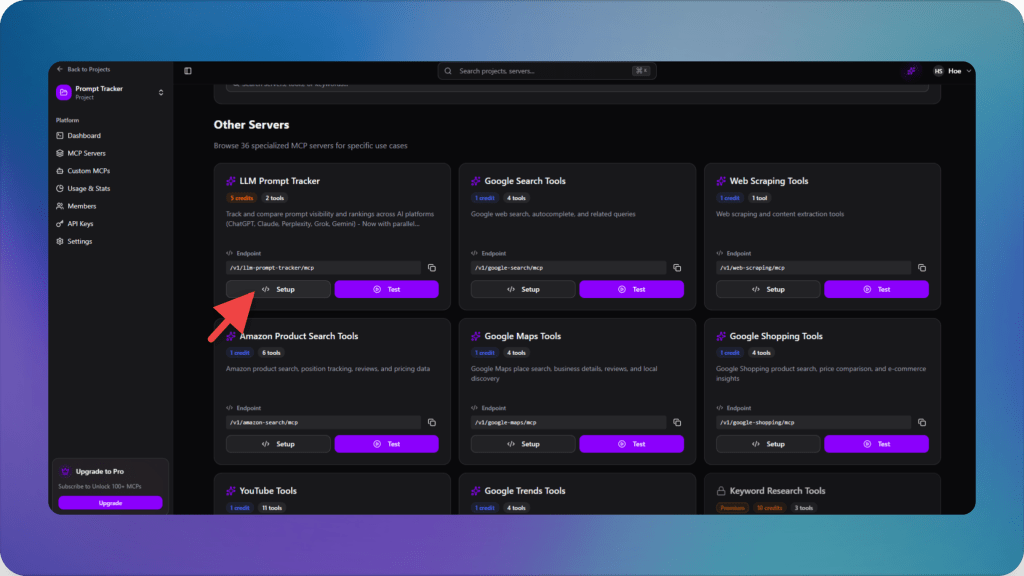
Step 2: Enable the LLM Prompt Tracker MCP Server
- In the left navigation panel, click MCP Servers.
- In the server list, find and select LLM Prompt Tracker. Use the search bar if the list is long.
- Click the Setup button.
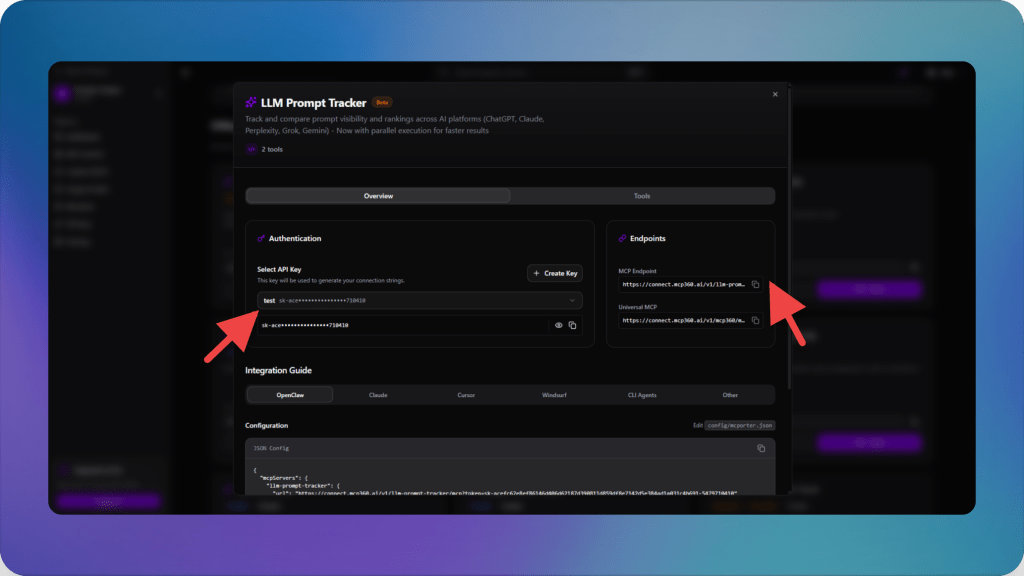
Step 3: Copy the MCP Endpoint
- Select the API key, then copy the generated MCP endpoint.
- Save this URL securely. You will need it in Claude. Do not add or remove any trailing slash unless instructed.
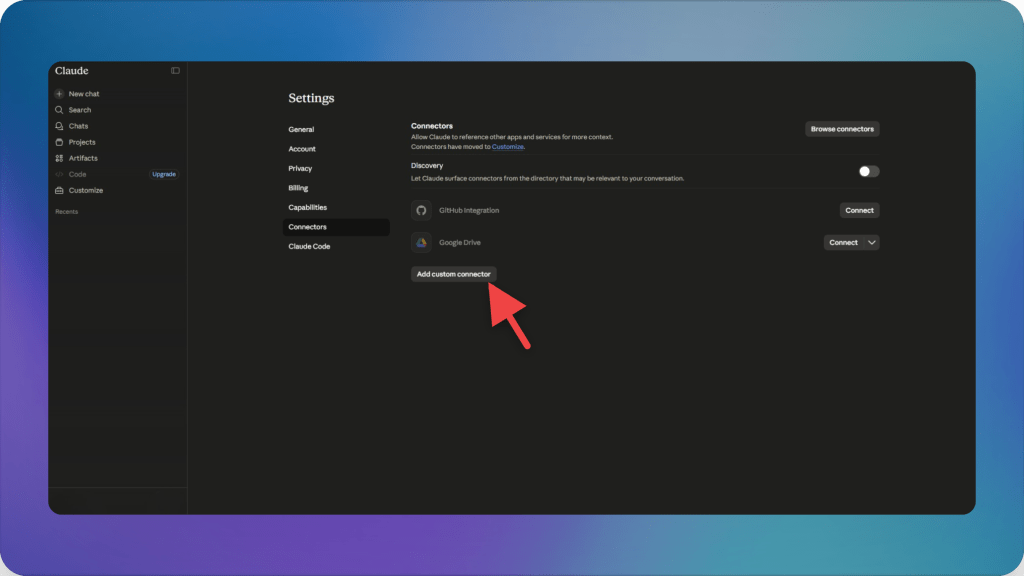
Step 4: Connect MCP360 to Claude
- Open Claude (web version recommended for easiest setup).
- Go to Settings → Connectors (or Connectors & APIs depending on your plan).

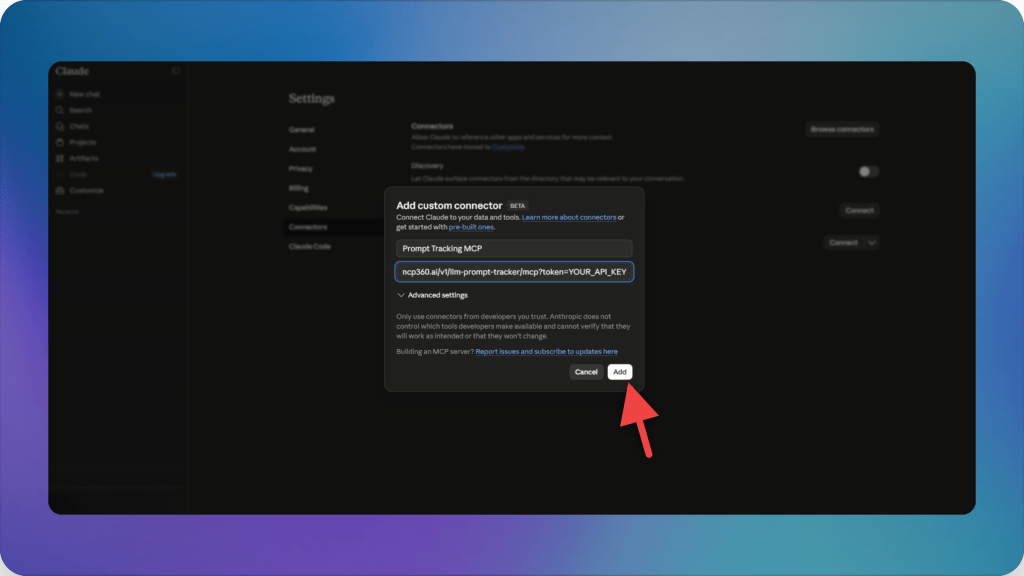
- Click Add Custom Connector.
- Enter a clear connector name such as “MCP360 Prompt Tracker.”
- Paste the endpoint URL you copied earlier and click Add.
Step 5: Verify the Tools
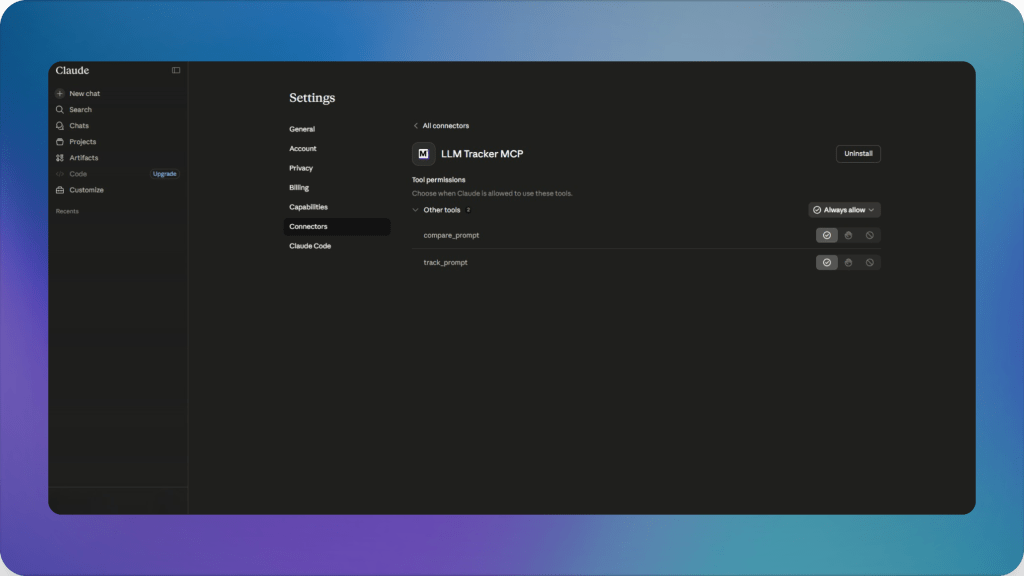
- After adding the connector, you should see tools such as Track Prompt and Compare Prompts.
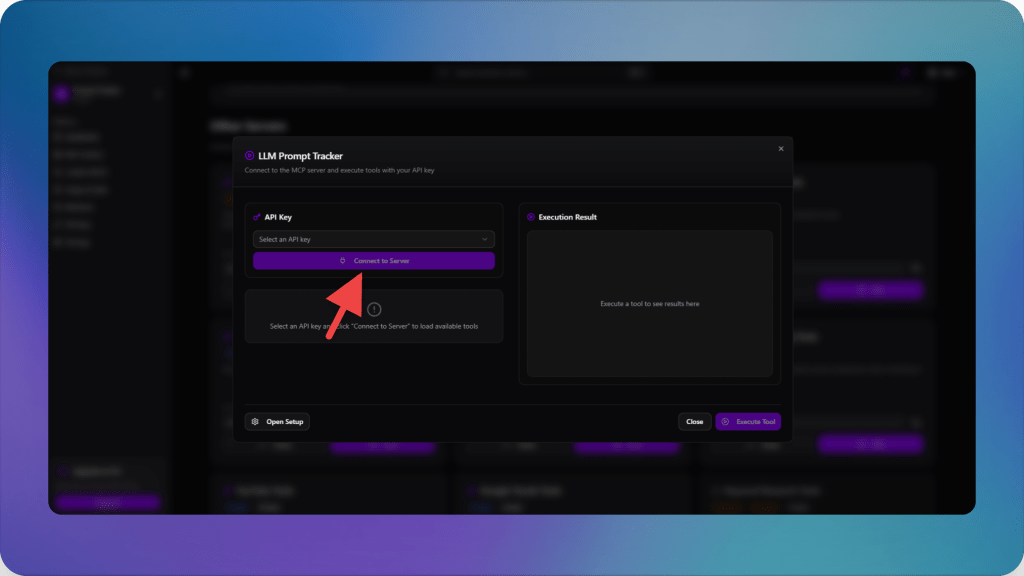
- Return to the MCP360 dashboard → MCP Servers → LLM Prompt Tracker.
- Click Test MCP, select the same API key used earlier, and click Connect MCP Server.
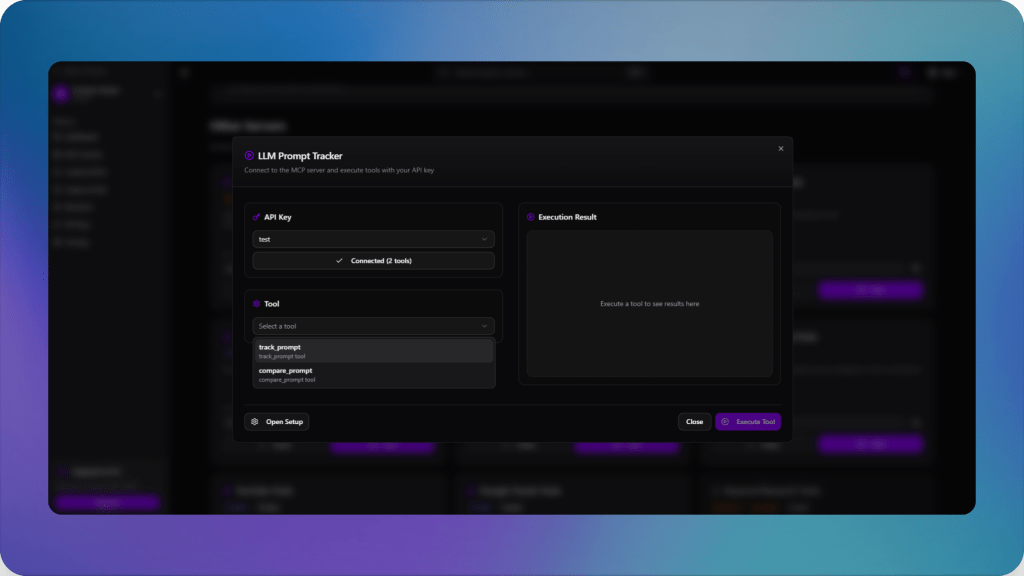
- The status should update to connected. You will now see the two tools available.
Step 6: Start Tracking and Comparing Prompts
- Run prompts or generate them using AI.
- Select the AI app, optionally add a target URL, then click Execute Tool.
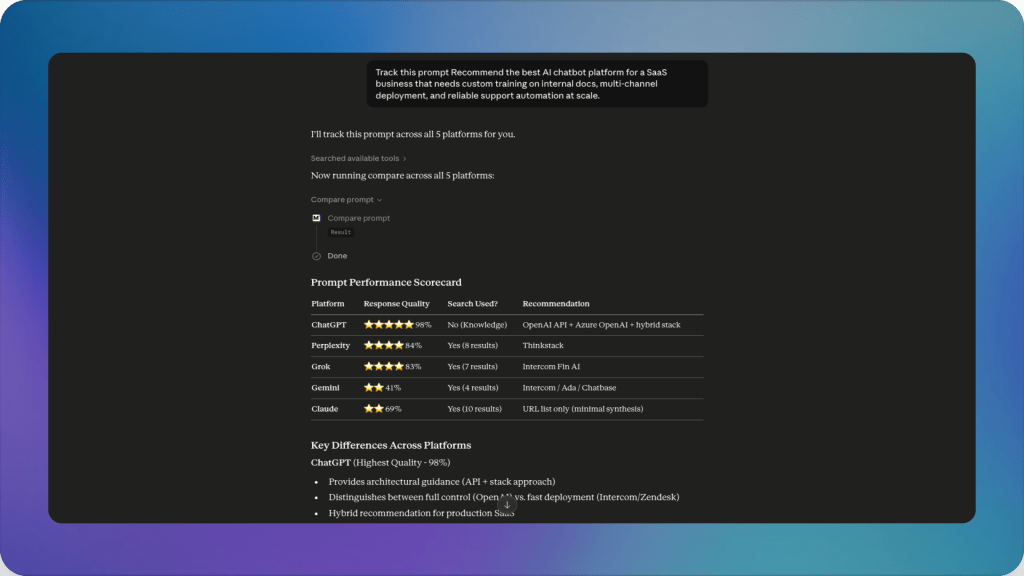
This setup enables prompt tracking directly within your workflow, without requiring additional integrations or custom logging systems.
Practical Use Cases: Where Prompt Tracking Improves AEO
Prompt tracking is useful when marketing teams need to understand how their brand appears inside AI-generated answers, especially during product discovery, comparison, and vendor shortlisting.
- Category visibility: Track prompts where buyers ask for the best tools in a category, such as “best AI marketing agents,” “best AI for ecommerce marketing,” or “AI agent platforms for marketing automation.” This shows whether your brand appears in the shortlist or stays absent from category-level recommendations.
- Citation tracking: A brand mention and a citation are different signals. Prompt tracking helps teams see whether AI answers cite their own website, third-party reviews, comparison pages, documentation, directories, or competitor-owned content. This matters because cited sources often shape how the answer explains the category.
- Competitor comparison: AI answers often place several vendors together. Prompt tracking shows which competitors appear beside your brand, which ones appear more often, and whether they receive stronger positioning in the answer.
- Alternative and replacement prompts: Buyers often ask for alternatives to tools they already know. Tracking prompts such as “[competitor] alternatives,” “cheaper alternative to [competitor],” or “best [competitor] replacement for ecommerce support” helps teams see whether they are included when buyers are actively building a shortlist.
- Positioning accuracy: Visibility alone is insufficient. A brand may appear in the answer but still be described weakly, inaccurately, or with missing capabilities. Prompt tracking helps teams review whether AI answers reflect the product’s real positioning, features, integrations, and best-fit use cases.
- Content gap discovery: When competitors appear and your brand does not, the prompt can reveal what content is missing. The gap may require a category page, comparison page, integration page, use-case page, case study, or third-party mention that helps AI systems understand your relevance.
- Visibility movement over time: AI answers change as sources, indexes, and model behavior change. Prompt tracking helps teams monitor whether their visibility, citation rate, and competitor overlap improve or decline across repeated checks.
Frequently Asked Questions
What is prompt tracking in AEO?
Prompt tracking in AEO is the process of monitoring user questions in AI answer engines and analyzing whether a brand appears, how it is described, and which sources influence the response.
How to do prompt tracking?
Prompt tracking is done by collecting target user prompts, running them across AI answer engines, capturing responses, and logging brand mentions, citations, and competitor presence for comparison over time.
What is difference between prompt tracking and SEO keyword tracking?
SEO keyword tracking measures rankings in search engines, while prompt tracking measures visibility inside AI generated answers based on user questions instead of search queries.
Why is prompt tracking important for AEO marketing?
Prompt tracking shows how often a brand appears in AI answers, how it is positioned, and which competitors dominate buyer focused questions inside AI tools.
What is the difference between brand mentions and citations in AI answers?
A brand mention means the name appears in the AI response, while a citation refers to an external source such as a website or document that the AI uses to support its answer.
How MCP360 helps in improving prompt tracking?
MCP360 helps run structured prompt tracking workflows by capturing AI responses, logging brand mentions, and organizing citation data in a consistent format across multiple prompts.
How does MCP360 help track AI visibility over time?
MCP360 enables repeated prompt checks and comparison of results over time, making it easier to track changes in brand visibility, citations, and competitor presence across AI answers.
How to verify that prompt tracking is working after setup?
After connecting the MCP endpoint to an AI tool, run a test prompt and check whether MCP360 is correctly capturing the response, brand mentions, and citations before using it for live tracking workflows.
Conclusion
Prompt tracking gives marketing teams a clearer way to understand how their brand appears inside AI-generated answers. It shows which buyer prompts mention the brand, which answers cite the website, which competitors appear more often, and where the product is being described inaccurately or weakly.
This matters because AI answers are becoming part of the discovery and shortlisting process. Buyers can ask a detailed question, compare options, and form an opinion before they ever visit a website. If marketing teams cannot see that layer, they are missing an important part of the modern buying journey.
AEO needs measurement beyond rankings and traffic. Teams need to know how their brand performs across real prompts, real answers, and real competitor comparisons. That means tracking the questions buyers ask, the sources AI systems cite, and the language used to describe the product.
MCP360 makes this easier by bringing prompt tracking into a structured workflow. Instead of checking answers manually and losing context, teams can monitor important prompts, review citations, compare visibility, and use the findings to improve content, positioning, and source authority.
The goal is simple: understand what AI answers say about your brand before those answers shape the buyer’s shortlist. If you are starting to measure this layer, MCP360 can give you a practical way to track the prompts, citations, and visibility signals that matter.

Article by
MitaliAI & Automation | Content Writer
Mitali is a content writer covering AI agents, automation, and no-code tools. Her writing spans the AI landscape, from support and sales automation to MCP integrations and agent workflows, with a focus on practical business use.