
The TL;DR
Composio is a widely used platform for connecting AI agents to external tools, valued for its broad application catalog, managed authentication, and fast initial setup. Production use tends to surface a different set of requirements.
-
• Where Composio Falls Short
No per-tenant configuration, closed-source tools, tool-calls-only coverage, and no no-code interface for teams without a developer on hand.
-
• Why Teams Look Elsewhere
A second customer, a tool that needs a code-level fix, a workload needing more than tool calls, or a security review on a deadline can each become the point where teams start testing alternatives.
-
• What This Guide Covers
Ten platforms built specifically for AI agent tool-calling and integration infrastructure, not broad automation suites with MCP added on, compared across catalog depth, pricing, and authentication architecture.
Composio earns its adoption for clear reasons. A free tier covering 20,000 tool calls per month, managed authentication across more than 1,000 applications, and framework adapters for LangChain, CrewAI, and the OpenAI Agents SDK let a team move from an idea to a working agent within a single afternoon. That combination of speed and catalog breadth makes it a reasonable default for a team evaluating AI agent infrastructure for the first time.
That speed has a ceiling, and it rarely shows up during the initial build. A working demo looks the same whether the platform underneath can flex to real production requirements or not, which is exactly why the gap tends to catch a team off guard once usage moves past a single builder’s own account. The specifics of where Composio’s coverage actually stops are worth walking through in detail before comparing what else exists.
This blog compares ten Composio alternatives, what each platform actually solves, where its coverage still falls short, and what it costs at current pricing.
Limitations of Composio
Composio connects agents to more than 1,000 external applications through managed authentication, an MCP gateway, and framework adapters for LangChain, CrewAI, and other agent stacks. The gaps below are the ones that consistently push teams toward an alternative once a prototype turns into a product.
- No per-tenant configuration: Every organization and every user gets identical tool behavior. A product that needs different field mappings or permissions per customer has to build that layer on top of Composio, since Composio does not provide it.
- Closed-source tools: The prebuilt catalog cannot be inspected, modified, or patched. When a tool’s behavior does not match what an agent needs, there is no code to fix, only a support ticket.
- Tool calls only: Composio does not cover continuous data syncs, webhook processing, or a unified data API, the same distinction covered in MCP vs Traditional APIs. An agent that also needs CRM records mirrored into a RAG pipeline needs a second platform.
- No no-code path: Every integration runs through an SDK or CLI. A business team without a developer on hand cannot configure or troubleshoot a connection directly.
- Enterprise trust documentation sits behind a trust center, not a self-serve download: Composio runs a public trust center, but the underlying SOC 2 report itself still requires a request through that portal rather than a direct download, worth confirming turnaround time for a security review on a tight timeline.
None of these eliminate Composio as an option for a single-tenant agent or an internal prototype, where fast, managed tool access is what it delivers most effectively. They explain why a production, multi-tenant, or highly customized workload is typically evaluated against at least one alternative first.
How to Compared These Composio Alternatives
Compare these Composio alternatives by looking at integration depth, authentication, pricing, customization, deployment flexibility, and how well they support production AI agent workflows.
- Auth architecture, rather than whether auth exists at all: Whether a platform supports one shared credential per integration or a genuinely separate credential per end user, and whether that support ships free or sits behind a paid tier.
- Catalog size against catalog verification: Whether a stated number of apps or actions came from the vendor’s own current pricing or product page, not a secondary blog repeating an old figure.
- What happens at the usage ceiling: Whether a plan’s quota running out throttles gracefully, stops everything cold, or triggers metered overage, and at what rate.
- Real cost at real volume: Every price below was checked against the vendor’s own site in late July 2026, not the free-tier headline.
- Category honesty: Whether a platform is actually a peer to Composio, a tool catalog with managed auth, or something adjacent, like a governance layer that assumes you already have a catalog. Both get included here, but labeled for what they are.
Composio Alternatives at a Glance
| Platform | Catalog | Schema Approach | Auth Model | Compliance | Core Differentiator |
|---|---|---|---|---|---|
| Nango | 900+ APIs | Unified, per-tenant custom fields | Native per-tenant OAuth | SOC 2 Type 2, HIPAA add-on | Open source, per-tenant by default |
| MCP360 | 100+ tools, multi-category | Meta-tool, search + execute | Team and project-scoped | SOC 2 Type II, GDPR, ISO 27001, including Free tier | Breadth across categories most SaaS-focused platforms skip |
| Arcade | 8,000+ tools | MCP-native, per-call scoped | Per-user, one-time challenge | None published as of mid-2026 | Authorization-first MCP runtime |
| Pipedream | 3,000+ apps, 10,000+ tools | Workflow-first, MCP layered on | Per-user via Connect, paid tier | Not publicly listed | Full workflow engine wrapped around tool calls |
| Paragon | 130+ apps, 1,000+ actions | Unified via ActionKit | Multi-tenant by design | SOC 2 Type II, HIPAA, GDPR | Tools, triggers, RAG, and workflows in one layer |
| Truto | 13+ categories, flat per connector | Unified, auto-generates MCP tools | White-labeled, per-tenant OAuth | Not publicly listed, zero data retention by design | Every integration automatically becomes an MCP tool |
| Merge | HRIS, ATS, CRM, ticketing | Unified, DLP-scanned | Embedded UI, no per-org config | DLP scanning, audit trails, SIEM streaming | Governed writes on Merge’s existing data models |
| StackOne | 450+ apps, 27,000+ actions | Provider-native, raw fields | Per-user OAuth, session-scoped | SOC 2, HIPAA, CCPA, GDPR | Deepest verified enterprise SaaS catalog |
| Klavis AI | 600+ tools | MCP-native, progressive discovery | Native multi-tenant OAuth | Not published | Open source, Strata’s progressive tool discovery |
| MintMCP | Governs existing servers, no catalog | N/A, governance layer | SSO/OIDC, role-based | SOC 2 Type II audited, HIPAA compliant | Governs any MCP server and ships no catalog of its own |
Best Composio Alternatives Compared
The ten platforms below are ordered by how consistently each one surfaces in independent comparisons of Composio alternatives, not by raw catalog size. StackOne’s catalog is the largest here, for instance, yet independent roundups cite Nango, Arcade, and Pipedream far more consistently, which is why it sits lower in the order despite the numbers. Several platforms also address a narrower problem than Composio does, noted explicitly within each entry.
1. Nango
Nango is an open-source, code-first integration platform that treats AI agent tool calls and traditional API syncs as two outputs of the same underlying connection, rather than two separate products bolted together for different teams to maintain. Every integration ships as version-controlled code a team can read, modify, and deploy through its own CI/CD pipeline, the direct answer to Composio’s closed-source catalog.
A built-in MCP server sits alongside two-way syncs and native per-tenant custom fields, the exact gap most commonly cited against Composio by teams building multi-customer products. Real-time observability rounds out a platform built for teams that want to own their integration logic, backed by SOC 2 Type 2 certification and a public trust center.
Pros
- 11,000+ GitHub stars and production use across 400+ B2B SaaS companies, a track record most newer entrants don’t have yet
- Every customer’s field mappings can be configured independently, not forced into one shared setup every account is stuck with
- Coding agents like Claude Code, Cursor, and Codex can write and maintain Nango integrations directly inside your own repo
- Real-time observability with OpenTelemetry export for every request the platform makes
- Enterprise self-hosted edition ships every Nango Cloud paid feature under a single license and maintenance fee
Cons
- Every request proxies through to the source API, adding latency compared to platforms that cache data locally
- Field mapping between unified schemas and your own data models is written in code, with no visual mapping UI
Pricing
- Free: $0/month, 900+ APIs, connection-based usage included for testing
- Starter: $50/month
- Growth: $500/month
- Enterprise: Custom pricing
Use Case
Teams building a customer-facing product where every end user connects their own account under your own brand get the most direct answer to Composio’s per-tenant gap here.
2. MCP360
MCP360 is deliberately structured differently from the rest of this list. Instead of one deep catalog of enterprise SaaS actions, it gives an agent access to 100+ tools spanning search, SEO, e-commerce, maps, and data APIs through a single connection, categories most enterprise-SaaS-focused platforms do not cover at all. Two meta-tools, search and execute, let an agent discover and call only what a task needs, so the tool catalog can keep growing without inflating token use.
A no-code Custom MCP Builder wraps any REST API into a callable tool, or a team writes Python or JavaScript directly when a wrapper falls short. SOC 2 Type II, GDPR, and ISO 27001 compliance apply at every plan tier, including Free, rather than sitting behind the top tier the way it does on some competitors.
Pros
- Search and execute meta-tools mean an agent loads only the tool schema it needs for a given call, not the whole catalog
- The no-code Custom MCP Builder handles auth and schema generation automatically once a REST API is pointed at it
- New tools are added to the marketplace monthly and become available instantly, with no reconfiguration on the agent side
- Automatic failover keeps a tool call working even when an upstream API changes or breaks
- Chat Playground for testing a tool call before wiring it into a live agent
Cons
- Built for breadth across many unrelated service categories rather than deep, per-tenant SaaS data syncs, so a product embedding customer-specific enterprise integrations needs a platform built for that exact pattern
- Auth is scoped by team and project rather than by individual external end customer, closer to StackOne’s model than to Nango’s per-tenant fields
Pricing
- Free: $0/month, 100 credits/month
- Starter: $16/month billed annually, 2,000 credits/month
- Professional: $83/month billed annually, 10,000 credits/month
- Advanced: $333/month billed annually, 100,000 credits/month
Use Case
An agent that needs to pull from many unrelated service categories in one session, like SEO research or market data aggregation, gets more direct value from MCP360 than from a platform built exclusively around enterprise SaaS.
3. Arcade

Arcade is an MCP-native runtime built around authorization rather than general automation, one of a wider field of AI agent runtimes built for a narrow job instead of a full platform. Hosted MCP servers ship on every plan from free upward, and every call is scoped and logged so the agent never sees a raw access token, only the result.
The catalog has grown past 8,000 tools across dozens of hosted MCP servers, and a $60 million Series A in June 2026 funded rapid expansion of both catalog and infrastructure. Named customers including LangChain and Snyk suggest real production adoption rather than prototype traffic alone.
Pros
- Vendor-neutral by design, works with any MCP client, LLM, or agent framework including LangChain, CrewAI, Pydantic AI, and Google ADK
- Built-in arcade evals for testing tool-call accuracy against real LLMs before shipping to production
- One-time user challenges per service, meaning repeat calls to the same app skip re-authentication
- Admin APIs for managing users, secrets, and tools across an organization’s Arcade deployment
- LangChain co-founder Harrison Chase has publicly credited Arcade with making MCP enterprise-ready
Cons
- No SOC 2 or ISO 27001 certification published as of mid-2026, a gap against several platforms on this list
- Pricing changed again in early July 2026, so current published tiers are newer and thinner on independent review than more established competitors
Pricing
- Hobby: $0/month, 1,000 standard tool executions, 50 pro tool executions, 1 hosted MCP server
- Growth: $25/month, 2,000 standard tool executions included then metered, 100 pro tool executions included then metered
- Enterprise: Custom pricing, dedicated tenant isolation, audit logs, RBAC, SSO and SAML
Arcade shipped a new pricing model the week of July 6, 2026. Figures above are the last confirmed live numbers as of June 2026 and should be reconfirmed before publish.
Arcade fits teams that want an MCP-native runtime built specifically around per-call authorization and audit trails for agents already running in production.
4. Pipedream
Pipedream pairs a hosted MCP server with a full workflow engine, so the same connection that authorizes a Slack post for an agent can also run a scheduled job or a webhook-triggered pipeline outside any agent context entirely. Composio and Pipedream solve a similar core problem, authenticated tool access, but Pipedream treats that access as one feature inside a broader automation platform rather than the entire product.
Pipedream Connect extends the same catalog with managed, per-user OAuth for teams embedding agent actions into their own product. Workday’s pending acquisition of the company, announced in late 2025, adds a large enterprise customer base behind a platform that was already developer-first.
Pros
- Trusted by 1,000,000+ developers, from early-stage startups to Fortune 500 teams
- Custom Node.js, Python, Go, and Bash code available at any workflow step alongside prebuilt actions
- Credit-based billing tied to compute time rather than a per-action task count
- Workday’s acquisition gives the platform a path to 75+ million end users already under contract
- Per-workflow MCP scoping lets a team limit exactly which tools an agent can reach, rather than exposing the entire catalog by default
Cons
- Connect, the per-user auth layer most agent products need, sits behind its own $99/month tier separate from the base workflow plans
- Workflows leaning on custom code across many chained steps get harder to audit and maintain as they grow
Pricing
- Free: $0/month, 100 credits/day
- Basic: $29/month, 2,000 credits
- Advanced: $49/month, 2,000 credits, unlimited workflows
- Connect: $99/month, 10,000 credits, MCP servers included, $2 per external connected user
- Business: Custom pricing
Use Case
Pipedream fits developer teams that want custom code available inline with prebuilt actions and are comfortable owning a full workflow engine rather than a tool-calling layer alone.
5. Paragon (ActionKit)
Paragon is an AI-native integration platform whose ActionKit product exposes more than 1,000 prebuilt actions across 130+ apps through a single API call or an MCP server, built specifically for multi-tenant agent products rather than internal automation. It positions itself as the only platform covering all four pillars an agent product needs, tool calling, event triggers, RAG ingestion, and low-code workflows, in one layer instead of stitching several vendors together.
Managed, multi-tenant authentication is purpose-built for shipping agent features to end users at scale, and SOC 2 Type II, HIPAA, and GDPR compliance ship with self-hosted and airgapped options for regulated buyers who cannot use a shared cloud environment. Founded in 2019 and YC-backed, the company has grown its engineering-team customer base more than tenfold in recent years.
Pros
- $21M+ raised from investors including Y Combinator, Inspired Capital, and Global Founders Capital
- ActionKit MCP server is publicly listed on Anthropic’s MCP registry, not a private or unlisted integration
- Named customers building on ActionKit include Copy.ai, Appsmith, and Athena Intelligence
- Framework and LLM agnostic, plugging into LangChain, the Vercel AI SDK, or a custom loop without rework
- Managed Sync indexes a user’s files and records into a vector database, covering the RAG-ingestion side of an agent product
Cons
- No public pricing, every plan requires a sales conversation, which slows early-stage evaluation compared to a self-serve competitor
- ActionKit Triggers, the event-driven layer, only reached public beta in 2026, newer and less proven than the core action catalog
Pricing
- Free tier available for initial development
- Usage-based paid plans, contact sales for exact figures, no public pricing as of this writing
Use Case
Teams shipping a customer-facing AI product that needs tool calls, triggers, and RAG ingestion under one multi-tenant roof, rather than isolated tool calls alone, get the most complete answer from Paragon.
6. Truto
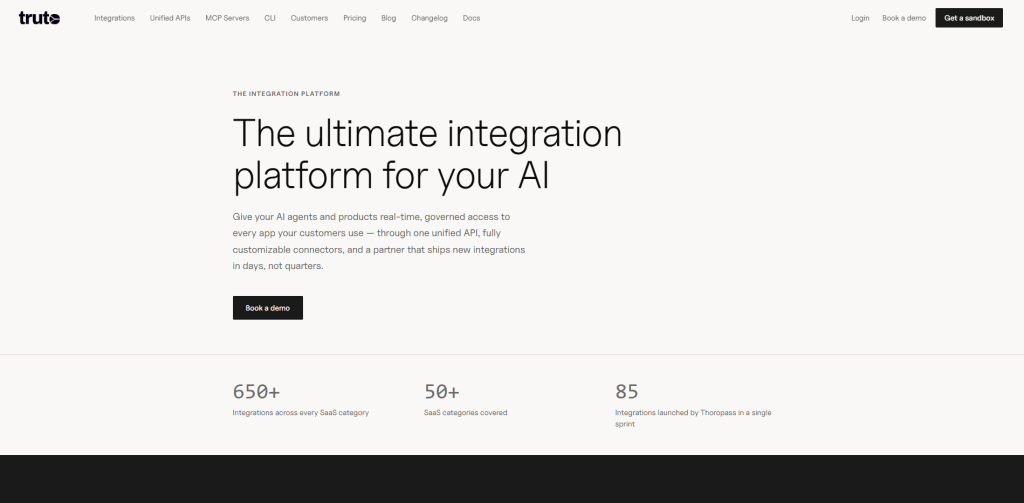
Truto is a code-friendly unified API platform that turns every connected integration into a callable MCP tool automatically, with no separate configuration step required on top of the base integration setup. It stores no customer data between calls, so every request flows in real time from the source system straight to the agent, avoiding the stale-cache and added-security-surface problems that come with platforms that cache data locally before serving it.
Pricing is flat per connector rather than per linked account or per API call, so a growing customer base does not inflate the bill the way it does on consumption-priced competitors. White-labeled OAuth and a three-level credential hierarchy support genuine per-tenant, multi-customer authentication out of the box.
Pros
- Truto Docs MCP feeds accurate, structured API documentation directly into Cursor, Claude, and ChatGPT, addressing hallucinated endpoints in coding agents
- Covers 13+ integration categories, from HRIS and CRM to e-signature and marketing automation, under one platform
- Proactive token refresh keeps credentials valid across the three-level credential hierarchy without manual re-authentication
- A Proxy API calls the underlying app’s API directly for anything the unified model does not cover
- SuperQuery and on-premise deployment add-ons are available for teams with deeper infrastructure requirements
Cons
- Strict API design standards mean an undocumented or poorly specified underlying API sometimes cannot be exposed as an MCP tool at all
- Custom field support and the broader connector catalog sit behind the higher Enterprise tier, not included at the entry price
Pricing
- Expansion: From $999/connector/year, unlimited connections, companies, and API calls
- Enterprise: From $1,999/connector/year, broader connector catalog, longer log retention, single tenancy or on-prem, SSO, SLA
- 14-day free trial, credit card required
Use Case
Truto fits a growing customer base where a per-connection or per-API-call bill would otherwise scale straight up with growth, since the flat per-connector price holds regardless of customer count.
7. Merge (Agent Handler)
Merge built Agent Handler in 2025 on top of its long-running Unified API, giving agents MCP-ready connectors, tool packs, and governed write actions across the same HRIS, ATS, CRM, and ticketing categories Merge already normalized for traditional data syncs. Every tool call gets scanned for sensitive data, logged, and routed through DLP rules before it reaches a downstream system, reflecting Merge’s enterprise compliance heritage.
Two products share the name: one for engineering teams building agent features into their own product, priced on usage credits, and one for IT and security teams governing which tools employees can connect to AI assistants, priced per seat instead. Both start free, which lowers the bar for a first real evaluation.
Pros
- Connector Studio can generate a new MCP connector from just a GitHub repo or API documentation URL, without custom coding
- Tool Packs bundle connectors and actions for a specific use case, like sending R&D updates to executives in Slack, ready to deploy as one unit
- Free to start, with 2,000 monthly credits on the product-facing Agent Handler plan
- Embedded Link UI component gives frictionless end-user authentication out of the box
- SIEM streaming and full audit trails for enterprise security teams governing agent tool use
Cons
- A newer layer than the core Unified API, so tool coverage and production track record are thinner than a platform built agent-first from day one
- No per-org tool configuration, the exact limitation most commonly cited against Composio itself
Pricing
- Agent Handler (product): Free to start, 2,000 monthly credits, usage-based beyond that
- Agent Handler for Employees: Per-seat pricing, core features included with email support
- Higher tiers and the core Unified API are contract-based
Use Case
Merge Agent Handler fits a team already normalizing HR, recruiting, or CRM data through Merge’s Unified API that now wants governed agent write access on the same data models, without a second vendor.
8. StackOne
StackOne is a managed MCP gateway built specifically for AI agents connecting to enterprise SaaS, covering 450+ apps and more than 27,000 pre-built actions through a single endpoint, the largest independently-verified catalog on this list. Unlike Composio’s normalized approach, StackOne takes a provider-native stance, preserving each vendor’s actual field names and data model instead of mapping everything into one unified schema, so nothing gets flattened when an agent needs a system’s real behavior.
Every connector ships as a declarative YAML definition stored in Git and is automatically exposed through MCP, REST, the A2A protocol, and major agent SDKs without extra configuration. Dynamic tool discovery and a “Code Mode” execution path cut context usage dramatically as the tool count grows.
Pros
- StackOne reports 91.6% first-try accuracy on its own S1 Search Bench for automated tool discovery
- Falcon execution engine handles agent actions with built-in retries and accuracy checks rather than raw API pass-through alone
- Dynamic tool discovery cuts context usage by roughly 460x, and Code Mode cuts token usage by about 96%
- StackOne Defender screens every tool response for prompt injection at 88.7% accuracy before it reaches the agent
- SOC 2, HIPAA, CCPA, and GDPR compliant, with per-user OAuth and session-scoped tokens handled natively
Cons
- Gateway and OEM are priced as separate models, and only Enterprise and OEM Enterprise sit fully behind a sales conversation, still a second axis to compare beyond a single-plan competitor
- Advanced capabilities like browser use, premium prompt-injection defense, and data sync consume credits faster than a standard tool call, so heavy workloads need real usage modeling first
Pricing
- Free: $0/month, 1,000 credits/seat/month, all 450+ connectors and 27,000+ actions included, MCP access included, no credit card required
- Team (Gateway): $600/month, 5,000 credits/seat/month, adds AI Connector Builder, SAML SSO, and 3 custom connector slots
- Enterprise / OEM Enterprise: Custom credit volume, contact for exact pricing, adds unlimited custom connectors, browser-use actions, and SOC 2 report access with a BAA
Use Case
Teams that need the deepest verified catalog of real SaaS actions, with each vendor’s actual data model intact rather than flattened into a generic schema, get the most out of StackOne.
9. Klavis AI
Klavis AI is an open-source, Apache 2.0-licensed platform providing hosted MCP servers across 600+ tools, with OAuth and multi-tenant auth built in so a team does not have to run or secure its own MCP infrastructure. Its Strata MCP server fronts the whole catalog behind one connection and reveals tools progressively, category first, then specific action, full schema only at execution time, keeping the context window small as the catalog grows.
A small, YC-backed team built this on a genuinely permissive license, so self-hosting, modifying, or reselling the platform carries no copyleft restriction. Focus has shifted somewhat toward sandboxed training environments for agent evaluation alongside the core integration product, which still slots into Claude Desktop’s MCP setup the same way any hosted server does.
Pros
- 5,800+ GitHub stars and 550 forks on the live repo, a strong adoption signal for an open-source project this young
- Klavis reports Strata’s progressive discovery delivers roughly 13% higher tool-selection accuracy and an 83%+ success rate on complex workflows
- MCP clients available directly inside Slack, Discord, and a web interface, alongside the usual coding-agent path
- Free tier available to start, including hosted Strata access through the dashboard
- Founding team background from Google DeepMind and Lyft, backed by Y Combinator
Cons
- Pricing tiers and usage limits are not fully published, which complicates cost forecasting before committing
- The company has expanded into sandboxed agent-training environments alongside its core integration product, a two-line bet from a small team that could dilute focus on either
Pricing
- Free: $0/month, covers getting started including hosted Strata
- Paid plans: For production scale, exact tiers not fully published
- Enterprise: Custom pricing
Use Case
Klavis AI fits a team that wants an open-source, self-hostable option under a genuinely permissive license and is comfortable with a leaner vendor than the venture-scale platforms elsewhere on this list.
10. MintMCP
MintMCP solves a different problem than the rest of this list. It is not a tool catalog, it is a governance layer that sits in front of MCP servers a team already runs, whether self-hosted, pulled from one of the MCP server directories teams use to find them, from Composio, or from any other provider, giving IT and security teams one place to see, permission, and audit every tool call an agent makes.
Every connection gets SSO, OIDC, and role-based scoping, with real-time monitoring that flags shadow MCP usage before it becomes an incident. One-click deployment turns an existing MCP server into a production service with OAuth and audit trails in minutes, not the weeks a self-managed gateway typically takes.
Pros
- Official Cursor Hooks partner, validating the platform’s approach for teams standardizing on Cursor as their coding agent
- No Kubernetes or dedicated DevOps resources required, unlike self-managed alternatives that need cluster setup and ongoing platform engineering
- Virtual server architecture keeps role-based access literal, a sales team’s agent cannot reach an HR database even if both MCP servers are technically available
- SOC 2 Type II audited and HIPAA compliant, with a complete audit trail of every tool call
- Reports an average of $3.70 returned per dollar invested in structured MCP governance adoption, per the platform’s own published figures
Cons
- No published pricing tiers, every plan requires a custom quote regardless of team size
- Provides no tool catalog of its own, so a team still needs a separate platform to actually reach external SaaS tools
Pricing
- No published free tier, all plans are custom quotes based on team size and requirements
Use Case
MintMCP fits a security or IT team that already has MCP servers running somewhere and needs a single governed, audited front door, not a team looking for its first tool catalog.
How to Choose the Right Composio Alternative
- Schema philosophy affects how much rework is required later: Unified-schema platforms (Truto, Merge, Nango, Composio itself) get an agent moving quickly but can lose some of an app’s real behavior at the edges. Provider-native StackOne requires more setup time upfront but preserves the original data model in full.
- The pricing model should match the expected growth pattern: Flat per-connector pricing (Truto) protects margins as the customer base scales. Credit and seat models (StackOne, Arcade, Merge) track usage directly. Contact-sales-only platforms (Paragon, MintMCP) suit teams already budgeting five or six figures for this layer.
- Open-source availability matters significantly to some teams and not at all to others: Only Nango and Klavis AI ship under a genuinely open license here. For a team that needs to inspect or self-host the integration code, that requirement narrows the field to two immediately.
- A governance-only platform addresses a different problem than a catalog does: MintMCP does not replace a tool catalog, it fronts whatever a team already runs. It pairs with one of the other nine platforms rather than competing against them directly, which is worth understanding before comparing it on the same terms.
- Catalog depth and catalog breadth answer different questions: StackOne, Pipedream, and Paragon lead on raw enterprise-SaaS action count. Arcade and MCP360 optimize for breadth across categories most enterprise-focused platforms skip entirely. The right axis depends on what the agent actually needs to reach.
Frequently Asked Questions
What is an MCP server?
An MCP server gives an AI agent a defined, secure way to call an external tool, like sending a Slack message or checking a webpage, using the Model Context Protocol. MCP360 bundle many of these servers behind one connection, so an agent can reach tools across categories like SEO or e-commerce without managing each one separately.
What is Composio and what does it do?
Composio is a platform that connects AI agents to more than 1,000 external applications through managed authentication and an MCP gateway. It handles OAuth setup and token refresh so a developer does not have to build that infrastructure for each app individually, which makes it a common starting point for a first working agent.
Is Composio free to use?
Yes, Composio offers a free tier covering 20,000 tool calls per month, enough to build and test a working agent. Enterprise trust documentation sits behind Composio's own trust center rather than a fully self-serve download.
Why do teams look for alternatives to Composio?
The most common reasons are Composio's lack of per-tenant configuration, meaning every customer gets identical tool behavior, its closed-source tool catalog, and coverage that stops at tool calls without data syncs or webhooks. Teams building a multi-customer product or needing source-level control typically hit one of these limits first.
Which Composio alternative works best for a multi-tenant, customer-facing product?
Nango is built specifically for this. Every customer's field mappings and credentials can be configured independently rather than sharing one setup, which directly answers the per-tenant gap most often raised against Composio. Arcade and Paragon's ActionKit also support genuine per-user authentication if Nango's open-source approach isn't the right fit.
Is there an open-source alternative to Composio?
Yes. Nango and Klavis AI are the two genuinely open-source options in this list. Both can be self-hosted and inspected, unlike Composio's closed-source catalog.
Does MCP360 offer a free plan?
Yes. MCP360's Free plan includes 100 credits per month with access to its 100+ tool catalog across search, SEO, e-commerce, and data APIs. Paid plans start at $16 per month billed annually for 2,000 credits, with SOC 2 Type II, GDPR, and ISO 27001 compliance included at every tier, including Free.
What should I look for when choosing a Composio alternative?
Start with schema philosophy and catalog scope. Unified-schema platforms move faster to build against, while provider-native options like StackOne preserve more of an app's real behavior. Catalog depth matters for deep enterprise SaaS coverage, while breadth across unrelated categories, which is where MCP360 fits, matters more for agents working outside typical enterprise tools.
Conclusion
The clearest pattern across these ten platforms is that a separate credential per end user, the gap most often raised against Composio, has stopped being a real differentiator. What still separates them is how much of an app’s real behavior a unified schema sacrifices, and whether the catalog runs deep or wide. Composio wins on speed. It rarely wins the other two.
None of this is settled. Arcade closed a $60 million round less than a year after Composio’s own Series A, StackOne built a product line around embedding agent auth into other companies’ software, and Merge is still retrofitting governance onto a platform built for data syncs. This category is still being built in public, and today’s leader has no guarantee of holding that spot next year.
Run whichever platform survives a shortlist against one real integration before signing anything, and confirm pricing directly with the vendor. If the actual gap is reaching many unrelated service categories rather than going deeper inside enterprise SaaS, MCP360 sits in that lane and is worth trying alongside whatever else makes the cut.
Tags

Article by
MitaliAI & Automation | Content Writer
Mitali is a content writer covering AI agents, automation, and no-code tools. Her writing spans the AI landscape, from support and sales automation to MCP integrations and agent workflows, with a focus on practical business use.