
The TL;DR
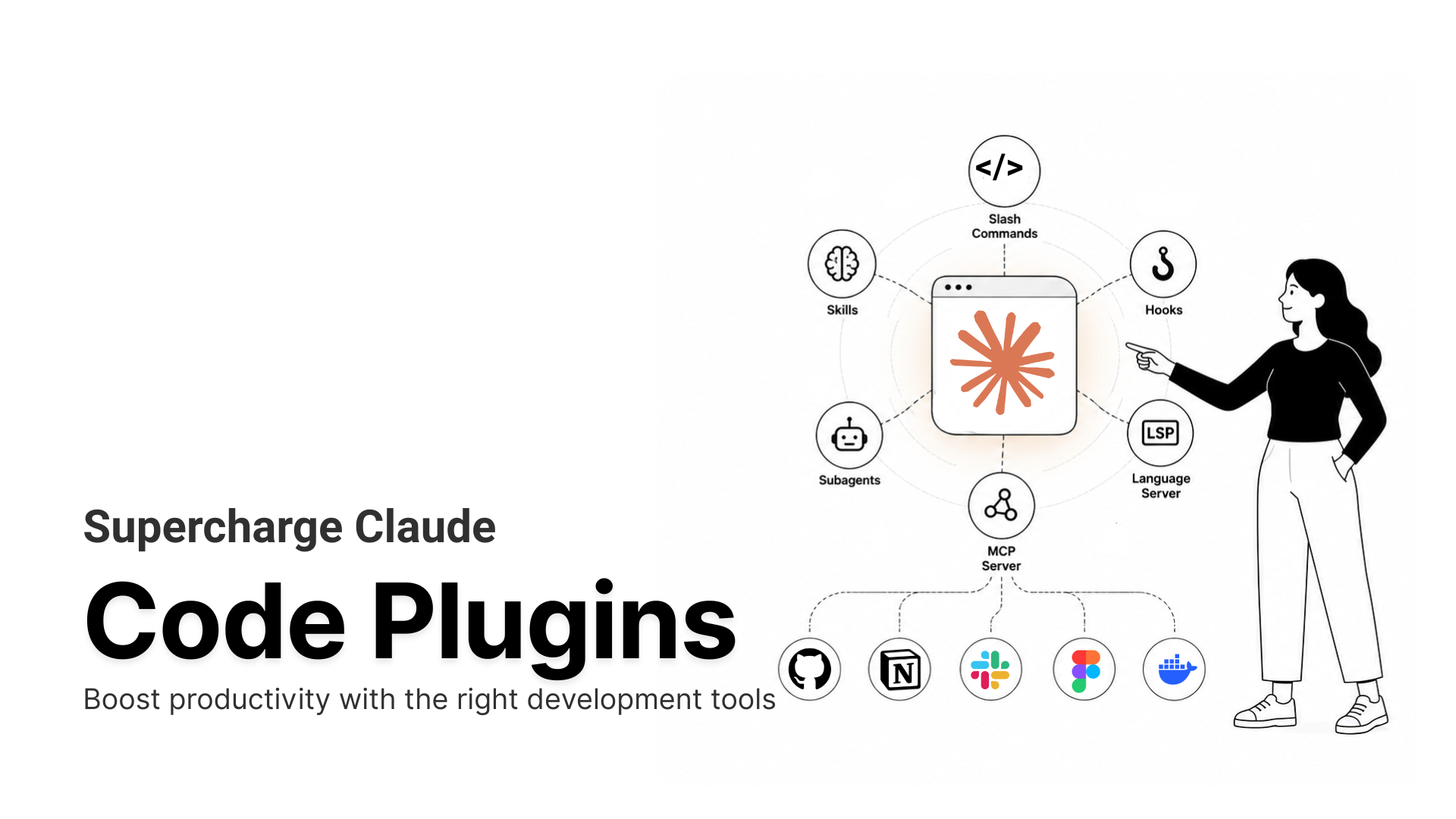
Claude Code plugins bundle slash commands, subagents, hooks, MCP servers, and language-server configs into installable packages that teams can share, install, and toggle with one command.
-
• What They Are
Claude Code plugins are installable bundles that package slash commands, subagents, hooks, MCP servers, and language-server configs into one unit. They can be added from a marketplace with a single command and toggled on or off to control context cost.
-
• What They Fix
Instead of copy-pasting setup files across machines, plugins let every teammate install the same workflow in the same way. That is why Anthropic now treats plugins as the standard way to share Claude Code customizations.
-
• The Security Catch
Plugins run with your user permissions and can execute arbitrary code. Documented 2026 attacks used malicious plugins to hijack dependency installs, so the source matters as much as the feature.
Claude Code already supports slash commands, subagent delegation, hook-based automation, MCP connections, and language-server integration, but each one lives in its own file, in its own project, wired up by hand. A commit workflow sits in one settings file. A security-review subagent sits in another. MCP credentials sit in a config that’s easy to forget updating six months later. None of that setup moves to a new machine on its own, and getting it to a teammate means a manual copy-paste with real odds something gets missed.
Claude Code plugins fix this by packaging any combination of those pieces (commands, subagents, hooks, MCP servers, LSP configs) into one unit that installs with a single command and switches off just as easily when a project doesn’t need it anymore. Anthropic shipped them in public beta on October 9, 2025, specifically to make setups shareable instead of one-off.
This guide gets you from installing your first plugin to building your own, managing a dozen across a team, and knowing exactly what you’re trusting when you run someone else’s code in your terminal.
What Are Claude Code Plugins

A Claude Code plugin is a packaging format. It can bundle any combination of these pieces, per Anthropic’s plugin documentation:
- Slash commands: shortcuts for operations you run often, invoked as
/plugin-name:command - Subagents: Purpose-built agents for narrow jobs like security review or test writing
- Hooks: Actions that fire automatically at set points, like after a file edit or before a commit
- MCP servers: Connections to external tools and data through the Model Context Protocol
- LSP servers: Language-server configs that give Claude real-time type checking and code navigation
- Monitors, settings, and binaries: Background watchers, default config, and executables added to the Bash tool’s path while the plugin is active
Claude Code Plugin Manifest and Namespace
Every plugin carries a manifest at .claude-plugin/plugin.json with its name, description, and version. The name becomes a namespace. A hello skill inside a plugin called my-tool runs as /my-tool:hello, so two plugins that both ship a commit command never collide.
How Plugin Toggles Reduce Context Usage
The toggle earns its keep day to day. Each enabled plugin adds to the system prompt on every turn, so a database plugin can sit dormant during frontend work instead of quietly taxing your context window. Recent Claude Code builds show a context-cost estimate before you even install, and flag plugins you added but haven’t touched in weeks. What used to be a guess is now a number you can read.
Plugins vs Skills vs MCP Servers
A few dozen people a month search “claude code plugins vs mcp” outright, and plenty more just get the three concepts tangled while they’re setting things up. They sit at different layers, and mixing them up costs you time when something breaks.
| Aspect | Skill | MCP Server | Plugin |
|---|---|---|---|
| What it is | Instructions in a SKILL.md file |
A server that exposes tools over a protocol | A package that bundles the other two plus hooks |
| What it does | Shapes how Claude handles a task | Connects Claude to external tools and data | Distributes a full Claude Code setup as one unit |
| Portability | Loads in any tool that reads skills | Works in any MCP client, including Cursor and Windsurf | Specific to Claude Code |
| How you add it | Drop the file in, or ship it inside a plugin | Add it to a config, or ship it inside a plugin | /plugin install name@marketplace |
| Reach for it when | You want to steer behavior on a task | You want tools any client can reuse | You want to share a whole workflow |
MCP Servers Travel, Plugins Don’t
An MCP server speaks a portable protocol, so the same server runs well beyond Claude Code. A GitHub MCP server bundled inside a plugin also works in Cursor, Windsurf, Gemini CLI, and other agent runtimes. A plugin is the Claude Code wrapper around that portability. It doesn’t replace it.
Claude Code Plugins vs IDE Extensions
One thing trips people up every time. A “Claude Code plugin” for IntelliJ or PyCharm usually means the JetBrains editor extension that runs Claude Code inside that IDE. That’s a different product from the plugin system covered here, which runs inside Claude Code itself.
Skills shape behavior. MCP servers supply tools. Plugins are how both get delivered and shared. That’s the distinction worth keeping straight the next time something breaks and you’re not sure which file to open.
Claude Code Plugin Marketplaces
There’s no single app store for this. Plugins come from marketplaces, and a marketplace is a git repository with a .claude-plugin/marketplace.json file. Adding one registers its catalog without installing anything. You pick what you want after.
Three kinds exist, per Anthropic’s marketplace documentation:
- Official:
claude-plugins-officialregisters itself automatically the first time you start Claude Code. Browse it in the/pluginmenu or at claude.com/plugins. - Community:
anthropics/claude-plugins-communityholds third-party plugins that passed automated validation and safety screening. Add it yourself with/plugin marketplace add anthropics/claude-plugins-community, then install from it as@claude-community. - Third-party: Any GitHub repo, git URL, local path, or hosted
marketplace.json. Seth Hobson’swshobson/agentsrepository is one of the more prominent examples, packaging dozens of subagents and workflow plugins that people add directly by URL.
Anyone can publish a marketplace. That keeps installation fast, and it puts source review on you, not on Anthropic, the moment you leave the official directory.
Claude Code Plugin Security and Risks
This is the section most plugin guides skip, and it’s the one that actually decides whether a plugin helps you or costs you.
What a Plugin Can Actually Do
Plugins and marketplaces execute arbitrary code on your machine, with your user permissions. A plugin can read and write files, read environment variables, and open network connections. Installing one is closer to adding a dependency than flipping a setting.
Real Claude Code Plugin Security Incident
In January 2026, SentinelOne’s Prompt Security team documented a marketplace plugin from an unofficial source whose dependency-management skill quietly redirected a routine Python install to an attacker-controlled source. The library imported cleanly. The example code ran without error. Trojanized code sat in the project anyway, capable of exfiltrating secrets or lying dormant until triggered. Because an enabled plugin persists across sessions, the damage doesn’t end when the conversation does.
How Anthropic Reviews Claude Code Plugins
Anthropic runs a two-tier review on its own directory. Every listed plugin clears automated screening, and plugins that pass an added human review earn an “Anthropic Verified” badge. The badge raises your confidence. It doesn’t guarantee a clean plugin, and Anthropic’s own wording stops short of that promise.
Claude Code Plugin Security Checklist
- Match permissions to function: A commit-message formatter has no reason to request broad filesystem access or outbound network calls. A cloud-provider plugin needs both, and its source should show exactly where those calls go.
- Read the source: Every entry in the official directory links to its repository. Open it. For third-party plugins outside the directory, the bar is higher, because automated screening isn’t guaranteed.
- Prefer Verified, prefer official: Inside the directory, the badge is the most reliable signal available right now.
- Restrict marketplaces at the org level: Administrators can limit which marketplaces users may add with the
strictKnownMarketplacesmanaged setting. - Toggle off what you’re not using: A disabled plugin can’t run hooks or load MCP servers, which shrinks your context cost and your attack surface at the same time.
A plugin is exactly as safe as the code you’d accept from a stranger on the internet, no more and no less. Check the source, match the permissions to the job, and lean on the Verified badge when you can’t check yourself.
How to Install Claude Code Plugins
The flow runs four steps. Every command below comes straight from Anthropic’s install documentation.
Step 1: Open the Plugin Manager
Run /plugin to open four tabs. Discover lists plugins across your marketplaces. Installed shows what you already have. Marketplaces manages your sources. Errors surfaces anything that failed to load.
Step 2: Add a Marketplace
The official marketplace is already there. Point Claude Code at another repo to add it:
/plugin marketplace add anthropics/claude-plugins-community
The same command takes full git URLs, local paths, and remote marketplace.json URLs.
Step 3: Install the Plugin
Install from the command line, or press Enter on a plugin in Discover to choose a scope:
/plugin install commit-commands@claude-plugins-official
Scope decides reach. User scope installs it for you across every project. Project scope writes it into .claude/settings.json, so every collaborator on that repo gets it too. Local scope keeps it to you, in one repo, not shared with anyone.
Step 4: Reload and Use
Run /reload-plugins to activate it without restarting. Because skills are namespaced, commit-commands gives you /commit-commands:commit, which writes a message from your staged diff and creates the commit in one turn.
Day-to-day management uses a short command set:
/plugin list/plugin enable plugin-name@marketplace-name/plugin disable plugin-name@marketplace-name/plugin uninstall plugin-name@marketplace-name
Those four commands cover the entire lifecycle from here. List what’s installed, flip something on or off, or remove it cleanly once you’re done with it.
The 10 Best Claude Code Plugins
Anthropic’s official directory is a strong starting point, but it isn’t the only place worth looking. These 10 cover the ground most people actually need, shipping code, keeping it secure, building UI, testing in a real browser, and connecting to outside tools. Descriptions, install commands, and links come straight from Anthropic’s plugin directory.
1. feature-dev
feature-dev runs a seven-phase workflow for building a new feature from a plain description. A code-explorer agent maps the relevant parts of your codebase first, so the plan is grounded in what’s actually there instead of a generic template. A code-architect agent designs the approach before any code gets written, and a code-reviewer agent checks the result against that plan once it’s done. It’s the plugin worth reaching for when a feature touches multiple files and you want exploration and design to happen before the first line of code, not after.
Setup
/plugin install feature-dev@claude-plugins-official
2. code-review
code-review runs five parallel Sonnet agents against a pull request, each checking a different angle: CLAUDE.md compliance, bug detection, historical context, prior PR patterns, and code comments. Every issue those agents surface gets a second pass from a separate validation agent, which scores it for confidence before anything reaches you. Findings below a set confidence threshold get filtered out automatically, so the comments that do show up are ones worth acting on. Run it with /code-review before you merge, and it posts inline comments directly on the PR through the GitHub CLI.
Setup
/plugin install code-review@claude-plugins-official
3. commit-commands
commit-commands handles the parts of a git workflow that are repetitive but easy to get wrong. /commit stages your changes and writes a commit message generated from the actual diff, not a placeholder. /commit-push-pr extends that into a full loop, committing, pushing to a feature branch, and opening a pull request in one step. /clean_gone clears out local branches already deleted on the remote, the kind of cleanup most people mean to do and never get to. It needs Git installed and, for PR creation, an authenticated GitHub CLI.
Setup
/plugin install commit-commands@claude-plugins-official
4. security-guidance
security-guidance is a hook that runs automatically on every file edit, not a workflow you have to remember to invoke. It checks for command injection, XSS, and other unsafe code patterns before the change lands, flagging what it finds in the same session instead of waiting for a CI run to catch it days later. Because it ships enabled by default in recent Claude Code builds, most people are already running it without having installed anything themselves. It’s the closest thing in the directory to a safety net built specifically for AI-written code.
Setup
/plugin install security-guidance@claude-plugins-official
5. frontend-design
frontend-design is a skill that auto-invokes whenever you’re doing frontend work, rather than something you call with a slash command. It steers Claude toward deliberate typography pairings, custom color systems, and asymmetric layouts, instead of the generic look most AI-generated UI defaults to. The guidance covers spacing and visual hierarchy, not just component structure. It’s most noticeable on greenfield UI work, where there’s no existing design system pulling the output back toward something more templated.
Setup
/plugin install frontend-design@claude-plugins-official
6. context7
context7 solves a specific, common failure: Claude suggesting a deprecated method or an API that was renamed after its training data was collected. It resolves a library name to a Context7-compatible ID, then pulls current, version-specific documentation and code examples directly from that library’s source repository. That documentation gets injected into your prompt automatically once the skill recognizes you’re asking about a framework, so you don’t need to type “use context7” every time. Without an API key it runs on a shared anonymous rate limit; setting CONTEXT7_API_KEY moves your requests onto your own plan.
Setup
/plugin marketplace add upstash/context7/plugin install context7@context7-marketplace
7. playwright
playwright is Microsoft’s browser automation and end-to-end testing MCP server, and it gives Claude a real browser to act on instead of guessing at what a page looks like. It can navigate to URLs, click elements, fill out forms, handle file uploads and dialogs, and take screenshots, all from plain-English instructions. Beyond individual actions, it runs full test assertion suites and returns structured results, so you can ask it to verify a checkout flow rather than clicking through it yourself. It also inspects network requests and console logs, which makes it useful for debugging as well as testing.
Setup
/plugin install playwright@claude-plugins-official
8. chrome-devtools-mcp
chrome-devtools-mcp connects Claude to a live Chrome browser through the actual Chrome DevTools Protocol, the same interface Chrome’s own DevTools panel uses internally. It records performance traces and surfaces actionable insights, including real-user Core Web Vitals data pulled from Chrome’s CrUX report. For debugging, it reads console messages with source-mapped stack traces, inspects network requests, and captures screenshots at any viewport size. Unlike playwright, its focus leans toward performance and diagnosis over test-suite automation, so the two plugins tend to get used together rather than as substitutes for each other.
Setup
/plugin marketplace add ChromeDevTools/chrome-devtools-mcp/plugin install chrome-devtools-mcp@chrome-devtools-plugins
9. figma
figma bridges the gap between a design file and working code by giving Claude structured access to Figma’s design data. It reads layout, typography, color, and component information directly from a frame you point it at, along with your file’s design variables and tokens. Code Connect keeps the output mapped to your actual codebase components instead of reinventing buttons and cards from scratch each time. Share a Figma URL and ask Claude to implement it, or run /implement-design to translate a frame using your project’s existing design system.
Setup
/plugin install figma@claude-plugins-official
Authenticate your Figma account when prompted after install.
10. typescript-lsp
typescript-lsp runs a real TypeScript language server in the background, giving Claude the same type information your editor would show you. It catches type errors and missing imports the moment a file is edited, rather than after you run a build or a separate lint pass. That live feedback lets Claude fix an issue in the same turn it introduced it, instead of you catching it three prompts later. It’s one of eleven language servers in the directory, and for JavaScript- or TypeScript-heavy projects it’s typically the single highest-leverage plugin to enable first.
Setup
/plugin install typescript-lsp@claude-plugins-official
The The directory goes well beyond these 10. Ten more language servers cover Python, Rust, Go, C/C++, Java, C#, Kotlin, Lua, PHP, and Swift, and partner plugins connect GitHub, GitLab, Linear, Box, Airtable, Buildkite, Adobe Creative Cloud, 42Crunch, and Bright Data, among others. Pairing single-purpose integrations like these with a broader MCP catalog is worth doing before you add them one at a time, since wiring servers in one by one rebuilds exactly the sprawl a gateway is meant to remove.
Using an MCP Gateway with Claude Code Plugins
None of the 10 above solve what happens when a plugin needs to reach a dozen different services at once. That’s a different problem, solved by a different kind of tool: an MCP gateway, which sits underneath a plugin instead of being one itself.
MCP360 is one option. It connects 100+ tools through a single endpoint and loads each tool on demand, so a plugin built around it offers broad access without every tool sitting in context at once. It plugs into a plugin the same way any MCP server does, through a .mcp.json file at the plugin root:
{ "mcpServers": { "mcp360": { "command": "npx", "args": [ "mcp-remote", "https://connect.mcp360.ai/v1/mcp360/mcp?token=YOUR_API_KEY" ] } }}
It isn’t the only gateway option, and it shouldn’t be the only one you evaluate. Judge it the same way you’d judge anything on the list above: what it connects to, what permissions it needs, and whether the source is something you can actually check.
How to Build Your Own Claude Code Plugin
The plugin format is small enough to build in an afternoon, even when nothing in the directory matches what you need. Here’s the path from empty folder to working plugin, following Anthropic’s quickstart.
Step 1: Create the Manifest
Make a plugin folder, add a .claude-plugin directory inside it, and write plugin.json:
{ "name": "my-first-plugin", "description": "A greeting plugin to learn the basics", "version": "1.0.0"}
Step 2: Add a Skill
Skills live in a skills/ directory, one folder each, holding a SKILL.md with frontmatter that tells Claude when to use it:
---description: Reviews code for best practices. Use when checking PRs or analyzing code quality.---When reviewing code, check organization, error handling, security, and test coverage.
Step 3: Add an MCP Server (Optional)
To give the plugin live tools, add a .mcp.json file at the plugin root. Anyone who installs the plugin gets that connection without touching their own config.
That server can be single-purpose, or it can be a gateway that covers many tools at once. See the “An MCP Gateway Worth Adding” section above for an example and a working config.
New tools added to a gateway plugin become available automatically, no redeploy needed. When the catalog doesn’t cover something, MCP360’s Custom MCP Builder wraps a REST API or your own Python or JavaScript behind the same endpoint, so internal services ship inside the plugin too.
Step 4: Test, Validate, and Share
Load the plugin without installing it, then run your namespaced skill:
claude --plugin-dir ./my-first-plugin
Run /reload-plugins to pick up edits, check that agents appear in /agents, then run claude plugin validate before you distribute anything. To publish, push the plugin to a git repo with a marketplace.json, or submit it to the community marketplace, which runs the same validation plus automated safety screening.
Managing Claude Code Plugins Across Teams
Installing a plugin is the easy part. Keeping a dozen of them clean across a team for six months takes actual discipline, not luck.
Claude Code Plugin Management Best Practices
- Disable anything you’re not actively using. Recent Claude Code builds flag plugins you installed but haven’t touched in weeks, right inside the
/pluginmenu, so clearing them out is a glance instead of an audit. - Watch the context-cost estimate shown before you install. A plugin that adds three agents and a dozen skills costs real tokens on every single turn, whether you use it that session or not.
Deploying Claude Code Plugins Across Teams
For a team, the unit of control is scope, not individual installs.
- Project scope writes a plugin into a repo’s
.claude/settings.json, so every collaborator gets it the moment they trust the folder. extraKnownMarketplaceslets administrators register a company marketplace for the whole org and prompts each teammate to install from it when they open a trusted repo.strictKnownMarketplaceslocks out unapproved marketplace sources entirely, rather than just suggesting the approved ones.
If your team runs MCP servers across more than just Claude Code, a dedicated manager like mTarsier can keep configuration consistent across every client, not just the one plugin scope covers here.
Frequently Asked Questions
Can I use Claude Code plugins in Claude.ai or Claude Desktop?
No. Claude Code plugins are specific to Claude Code itself, whether you run it from the terminal, VS Code, JetBrains, the desktop app, or the web version at claude.ai/code. The general claude.ai chat interface doesn’t have this plugin system at all, which is the most common source of confusion for people who read about a plugin and then can’t find it anywhere in a normal chat.
Is it safe to install a Claude Code plugin from an unofficial marketplace?
It can be, but the risk is real, not theoretical. In January 2026, security researchers documented a marketplace plugin whose dependency-management skill redirected a routine install to a malicious source, and the trojanized code sat undetected. Match the plugin’s requested permissions to what it actually claims to do, read the source repository first, and prefer the official directory’s Verified badge whenever one exists.
What happens when I uninstall a Claude Code plugin?
Everything the plugin bundled goes with it, not just the slash command you might remember installing. That includes any hooks, subagents, and MCP servers it added, so if a plugin wrapped a gateway like MCP360, uninstalling it removes that connection too. Run the uninstall command to remove it cleanly, then check your installed agents and MCP servers afterward to confirm nothing was left behind.
What’s the difference between the official and community Claude Code plugin marketplaces?
The official marketplace is registered automatically and reviewed directly by Anthropic. The community marketplace holds third-party plugins that passed automated validation and safety screening, but you have to add it yourself, and each plugin there is pinned to a specific commit so it can’t change without your knowledge. Neither guarantees safety, just different levels of review before you see a plugin at all.
How much context does installing a Claude Code plugin actually cost?
It varies by plugin, but Claude Code shows a context-cost estimate before you confirm the install, so you don’t have to guess. A plugin bundling several agents and skills can add real tokens to every single turn, whether you’re using it that session or not. Gateway-style plugins built around something like MCP360 manage this differently, since they load individual tools on demand instead of listing every one upfront.
Which Claude Code plugin is best for automated code review?
The code-review plugin is the strongest fit in the official directory. It runs five parallel Sonnet agents against a pull request, each checking a different angle, then scores every finding for confidence so only issues above a set threshold reach you as comments. Install it from the official marketplace and run it on any PR branch before you merge.
Is there a downside to installing a separate plugin for every tool I need?
Yes, it rebuilds the exact sprawl plugins were meant to fix. Each single-purpose integration is one more thing to review, update, and account for in your context budget, and installing them one at a time doesn’t scale past a handful of services. A gateway plugin like MCP360 connects to 100+ tools through one endpoint instead, so you review one source rather than a dozen.
Does installing a Claude Code plugin change my project files, or just my global settings?
It depends on the scope you choose during install. User scope writes to your global config and applies across every project. Project scope writes into that repo’s settings file, which is a real file collaborators will see in version control. Local scope keeps the plugin to you alone, in that one repo, without touching shared settings at all.
Conclusion
Plugins turned Claude Code from a tool you configure by hand into a platform you can standardize and hand off. The plugin system itself costs nothing beyond your existing Claude Code plan, so the only real cost of trying one is the time it takes to read its source first. Start with the one that removes real friction this week. Maybe that’s a git workflow, an LSP for your main language, or a security pass on AI-written code. Add the next plugin only once the first one has earned its context cost.
Every third-party plugin runs as you the moment you enable it. Read the source before you trust it. Lean on the Verified badge when you’re unsure. Keep your list short enough that you could explain, from memory, why every plugin on it is still turned on.

Article by
HarsheenMCP & AI Agents | Content Writer
Harsheen is a content writer covering AI agents, automation, and no-code tools. She writes across topics from chatbots and customer experience to MCP and enterprise workflows, showing how real teams adopt AI in everyday operations.