
The TL;DR
Google shut down Gemini CLI for individual developers on June 18, 2026, replacing it with the closed-source Antigravity CLI. That is the real story here, not a benchmark score.
-
• The Tool Changed, Not Just the Price
Gemini CLI’s open-source code is no longer available for individual developers. It has been replaced by Antigravity CLI, a closed-source binary that runs on a tighter shared quota model.
-
• Benchmarks Don’t Match the Marketing
Vendor benchmark scores make Gemini CLI and Claude Code look close. However, independent SWE-bench testing shows Claude Code leading by a much wider margin in real coding-agent performance.
-
• Google’s Own Tool Now Runs Claude
Antigravity CLI can run Claude Sonnet 4.6 and Opus 4.6 alongside Gemini. That blurs the comparison Google originally positioned Antigravity CLI to replace.
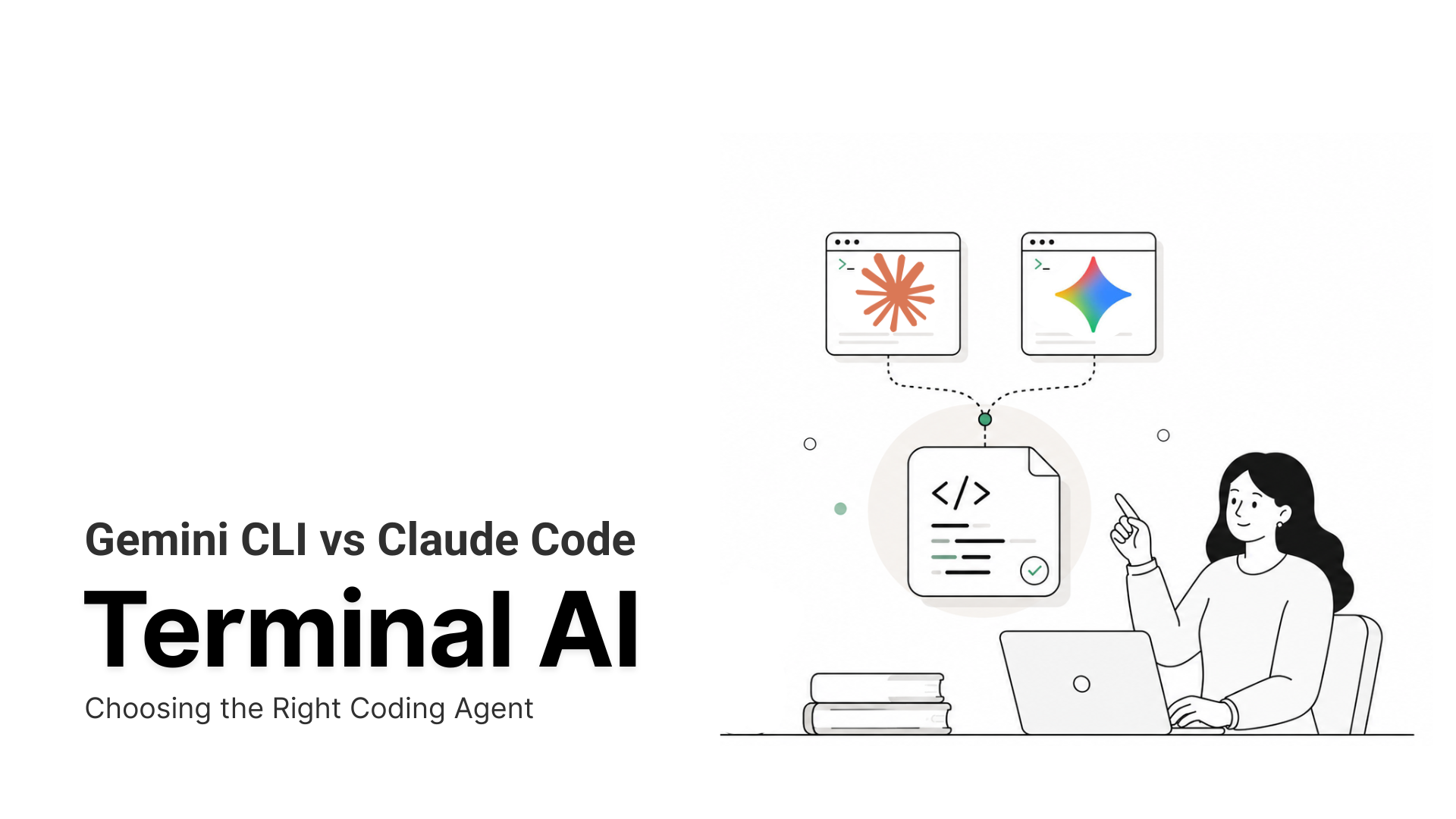
Google shut down Gemini CLI for every individual developer on June 18, 2026, and replaced it with a closed-source tool called Antigravity CLI. If you’re comparing Gemini CLI to Claude Code today, that single change decides more of the outcome than any benchmark score in this post.
This wasn’t a pricing tweak. Gemini CLI launched as a free, open-source tool that became the default starting point for agentic coding. Claude Code launched around the same time as a paid, proprietary alternative built for a different kind of user. Thirteen months later, Google folded its free tool into a closed-source platform.
The old answer used to be about budget, and that’s changed. Here’s what actually shifted, what each tool costs now, and which one is worth running today.
What Is Gemini CLI?
Gemini CLI is Google’s open-source terminal coding agent, licensed under Apache 2.0. It launched on June 25, 2025, hit 15,000 GitHub stars in its first 24 hours, and eventually surpassed 100,000, making it the most visible open-source AI coding tool in its category.
The free tier was the draw. A personal Google account got you 60 requests per minute and 1,000 per day at no cost, no credit card required. It defaulted to Gemini 3 Flash, with Gemini 3.1 Pro available on paid tiers, and offered a 1M-token context window from the start.
Core capabilities included natural language coding, Google Search grounding for live web context, MCP support, an Extensions framework (Conductor for spec-driven project plans and automated reviews, Jules for async agent delegation), pipeline mode for scripting, and a VS Code companion extension.
That version of Gemini CLI, the free, open-source one, is gone for individual developers. What replaced it is covered next.
What Is Claude Code?
Claude Code is Anthropic’s terminal coding agent, launched as a research preview in February 2025 and reaching general availability that May. It runs on Anthropic’s Claude model family. Sonnet 5 became the default model for Pro users on July 1, 2026, replacing Sonnet 4.6 (more on what changed), and Opus 4.8 is available on Max plans. Some of the benchmark and cost figures later in this post reflect Sonnet 4.6 and Opus 4.6, since that’s what was current when those specific tests ran, and it’s noted where that matters.
Claude Code reads your local filesystem, executes terminal commands, and manages Git workflows, calling the Anthropic API for processing while your code stays on your machine during the session. It is not open-source.
Key capabilities include Auto Mode for autonomous execution, Plan Mode for read-only analysis before making changes, a hooks system with 12 lifecycle events, background agents that run in isolated Git worktrees, Agent Teams for parallel multi-agent sessions (added in v2.0, December 2025), session persistence, and native Git integration.
Claude Code has no free plan. The entry point is the Pro plan at $20/month, or $17/month billed annually.
Gemini CLI vs Claude Code at a Glance
| Feature | Claude Code | Gemini CLI / Antigravity CLI |
|---|---|---|
| Maker | Anthropic | |
| Launched | May 2025 | June 2025 (Gemini CLI). Antigravity CLI announced May 2026, mandatory June 18, 2026 |
| Current default model | Sonnet 5 (Pro), Opus 4.8 (Max) | Gemini 3.5 Flash |
| License | Proprietary | Apache 2.0 (Gemini CLI, legacy) or closed-source (Antigravity CLI) |
| Free tier | None. Pro starts at $20/mo | None for individuals since June 18, 2026 |
| SWE-bench Verified, own scaffolding* | 71.8% | 65.4% |
| Context window | 1M tokens | 1M tokens |
| MCP support | Native, 300+ community servers | Via settings.json config and Extensions |
| Terminal command | claude | agy (formerly gemini) |
*Tested on Sonnet 4.6 and Gemini 3.1 Pro, the models current at the time. Claude Code has since moved to Sonnet 5 by default.
The Gemini CLI Shutdown
At Google I/O on May 19, 2026, Google announced it was folding Gemini CLI into a new platform called Antigravity. On June 18, Gemini CLI stopped serving requests for Google AI Pro, Ultra, and free-tier users. Enterprise customers on Gemini Code Assist licenses kept their access.
The replacement, Antigravity CLI, is a closed-source Go binary run with the agy command, confirmed against Google’s own documentation and GitHub repository. It carries over Agent Skills, Hooks, Subagents, and Extensions (renamed Plugins), though Google says feature parity isn’t complete yet.
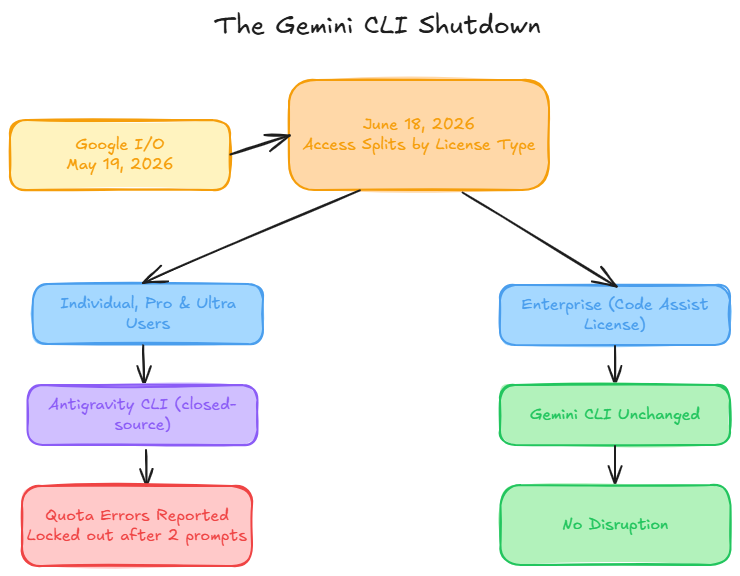
Antigravity CLI Can Run More Than Gemini. agy models lists Gemini 3.5 Flash, Gemini 3.1 Pro, Claude Sonnet 4.6, and Claude Opus 4.6 as selectable backends, confirmed against Google’s own tutorial. The “Gemini vs Claude” framing doesn’t hold cleanly inside Google’s own tool.
The Quota Is Tighter. One paid Google AI Pro user reported an “Individual quota reached” error after two prompts in agy, on a plan that had survived over 1,000 modifications under the old Gemini CLI. The quota is now shared across the CLI, the desktop app, and the SDK.
Enterprise Gemini Code Assist licenses are unaffected. For everyone else, the free entry point Gemini CLI offered is gone.
What Each Tool Costs Now
Claude Code, verified against claude.com/pricing:
| Plan | Cost | Included |
|---|---|---|
| Pro | $20/mo ($17/mo annual) | Claude Code, Sonnet 5 (current default), rolling 5-hour usage windows |
| Max 5x | $100/mo | 5x Pro usage, Opus 4.8 access |
| Max 20x | $200/mo | 20x Pro usage, full Opus access |
| Team Premium | $100/seat/mo | Admin controls, shared usage, 5-seat minimum |
| API (current) | Pay per token | Sonnet 5, $2/$10 per million tokens through Aug 31, 2026, then $3/$15. Opus 4.8, $5/$25 |
There is no free Claude Code plan. The free tier on claude.ai does not include it.
Gemini CLI and Antigravity CLI, verified against geminicli.com, antigravity.google, and gemini.google:
| Access | Cost | Status After June 18, 2026 |
|---|---|---|
| Personal Google account (free) | $0 | Discontinued for Gemini CLI. Antigravity CLI’s free tier exists but is throttled |
| Google AI Pro (personal subscription) | $19.99/mo | Now runs through Antigravity CLI, quota shared across CLI, desktop, and SDK |
| Google AI Ultra (personal subscription) | $100/mo (new developer tier) or $200/mo (previous flagship tier) | Restructured May 19, 2026 into two tiers, replacing the old single $249.99/mo plan |
| Gemini Code Assist Standard (business license) | No flat public rate. Purchased through the Google Admin console or a sales quote. Third-party estimates range $19 to $23/user/mo | Unaffected. Retains Gemini CLI access |
| Gemini Code Assist Enterprise (business license) | $45/user/mo, confirmed via Google’s own launch page | Unaffected. Retains Gemini CLI access |
| Pay-as-you-go API key | Per token | Still active for both Gemini CLI and Antigravity CLI |
Google AI Pro and Ultra are personal subscriptions, and those lost easy Gemini CLI access on June 18. Gemini Code Assist Standard and Enterprise are separate business licenses, and those customers saw no change at all. If someone tells you Gemini CLI is still free, ask which of these rows they’re actually on.
For an individual developer starting from zero today, Claude Code’s $20/month has no free counterpart on the Gemini side. Before June 18, that wasn’t true.
MCP and Tool Access
Both tools connect to external services through the Model Context Protocol, the open standard Anthropic released in November 2024.
Claude Code supports HTTP and stdio transports, OAuth-authenticated remote servers, and over 300 community-built servers. It also supports tool search, which loads a tool’s definition only when a task needs it, instead of loading every schema upfront. Anthropic measured the savings directly. One workflow dropped from 150,000 tokens to 2,000, a 98.7% reduction.
Gemini CLI configures MCP servers through ~/.gemini/settings.json, and layers its own Extensions on top, Conductor for project plans, Jules for async agent delegation, and native Google Workspace hooks. Whether these carry over cleanly into Antigravity CLI is still being tested, since Google confirmed only partial feature parity at launch.
The token-loading problem isn’t specific to either tool. It shows up whenever an agent connects to more than a handful of MCP servers, regardless of which one sits underneath.
MCP360 solves it the same way Claude Code’s tool search does. Two meta-tools, search and execute, let an agent pull only the tool definition a task actually needs instead of loading a full catalog upfront.
Security and Permissions
Running a coding agent in your terminal means giving it access to your filesystem, your shell, and often your credentials. Both tools ask for permission before acting by default, but the failure modes differ.
Claude Code confirms before running commands unless Auto Mode is enabled. A hooks system with 12 lifecycle events lets teams enforce custom policies, and background agents run in isolated Git worktrees so parallel sessions don’t collide. Shipyard documented a case where Claude Code altered terminal permissions mid-session and needed manual recovery, a reminder that autonomous execution still needs supervision.
Gemini CLI set folder trust to untrusted by default starting with v0.24.0, with granular shell-command allowlisting through its Policy Engine. Being open-source meant that model was inspectable by anyone. Antigravity CLI is closed-source, so that inspection option is gone for individual users. Its zero-trust mode still restricts the agent to read-only tools until a human approves anything else.
Three practices hold regardless of which tool sits in your terminal:
- Scope credentials narrowly. Short-lived tokens, rotated on a schedule, limited to what the task actually needs.
- Treat Auto Mode and YOLO mode as exceptions, not defaults, on any codebase you don’t already trust the agent with.
- Log every tool call. Both tools support session logging. Turn it on before you turn on autonomy.
If either tool’s MCP connection acts up mid-session, these are the most common causes and fixes.
Which One Should You Use
Pick Claude Code if:
- You need consistent output on complex, multi-file tasks. The benchmark gap points this way, where both tools built the same coding agent and Claude Code finished faster and cheaper.
- You want a tool that finishes autonomously rather than needing manual retries.
- You’re already on a Claude Pro or Max plan. Claude Code is included at no extra cost.
- Your workflow depends on MCP-connected tools. Claude Code’s server count and tool-search efficiency are ahead of Gemini’s extension list. Best 8 MCP Servers for Claude Desktop is a good next stop, and connecting Claude Code to MCP360 keeps that server list from bloating your context window.
Pick Antigravity CLI if:
- Your organization holds a Gemini Code Assist Standard or Enterprise license. Access and pricing are unchanged by the shutdown.
- You’re building inside Google Cloud already, in BigQuery, Cloud Run, or Vertex AI, where Antigravity’s native hooks save setup time.
- You want to test Claude models through Google’s tooling. Antigravity CLI’s model list includes Claude Sonnet 4.6 and Opus 4.6 alongside Gemini.
- You can tolerate a tighter, still-settling quota system while Google works out the kinks from the June migration.
Frequently Asked Questions
What is Claude Code?
Claude Code is Anthropic’s AI coding tool that runs in your terminal. It reads your code, edits files, and runs commands for you. It now uses Sonnet 5 by default. Plans start at $20 a month.
What is Gemini CLI?
Gemini CLI was Google’s free coding tool for the terminal, launched in June 2025. It let you edit code and run commands using Gemini models. Google shut it down for regular users on June 18, 2026.
Is Gemini CLI still free after the shutdown?
No. Google ended free access to Gemini CLI on June 18, 2026. Only companies with a Gemini Code Assist license kept access. Everyone else now uses Antigravity CLI instead.
Is Claude Code free to use?
No, Claude Code has no free plan. It starts at $20 a month with the Pro plan, which includes Sonnet 5. A higher-usage Max plan starts at $100 a month.
What model does Claude Code use now?
Claude Code used Sonnet 4.6 for most of its first year. That changed on July 1, 2026, when Sonnet 5 became the default. Max plan users get Opus 4.8 instead.
What happens to my Gemini CLI scripts and CI/CD pipelines after the shutdown?
Any script that calls the gemini command will stop working after June 18, 2026, unless you have an enterprise license. Update those scripts to use Antigravity CLI’s agy command, or switch to Claude Code. If your setup also uses MCP tools, a gateway like MCP360 keeps that part working no matter which agent you pick.
Can Antigravity CLI run Claude models?
Yes. Antigravity CLI can run Claude Sonnet 4.6 and Claude Opus 4.6, not just Gemini models. Typing agy models shows the full list, including Gemini 3.5 Flash and Gemini 3.1 Pro.
Which is better for code quality, Gemini CLI or Claude Code?
Claude Code, based on independent tests. On SWE-bench Verified, a common coding benchmark, Claude Code solved 71.8% of tasks against Gemini CLI’s 65.4%. On SWE-bench Pro, a newer and harder version, Claude scored 69.2% against Gemini’s 54.2%. If you connect either tool to many outside tools, a gateway like MCP360 keeps things fast.
Does Claude Code and Gemini CLI support MCP?
Yes, both do. Claude Code connects to over 300 MCP tools and only loads what it needs. Gemini CLI connects through a settings file and its own Extensions. Loading every tool at once slows things down either way, which is the problem MCP360 is built to fix.
Conclusion
Claude Code is the stronger choice today. It costs more and has no free tier, but it has the track record Antigravity CLI is still building.
Both tools are still moving, though. Antigravity CLI doesn’t have full feature parity with the Gemini CLI it replaced yet, and its quota system is still settling after a rough first few weeks. Google will likely close both gaps over the next few months, since a tool that locks out paying users after two prompts won’t stay broken forever.
Claude Code itself just moved to Sonnet 5 as its default, and nobody has independently benchmarked that exact pairing yet. Whatever gap exists today will likely look different by the next round of comparisons.
What won’t change is the shape of the decision. Both agents will spend more time calling outside tools as agentic coding matures. That makes the layer connecting your agent to those tools worth getting right early, before you’re managing a dozen MCP servers by hand. MCP360 is built for exactly that, one integration instead of a pile of separate ones, whichever coding agent ends up running on top of it.
If your organization already holds a Gemini Code Assist license, none of this changes your math. Check back on Antigravity CLI once its rough edges wear off.

Article by
HarsheenMCP & AI Agents | Content Writer
Harsheen is a content writer covering AI agents, automation, and no-code tools. She writes across topics from chatbots and customer experience to MCP and enterprise workflows, showing how real teams adopt AI in everyday operations.