
The TL;DR
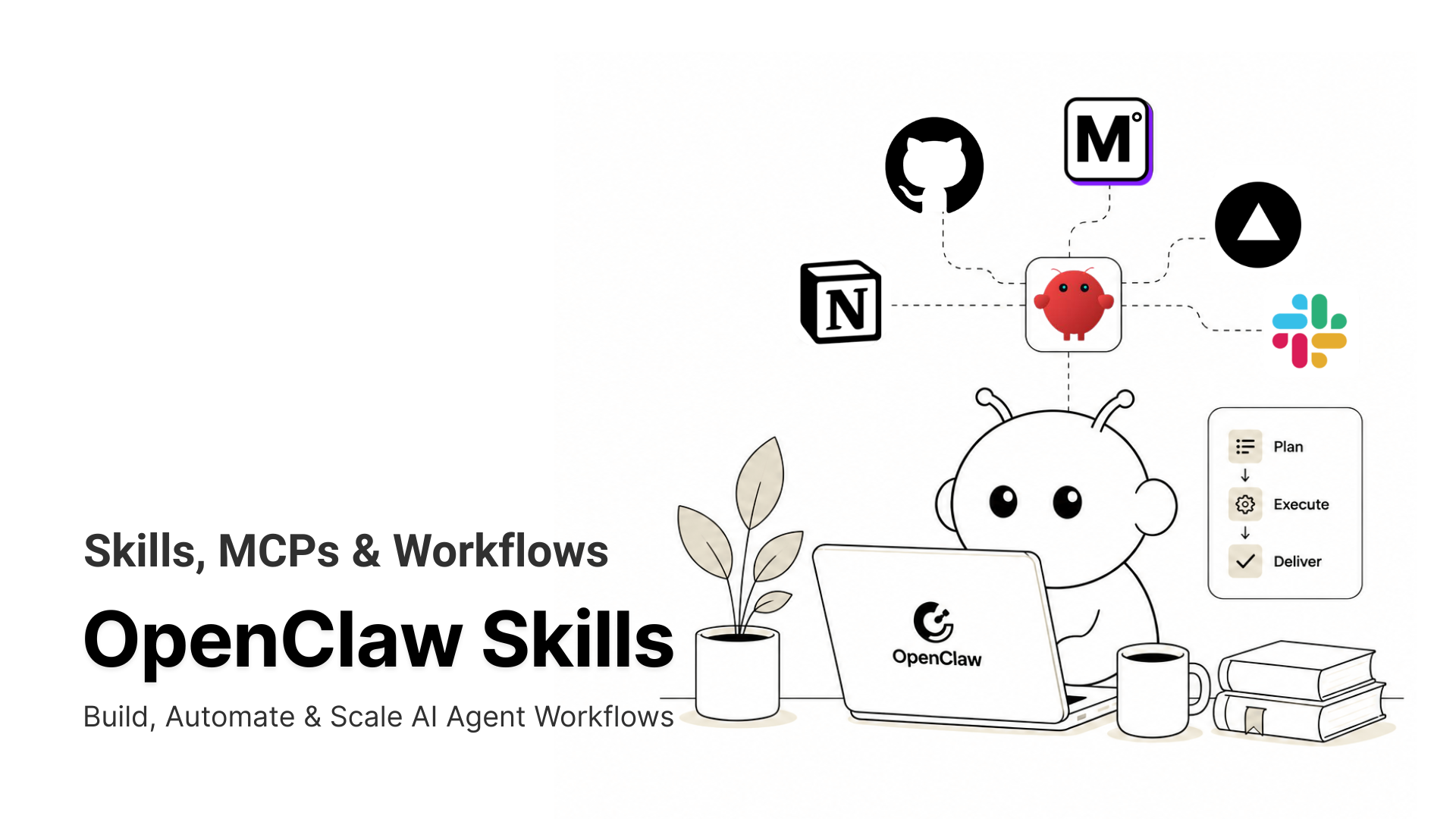
OpenClaw skills turn repeatable agent workflows into reusable instruction files, helping agents run multi-step tasks with the right tools, order, and output quality.
-
• Why Skills Matter
Without skills, agents improvise each workflow from scratch. That can cause inconsistent results, broken tool handoffs, and different outputs for the same request across different runs.
-
• What Skills Enable
Skills give the agent a written playbook. They define which tools to call, the sequence to follow, and how one step’s output should become the next step’s input.
-
• Best Skills in 2026
The most useful OpenClaw skills support automation, communication, development workflows, data operations, and MCP-powered integrations with tools like MCP360, n8n, GitHub, Notion, and Slack.
OpenClaw agents can plan multi-step tasks, choose the right tools, and return structured output. But they often fail at the handoff stage.
When one step needs data from another system, the result from the first tool does not automatically become a valid input for the next. The workflow may fail silently, lose context, or produce inaccurate output.
OpenClaw skills solve this by defining the execution path before the agent runs. Each skill specifies which tools should run, the order they should follow, and how output should move between steps.
The risk most developers miss is security. A skill that is not properly vetted before installation can overwrite tool parameters during execution or write to agent memory paths outside its intended scope.
This blog explains how OpenClaw skills work, how to install them safely, and which 10 skills are worth using in production in 2026.
What Are OpenClaw Skills
An OpenClaw skill is a structured execution definition that maps user intent to a multi-step workflow across MCP tools and external systems. Skills define tool call order, handle intermediate results between steps, and run the task to completion without manual coordination.
Skills roughly split into two categories. A context skill is a SKILL.md file that shapes how the agent reasons and what quality bar it holds itself to. It doesn’t touch APIs or add tool access. An execution skill, like MCP360, n8n, or GitHub, connects the agent to live external systems and handles auth, tool sequencing, and data flow. Most guides treat these as interchangeable. They aren’t, and mixing them up is the most common setup mistake we see.
Model Context Protocol (MCP) is the standard underneath most execution skills. It’s what lets an agent discover and call a tool without a custom integration for each one. MCP360 sits between skills and external systems as an MCP gateway. Instead of wiring each tool separately, you register everything inside MCP360 and reach all of them through one endpoint.
Skills aren’t always the right call. If a task needs one tool with no chaining, skip the skill layer. Same for one-step operations and early experiments. Formalize once the task is stable.
Benefits of OpenClaw Skills
OpenClaw skills extend what your AI assistant can do by connecting it with real-time applications, automation workflows, and local system capabilities. Instead of handling tasks manually across tools like WhatsApp, Slack, IDEs, home servers, and deployment systems, OpenClaw skills let the assistant follow defined workflows, apply user preferences, and complete tasks with more consistency.
The main benefits of OpenClaw skills are:
- Broad ecosystem: OpenClaw skills can be discovered through ClawHub, private repositories, community forums, and Reddit threads. As the ecosystem grows, developers can find skills for coding, productivity, system monitoring, communication, deployment, and other workflow-specific use cases.
- Easy installation: Installing a skill usually requires only the skill’s markdown file and the OpenClaw CLI. Once installed on your local machine, the skill becomes available inside your OpenClaw environment and can be used as part of your AI assistant’s workflow.
- Task automation: Skills help automate repetitive tasks such as calendar management, email handling, server health checks, code reviews, deployment workflows, and project updates. This reduces manual effort and helps teams move faster.
- Proactive operations: With local system access and persistent memory, OpenClaw can maintain context across sessions, apply user preferences, and execute skills in the background. This allows the assistant to complete tasks proactively without needing constant supervision.
- Consistent workflows: Each skill defines how a task should be handled, which tools should be used, and how information should move between steps. This makes complex workflows more reliable and reduces errors caused by missing context or inconsistent execution.
How OpenClaw Skills Execute Step by Step

Most developers skip the execution model and wonder why a task breaks at step three. Worth understanding before you install anything.
Every skill-based request moves through four stages.
- Discovery: OpenClaw scans its skill directories at startup and loads each skill’s name and description into the agent’s context. The full instruction file stays on disk until needed, which keeps token usage down.
- Matching: When a request arrives, the model matches it against the loaded descriptions. A skill with a sharp, specific description gets picked reliably. A vague one gets ignored or misfired.
- Instruction following: Once matched, the agent reads the full SKILL.md and works through it. Bundled scripts run through the shell. External tools get called through MCP where the skill references them. The instructions carry state between steps by telling the agent exactly what to pass forward.
- Output routing: The skill’s final instructions tell the agent where results go, whether that’s a chat reply, a file, or a downstream system like Slack or Notion.
A task that pulls customer feedback, summarizes it, and posts to Slack runs as a single skill execution, not three separate tool calls. That’s the architectural difference from wiring up direct MCP server integrations one by one. It’s also why picking the wrong runtime for the job matters. See our breakdown of OpenClaw alternatives if you’re still deciding on a runtime.
Why ClawHub Skill Security Matters
The skill registries had a brutal start to the year, and the audit numbers back that up.
There’s no mandatory code review and no removal process with a defined SLA for flagged skills. The security scan badge on a listing is a useful signal, not a guarantee.
How bad is it, exactly? Depends on which audit you read. Snyk’s research scanned the full ClawHub marketplace and found that 283 of 3,984 skills, 7.1% of the marketplace, are designed in a way that leaks API keys, passwords, or PII through the LLM’s context window. A separate wave of coverage citing the same research put the figure at 13.4% once broader categories like malware and prompt injection were included. Either number is high enough that “read the SKILL.md first” isn’t optional advice.
ClawHub responded. The registry now runs every uploaded skill through VirusTotal scanning with daily rescans of active skills, requires publisher accounts to be at least a week old, and auto-hides any skill that collects three malicious-content reports. Those controls matter, and they also have proven holes. Trail of Bits researchers bypassed ClawHub’s scanning by prepending roughly 100,000 newline characters to a skill file, pushing the malicious section past the scanner’s truncation window.
skills.sh, Vercel’s open skill directory, sometimes gets framed as the safe alternative. The honest read is more mixed. It hosts over 60,000 skills, and every submission passes through automated security audits from Gen, Socket, and Snyk, with flagged skills hidden from the leaderboard and warnings shown before install. There is still no human code review, ranking runs on install telemetry that bots can inflate, and the same Trail of Bits research slipped payloads past its scanners using tricks like hiding a shell script inside a .docx and shipping a poisoned .pyc alongside clean-looking Python source.
So treat both registries the same way. First-party skills published directly by a named vendor like Vercel, Anthropic, or Snyk carry the real trust, and everything else gets vetted by you. Two checks before installing anything:
- Read the SKILL.md first: Flag any instructions referencing outbound URLs, webhook endpoints, or memory writes outside the skill’s declared scope.
- Check the GitHub repo: Zero commit history and no README beyond the registry listing means skip it entirely. Running mcp-scan or reviewing the listing’s audit report takes under a minute and catches the known-bad patterns.
How to Install OpenClaw Skills
Before adding any skills, the OpenClaw runtime must be installed and running. If you have not set up OpenClaw yet, check the OpenClaw installation guide first. Once the runtime is configured, installing OpenClaw skills takes just a few steps. You can either install through skills.sh or directly from ClawHub.
- Install via skills.sh
cd ~/.openclawnpx skills add <owner/repo> --skill <skill-name>
Select OpenClaw from the framework prompt. Check your dashboard to confirm the skill appears before starting a session.
- Install via ClawHub
Open the ClawHub platform and browse available skills.

Select the skill you want to install and copy its installation command. Skills on ClawHub typically provide a ready-to-use install command.

Open your terminal and paste the copied command. Press Enter and wait for the installation to complete.

Restart your OpenClaw session. The newly installed skill will be available in your workspace.
How to Create a Custom OpenClaw Skill
ClawHub gives you ready-made skills, but OpenClaw also lets you package your own recurring workflows (instructions, templates, scripts, and supporting resources) into a reusable capability.
1. Create a Skill Directory
cd ~/.openclaw/workspacemkdir -p skills/my-skill
Your workspace should now look like this.
workspace/└── skills/ └── my-skill/ └── SKILL.md
Each skill lives in its own directory, which OpenClaw scans automatically when loading skills.
2. Define the Skill in SKILL.md
nano skills/my-skill/SKILL.md
Add the metadata and instructions.
---name: my-skilldescription: Describe what this skill does---# My Skill## PurposeExplain what this skill does.## Instructions1. Step one2. Step two3. Step three
The metadata helps OpenClaw identify the skill. The instructions define how the agent should use it.
3. Add Supporting Files (Optional)
my-skill/├── SKILL.md├── scripts/│ └── custom-code.py└── resources/ └── template.md
Useful for workflows that need custom logic, reusable prompts, or reference material.
4. Restart and Test the Skill
openclaw gateway restart
Then start a session and ask OpenClaw to use it. Try something like “Use my-skill to perform this task.” If it’s configured correctly, OpenClaw loads the instructions from SKILL.md and applies them. Over time, custom skills become a reliable way to standardize workflows and extend OpenClaw with domain-specific expertise, without depending on a third-party MCP integration for every recurring task.
Best OpenClaw Skills in 2026
The 18 skills below are grouped by operational category. Find the category that matches your task type, then evaluate what is inside it.
1.MCP360 — The MCP Gateway for OpenClaw Agents
MCP360 is a unified MCP gateway that connects OpenClaw to 100+ external tools through a single configuration endpoint. Rate limiting, failover, and response normalization all happen at the gateway level. The agent never needs to know which API it hit or manage authentication per service.
Without a gateway, every external tool requires its own MCP server setup, and you own the error handling, rate-limit logic, and maintenance as each API changes. MCP360 collapses that into one endpoint. When new tools join the catalog, existing users get access without config changes.
Use Case
Agents doing real-time research, SEO audits, content tasks pulling from multiple data sources, or anything blocked on live external data access.
Setup :
mcporter config add mcp360 \ --command 'npx mcp-remote "https://connect.mcp360.ai/v1/mcp360/mcp?token=YOUR_TOKEN"'
Available tools are discovered automatically on session start. Check plan limits at mcp360.ai/pricing for high-volume setups.
2. n8n — Event-Driven AI Agent Workflows
n8n manages the trigger layer when a task needs to start from an external event. A form submission, database update, webhook, or scheduled job rather than a manual prompt.
When self-hosted, everything runs on your own infrastructure. No per-execution pricing, no data leaving your network. The tradeoff is that n8n controls live automation systems, so a misread instruction can fire real actions against real external services. Start with read-only API scope and expand access deliberately once you understand what the skill is doing. For a worked example pairing this with MCP360, see N8N with MCP360: AI Automation for Better Workflows.
Use Case
Triggering skills from external events without opening a UI, building and exporting automation JSON through natural language, and debugging failed runs by pulling logs in chat.
Setup :
Install: clawhub.ai/KOwl64/n8n-workflow-automation
3. Slack — Real-Time AI Workflow Alerts
Slack is the most direct way to get agent outputs in front of a team without anyone needing to check a dashboard or pull a report. The skill pushes structured alerts and execution updates into channels as they happen.
Where it earns its place is in tasks with multiple steps where a human needs to review something before the next step runs. Instead of polling for status or setting up a separate monitoring tool, the agent posts a message when it needs input or when something completes. You stay in Slack and the task continues when you respond.
Use Case
Completion alerts for long-running tasks, mid-execution status updates that need team visibility, and intermediate results that require human review before the next step runs.
Setup :
Install: openclaw mcp add slack
4. Google Workspace — Docs and Sheets Output
Google Workspace turns task outputs into Docs, Sheets, and Slides that live in Drive and can be shared, commented on, and edited by a team. The skill handles formatting decisions based on the output type, so a data-heavy result becomes a Sheet while a narrative summary becomes a Doc.
The clearest use case is when an agent produces results that need to be reviewed, edited, or distributed by people who did not participate in the task. The output moves from the agent’s window into a shareable format without you manually copying anything across.
Use Case
Generating formatted reports from task data, updating live spreadsheets with agent-produced results, creating Docs from long-form summaries, and producing presentation slides for review after execution.
Setup :
Install: openclaw mcp add google-workspace
5. Notion — Long-Term Knowledge Storage
Notion stores OpenClaw outputs as organized knowledge across pages, databases, and linked records. Unlike Google Workspace where the focus is on formatted sharing, Notion is built for accumulation. Each task adds to an existing structure rather than creating a new standalone document.
That distinction matters for teams running agents repeatedly across similar tasks. Instead of a folder full of disconnected reports, Notion builds a linked knowledge base where outputs reference each other and can be queried, filtered, and updated as the project evolves.
Use Case
Building knowledge bases that grow from repeated agent tasks, maintaining living documentation that gets updated rather than replaced, and storing results that need to be cross-referenced across future sessions.
Setup :
Install: openclaw mcp add notion
6. GitHub — AI-Generated Code Commits
GitHub connects agent-generated code directly to your repositories. Without this skill, generated code lives in the agent’s output window and needs to be manually copied, reviewed, and committed. The skill removes that step by letting the agent create branches, open pull requests, and commit changes directly through the GitHub API.
The key thing to understand about this skill is that it does not bypass your review process. It creates PRs that go through the same review gates as any other code change. The agent handles the mechanical work of creating the branch and opening the PR. Your team reviews and merges as normal.
Use Case
Creating pull requests from agent-generated code changes, committing documentation updates to a repository, automating branch creation for agent-produced features or fixes, and triggering repository events from task execution.
Setup :
Install: openclaw mcp add github
7. Vercel — End-to-End Deployment Workflows
Vercel connects OpenClaw to your deployment pipeline. A task can generate code, open a pull request, trigger a build, and push to production without touching the terminal or dashboard. It runs against your live account with no sandbox mode, so be precise with project names when managing multiple deployments.
What makes Vercel distinct from the GitHub and GitLab skills is the deployment target. Those skills get code into a repository. Vercel gets it running in an environment. For frontend and serverless workloads, Vercel handles preview deployments for each PR automatically, so stakeholders can review the actual running application before anything merges to production.
Use Case
End-to-end deploy tasks from generated code to production, creating preview environments for agent-produced UI changes, debugging failed builds by pulling logs conversationally, and rolling back a production push quickly when something breaks.
Setup :
Install: clawhub.ai/TheSethRose/vercel
8. SQL — Precise Data Retrieval
SQL handles deterministic data retrieval when a task needs results it can count on. Strict filtering, joins across multiple tables, aggregations, and structured transformations fall here. Airtable is flexible but non-deterministic at scale. SQL gives you the same result every time for the same query, which matters when downstream steps make decisions based on that data.
Most production agent tasks that touch business data eventually need SQL at some point. Customer records, transaction history, product catalogs, and analytics tables all live in relational databases. This skill is how OpenClaw gets to them without manual data exports or intermediate files.
Use Case
Querying production databases mid-task for customer or business data, extracting joined or aggregated datasets that downstream steps depend on, running analytical queries against existing data infrastructure, and pulling filtered records that match task-specific conditions.
Setup :
Install: openclaw mcp add sql-database
9. Exa — Technical Search Results
OpenClaw’s default browsing pulls from general search indices, which means SEO-optimized blog posts rank above official docs and old Stack Overflow answers surface before current GitHub issues. Exa routes queries through an index built for technical content, including repos, framework docs, coding forums, and API references.
The difference shows up most clearly when the agent is working on something version-specific or recently released. A general search returns articles written about the framework two years ago. Exa surfaces the actual changelog, the open issues, and the reference implementation.
Use Case
Finding current API documentation for fast-moving frameworks, locating reference implementations on GitHub for specific patterns, reducing hallucinations on library-specific or version-specific questions, and sourcing technical content that general search indices deprioritize.
Setup :
Install: clawhub.ai/fardeenxyz/exa
10. OpenAI Whisper — Local Audio Transcription
Whisper runs locally, which means audio files never leave your machine. For tasks that process meeting recordings, client calls, or any audio with sensitive content, that distinction matters. Most teams route audio through a cloud transcription API without thinking twice about where the audio goes.
Quality on the large model matches paid cloud services for clear audio. The output feeds directly into downstream skill steps for summarization, action item extraction, or structured note generation. Requires at least 10 GB of VRAM for the large model. Start with the medium model on CPU-only machines and accept the slower processing speed.
Use Case
Transcribing internal meetings and client calls without sending audio to external servers, converting voice notes into structured task inputs, feeding meeting summaries into downstream summarization or action item skills, and generating searchable transcripts from recorded sessions.
Setup :
Install: clawhub.ai/steipete/openai-whisper
Best Practices for OpenClaw Skill Workflows in Production
Running skills in production differs from testing them locally. A few things that hold up across setups of different sizes.
- Map skills to outcomes rather than tools: A skill should represent a complete operation like lead qualification, incident triage, or report generation. Outcome-based skills have cleaner boundaries and extend more easily as tasks grow.
- Avoid one skill per tool: Skills model tasks. The same skill often coordinates multiple MCP tools to reach the right output, and splitting it per integration just multiplies the instruction files the agent has to juggle.
- Keep execution paths predictable: Skills that branch heavily or rely on dynamic tool selection at every step are hard to debug. Consistent input-to-output behavior matters more than flexibility.
- Write instructions the way you’d brief a junior teammate: Since the model does the coordination, “post the summary to #alerts with source links attached” outperforms “share the results appropriately.” Vague instructions are where handoffs break.
- Reuse common steps across skills: Notifications, approvals, document generation, and reporting appear across many tasks. Treat them as reusable components rather than rebuilding them inside every skill.
- Run MCP360 as the orchestration backbone: As tasks expand across platforms, tool-level coordination starts fragmenting. Routing through a gateway keeps the integration layer consistent and easier to debug when something breaks.
- Rescan your installed skills monthly: The February 2026 malicious campaigns predated their own disclosure. Skills you installed early may have passed a weaker review than what runs today. A monthly mcp-scan pass over your skills directory catches drift.
Production reliability comes from clear workflow design far more than from the number of tools connected to a skill.
Frequently Asked Questions
What exactly is an OpenClaw skill and how is it different from a regular plugin?
A skill is a SKILL.md file that teaches an agent how and when to use tools it already has. A plugin adds new tools, channels, or model providers. Skills change how the agent reasons. Plugins change what it can call. They solve different problems and should not be treated as the same thing.
What is an MCP gateway and why do AI agents need one?
An MCP gateway connects an AI agent to multiple external tools through a single endpoint. Without one, every tool needs its own authentication, error handling, and maintenance. A gateway like MCP360 handles all of that centrally, with rate limiting and failover built in, so the agent never needs to manage individual tool connections.
How do I know if an OpenClaw skill from ClawHub is safe to install?
Read the SKILL.md first, then check the GitHub repo. Zero commit history or no README is a skip. Reject any skill that requests file system access without a clear reason. About 15% of community-published ClawHub skills have been flagged for suspicious behavior, so treat unreviewed skills from new publishers the same way you would an unsigned executable.
What is the difference between a context skill and an execution skill?
A context skill changes how the agent reasons through a SKILL.md file. It sets workflow patterns and constraints without touching any API. An execution skill like GitHub, Slack, or MCP360 connects the agent to a live external system and handles authentication and data flow. Installing one when you need the other is the most common setup mistake.
Can I run multiple OpenClaw skills at the same time without slowing the agent down?
Yes, but each skill file consumes tokens from your context window. Three to five focused skills outperform fifteen overlapping ones. Keep only what the current task needs active. More skills loaded does not produce better output.
Which skills should I install first when setting up OpenClaw for a multi-tool workflow?
Start with an MCP gateway like MCP360 for live external data access. Then add a communication skill like Slack and a document skill like Notion or Google Workspace. Get those three layers stable before adding anything else. The rest of the stack is easier to configure once the foundation is working.
What is ClawHub and how is it different from skills.sh?
ClawHub is the public registry where any developer can publish an OpenClaw skill. Skills.sh is maintained by Vercel with stricter review before listing. ClawHub has more options but no mandatory security check. Skills.sh has fewer listings but higher baseline quality. For production setups handling sensitive data, skills.sh is the safer source.
Do OpenClaw skills work with Claude-based agents outside the OpenClaw runtime?
SKILL.md files can be used as instruction references in other setups, but full skill execution with tool sequencing and state management requires the OpenClaw runtime. MCP360 works independently with Claude Desktop, Cursor, Cline, VS Code, and Windsurf, so Claude-based agents can access MCP360’s tool catalog without the full OpenClaw stack.
Conclusion
Most teams underestimate how much the skill layer determines long-term reliability. A workflow that runs fine today on improvised coordination degrades as task complexity grows, more integrations get added, and edge cases accumulate. A well-written skill absorbs that complexity once, so nobody manages it by hand on every run.
Start with a gateway for live external data access. Set up OpenClaw and connect your first MCP tools if you haven’t already, then layer in one communication skill and one document skill before touching anything else on this list. The agents that hold up at scale share one trait. Every skill in the stack has a defined role, a vetted source, and a clear boundary on what it’s allowed to touch.

Article by
MitaliAI & Automation | Content Writer
Mitali is a content writer covering AI agents, automation, and no-code tools. Her writing spans the AI landscape, from support and sales automation to MCP integrations and agent workflows, with a focus on practical business use.