
The TL;DR
Travel research agents bring flights, hotels, maps, and itinerary planning into one connected workflow, reducing the need to switch between separate platforms or repeat the same trip details.
-
• Manual Planning vs AI Agents
Traditional trip planning separates flights, accommodation, transport, and maps across multiple tools. AI agents connect those steps through shared context, so changes to one part of the trip can inform the rest of the plan.
-
• How Travel Planning Improves
Destinations, hotel locations, travel times, schedules, and budgets stay connected throughout the planning process. This makes comparisons faster, reduces repeated searches, and helps users build more practical itineraries.
Planning a trip usually means jumping between three tools: one for flights, one for hotels, and one for maps to check whether the options actually work together. Every change to the dates, destination, or hotel means repeating the same comparison across all three.
MCP360 removes that back-and-forth by giving one agent access to Google Flights, Google Hotels, and Google Maps at the same time. The agent can keep your dates, budget, hotel preferences, and location constraints in one context, then compare them as a connected plan instead of separate searches.
This blog shows how to connect those three travel servers in MCP360 and use them through YourGPT’s chat interface. The result is a travel research agent that can compare flights, evaluate hotel locations, check travel times, and update the itinerary without losing context between steps.
Why Travel Research Breaks Down Across Multiple Tools
Take a five-day trip to Lisbon in September. Flight prices live on Google Flights or an airline’s own site. Hotel details sit somewhere else entirely, and confirming a hotel is close to Alfama, the neighborhood you want to stay near, means opening a map as a third step. None of that is unusual. It’s how travel search has worked for years. What makes it slow comes down to a few things.
- Data lives on separate platforms. Flights, hotels, and location data each sit behind their own search, with no shared thread connecting them. Checking one doesn’t tell you anything about the other two.
- Decisions need more than one data point. Picking a hotel for the Lisbon trip means weighing its rating against its distance from Alfama, its price against whatever dates the flight calendar shows as cheapest, and its neighborhood against wherever you plan to spend time. No single search returns all three.
- One question leads to several more. A flight question turns into an airport transfer question. A hotel pick raises a question about what’s actually walkable nearby. Travel research rarely resolves in one pass.
- Changes force a redo. A different week, a different budget, a city added to the route, and the traveler goes back through flights, hotels, and the map again, because none of the earlier research carries forward on its own.
None of these four problems is hard to solve on its own. The trouble is that all four show up on the same trip, every time. That gap is what a travel research agent closes.all show up on the same trip, every time. That’s the gap a travel research agent is built to close.
What Is a Travel Research Agent?
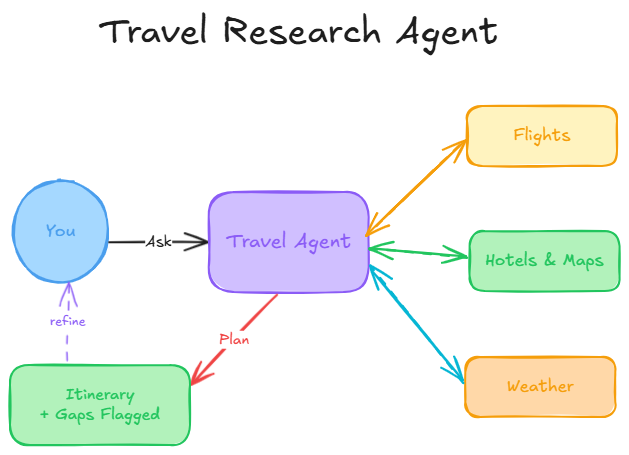
A travel research agent doesn’t book anything. It searches, compares, and carries context forward between questions. Go back to that Lisbon trip. Ask it for flights from Chicago in September, then ask about hotels near Alfama, and it should already know the dates and destination without you repeating them.
That context retention is the entire value proposition. A flight search tool alone is a form with fields. What turns it into an agent is a model that can hold “Lisbon, mid-September, two adults” across a dozen follow-up questions and use that state to narrow every subsequent search.
How the Agent Turns Separate Searches Into One Plan
An agent built on these three tools doesn’t treat the Lisbon research as three separate lookups. Ask it to compare two neighborhoods for a hotel, and it can pull search_hotels results for both, then run search_nearby against each one before answering, weighing the tradeoff instead of returning two lists side by side and leaving the comparison to you.
That matters most when questions build on each other. A change in travel dates should, on its own, tell the agent to check search_flight_calendar and search_hotels again for the new week, not require starting a fresh conversation. A multi-city trip means the agent tracks flight legs and hotel picks together across every stop, so a delay on leg two gets weighed against what it does to leg three, not evaluated on its own.
The result reads less like a search engine and more like someone who remembers what you asked five questions ago. That’s what this build is actually for, and it’s why the three servers below are worth wiring up as a set rather than one at a time.
Create Your Own Travel Research Agent with YourGPT
YourGPT handles the agent layer, covering natural language understanding, conversation context, and response generation. MCP360 connects the agent to Google Flights, Hotels, and Maps through a single MCP endpoint, so the agent can pull live travel data without separate integrations for each tool. You can even read the full integration guide before connecting MCP360 with YourGPT. You have two ways to expose them:
- Individually, one endpoint per server, if you only want the agent touching these three tools:
https://connect.mcp360.ai/v1/google-flights/mcp?token=YOUR_API_KEYhttps://connect.mcp360.ai/v1/google-hotels/mcp?token=YOUR_API_KEYhttps://connect.mcp360.ai/v1/google-maps/mcp?token=YOUR_API_KEY
- Through the Universal Gateway, one endpoint for your entire MCP360 catalog, which is the better option if this agent will eventually pick up other tools too. Here is how you can create it using Universal gateway endpoint:
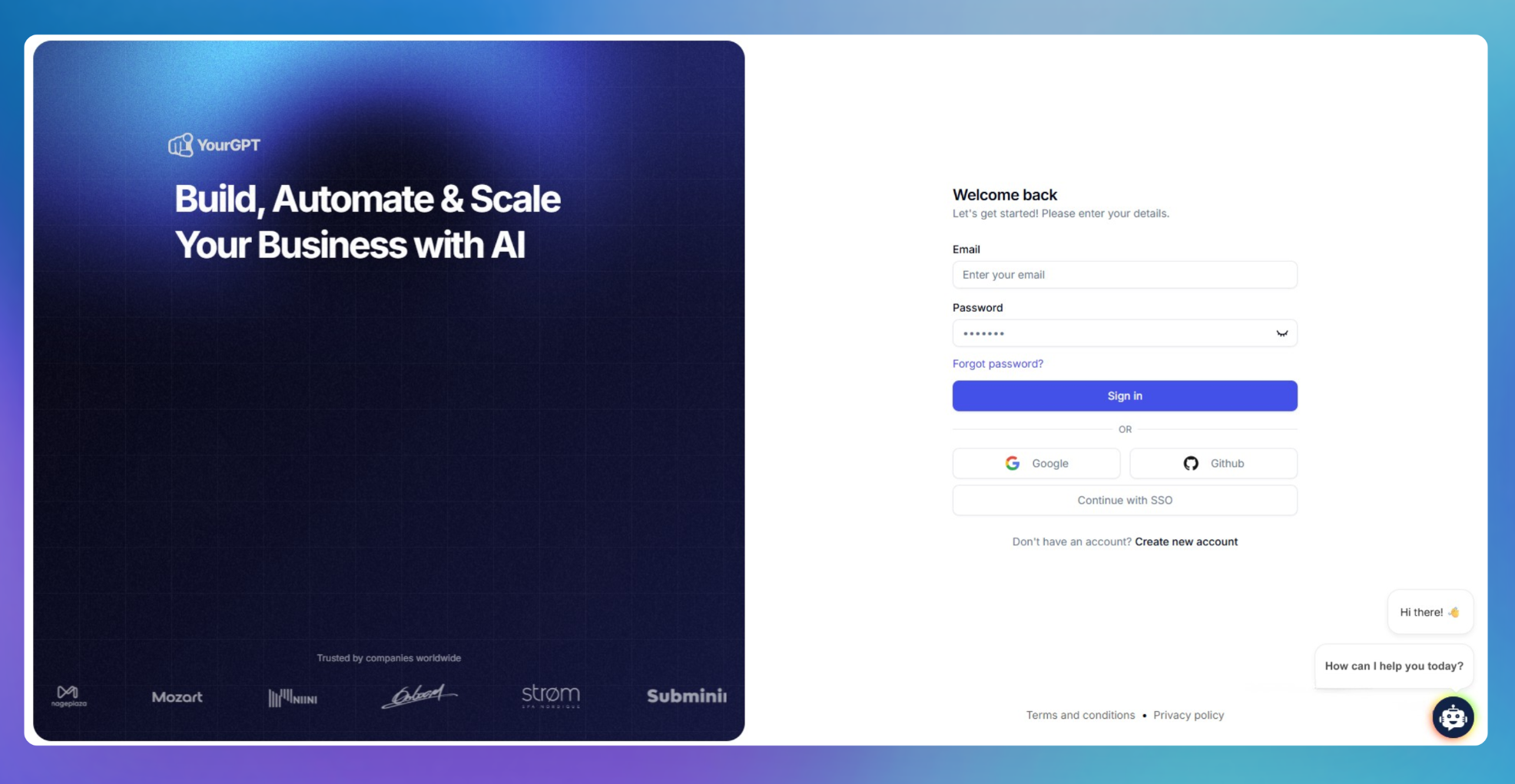
Step 1. Create a Travel Research AI Agent
- Sign up for YourGPT and create a new custom AI agent.
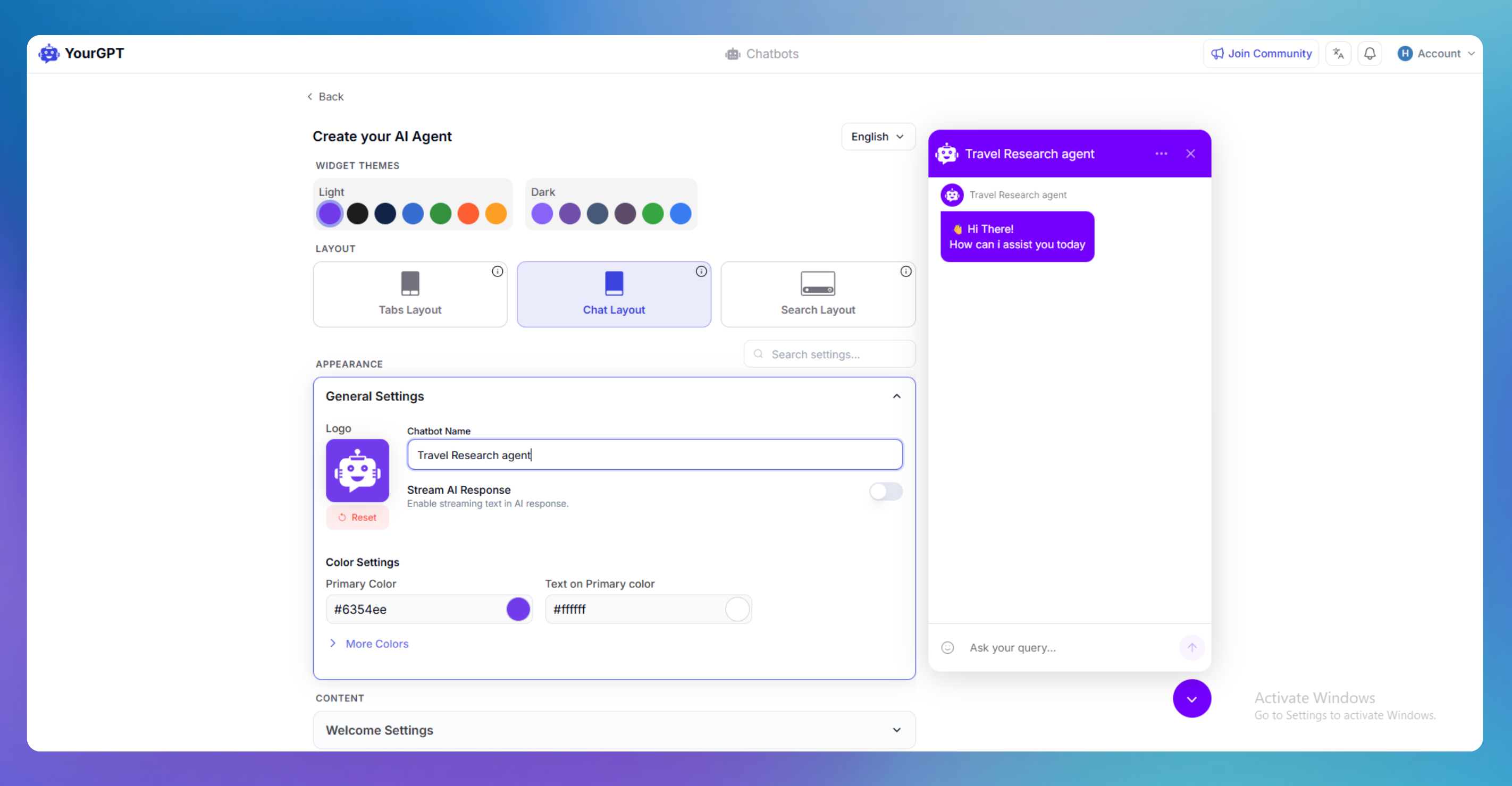
- Enter a name for your agent, such as Travel Research Assistant, and configure the welcome message.
- Review the settings and click Create Agent.

Step 2. Configure Your Agent for Travel Research
- Open the agent settings and define the agent’s role and instructions.
- Configure the agent to research destinations, compare travel options, answer travel-related questions, and assist with trip planning.
- Add relevant travel resources, FAQs, and other knowledge sources to improve response quality.
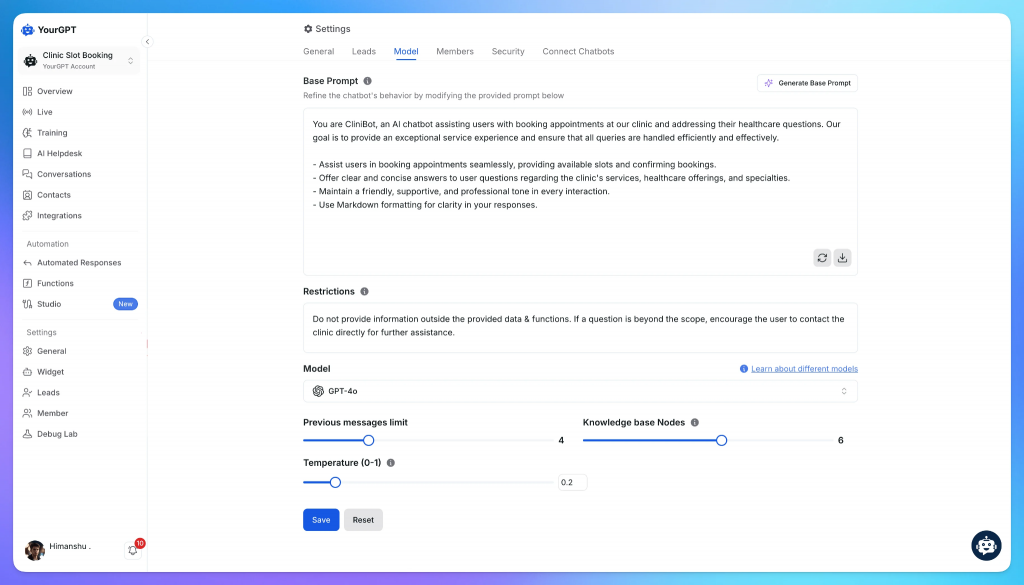
- Save the configuration after reviewing the settings.
Connect MCP360 to Your Travel Research Agent
YourGPT handles the agent layer, covering natural language understanding, conversation context, and response generation. MCP360 connects the agent to Google Flights, Hotels, and Maps through a single MCP endpoint, so the agent can pull live travel data without separate integrations for each tool. You have two ways to expose them:
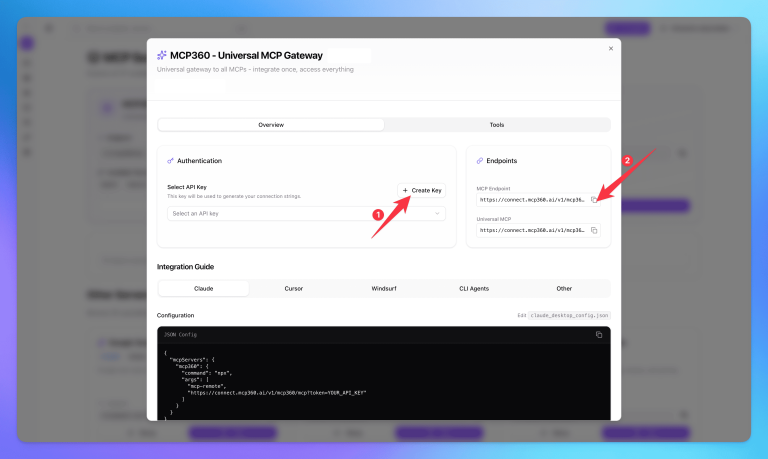
Step 1. Copy MCP Endpoint
After creating and configuring your travel research agent, the next step is connecting it to MCP360. This gives the agent access to external travel tools through a single MCP connection.
- Log in to MCP360 and open an existing project or create a new one.
- From the sidebar, navigate to MCP Servers.
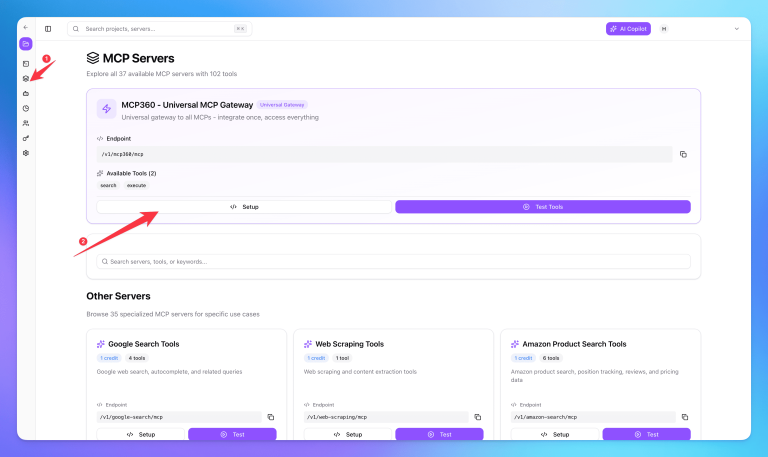
- Select the tools you want to use with your travel research agent. You can also use the Universal MCP Gateway to access all available tools through a single endpoint.
- Copy the MCP URL provided by MCP360.
Step 2. Configure MCP360 in Your Agent
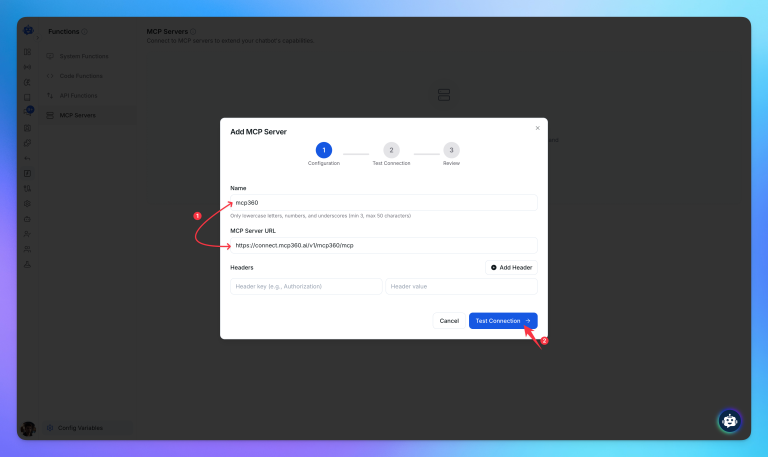
- Log in to YourGPT and open the dashboard.
- From the sidebar, navigate to Functions → MCP Servers.

- Paste the MCP360 URL into the MCP Server configuration field.
Step 3. Verify MCP Connection
- Click Test Connection to verify that the setup is working correctly.

- After a successful test, click Continue, then select Create Function.
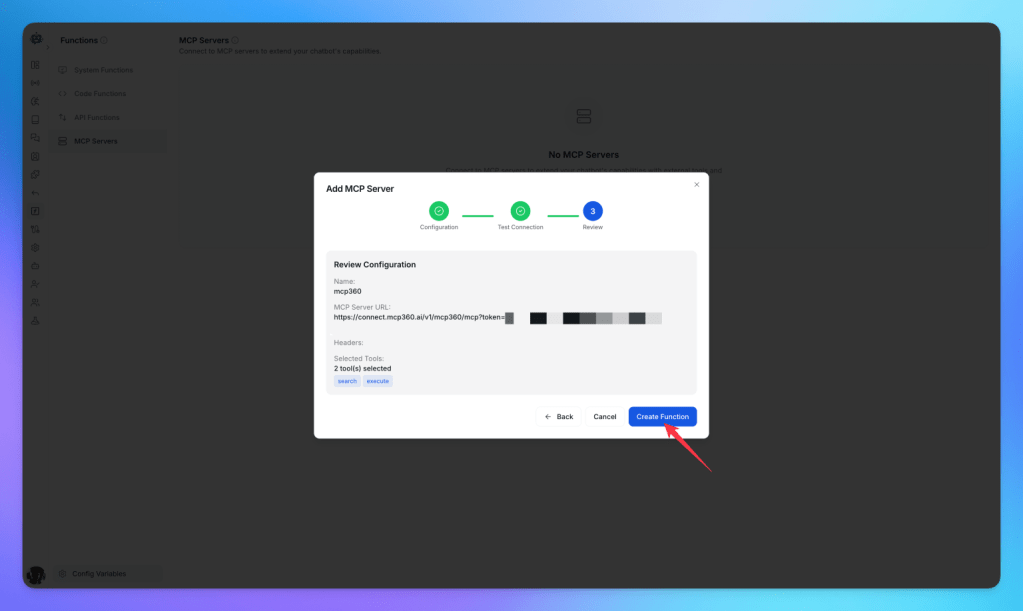
- YourGPT will load all tools available through the MCP360 connection.

Once setup is complete, the travel research agent can access MCP360 tools directly from YourGPT.
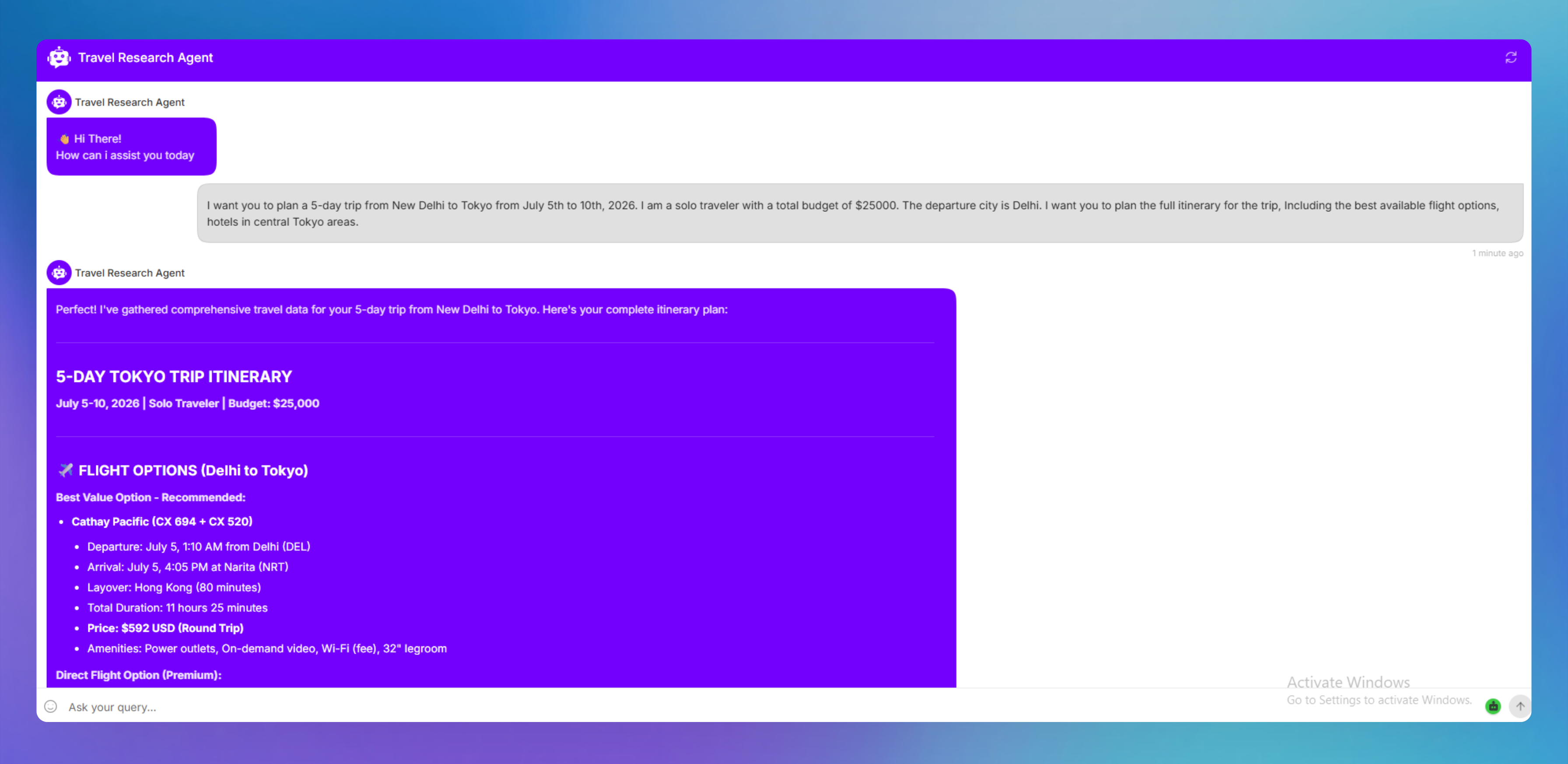
Step 4. Research Travel Queries Using Your Agent
Now test the setup by sending a travel query to the agent. The agent will use MCP360 tools in the background to fetch relevant travel information and return results.
Real-World Use Cases for Travel Research Agents
The value of this setup becomes clearest when travel decisions involve more than one moving part. Here are the scenarios where teams and individuals get the most out of a connected travel research agent.
- Multi-city routing: A trip through three or four cities means checking flight connections, layover cities, and hotel positions in each stop against each other. The agent can run
search_flightsfor each leg andsearch_nearbyfor each hotel option without losing track of the earlier legs. - Location-based hotel filtering: Star ratings only tell part of the story. Pairing
search_hotelswithsearch_nearbylets the agent check whether a highly rated hotel is actually walkable from the neighborhoods the traveler cares about, rather than just sorting by review score. - Neighborhood quality checks: A hotel that’s close to the right area on paper can still be a bad pick if the area itself doesn’t hold up.
search_nearbycombined withget_reviewslets the agent look at what’s actually around a hotel, the cafes, the reviews for nearby spots, not just the hotel’s own rating. - Flexible-date cost comparison:
search_flight_calendarturns “when should I go” into a real answer instead of a guess. The agent can pair that against hotel pricing for the same date range to spot the cheapest overall week rather than the cheapest single flight. - Itinerary sanity checks: A daily plan that looks fine on paper can fall apart once real transit times get involved.
search_nearbyandget_place_detailslet the agent flag a schedule that has someone crossing a city twice in one afternoon before that becomes a problem on the actual trip.
None of this needs extra code once the connection from Step 2 is in place. It’s just what the model can already do once it can call all three tools in the same conversation. Before you point this at anything beyond your own testing, there’s one more thing worth setting up first.
Frequently Asked Questions
What is a travel research agent?
A travel research agent is an AI agent that searches and compares flights, hotels, and places through conversation instead of separate browser tabs. It remembers trip details like destinations and travel dates across follow-up questions, so you don’t have to repeat earlier searches. It helps research and compare travel options, but it doesn’t complete bookings on your behalf.
Can an AI travel agent actually book flights and hotels?
Most AI travel agents can search and compare travel options but don’t complete bookings themselves. Instead, they hand you off to the airline, hotel website, or booking platform through a link. Booking systems involve payment, passport, and loyalty information, so many research-focused agents intentionally stop before the purchase step.
Does connecting more MCP servers slow this agent down?
Not necessarily. MCP360 loads tool definitions only when they’re needed through its search_tools and execute_tool meta-tools. Connecting services like Google Flights, Hotels, and Maps doesn’t load every tool into the context window upfront. Performance issues usually come from tools returning large responses rather than from having multiple MCP servers connected.
What’s the difference between MCP360’s gateway URL and connecting to each server individually?
Both approaches provide access to the same tools. Individual MCP endpoints work well if your agent only needs a few services. The MCP360 gateway gives you a single endpoint for your entire tool catalog, making it easy to add new tools like weather or currency conversion later without updating your AI client’s configuration.
Is it safe to let an AI agent see my travel search data?
It can be, provided access is limited appropriately. Travel dates, destinations, and trip length together can reveal when someone is away from home. In this setup, the tools perform read-only searches and don’t access booking, payment, or passport information. Restricting API keys to only the required servers and controlling access to conversation logs reduces most practical risks.
Why does this build use separate tools like search_flights and search_places instead of one combined search?
Smaller, focused tools let the AI choose only the information required for each request. A flight search doesn’t need nearby places, and a hotel comparison doesn’t require flight calendars. Splitting functions into dedicated tools improves reasoning, reduces unnecessary context, and makes multi-step travel conversations more flexible.
How does the agent handle a multi-city trip instead of a single destination?
The agent remembers each leg of the itinerary and searches flights and hotels separately for every destination while keeping the full trip in context. Changes to one leg are evaluated against the rest of the itinerary, allowing the AI to compare trade-offs across multiple cities instead of treating each search independently.
Do I need to write custom code to connect these three servers to YourGPT?
No. MCP360 exposes Google Flights, Hotels, and Maps as ready-to-use tools once you generate an API key and add the MCP endpoint in YourGPT‘s Functions section. The agent immediately gets access to tools like search_flights, search_hotels, and search_places. The only customization required is the system prompt that defines how the agent should use those tools.
Conclusion
A travel research agent built on Google Flights, Google Hotels, and Google Maps closes the gap that usually sends a traveler across a dozen tabs. Checking a flight’s arrival time against a hotel’s check-in window, or a hotel’s location against the places someone wants to visit, happens inside one conversation instead of three separate searches, and none of it requires custom integration code.
The same pattern extends past travel. The MCP360 gateway behind these three servers also links a currency converter for multi-country pricing and a weather server for packing and timing decisions, with the rest of the catalog available as trip planning gets more specific. Booking platforms, loyalty programs, and visa and entry requirements are the kinds of MCP servers likely to follow, and an agent built this way already has the plumbing to pick each one up through the same connection, using one API key instead of a fresh integration for each addition.
Start with the query that usually means a browser full of tabs and a spreadsheet, comparing two neighborhoods on price, rating, and walk distance to what you plan to see. Get the three servers here live and answering that question first. From there, browse MCP360’s full server catalog, or see our roundup of essential MCP servers, for what to connect next.

Article by
HarsheenMCP & AI Agents | Content Writer
Harsheen is a content writer covering AI agents, automation, and no-code tools. She writes across topics from chatbots and customer experience to MCP and enterprise workflows, showing how real teams adopt AI in everyday operations.